- Discover 10 fundamentals of project management
- Understand step-by-step plans for PM execution
- Learn tips to avoid 5 common mistakes by beginners
5 Best Project Management Software With Time Tracking 2026

When to Choose monday.com
I recommend monday.com for any team that wants a visual project hub with easy integrated time tracking. You’ll need the Pro plan for the native time management feature, and you automatically get a 14-day free trial when you sign up for monday.com.


Basic
- Minimum users: 3; All prices per user
Standard
- Minimum users: 3; All prices per user
More plans
Pro
- Minimum users: 3; All prices per user
Enterprise
- Enterprise-level features.
2. ClickUp — Highly Customizable Tool with Native Time Tracking

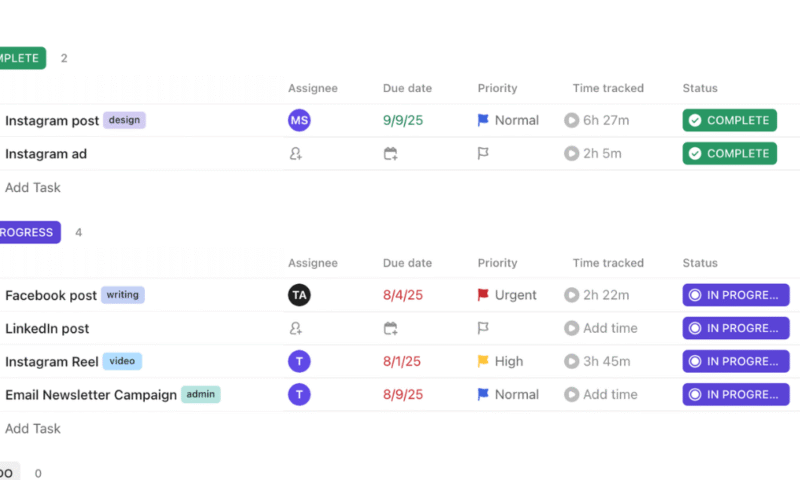
ClickUp has both manual and automatic time-tracking options.
ClickUp allows you to track project progress with integrated time tracking. Billable hours can be recorded manually or using the built-in timer. Basic reports and timesheets help teams compare estimated vs actual hours. It also includes basic invoicing features.
What Makes ClickUp Special
ClickUp shines because of its deep customization options. You can build unique workflows and custom dashboards that pull together task, workload and time information in one place. Read more in our ClickUp review.
When to Choose ClickUp
Choose ClickUp if you want a highly customizable project management tool that allows you to adapt time tracking to your workflow. Time tracking is limited on the free and Unlimited plans, so the Business plan offers the best value. Try it with a 30-day money-back guarantee.


Free Forever
- Basic functionality with some limitations
3. Asana — Best for Flexible Time Tracking via Native or Integrated Features
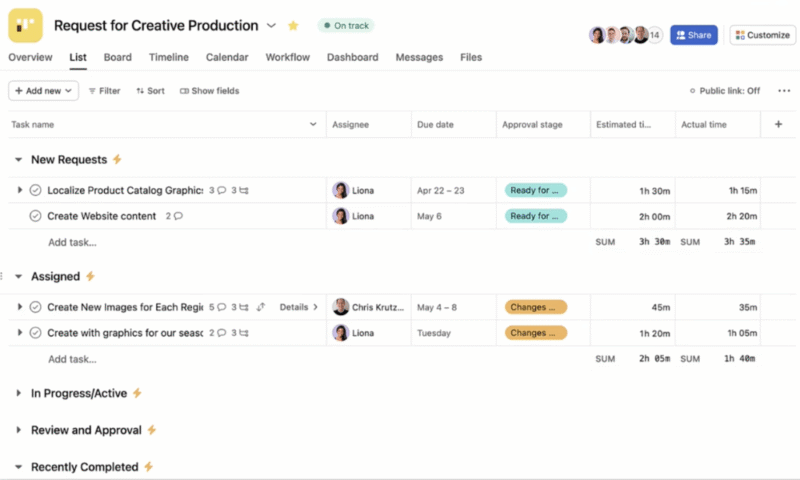
Asana has a structured and intuitive interface.
Asana is a flexible work management platform with native time-tracking capabilities centered on task estimates and actual hours logged. It also integrates seamlessly with third-party time-tracking tools like Clockify and TrackingTime.
What Makes Asana Special
Asana’s power comes from its flexible task management and workload planning, as detailed in our Asana review. The structured interface makes it easy to understand who’s handling what, and it allows you to blend detailed planning with contextual time data.
When to Choose Asana
Choose Asana if your priority is a structured workspace that lets you plan and visualize complex initiatives. You can add time data natively with the Advanced plan or pull it from external time management tools on lower tiers. Try Asana with a 14-day free trial.


Starter
- Price is per user. unlimited users, expanded features
Advanced
- Price is per user. unlimited users, even more features
Enterprise
- Custom pricing, advanced security features
4. nTask — Best Free Time Management Software
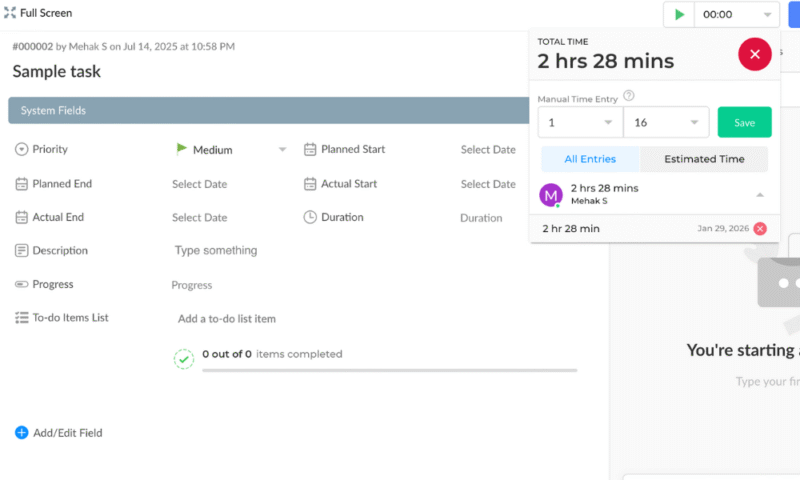
nTask offers native time tracking on its free plan.
nTask is a great free project management software solution that combines task planning with a robust built-in time tracker. It’s perfect for individuals and small teams looking to manage projects, track hours and collaborate on a budget.
What Makes nTask Special
nTask is incredibly affordable and has a generous free plan. You can create projects and tasks, log time against work items, and view timesheets that show how hours are spent, as well as implement collaborative features like task comments. Read more in our nTask review.
When to Choose nTask
Choose nTask if you need a cost-effective way to manage tasks and track time. It’s a great freelance time management software solution and is ideal for small teams with limited budgets. Sign up for the free plan to see if it fits your needs.


Premium
- No minimum or maximum team members.
Business
- No minimum or maximum team members.
Enterprise
- Self-hosted option. 50 team members minimum.
5. Wrike — Best for Larger Teams
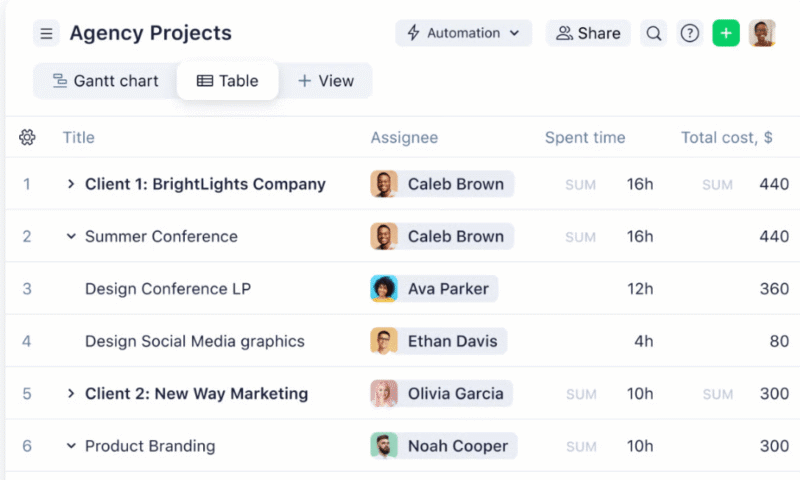
Wrike allows you to track time and analyze costs all in one place.
Wrike is a powerful work management platform built for teams that need advanced control over projects, time and resources. It combines project planning, task tracking, collaboration, analytics and built-in time logging in one central hub.
What Makes Wrike Special
Wrike offers enterprise-grade features and scalability. Its native time tracking lets users log hours via a built-in timer or manual entries directly on tasks, giving leaders a clear view of team performance. Read more in our Wrike review.
When to Choose Wrike
Opt for Wrike if you need a platform that goes beyond basic project tracking and includes robust time management and in-depth analytics. It’s ideal for mid-sized to large teams or professional services organizations. Get a 14-day free trial of the Business plan.


Free
- Unlimited users. Basic features.
Team
- Price is per user. Plans for 5, 10 and 15 users.
Business
- Price is per user. No monthly option. Plans for 5 to 200 users.
More plans
Enterprise
- For large teams; Enterprise-grade security and scalability; Plans for 5 to an unlimited number of users.
Pinnacle
- For teams with complex work needs; Advanced tools and analytics for complex work; 5 to unlimited users
Methodology: Our Testing Framework & How to Choose
I conducted extensive hands-on testing and feature analysis to determine the usability and value of each tool. I go over some of the main factors I considered below:
- Time-tracking capabilities: I tested native and integration-based time management features, focusing on ease of use, manual and automatic tracking options, and timesheets and reports.
- Project management capabilities: I evaluated task organization options; views such as list, board, timeline and Gantt; dependencies; and workflow customization options.
- Usability and interface design: I assessed how intuitive each platform felt, especially for new users. The aim was to determine how efficiently teams can learn the software and manage time without friction.
- Pricing and value for money: I carefully compared all the tools across free and paid plans, paying attention to feature availability, limitations and overall cost-effectiveness for time-conscious teams.
Final Thoughts
Project management tools support time tracking through native features or integrations with third-party apps. monday.com stands out as my top choice due to its ease of use and visual clarity. It offers native time tracking on its Pro plan, and you can sign up for a 14-day free trial to test it before purchasing.
Have you tried any time-tracking tools? Which features do you like to have? Do you have any questions that I haven’t covered in this guide? Please share in the comments below, and thank you for reading.
FAQ: Project Management Software With Time Tracking
Project management software with time tracking includes native features to track billable vs non-billable hours and manage a team’s time across different projects
Time tracking improves team productivity by increasing visibility into how time is actually spent. It helps teams identify bottlenecks, plan workloads more accurately, balance resources and reduce wasted effort by aligning time spent with priorities, deadlines and project goals.
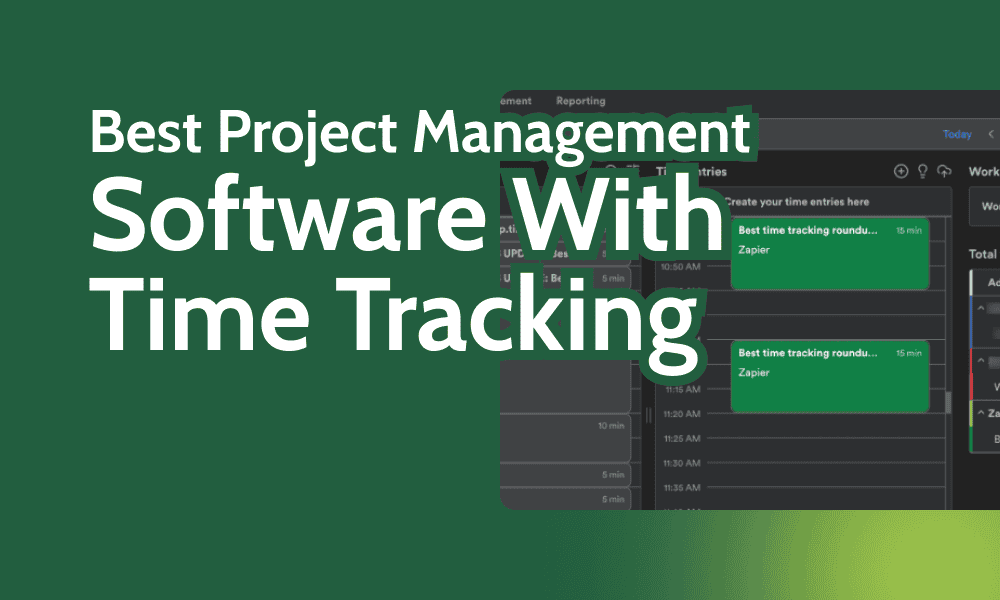
Project management software with time-tracking features allows teams to measure work hours alongside project timelines. This improves productivity and can inform data-driven decision-making. In this article, I’ve rounded up some of the best project management tools that support automated time tracking for different kinds of teams.
Cloudwards’ Choice: monday.com


monday.com is my top choice because of its powerful features and visual clarity. It makes it easy for team members to record time-tracking data linked to project tasks. Users can generate custom reports to gain specific insights and keep the team aligned. Get a 14-day free trial of monday.com’s Pro plan, which offers built-in time tracking.
The 5 Best Project Time-Tracking Software Compared
Hands-On Testing
Feature Comparison Overview
| Tool: | View Types | Time Tracking | Custom Fields | Dashboards | Real-Time Collab |
|---|---|---|---|---|---|
| 12: list, board, timeline, calendar, etc. | Yes (Pro plan) | |||
| 16: board, timeline, Gantt, map, etc. | Yes (limited on lower tiers) | |||
| 9: board, list, calendar, etc. | Yes (Advanced plan) | |||
| 5: list, grid, kanban, Gantt, calendar | Yes (all plans) | |||
| 9: table, board, list, calendar, Gantt, chart | Yes (Business plan) |
Platform & Administration
| Tool: | Apps | Storage | File Management | Permissions |
|---|---|---|---|---|
| Web | 500MB-1000GB | File column, gallery view, versioning, uploads from cloud drives | Board, dashboard, workspace & account level |
| Web | 60MB-unlimited | Attachments, integrations with cloud drives | Folder, list & space level |
| Web | Unlimited (100MB max per file) | Attach/upload files to tasks & comments, integration with cloud drives | User permissions, app controls |
| Web | 100MB-100GB per user | Attach files to tasks & comments, basic document handling | Basic role-based access, advanced permissions on paid plans |
| Web | 2GB-50GB per user | Upload files from local/computer, Box, Dropbox, Google Drive, etc.; file versioning | Access roles: full, editor, limited, read-only; custom roles on Enterprise plans |
Integration & Automations
| Tool: | Integration Count | Top Integrations | Native vs 3rd-Party | Automation Features |
|---|---|---|---|---|
| 200+ | Slack, Gmail, Outlook, Jira, Dropbox | Both native & third-party integrations | Workflow builder with triggers 7 actions (e.g., auto-notify, auto-create items) |
| 1,000+ | Slack, GitHub, Google Sheets, Zapier | Both native & third-party integrations | Custom integrations/API & drag-and-drop automation of tasks & triggers |
| 200+ native integrations & thousands via Zapier | Slack, Google Drive, Microsoft Teams, Figma | Mostly third-party | “Rules” to automate tasks (e.g., when task complete → trigger action) |
| 2,000+ via Zapier | Google Calendar, Slack, Zoom | Mostly third-party | Basic task automation, notifications & workflow triggers |
| Thousands via Wrike Integrate | Google Drive, Zoom, GitHub, Jira | Mostly third-party | Powerful workflow automation, AI assistance, status-based triggers & approvals |
Best Time-Tracking and Project Management Software
I tested dozens of tools to find the best options for tracking project hours and tasks in one place: monday.com, ClickUp, Asana, nTask and Wrike.
1. monday.com — Best for Visual Project and Time Tracking
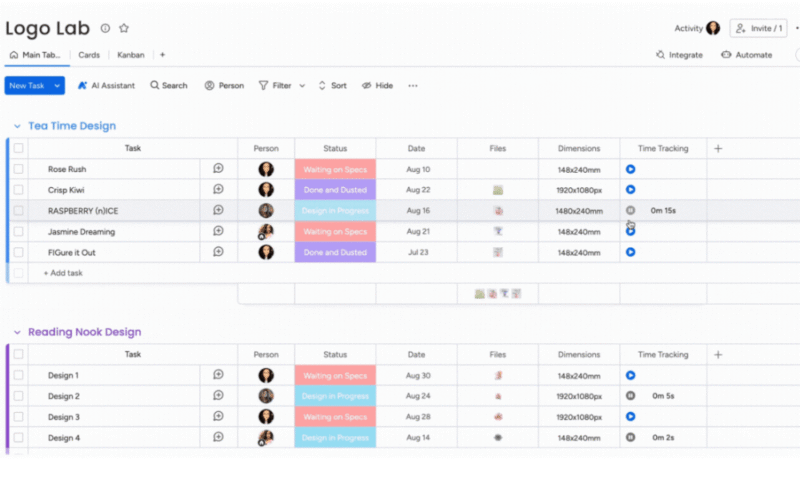
monday.com provides clear visibility into the time tracked for each task.
monday.com stands out as a visual work management platform that blends project planning with time tracking. Its Pro plan offers built-in time tracking that lets you log work directly on tasks and projects.
What Makes monday.com Special
monday.com’s core strength is its visual clarity and ease of use. It offers highly customizable boards that enable teams to plan and track projects in the way suits them best. For a complete guide, read our monday.com review.


- Discover 10 fundamentals of project management
- Understand step-by-step plans for PM execution
- Learn tips to avoid 5 common mistakes by beginners
When to Choose monday.com
I recommend monday.com for any team that wants a visual project hub with easy integrated time tracking. You’ll need the Pro plan for the native time management feature, and you automatically get a 14-day free trial when you sign up for monday.com.
Basic
- Minimum users: 3; All prices per user
Standard
- Minimum users: 3; All prices per user
More plans
Pro
- Minimum users: 3; All prices per user
Enterprise
- Enterprise-level features.
2. ClickUp — Highly Customizable Tool with Native Time Tracking
ClickUp has both manual and automatic time-tracking options.
ClickUp allows you to track project progress with integrated time tracking. Billable hours can be recorded manually or using the built-in timer. Basic reports and timesheets help teams compare estimated vs actual hours. It also includes basic invoicing features.
What Makes ClickUp Special
ClickUp shines because of its deep customization options. You can build unique workflows and custom dashboards that pull together task, workload and time information in one place. Read more in our ClickUp review.
When to Choose ClickUp
Choose ClickUp if you want a highly customizable project management tool that allows you to adapt time tracking to your workflow. Time tracking is limited on the free and Unlimited plans, so the Business plan offers the best value. Try it with a 30-day money-back guarantee.
Free Forever
- Basic functionality with some limitations
3. Asana — Best for Flexible Time Tracking via Native or Integrated Features
Asana has a structured and intuitive interface.
Asana is a flexible work management platform with native time-tracking capabilities centered on task estimates and actual hours logged. It also integrates seamlessly with third-party time-tracking tools like Clockify and TrackingTime.
What Makes Asana Special
Asana’s power comes from its flexible task management and workload planning, as detailed in our Asana review. The structured interface makes it easy to understand who’s handling what, and it allows you to blend detailed planning with contextual time data.
When to Choose Asana
Choose Asana if your priority is a structured workspace that lets you plan and visualize complex initiatives. You can add time data natively with the Advanced plan or pull it from external time management tools on lower tiers. Try Asana with a 14-day free trial.
Starter
- Price is per user. unlimited users, expanded features
Advanced
- Price is per user. unlimited users, even more features
Enterprise
- Custom pricing, advanced security features
4. nTask — Best Free Time Management Software
nTask offers native time tracking on its free plan.
nTask is a great free project management software solution that combines task planning with a robust built-in time tracker. It’s perfect for individuals and small teams looking to manage projects, track hours and collaborate on a budget.
What Makes nTask Special
nTask is incredibly affordable and has a generous free plan. You can create projects and tasks, log time against work items, and view timesheets that show how hours are spent, as well as implement collaborative features like task comments. Read more in our nTask review.
When to Choose nTask
Choose nTask if you need a cost-effective way to manage tasks and track time. It’s a great freelance time management software solution and is ideal for small teams with limited budgets. Sign up for the free plan to see if it fits your needs.
Premium
- No minimum or maximum team members.
Business
- No minimum or maximum team members.
Enterprise
- Self-hosted option. 50 team members minimum.
5. Wrike — Best for Larger Teams
Wrike allows you to track time and analyze costs all in one place.
Wrike is a powerful work management platform built for teams that need advanced control over projects, time and resources. It combines project planning, task tracking, collaboration, analytics and built-in time logging in one central hub.
What Makes Wrike Special
Wrike offers enterprise-grade features and scalability. Its native time tracking lets users log hours via a built-in timer or manual entries directly on tasks, giving leaders a clear view of team performance. Read more in our Wrike review.
When to Choose Wrike
Opt for Wrike if you need a platform that goes beyond basic project tracking and includes robust time management and in-depth analytics. It’s ideal for mid-sized to large teams or professional services organizations. Get a 14-day free trial of the Business plan.
Free
- Unlimited users. Basic features.
Team
- Price is per user. Plans for 5, 10 and 15 users.
Business
- Price is per user. No monthly option. Plans for 5 to 200 users.
More plans
Enterprise
- For large teams; Enterprise-grade security and scalability; Plans for 5 to an unlimited number of users.
Pinnacle
- For teams with complex work needs; Advanced tools and analytics for complex work; 5 to unlimited users
Methodology: Our Testing Framework & How to Choose
I conducted extensive hands-on testing and feature analysis to determine the usability and value of each tool. I go over some of the main factors I considered below:
- Time-tracking capabilities: I tested native and integration-based time management features, focusing on ease of use, manual and automatic tracking options, and timesheets and reports.
- Project management capabilities: I evaluated task organization options; views such as list, board, timeline and Gantt; dependencies; and workflow customization options.
- Usability and interface design: I assessed how intuitive each platform felt, especially for new users. The aim was to determine how efficiently teams can learn the software and manage time without friction.
- Pricing and value for money: I carefully compared all the tools across free and paid plans, paying attention to feature availability, limitations and overall cost-effectiveness for time-conscious teams.
Final Thoughts
Project management tools support time tracking through native features or integrations with third-party apps. monday.com stands out as my top choice due to its ease of use and visual clarity. It offers native time tracking on its Pro plan, and you can sign up for a 14-day free trial to test it before purchasing.
Have you tried any time-tracking tools? Which features do you like to have? Do you have any questions that I haven’t covered in this guide? Please share in the comments below, and thank you for reading.
FAQ: Project Management Software With Time Tracking
Project management software with time tracking includes native features to track billable vs non-billable hours and manage a team’s time across different projects
Time tracking improves team productivity by increasing visibility into how time is actually spent. It helps teams identify bottlenecks, plan workloads more accurately, balance resources and reduce wasted effort by aligning time spent with priorities, deadlines and project goals.