Dealing with PDF files is one of the banes of my life. From signing contracts and NDAs, to jumping through mortgage forms, the whole process is a mind-numbing slog.
Download, find an app, sign, send to yourself, find the original email asking you to sign, then attach and send. It’s not much on paper, but life’s full of enough micro annoyances as it is.
All this ranting to say that finally, there’s an easier way.
Google has announced a smattering of new features for Chrome, one of which is the ability to sign PDF documents directly in the browser. You can also add highlights and written notes directly within the built-in PDF viewer too – all without having to jump through the rigamarole of separate apps or software.
While it’s not designed to compete with heavyweight desktop PDF software, for everyday contracts, school documents, internal reports, and approval forms, staying inside a single tab is an absolute godsend.
Chrome now also offers the option to send a PDF directly to your Google Drive account instead of downloading it locally first.
When you use it, the file is automatically stored in a specific Drive folder labelled “Saved from Chrome”, making it easier to locate later across devices.
Anyone who’s ever downloaded something important only to forget where it landed will appreciate that small but practical tweak.

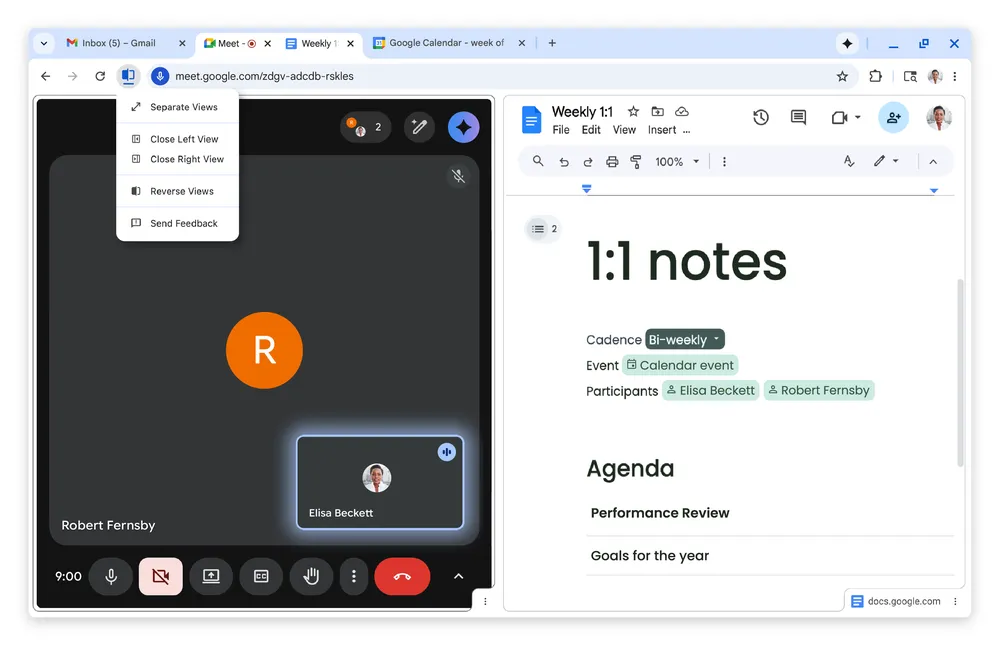
Elsewhere, the new Chrome update also introduces a native Split View feature. Rather than opening two browser windows and arranging them manually, you can now place two tabs side by side within one Chrome window.
The aim is to keep related tasks visible at the same time – whether that’s referencing notes while drafting an email, checking product specs while comparing prices, or following instructions without constantly switching back and forth.
If your workday mostly happens inside the browser, cutting back on constant tab shuffling could make quite a welcome difference.
I’ll admit that none of this is as mind-blowing as, say, shiny new hardware. But if you’re anything like me, these new features will be very much appreciated all the same.