
Key takeaways
- Instagram Notes are short, 60-character messages that appear at the top of your followers’ DM inbox and disappear after 24 hours.
- You can now add Notes directly to your posts and Reels, not just in your DM inbox.
- Notes are visible only to mutual followers or your Close Friends list, and you cannot see who viewed them.
- Brands can use Instagram Notes to drive DM conversations, share time-sensitive updates, and boost engagement without the production effort of Stories or feed posts.
What are Instagram Notes?
Instagram Notes are short text messages (up to 60 characters) you can share with your mutual followers or your Close Friends list. They appear at the top of the DM inbox and disappear after 24 hours. When someone replies to your Note, the response arrives as a direct message.
You may have seen them; they sit in your inbox above your direct messages.
Think of Notes as the lightest-touch way to communicate on Instagram. They don’t trigger push notifications, they require almost no production effort, and they’re more casual than an Instagram Story or a DM. People use them to make announcements, share quick thoughts, or spark conversations.
Instagram started testing Notes in July 2022 and launched the feature widely that December, with availability expanding to additional regions — including the EU and Japan — in January 2023. Since then, the feature has expanded to include music Notes and the ability to attach Notes to posts and Reels.
Here’s what you can and can’t include in a Note:
- Text: Up to 60 characters, including spaces
- Emojis: Supported within the character limit
- Music clips: Share a song from Spotify or Instagram’s music library
- Links: Not supported
- Images or video: Not supported
- Hashtags: Not functional in Notes

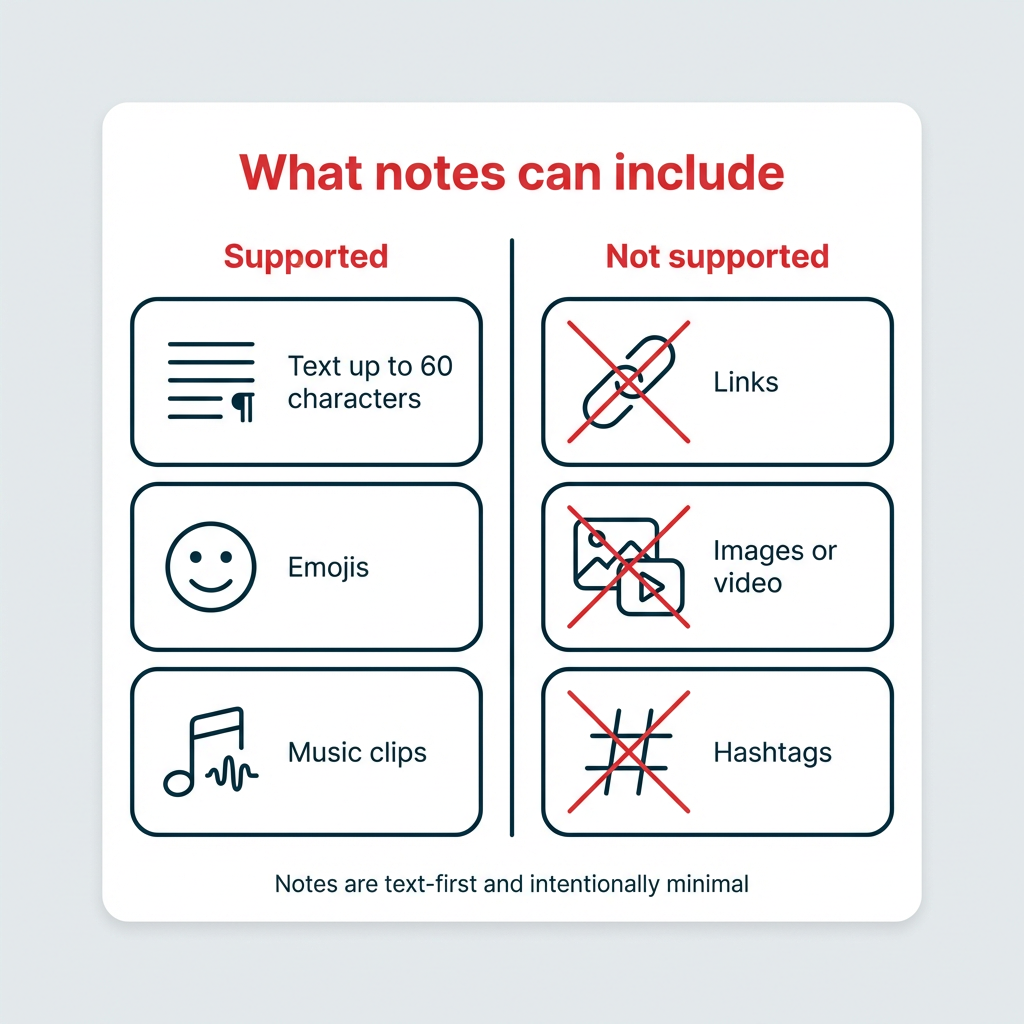
Notes are designed to be quick, text-first messages, not a replacement for richer content formats.

#1 for Instagram marketing
Schedule posts, Reels, and Stories. Answer comments and DMs, and build beautiful reports. It’s so easy.
Start your free trial
Instagram Notes character limit and features
The Instagram Notes character limit is 60 characters for text, including spaces and emojis. That’s roughly the length of a short sentence or a quick question.
Beyond text, you can also share music Notes. These let you attach a short audio clip from Spotify or Instagram’s built-in music library. Music Notes display the song title and artist alongside your profile photo in the inbox.
You can’t include links, images, hashtags, or any rich media in a text Note. The format is intentionally minimal.
|
Feature |
Notes |
Stories |
DMs |
|---|---|---|---|
|
Character/length limit |
60 characters |
No text limit (photo/video up to 60 seconds) |
No limit |
|
Duration |
24 hours |
24 hours |
Permanent (unless deleted) |
|
Visibility |
Mutual followers or Close Friends |
All followers (or Close Friends) |
Specific recipients |
|
Interaction type |
Replies go to DMs; likes |
Replies, reactions, stickers, polls |
Full conversation |
|
Effort level |
Very low |
Medium (requires visual content) |
Low to medium |
|
Push notifications |
No |
Optional |
Yes |
Who can see your Instagram Notes?
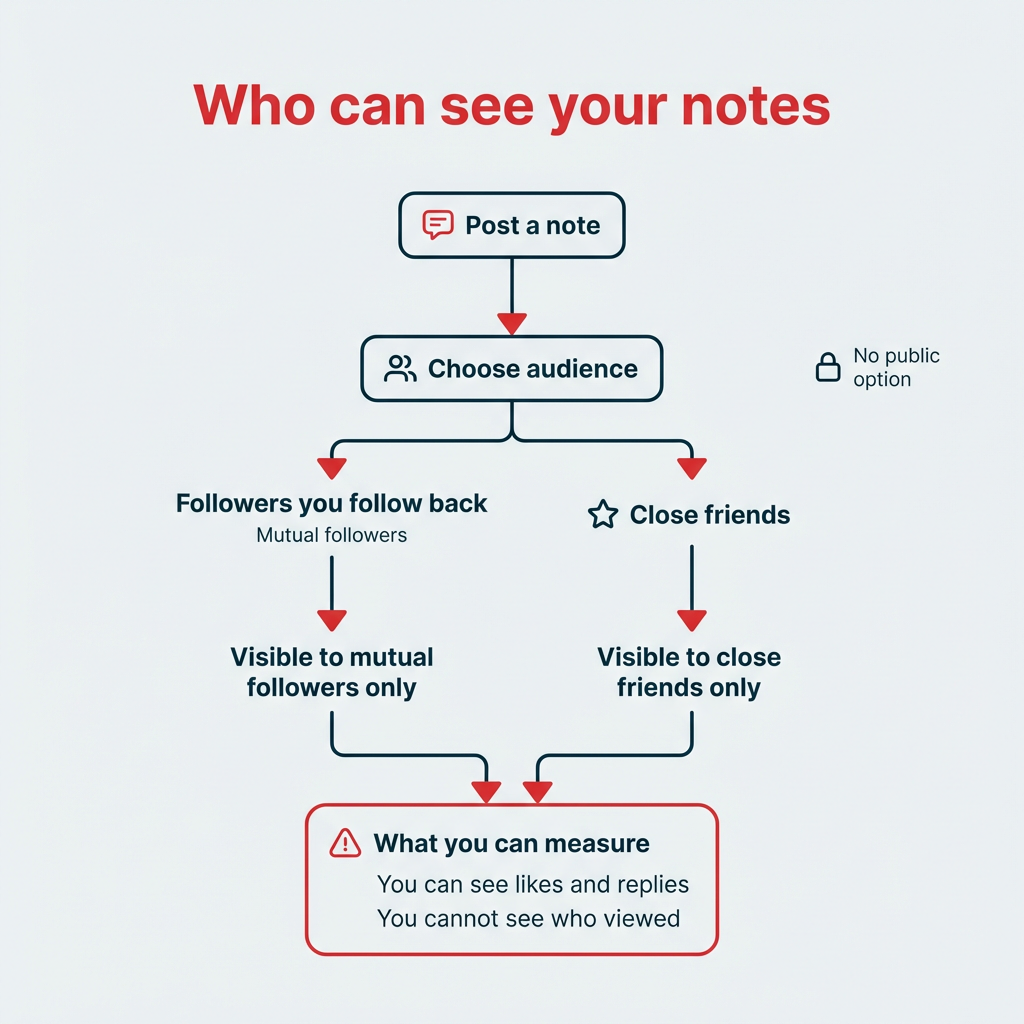
Your Instagram Notes are visible only to people who follow you and whom you follow back (mutual followers), or to people on your Close Friends list, depending on which audience you select when posting.
You choose the audience each time you create a Note. There’s no public option, so Notes won’t appear to people who don’t follow you or whom you don’t follow back.
One important detail: You cannot see who viewed your Note. Instagram only shows you who replied to or liked it. So there’s no “viewers list” like you’d find on Stories.
How do you create an Instagram Note?
Creating an Instagram Note takes about 30 seconds. Here’s the quick version:
- Open your Instagram app.
- Tap your inbox (top right corner).
- Tap your profile photo where it says “+ Leave a Note.”
- Type your message (up to 60 characters) or select a song.
- Choose your audience and tap Share.
Now, here’s the detailed walkthrough:
Step 1: Open your Instagram app.
Step 2: Navigate to your inbox in the top right corner.

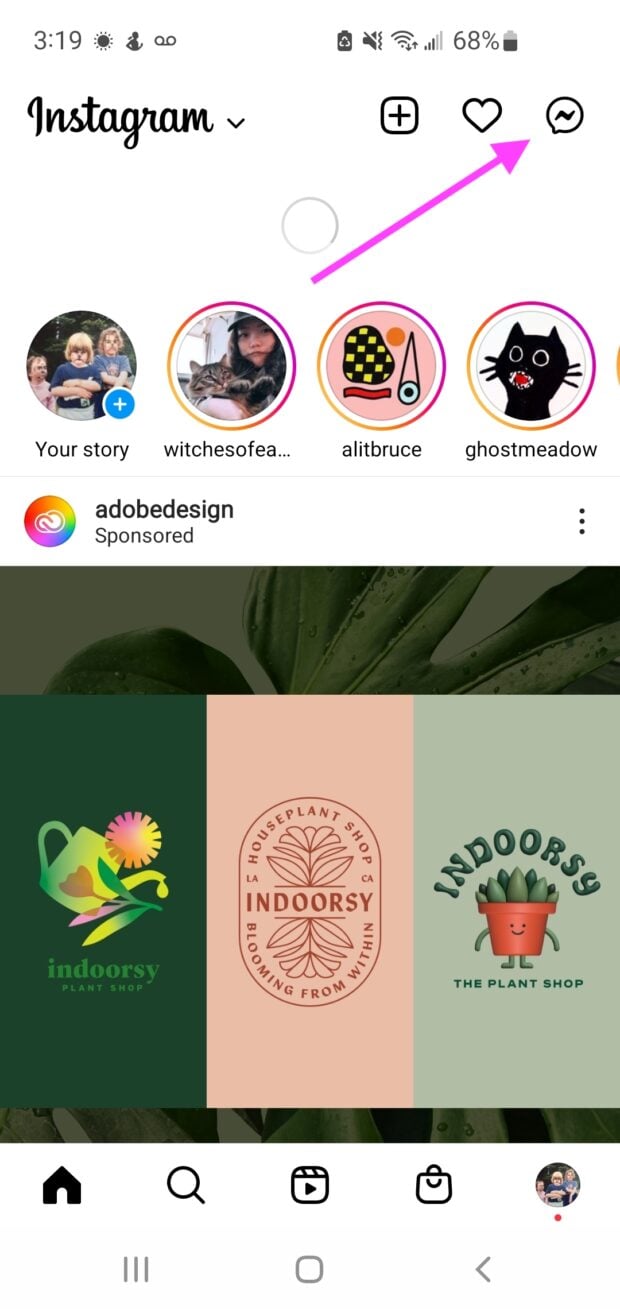
Step 3: In the Notes row at the top, tap your profile photo where it says + Leave a Note.
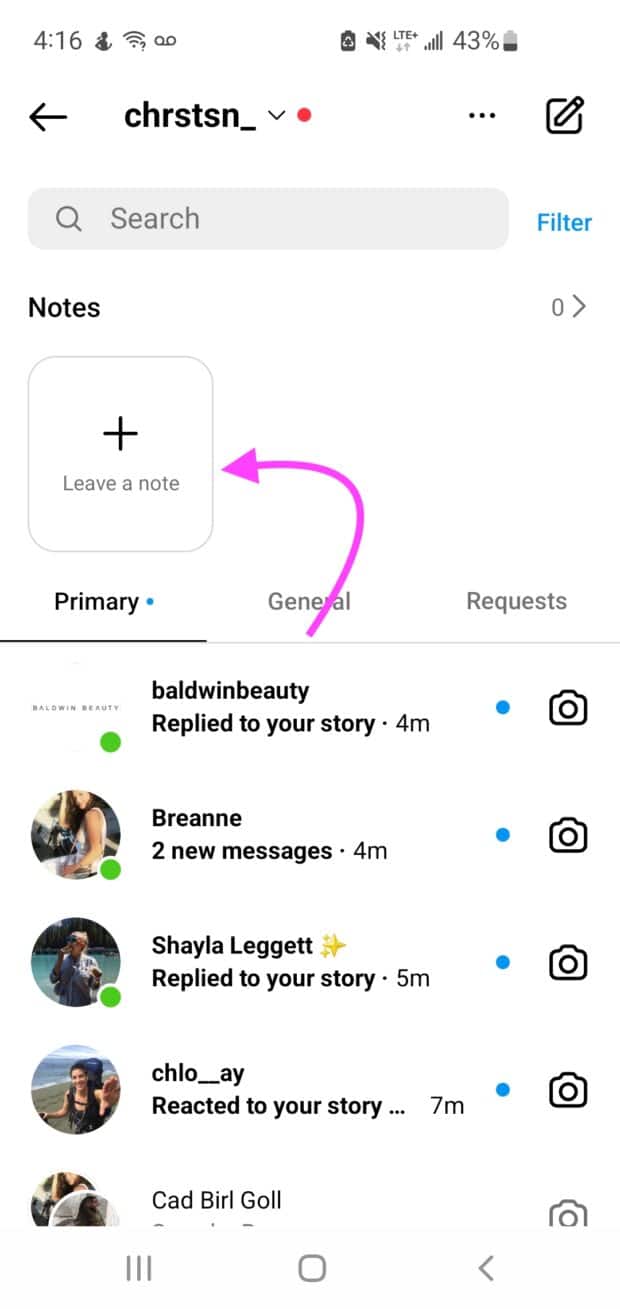
Step 4: Type your message, choose who to share with (Followers You Follow Back or Close Friends), and tap Share.
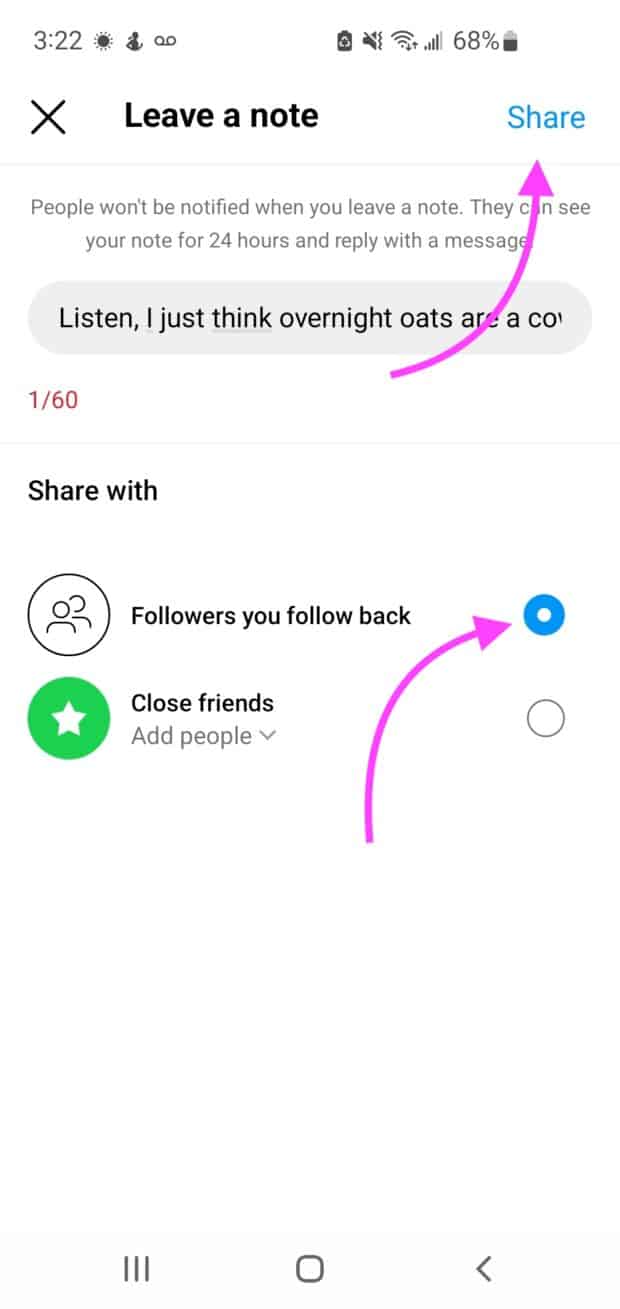
That’s it. Your Note will appear at the top of your audience’s inbox for the next 24 hours.
How do you create a music Note?
Music Notes let you share a song clip instead of (or alongside) text. Here’s how:
- Follow Steps 1-3 above to open the Note creation screen.
- Tap the music icon at the top of the Note screen.
- Search for a song using Instagram’s music library or your connected Spotify account.
- Select the track, choose your audience, and tap Share.
The song title and artist will display next to your profile photo in the Notes row. It’s a quick way to share what you’re listening to or set a mood for your brand.
How do you add a Note to a post or Reel?
Instagram expanded Notes beyond the DM inbox in 2024. You can now attach a short Note to any of your feed posts or Reels, giving viewers extra context or a conversation starter right on the content itself.
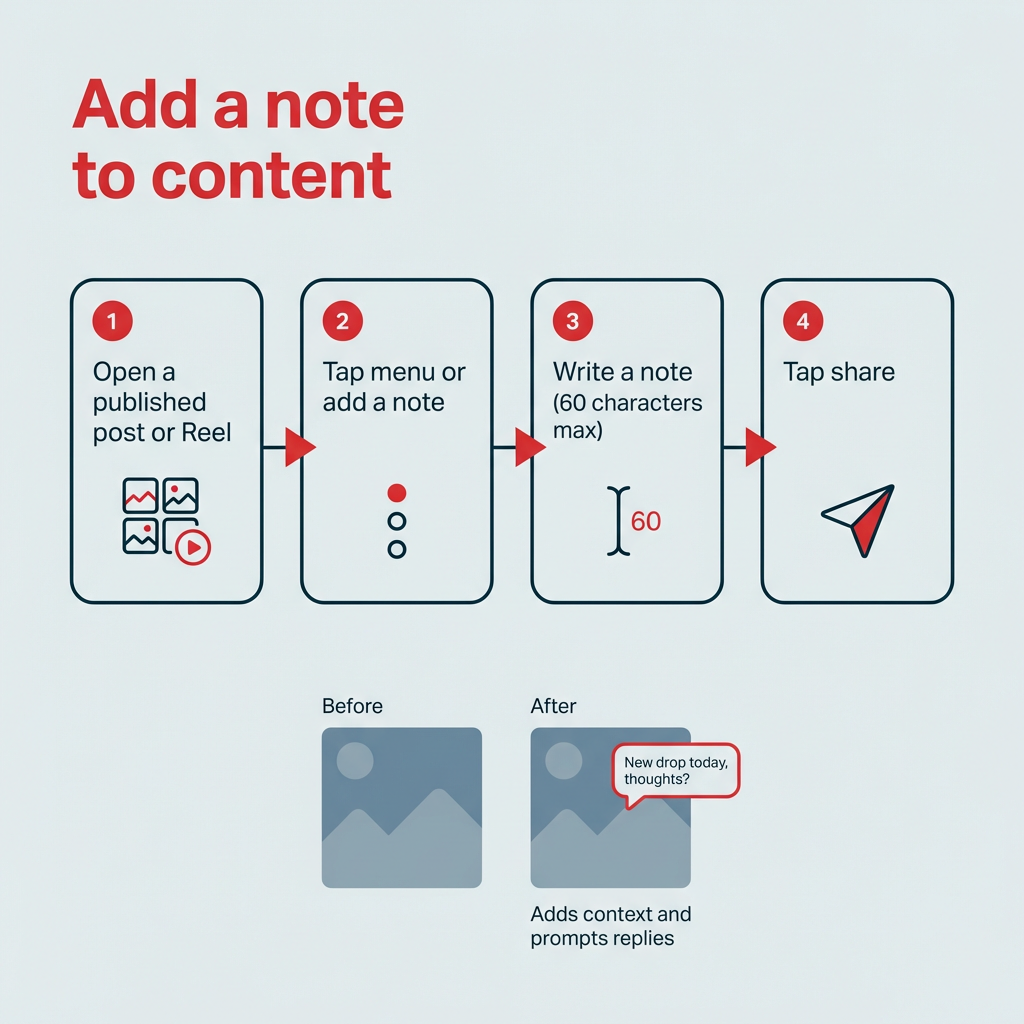
Here’s how to add a Note to a post or Reel:
- Open one of your published posts or Reels.
- Tap the three-dot menu (or the “Add a note” prompt if visible).
- Type your Note (same 60-character limit).
- Tap Share.
The Note will appear as a small text bubble on your content, visible to your mutual followers. It’s a useful way to add timely commentary, highlight a detail, or prompt replies without editing the original caption.
How do you disable Notes on a post or Reel?
If you’d rather not have a Note attached to a specific piece of content, you can remove it. Navigate to the post or Reel, tap the Note, and select the option to delete it. This removes the Note without affecting the post itself.
How do you interact with Instagram Notes?
Notes aren’t just for broadcasting. They’re designed to start conversations. There are two main ways to interact with someone’s Note: replying and liking.

How do you reply to an Instagram Note?
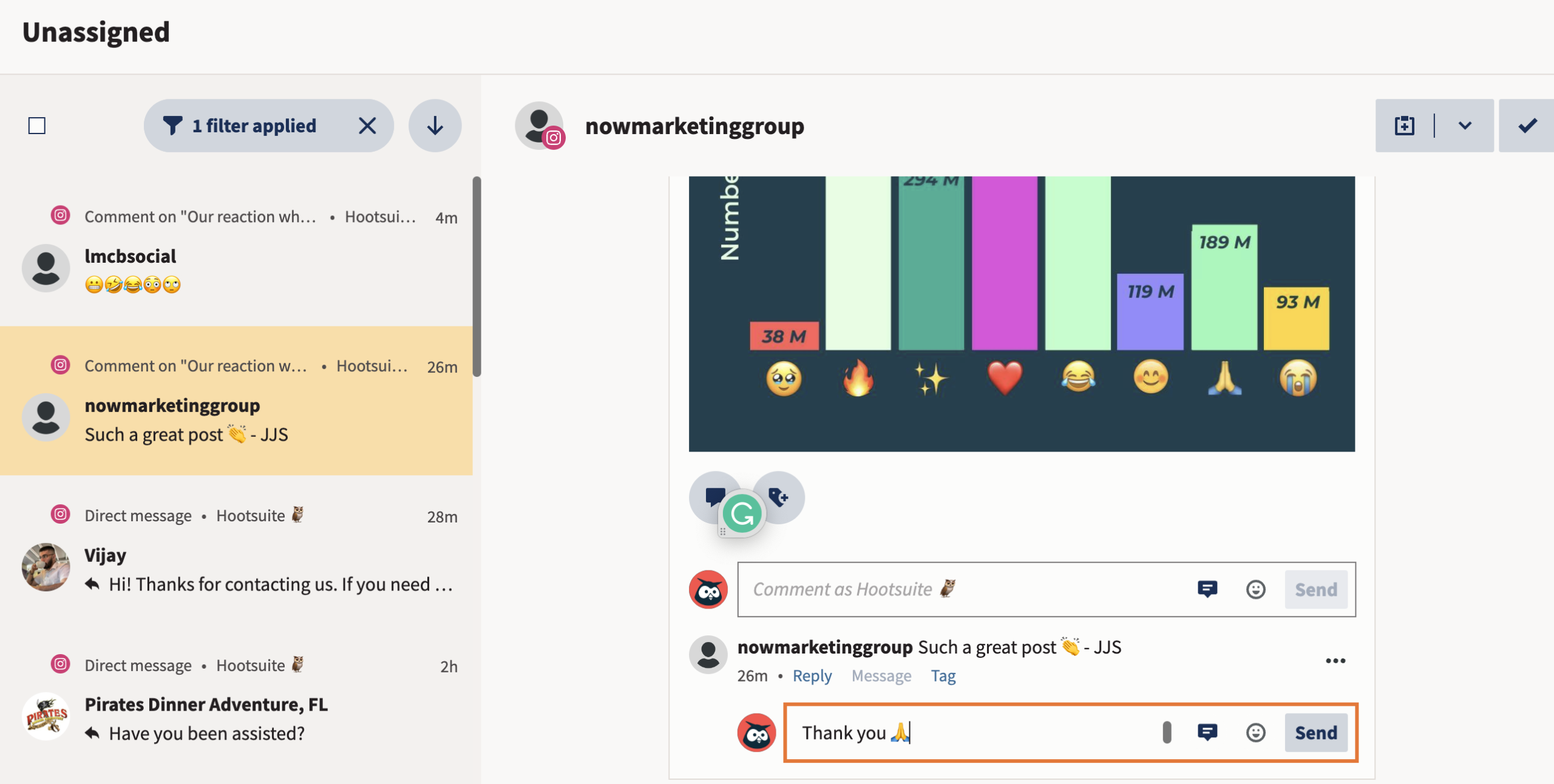
Replying to a Note sends a direct message to the person who posted it. Here’s how:
- Open your inbox and find the Note in the row at the top.
- Tap the Note you want to reply to.
- Type your response and hit Send.
Your reply will appear as a DM thread between you and the Note’s author. This is one of the reasons Notes are valuable for brands: they create a natural entry point into DM conversations.
How do you like an Instagram Note?
You can also like a Note without starting a full conversation. Tap the Note, then tap the heart icon. The author will receive a notification that you liked their Note.
Liking is a lighter interaction than replying, but it still signals engagement and can encourage the author to keep posting Notes.
How do you delete an Instagram Note?
Maybe you spotted a typo or changed your mind. Whatever the reason, deleting a Note is straightforward.
Step 1: Navigate to your inbox.
Step 2: Tap on your Note (it appears next to your profile photo in the Notes row).
Step 3: Tap Delete Note.
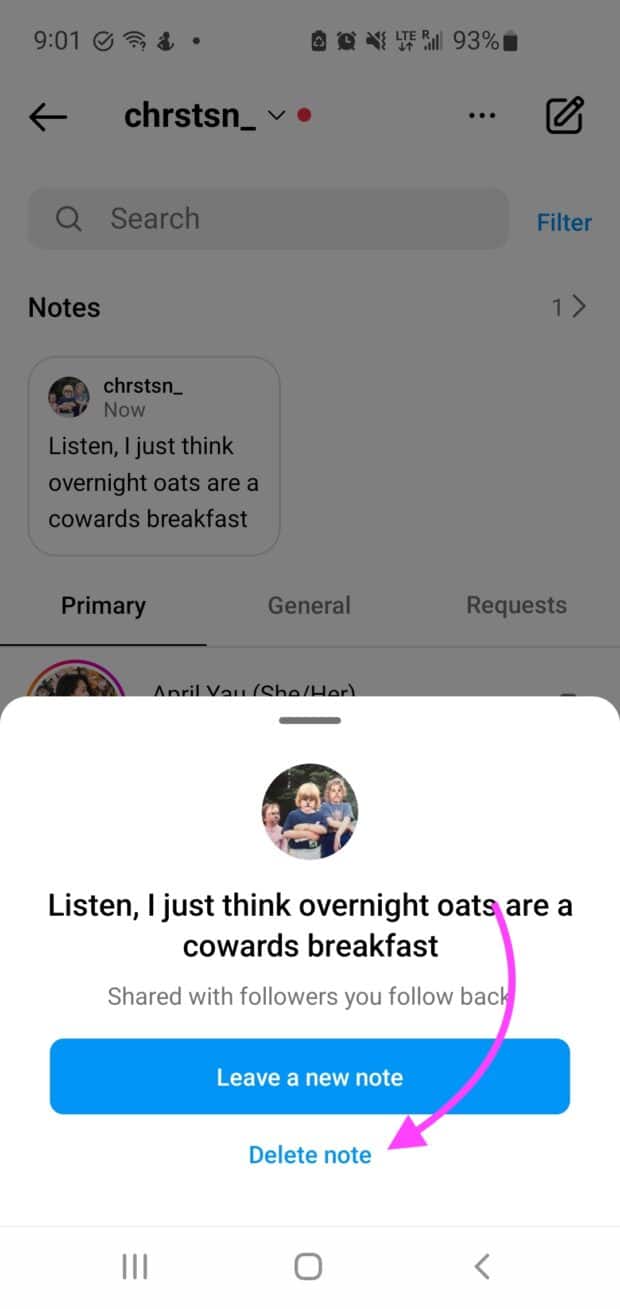
Your Note is gone. Keep in mind that Instagram Notes don’t have a draft-saving capability, so once you delete a Note, it’s gone forever. There’s no way to recover it.
How do you mute or unmute Instagram Notes?
If someone’s Notes are cluttering your inbox, you can mute them without unfollowing the person.
- Go to the profile of the person whose Notes you want to mute.
- Tap Following.
- Tap Mute.
- Toggle Notes off.
Their Notes will no longer appear in your inbox. To unmute, follow the same steps and toggle Notes back on.
Muting Notes doesn’t affect whether you see that person’s posts, Stories, or messages. It only hides their Notes from your DM inbox row.
What are some Instagram Notes ideas for brands and creators?
With only 60 characters to work with, Notes reward brevity and creativity. Here are some practical ideas to get you started:
- Tease an upcoming launch: “Something new drops Friday” builds anticipation without giving everything away.
- Ask a quick question: “What should we post next?” or “Coffee or tea?” can spark DM replies and boost engagement.
- Share a limited-time promo code: “Use FLASH20 for 20% off today only” creates urgency in a low-effort format.
- Celebrate a milestone: “Just hit 10K followers, thank you!” makes your audience feel part of the journey.
- Share behind-the-scenes context: “Recording episode 50 right now” gives followers a peek into your process.
- Drive traffic to new content: “New Reel just dropped” or “Blog post is live” nudges people to check your profile.
- Share a hot take relevant to your niche: A bold opinion in 60 characters can spark real conversations in your DMs.
- Use a music Note to set a mood: Share a track that matches your brand’s vibe or ties into a campaign theme.
- Post a countdown: “3 days until our biggest sale” keeps your brand top of mind.
- Offer quick customer support: “DM us your order number for help” turns Notes into a service channel — especially when paired with automated DM replies.
The best Notes feel personal and timely. Instagram’s own guidance encourages Notes that spark curiosity and start conversations. Treat them like a quick aside to your audience, not a polished marketing message.
How can you use Instagram Notes for marketing?
Instagram Notes can be a surprisingly effective marketing tool. With eight-in-ten U.S. adults ages 18–29 on the platform, brands have a low-effort way to connect with their most engaged audience without the production overhead of Stories or Reels.
Notes are the least pushy form of Instagram communication. They don’t come with push notifications and are tucked away in the inbox. They’re more subtle than Stories and less direct than sending a DM. But because they sit at the top of your audience’s inbox, they’re hard to miss.


Here’s why they’re worth adding to your content mix:
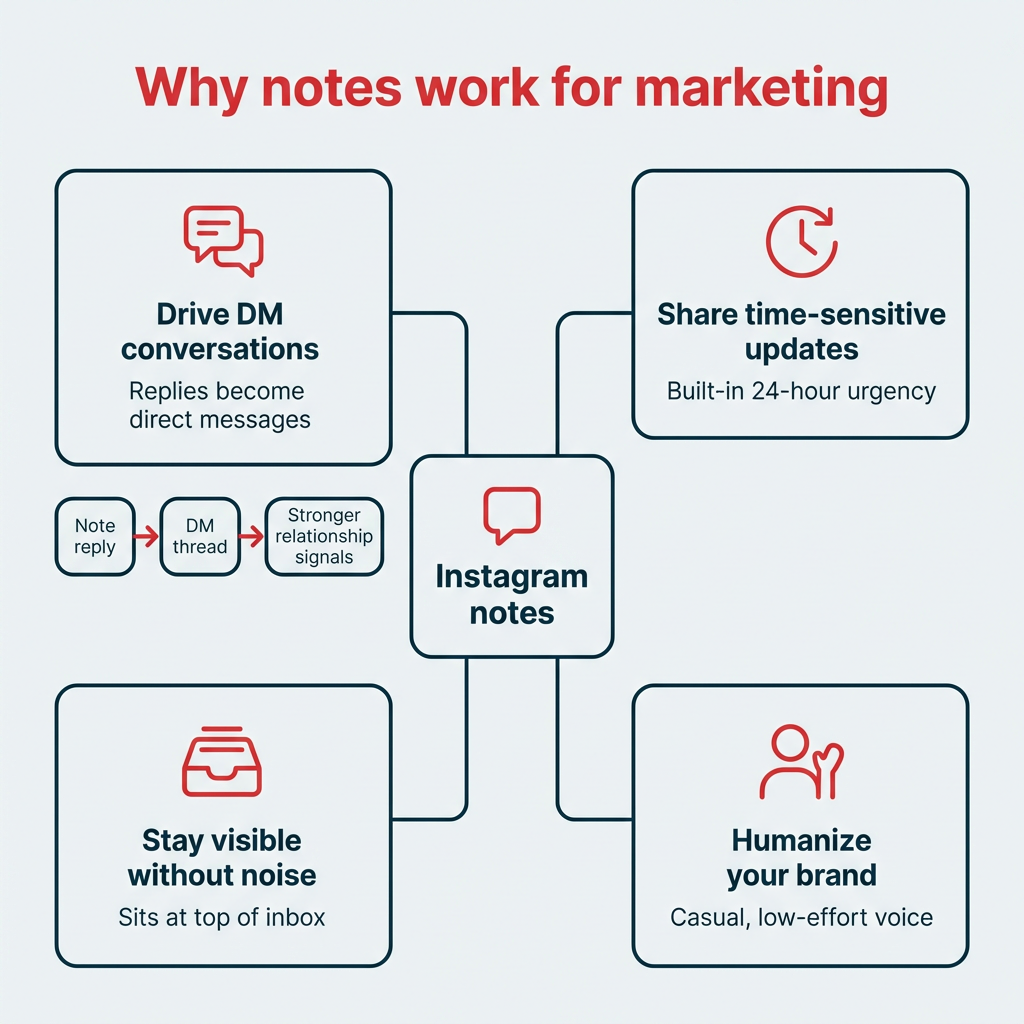
- Drive DM conversations: Every reply to a Note opens a DM thread. Instagram’s algorithm rewards DM engagement, so Notes can indirectly boost your visibility.
- Share time-sensitive updates: The 24-hour lifespan makes Notes ideal for flash sales, event reminders, or day-of announcements.
- Humanize your brand: A quick, casual Note feels more personal than a polished feed post. It’s a way to show the people behind the brand.
- Complement your content calendar: Notes don’t replace your feed or Stories strategy. They fill the gaps in your content calendar with minimal effort.
- Stay visible without adding noise: Notes sit at the top of the inbox and won’t get lost in the feed. They’re a quiet way to stay on your audience’s radar.
Do Instagram Notes affect the algorithm?
Instagram hasn’t confirmed that Notes directly affect feed or Reels ranking. However, Notes drive DM conversations, and Instagram’s ranking explainer notes that engagement history — including DM interactions — is among the signals it considers when ranking content.
Posting a Note won’t directly push your next Reel to the top of someone’s feed. But the engagement Notes generate—replies, DM threads, likes—likely strengthens relationship signals between your account and your followers.
The practical takeaway: Use Notes consistently to encourage replies, and those DM conversations can reinforce the kind of engagement Instagram’s algorithm rewards. For a deeper look at how ranking works, check out our breakdown of how the Instagram algorithm works.
How can you manage your Instagram presence with Hootsuite?
Hootsuite helps you manage your entire Instagram presence from one dashboard. Notes are created natively in the Instagram app, but your broader Instagram strategy benefits from a unified platform. Hootsuite lets you schedule posts and Reels, track analytics, monitor comments and DMs, and manage your entire social presence from one dashboard.


OwlyWriter AI can help you generate caption ideas when you’re staring at a blank screen. And with Hootsuite’s analytics, you can track how your overall Instagram engagement trends alongside your Notes activity.
Frequently asked questions
What are Instagram Notes?
Instagram Notes are short, 60-character messages you can share with mutual followers or your Close Friends list. They appear at the top of the DM inbox and disappear after 24 hours. Replies to Notes arrive as direct messages.
Where do I find Instagram Notes?
Instagram Notes are in your inbox, at the top of your messages under the “Notes” row. They appear above your DM conversations, with the most recent Notes toward the right of your screen. You can scroll through them horizontally, and you don’t need to tap a Note to read it.
Why do I not have Notes on Instagram?
If you don’t see Notes in your Instagram inbox, your app likely needs an update. Head to your device’s app store, search for Instagram, and tap Update. Once the update finishes, open the app and check your inbox. Notes should appear in a row at the top of your messages.
Are Instagram Notes visible to everyone?
No, Instagram Notes are not visible to everyone. They’re only shown to your mutual followers (people who follow you and whom you follow back) or to people on your Close Friends list, depending on which audience you select when posting.
Can you see who views your Instagram Notes?
No, you cannot see who viewed your Instagram Note. Instagram does not provide a viewers list for Notes the way it does for Stories. You can only see who replied to or liked your Note.
How long do Instagram Notes last?
Instagram Notes last 24 hours from the time you post them. After that, they disappear automatically. You can also delete a Note manually before the 24 hours are up.
How many characters can an Instagram Note be?
An Instagram Note can be up to 60 characters long, including spaces and emojis. That’s roughly the length of a short sentence. Music Notes follow the same format but display a song clip instead of (or alongside) text.
Can you add a Note to an Instagram post or Reel?
Yes, you can add a Note to any of your published feed posts or Reels. Open the post, look for the “Add a note” option, type your message, and share. The Note will appear as a text bubble on your content, visible to mutual followers. For more Instagram tips and tricks, check out our power user guide.
Can you use Instagram Notes for marketing?
Yes, brands can use Instagram Notes for marketing by sharing time-sensitive updates, sparking DM conversations, teasing launches, and engaging followers with minimal production effort. Notes are especially useful for staying visible in your audience’s inbox without the commitment of a feed post or Story.
How do you reply to an Instagram Note?
To reply to an Instagram Note, tap the Note in your DM inbox and type your response. Your reply will be sent as a direct message to the person who posted the Note, starting a DM thread between the two of you.
Save time managing your social media presence with Hootsuite. Publish and schedule posts, find relevant conversions, engage your audience, measure results, and more — all from one dashboard. Try it free today.