




Getting locked out of your digital wallet can feel like watching your set of house keys drop into the ocean as you stand on the shore. You may not expect it, but it’s over before you realize it and leaves a sting forever—not to mention the financial losses. In most cases with crypto, you’re the only person who has control of your private keys. No one else can get access to your funds, so no one else can help you. Because of this, it’s helpful to know which backup options are available before losing access to your digital wallet.
Depending on the type of crypto wallet you’re using, you may have multiple options available for backing it up. With a bit of reading and organization, you’ll discover that a plan to recover your funds in case of emergency isn’t that difficult.
Let’s see what we can (and should) do to protect our funds.
Seed Phrases: The Baseline Backup
In most wallets, you’re provided with a seed phrase when you install the app for the first time. This is a sequence of either 12 or 24 random words based on standards like BIP39, designed to recover your entire wallet on another device in the event that the primary one becomes lost. The idea is quite simple. If your phone falls into the pool or your laptop won’t start, you can use these words to recover your coins elsewhere. No need for anything else.
That’s possible because the coins were never in your device, but in a distributed ledger composed of hundreds or thousands of nodes (computers) worldwide, depending on the network.
Storage is the key factor when working with seed phrases. Good options include writing them down and placing the recording somewhere that’s protected from physical damage (i.e., humidity, fire hazards) or inquisitive pets. Some have chosen to engrave their seed phrases on steel plates to protect them against corrosion, and some others have chosen to keep two or more paper copies of their seed phrase stored separately, in safe locations.
Above all, seed phrases must be maintained completely offline. A photo on the cloud or a screenshot buried in a downloads folder has caused many people trouble, for instance. Investigating the recovery process using a “practice” wallet holding a minimal amount of currency can help ensure all elements are working for you. Spending an hour verifying and testing can save a significant amount of time and aggravation later on.
Hardware Wallets & Split Backups
Hardware wallets can provide an additional level of security, as they store the user’s private key(s) in a small device that doesn’t connect to the Internet and that the user is still able to use (unlike a piece of paper, for instance). Brands such as Ledger and Trezor have different designs and offer different forms of recovery, but the concept is comparable to having a small safe in your pocket.
Now, when it comes to backup features, not all hardware wallets offer the same functions. Trezor was the first manufacturer to create Shamir backup (also called SLIP-39). In this case, several recovery shares can be created and must be combined to recover your funds. You can even afford to lose some of the recovery shares and still be able to retrieve the wallet. This mechanism allows you to distribute the backup responsibility across multiple locations or people, which is like creating a “back up for your back up” system.
However, Shamir isn’t something native to every hardware wallet. Other vendors have their own backup standards and approaches, so it helps to check each model before making a purchase. Each manufacturer has a different way of approaching recovery, and by doing a little research, we can find the alternative that best suits our needs. n
Multisig, Social Recovery, and Custodial Options
Some users prefer backups that have multiple users and devices involved, rather than relying on a single source. With a multisignature solution, several keys must be present in order for a transaction to take place. This means that losing one key shouldn’t cause you to lose access to everything you own; instead, it works more like a locked box that requires multiple keys to open. Each person involved in this process keeps their own key to their piece of the lock, and by working together and coordinating their efforts, they can protect themselves from any undue problems.
Meanwhile, social recovery wallets offer a different approach. Instead of guarding a seed phrase alone, you can select trusted individuals who will assist you in restoring access to your account when it’s lost or otherwise becomes inaccessible due to technical issues. Users who prefer to receive support from other people when something goes wrong or if they’re concerned about losing a physical copy of their seed phrase can easily use this type of protection.
It’s available in wallets like Ready (formerly Argent) and Safe (formerly Gnosis Safe). It does demand careful selection of guardians, though, so it helps to choose people who understand their role and keep their devices safe.


Now, for people who prioritize ease of use over full self-custody, custodial services remain an option. These platforms hold keys on behalf of users and manage recovery through their own support teams. The main drawback is trust: you’re giving up full control. While it benefits users in terms of convenience, it also introduces the additional risk that the service could become nonoperational or a victim of fraudulent activity, which would put their users at risk of loss. Crypto exchanges like Binance or Coinbase can act as custodial wallets. Some newcomers begin this way and later graduate to non-custodial setups once they feel comfortable.
Backups in Obyte
Like a truly decentralized and self-custodial crypto wallet, Obyte offers private keys to its users. In this case, they’re twelve random words you must write down and store offline. There’s no other way to access your wallet without them. Additionally, if you want to store part of your funds offline for security reasons, you can create a textcoin (basically, another private key) with them inside, and then delete it from the History in the wallet.
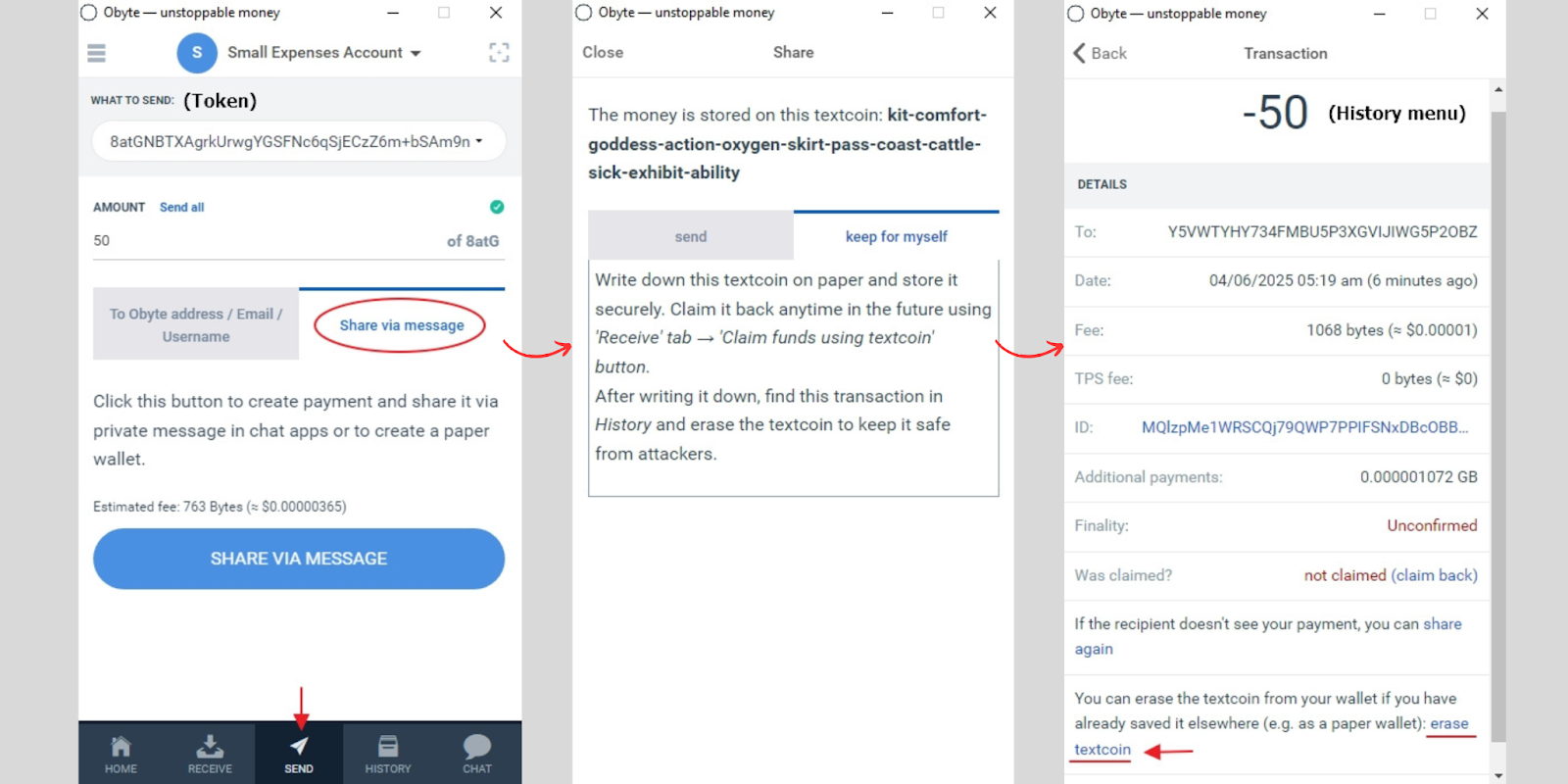

Multisignature features are also available in the Obyte wallet. Two or more signers (devices) can approve or not approve every transaction from a multidevice account.
Now, here’s a trick you must know about backups in Obyte: the main seed phrase (and public textcoins) can only back up non-private tokens. Coins like Blackbytes (GBB), smart contracts, multisignature accounts, and chats can only be protected with a full backup, available from the general settings in the wallet. This will give you an archive that you must store on your own device. Private textcoins can also be an easy way to back up private assets.

Beyond the wallet itself, GBYTE, the main asset of Obyte, is available for trading on centralized crypto exchanges like NonKYC.io and Biconomy. Once the coin leaves the wallet app and enters the exchange, it stops being non-custodial, and it’s entirely in the hands of those companies. Therefore, you should do your due diligence if you want to handle your funds without issues.
In any case, whichever method feels right, a small moment spent creating a backup today can save a long story tomorrow.
:::info
Featured Vector Image by pch.vector / Freepik
:::
n
n


