
When it comes to SEO, and really all digital marketing, the most compelling stories have always, and will continue to come from data. And as a business owner or marketer, let’s face it–you can’t afford to make decisions based on anything else. One wrong test, created in the name of hunch, can mean the loss of thousands, or even millions of dollars. One right test, created in the name of a solid piece of data–well, that can be a complete game changer.
That’s what we’re here to talk about today. Let’s leave the theories at home and run through five easy, yet definitive SEO A/B tests that you can leverage now to drive more traffic to your website.
Contents
What is SEO A/B testing?
SEO A/B testing is the process of testing changes to pages (titles, meta, content, etc.) in isolation to measure impact on organic search traffic.
The purpose? To help you understand what’s working–and what’s not–when it comes to your SEO strategy.
Because Google’s algorithm is somewhat of a black box, and because Google changes its algorithm daily, SEO A/B testing can be somewhat of a hit-or-miss proposition. The results are also far from immediate. But within the right framework, and with the right tests and tracking, running SEO A/B tests can be a serious boon to your top-line traffic, conversions, and even revenue.
Let’s run through the tests.
5 SEO A/B tests you can run right now
Shared SEO knowledge is a great starting point, but these SEO tests take you beyond theory to learn what gets your unique website higher rankings and more traffic.
1. Title tag variation
CTR (click-through rate) has a major influence on rankings. Small changes can lead to big wins. A recent study by Backlinko, analyzing over 4 million Google search results, found the following average CTRs for the top organic positions:
- Position 1: 27.6%
- Position 2: 15.8%
- Position 3: 11.0%
- Position 10: 2.4%
Now, I know what you’re thinking. That CTR dip is caused by the page being lower in the SERP (search engine results page), right?
To a certain extent, yes. Pages lower in the SERP are naturally going to have lower CTR because they’re lower on the page.
But that doesn’t mean that an unenticing title cannot have a really negative impact on CTR. And it does mean that having a great title can help push your page above your competitors and generate traffic by virtue of a higher ranking and a great title.
Title tags have a huge impact on CTR.
Here’s how to run a title tag a/b test.
Pick a page group (control + variant)
Select a set of semantically similar pages with enough traffic to test meaningfully. These could be product pages, blog posts, category pages, pillar pages—there’s really no wrong answer here.
Then, divide them into two statistically similar groups:
- Control Group: No change to the title tags.
- Variant Group: You’ll change the title tags here.
Create your title variations
Change only the title tags in the variant group. For example:
- Original: Buy Red Sneakers | BrandName
- Variant: Red Sneakers for Sale – Free Shipping | BrandName
One thing to keep in mind is that your new title should still target the primary keyword.
Measure performance
Generally speaking, you want to wait at least 2–4 weeks to collect enough data. SEO takes time. You want to give the experiment enough time to generate meaningful data.
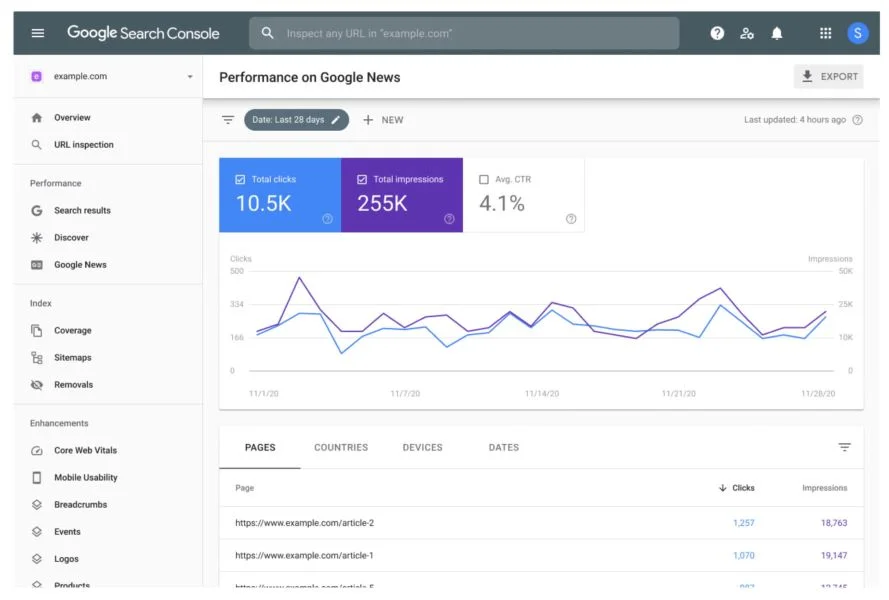
For performance analysis, I like to use Google Search Console to track pre-click metrics like CTR, impressions, and clicks. GA4 is going to give you useful post-click metrics like traffic and conversion rate, but for pure rank and CTR improvement, which is really what we’re trying to track with this test, everything you need is in Search Console.

Iterate
Compare CTR and clicks between the control and variant groups. What did you learn? What sentiments or phrases worked? What didn’t? Is there anything else that could have affected the results, such as seasonality or rank changes?
Once you answer these questions, you can decide whether it’s worth rolling out new titles to other relevant pages.
Note: Google will often rewrite your title tag itself, which can create some data discrepancies when running this test–so keep that in mind.
2. AI Overview content optimization test
You’ve no doubt heard a lot about AI Overviews. This Google feature uses generative AI to summarize answers directly on the search engine results page (SERP). That means instead of just showing the typical list of blue links, Google now provides a synthesized answer at the top of the page for a ton of queries.


This can be a bit of a double-edged sword for online businesses. If you’re not optimized for Overviews, you risk losing organic visibility, even if you rank #1 traditionally. But if you are? You gain massive exposure at the top of the SERP, and, if you’re lucky, can capture clicks directly from the summary.
Here’s how to run the test.
Choose a page type and query set
Like the last test, you want to start with a group of pages that target similar search intent. Try to pick pages with somewhat stable organic traffic and rankings in the top 20.
Then, just like the last test, split the pages into a control group and a variable group. Try to have at least 20–30 URLs in each group for meaningful results.
Make structured content changes (variant only)
Then, in your variant group, you’re going to want to add the following elements:
Monitor performance
Same step as last time. You’re going to want to use Search Console to gauge results. Did the variant group appear in AI Overviews more often? Did CTR improve compared to control? Any ranking or traffic loss?
With the proliferation of Overviews in today’s SERPs, running this test can have significant dividends.
🛑 Want better outputs from your AI tools? Free resource >> 200 Plus AI Prompts Any Business Can Use
3. Internal link placement test
Because external links get the glory when it comes to building domain authority, internal links are too often overlooked. But the fact remains: if you don’t link internally between semantically similar pieces of content, using accurate anchor text, it is essentially impossible to build topical authority on a given subject and enjoy strong rankings.
The good news is, you can test internal links just like you can test anything else on your site. And as you guessed it, the first step in running this test is collecting a group of pages with consistent traffic/rankings, and splitting them up into control and variant groups.
Then, you’re going to want to add links to your variant group pages from high-authority or relevant pages on your site. How do you know which pages are high authority? Sort by page authority in an SEO tool like Ahrefs or SEMrush (Use the UR metric in Ahrefs).
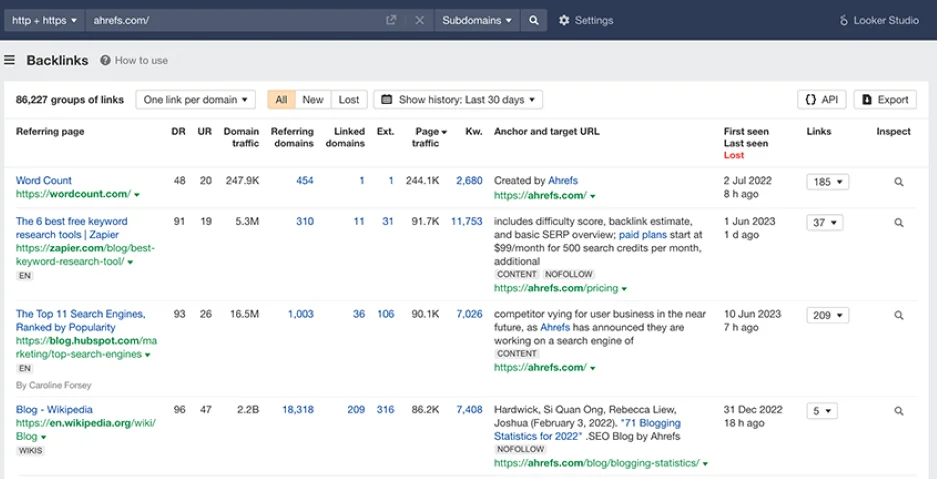

Try adding three to five new internal links pointing to your variant pages from relevant pages. Make sure your anchor text is optimized, meaning keyword-rich and natural-sounding, and try to place links higher up in content or near related sections.
Wait another two to four weeks, and if you’ve built strong links, you should see rankings and clicks start to improve on your variant pages.
4. Content length and depth test
While it’s true that search engines reward relevance and completeness, longer isn’t always better. That said, longer, more robust content generally correlates with higher rankings because it is often more in-depth and higher quality.


Use logical structure, subheadings, and bullet points to make long posts more scannable for humans, algorithms, and AI systems.
Google rewards quality and credibility above all. That means that if there are blog posts or product pages on your site with thin content, or places where it would make sense for you to add depth, these are great opportunities for a split test.
For this test, choose a set of evergreen blog posts that are on the thinner side in terms of word count (under 1.5k words). If all of your content is already fairly robust (not a problem most businesses have), this is still a test worth running. Even beefing up robust content can improve traffic and rankings.
In your variant group, expand on content with FAQs, visuals, and expert quotes. Add new sections targeting ancillary keywords with volume. Add graphs, infographics, statistics, and anything else that will increase engagement signals. Above all, think quality. The more you can increase the quality of your content, the better chance you have of seeing results.
Wait the prescribed two to four weeks, and watch as your newly beefed-up content racks up impressions and clicks.
5. Schema markup implementation test
Because it’s a bit more technical in nature, schema markup is often overlooked as a growth technique. But the fact remains that adding schema markup, or structured data, to pages can significantly improve visibility and drive increases in organic CTR.
For this test, you’re going to want to select a group of pages that would benefit from schema and are structured enough to support it. These could be product pages, how-to content, service pages, recipes—you get the picture.


Schema is what lets your search results have sitelines like ones shown here.
Depending on your CMS, you may need some plugins to help with this. I told you it was going to be a bit more technical!
Schema can be added via:
- CMS plugins (like Yoast, Rank Math)
- Manual JSON-LD
- Google Tag Manager
Let’s run through each method.
Add manually using JSON-LD
This is the most direct and flexible approach. Simply identify the schema type (FAQ, Product, Article, etc.) from schema.org, create the markup in JSON-LD format, and paste the code into the
or of the page (Google recommends the if possible).
Use a CMS plugin
If you’re using WordPress, you can use plugins like Yoast, Rank Math, or Schema Pro to add schema. On Shopify, you can modify your theme directly or use an app like Smart SEO or JSON-LD for SEO. On Wix or Squarespace, you’re going to get limited built-in support, but there are custom code blocks you can add if advanced schema is needed.
Add via Google Tag Manager
This is very similar to option one, except you are adding the code to an HTML tag in Tag Manager and setting the tag to fire across your website. This is a good lower-code option for large sites or non-dev teams.
To gauge the results of your structure snippet test, you can monitor all the typical metrics in Search Console. But you also want to check the SERP to see whether Google is now directly displaying your rich features (stars, FAQs, etc.) and whether you’re seeing a spike in CTR from those enhancements.
Turn insights into traffic with SEO A/B testing
SEO A/B testing isn’t just for enterprise sites. It’s one of the most effective ways to grow organic traffic with confidence. So don’t think that if you’re an SMB, these strategies aren’t for you.
By running controlled experiments like optimizing title tags, improving internal links, and adding schema markup, you can discover exactly what moves the needle for your site. And what’s more important, you can inform your decisions with data, not blind theories or opinions.
Start with one test, monitor results closely, and iterate based on what works. Happy testing!