Although using two-factor authentication and passkeys makes your accounts more secure, keeping your passwords safe and secure is still massively important because you don’t want a data breach to come haunt your accounts, such as the gigantic data breach uncovered by Cybernews in which 16 billion logins were exposed. Fortunately, iOS includes a built-in tool that makes it easier to keep your credentials protected. It’s iOS’ built-in Passwords app, a free and reasonably capable password manager that you can not only use on your iPhone but also on other Apple devices, such as an iPad, Mac, and Vision Pro.
While the Passwords app was introduced with iOS 18, it packs many features that have long been a part of iOS, often hidden under settings. One such feature, known as Security Recommendations, tells you which of your saved passwords were compromised in a data leak and reused on multiple accounts. Additionally, it can also point out your weak passwords. This is quite convenient and helpful as it helps find out exactly which of your account credentials are at risk, so you can mitigate that by changing those passwords and potentially protect your accounts from hackers. Here’s how to view Security Recommendations for your passwords.
How to use Security Recommendations on your iPhone

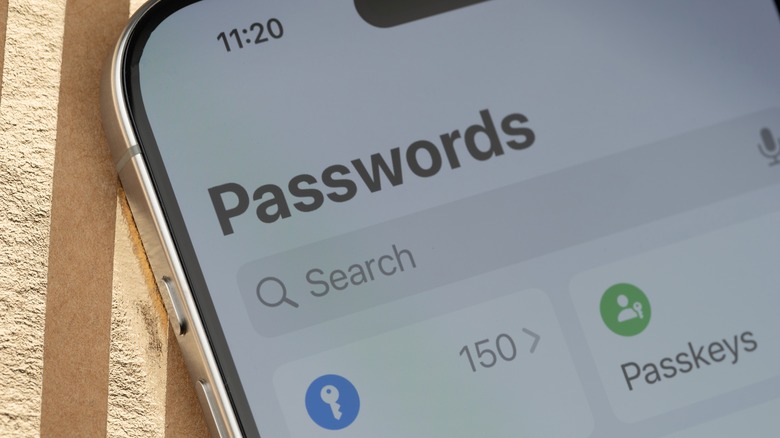
Security Recommendations is a useful feature in the Passwords app that includes all the recommendations it has about your stored credentials. To access it, open the Passwords app on your iPhone, and you’ll see the Security card on the home screen. Tap on it to view your Security Recommendations, including compromised passwords, easily guessed (weak) passwords, and reused passwords. You can further tap on each of the recommendations to get help with resetting your passwords.
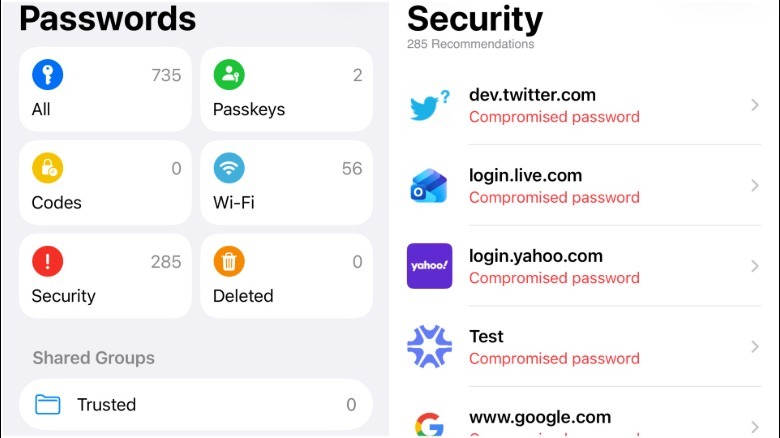
Besides the security section, the Passwords app shows any relevant recommendations when you are viewing the detail page of any stored credentials. Sometimes the recommendations will also appear when you’re using the AutoFill feature to fill in account credentials on an app or website. If you’re still running iOS 17 or an older version because your iPhone is no longer getting iOS updates, you can view the Security Recommendations by navigating to Settings > Passwords > Security Recommendations.

You can find similar features in popular password managers, such as 1Password, as well as in select browsers that let you save your passwords, such as Chrome, Edge, and Firefox. Password security is of vital importance. So, if you don’t already use a password manager, you should start, even if it’s Apple Passwords or a third-party free option like Bitwarden.