Edgar Cervantes / Android Authority
TL;DR
- Google Photos is preparing a new battery-preserving feature that will limit frequent backups.
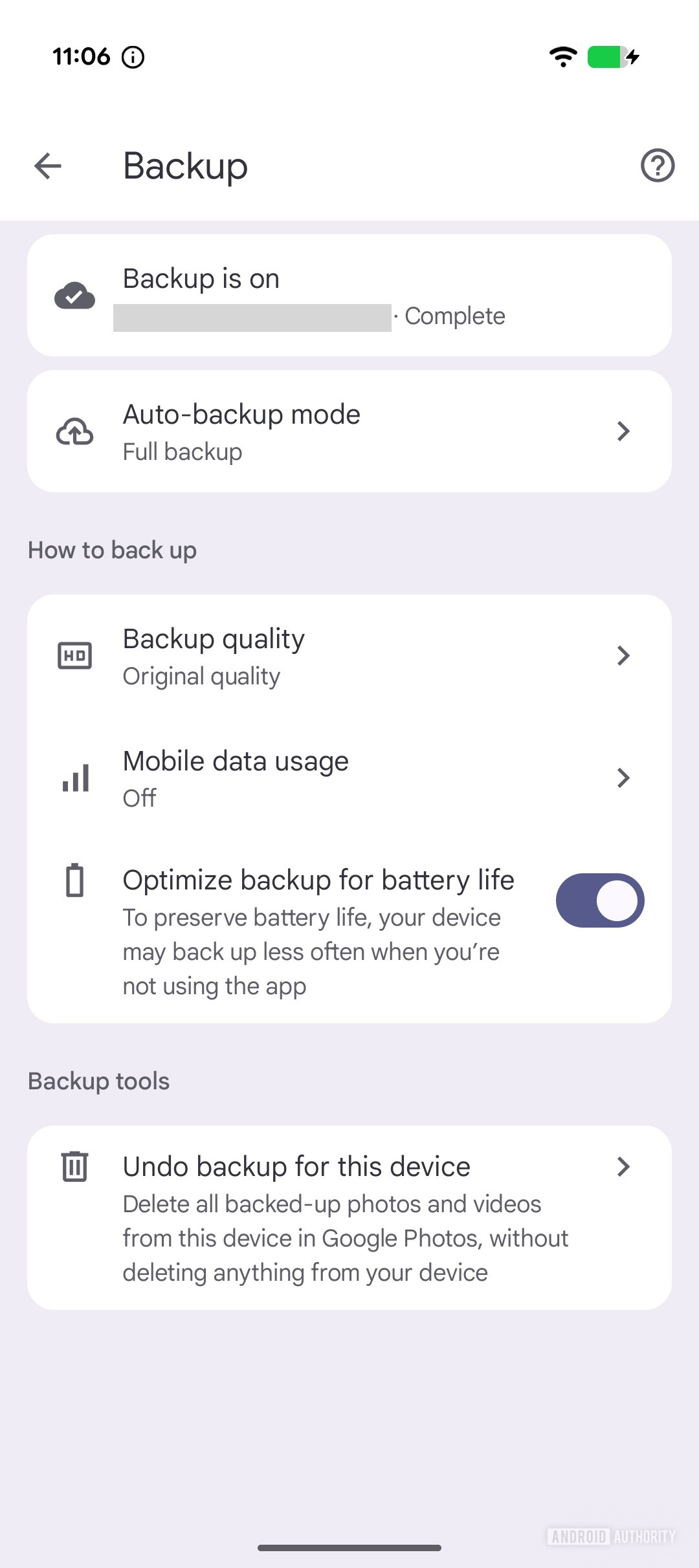
- We’ve discovered a new “Optimize backup for battery life” setting in the app.
- When enabled, this setting changes how Google Photos behaves in the background, allowing it to back up less often when you’re not actively using the app.
For years, backup controls in Google Photos have primarily focused on data usage. Users can choose whether backups happen over mobile data or Wi-Fi, limit uploads on cellular networks, or pause syncing altogether. There has been very little in the way of power-focused controls for Google Photos backups. If the app decides to back up aggressively in the background and that drains your phone’s battery, your only real option today is to turn backups off entirely. That could change very soon.
While digging through Google Photos v7.59, we discovered evidence of a new feature in development that appears to focus on balancing backup performance with battery consumption. It took a bit of tinkering, but we managed to surface a new toggle labeled “Optimize backup for battery life” in Google Photos’ backup settings. When enabled, this setting limits how Google Photos behaves in the background, allowing it to back up less frequently when you’re not actively using the app.

AssembleDebug / Android Authority
In other words, instead of constantly syncing every new photo or video moments after it’s captured, Google Photos would ease off background activity to preserve your phone’s battery life.
Don’t want to miss the best from Android Authority?


If and when this feature eventually rolls out, users may notice a few behavior changes. Photos and videos taken during the day may not appear on the web or sync to other devices immediately. It’s also possible that a backup session only triggers once users open the app, deprioritizing background syncing for battery longevity. This way, you can conserve battery life without disabling backups entirely or resorting to system-level restrictions.
⚠️ An APK teardown helps predict features that may arrive on a service in the future based on work-in-progress code. However, it is possible that such predicted features may not make it to a public release.
Thank you for being part of our community. Read our Comment Policy before posting.