![What are the latest Hootsuite product features? [Nov 2025]](https://blog.hootsuite.com/wp-content/uploads/2025/12/What-are-the-latest-Hootsuite-product-features-Nov-2025-X-Twitter-ads-The-practical-2025-guide-for-social-marketers-media-analytics-tools.png "What are the latest Hootsuite product features? [Nov 2025]")
Looking for the latest Hootsuite product features? November’s updates focus on tighter inbox management, more confident publishing, richer reporting, and keeping pace with platform changes — all designed to support modern social media management at scale.
As an all-in-one social media management tool, Hootsuite helps teams manage multiple social media accounts, schedule posts, and monitor performance across leading social media platforms in real time.
Here’s everything we’ve rolled out this month.
Quick summary of November updates:
- Manage YouTube comments alongside all your other social conversations for better customer support
- Confidently preview Instagram and Facebook social posts before publishing
- Create and publish videos with Adobe Express in Hootsuite for faster content creation
- Filter Inbox messages by mentions to streamline responses and notifications
- Export richer social media analytics data for analytics reports, custom reports, and BI tools
- Updates to Facebook metrics as Meta retires fan and impression data across social media networks
What are the Hootsuite product updates for November 2025?
You can now view and reply to YouTube comments directly in Hootsuite Inbox, bringing another key channel into one unified place for engagement across your social media presence. This helps teams manage public comments alongside DMs, mentions, and replies — all from the same Hootsuite dashboard.
This update helps your team members:
- Manage YouTube conversations without switching tools or social media accounts
- Keep response times fast with real-time engagement
- Maintain a single source of truth for customer satisfaction and support workflows
Takeaway: Inbox now supports YouTube comments, making it easier to manage every conversation in one place and streamline engagement.
Create: Confidently preview Instagram and Facebook posts
Post previews for Instagram and Facebook have been improved so you can clearly see how your content will appear before you schedule posts. This makes it easier to plan your content calendar, apply the right hashtags, and ensure brand consistency across channels like LinkedIn, Instagram, and Facebook.


Why it matters:
- Fewer surprises after publishing across multiple social media platforms
- Faster approvals using built-in approval workflows and permissions
- More confidence that posts look right on every profile
Takeaway: Enhanced previews help you publish with confidence and optimize post performance before content goes live.
Create: Create videos with Adobe Express in Hootsuite
Our Adobe Express integration now supports video creation, not just static images. You can create MP4 videos using Adobe Express, Canva, and your existing content library, then import them straight into Hootsuite Create.

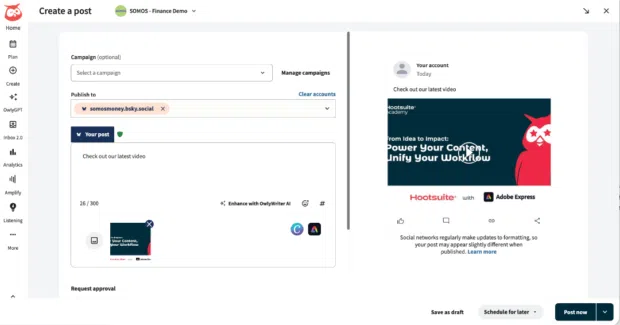
This means you can:
- Create short-form videos for TikTok, Instagram, and Facebook without leaving your workflow
- Use on-brand templates to amplify campaigns and social ads
- Publish video content faster across all connected social media networks
Takeaway: Adobe Express now helps you create and publish videos directly inside Hootsuite, speeding up social media scheduling.
Inbox: Filter messages by mentions
Finding messages that mention your brand, products, or influencer partners just got easier. Inbox now includes a mentions filter, helping teams surface high-priority conversations faster.


This update helps you:
- Quickly identify messages that need attention
- Prioritize direct engagement that impacts customer satisfaction
- Reduce time spent searching through Inbox
Takeaway: The new mentions filter helps teams respond faster and improve team collaboration.
Analytics: More metrics in your data exports
We’ve expanded data exports to include newer metrics from Advanced Analytics, including additional organic metrics and GA4 data. These updates support deeper analytics tools, performance reports, and benchmarking efforts.


Why it matters:
- Bring richer social media analytics into BI tools like Power BI
- Get an in-depth view of social media performance
- Power custom reports and long-term social media strategy
Note: Teams should update external reporting settings to account for the new metrics being added.
Takeaway: Data exports now include more analytics, giving you a fuller view of performance across all social media platforms.
Analytics: Facebook Page metrics updates (fan and impression changes)
Meta is retiring fan- and impression-based metrics from its API. As a result, several Facebook metrics will no longer appear in Hootsuite analytics reports.
What’s changing:
- Metrics like Page fans, Page impressions, and Post impressions are being removed
- Impressions are being replaced by views
What you’ll still see:
- Page followers (including new and lost)
- Views, organic views, and paid views for Pages and posts

Takeaway: Facebook metrics in Hootsuite now align with Meta’s shift from impressions to views, supporting clearer post performance analysis.
Listening: Facebook Insights metrics changes in Listening & Talkwalker
Meta is also removing fan and impression metrics from the API used by Hootsuite Listening and Talkwalker. These updates affect social listening features and analytics reporting.
As a result:
- Fan- and impression-based metrics will no longer appear
- In analytics, new metrics like Page media views, post reach, and media views are available instead. With this change, we’re now also adding Reels data to more post-level metrics

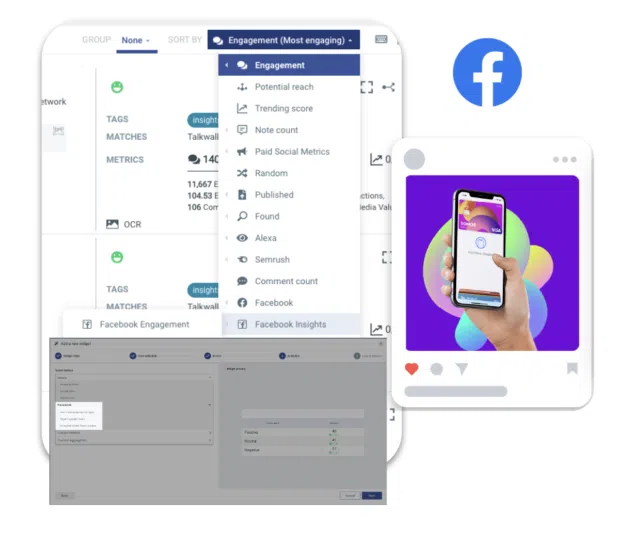
Takeaway: To align with Meta’s API changes, we’ve updated metrics and added new ones in Analytics to support your reporting needs.
FAQ
Does Hootsuite support managing YouTube comments?
Yes. You can now view and reply to YouTube comments directly inside Hootsuite Inbox, alongside messages from other social media platforms.
Why did Facebook impression metrics change in Hootsuite?
Meta is retiring impression- and fan-based metrics from its API. Hootsuite now reflects this change by focusing on views, reach, and follower metrics instead.
Can I export Hootsuite analytics data to external tools?
Absolutely. Data exports now include more organic and GA4 metrics so you can analyze social media performance using your preferred analytics tools.