
Currently, Netflix offers exactly three different offers: Essential with ads, Standard and Premium. They all have different prices and features. Number of screens and image quality being the only differences, the choice ultimately remains rather easy once you have understood the benefit of each type of subscription.
It is important to note that the catalog diverges a little depending on the formula chosen, some series and programs will be inaccessible for users who have opted for the cheapest formula.
Price and benefits of each Netflix subscription, which one to choose?
| Package | Prix | Quality | Catalogue | Screens |
|---|---|---|---|---|
| Essential with advertising | €7.99/month | Full HD (1080p) | – Film and series: limited availability (85% of content) – Broadcast of advertisements before or during most series and films – Mobile games: unlimited access |
– 2 – Download titles on 2 devices |
| Standard | €14.99/month
Ability to add up to 1 additional subscriber |
Full HD (1080p) | – Film and series: unlimited access – No advertising – Mobile games: unlimited access |
– 2 – Download titles on 2 devices |
| Premium | €21.99/month
Possibility of adding up to 2 additional subscribers |
Ultra HD (4K et HDR) | – Film and series: unlimited access – No advertising – Mobile games: unlimited access |
– 4 – Download titles on 6 devices |
Netflix Essential Subscription with Ad – Low budget
This is the least expensive subscription which costs only €7.99 per month in France. In this offer, you are entitled to a wide choice of series and films, a personalized experience, mobile games, access to Netflix on most TVs and mobile devices and the ability to change or cancel your plan at any time.
With this subscription, you benefit from video quality up to 1080p in FullHD, an average of 4 to 5 minutes of advertising per hour (15 to 30 seconds broadcast before and during programs), and some series and films which will not be available due to restrictions linked to the rights on certain titles and finally, the possibility of downloading titles on 2 compatible devices at the same time.
Netflix Standard Subscription – Good value for money
For this second subscription, the offer is obviously better than the Essential version with Pub. For €14.99/month, you can enjoy a 1080p image (Full HD) and use on two simultaneous screens (connected TV, smartphone, tablet, computer, game consoles, etc.), as well as the possibility of downloading titles on 2 compatible devices at the same time.
The main advantage of this offer lies in its quality/price ratio; if Netflix prices have increased, it is no less interesting to subscribe to this Standard offer if you want to access the complete catalog in 1080p maximum, and 4K is of little interest to you or simply if you do not need more than two screens at the same time.
This is a perfect offer for a couple who don’t always watch the same thing at the same time, for example, and who don’t want to be distracted by ads. However, plan on having a sufficient internet connection to enjoy it in Full HD (5 Mbps download). Netflix, on the other hand, offers content playback in 720p if your bandwidth cannot keep up.
Finally, note the possibility of adding up to 1 additional subscriber who does not live with you for €5.99 per month with advertising or €6.99 per month without advertising.
Netflix Premium Subscription – For the Best Quality or Family
This is Netflix’s latest and most expensive offering. The Premium subscription is offered at €21.99/month and offers viewing of content in 4K (Ultra HD) as well as HDR and Netflix Spatial Audio; Please note, however, that not all content is compatible with this resolution and HDR technology. The films, series and reports that support them will have the mention to display on their Netflix page. Likewise, you obviously need the compatible device (TV, smartphone, computer, etc.) and a sufficient internet connection (15Mbps download).
If you’re wondering who this offer might be for, it’s very simple: either people looking for the best possible picture quality on Netflix, or families (or both). The Premium subscription allows you to enjoy content on four screens simultaneously, and to download titles on 6 compatible devices at the same time, perfect for sharing with several people in the same household.
Finally, note the possibility of adding up to 2 additional subscribers who do not live with you for €5.99 each per month with advertising or €6.99 each per month without advertising.
Subscribe on your own or via your box?
There are two ways to subscribe to Netflix: via the service’s official website, or via your TV box. Internet service providers in fact offer to subscribe via their box, allowing the price of the subscription to be integrated directly into your monthly bill from Bouygues, SFR, Free or Orange (obviously, this is extra and at the real Netflix prices). If this makes it easier to register for the video streaming service, you should remember to check that your Netflix subscription can be used elsewhere than on your box, in case you need it on your tablet, smartphone, etc. Also note that Canal+ offers a CANAL+ CINÉ SERIES offer including its channels, Netflix as well as Canal+ Séries, OCS, Disney+ starting at €34.99/month (with 24-month commitment).
How to sign up for Netflix?
To register on Netflix, it is recommended to go directly to their official website and follow these steps:
- The home page is designed to make registration easier: insert your email address in the field provided for this purpose and click on “Start”;
- Click “Next”;
- Choose a password in the field provided and click “Next”;
- Click “Next” again;
- Select the offer you want by clicking directly on its name (in the red square) then click on “Next”;
- You are now on the payment page. Choose the payment method you want (Credit/debit card, PayPal or gift code);
- Enter your bank details (or connect to PayPal, or even enter the gift code);
- Then create your profile;
- Validate everything and confirm your registration.
It’s done: you can enjoy the entire Netflix catalog. To use it on another device, you will only have to enter the email address and password chosen during registration. As a reminder, Netflix exists on many media:
- Compatible connected televisions;
- HDMI connected dongles (Amazon Fire, Xiaomi TV, Chromecast TV, etc.);
- Video game consoles (PlayStation 4 and 5, Xbox One, Xbox Series X|S);
- Smartphones (Android et iOS) ;
- Computers (Windows and Mac, via an application or directly your browser);
- Box TV compatibles.
Note: The additional subscriber has their own account and password, but their subscription is paid for by the person who invited them to share their Netflix account. The number of additional subscribers you can add depends on your plan.
How to cancel your Netflix subscription?
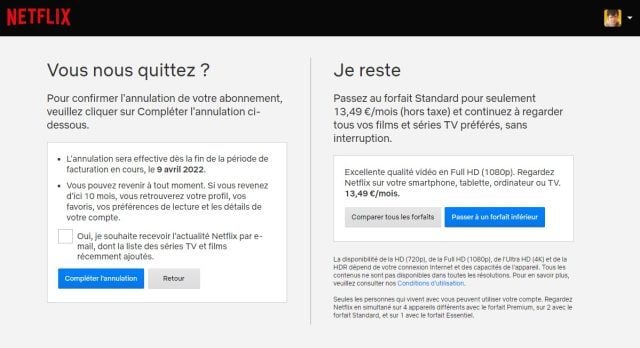

Canceling a Netflix subscription is as easy as subscribing. To do this, you must go to the official website of the service and log in. Once this is done, follow these few steps:
- Click at the top right on your profile image, then on “My account”;
- At the top left of the page, under “Account”, click on “Cancel subscription”;
- On the left of the page, click “Complete cancellation”;
- You will receive a confirmation email and will therefore be unsubscribed.
🟣 To not miss any news on the WorldOfSoftware, follow us on Google and on our WhatsApp channel. And if you love us, .