





A new feature option has been spotted in Microsoft Copilot which allows the AI chatbot to gather information about how you use various Microsoft products. Windows Latest was the first to report on the discovery of the toggle, which is turned on by default. According to the page where the setting is found, it lets “Copilot use data from Bing, MSN, Edge, and other Microsoft products you’ve used” when it’s enabled.
This essentially means your cookies and browser data from Microsoft Edge, along with your search history in Bing, can be used to inform Copilot’s responses. This is just one more way that Microsoft is embedding its AI options into the rest of its programs. It was also kind of to be expected when we started seeing the company trying to keep up with other companies like Perplexity and Google, especially since Microsoft started touting Edge as an AI browser thanks to its Copilot integration.
While this toggle might seem useful, there’s no outline of exactly what information Copilot might be pulling from your other Microsoft services. As such, it might be safest to turn this feature off to avoid any accidental feeding of personal information and private data to the AI chatbot.
Feeding Copilot’s memory

The functionality here appears to be part of Microsoft’s bid to improve Copilot’s memory and thus make the AI chatbot more effective for users. That’s a sensible goal, but it’s the fact that this feature has been turned on by default and without any notice from Microsoft that is concerning. Additionally, the lack of any real outline of exactly what kind of data is being pulled, or exactly what Microsoft products it pulls them from is a bit concerning, too.
Many Windows users don’t use Copilot on a regular basis, and some have even looked for ways to remove Copilot completely – users rejoiced last year when a Windows 11 bug uninstalled Copilot for some. Still, Microsoft continues to push its AI functionality, enabling many features by default. When Microsoft forces these features on users — especially features that involve pulling from potentially sensitive information — it only adds to the growing negative sentiment surrounding AI.
There’s also the concern that this feature might one day pull information from your Windows installation. This could be anything from data on personal files to information about your system’s specific hardware — all of which could potentially be used by bad actors in some way. We already know some AI can install viruses on Windows computers, and there’s also the fact that even if you don’t use Copilot, you might still be having your information and data sucked up by Copilot.
How to stop Copilot from watching you
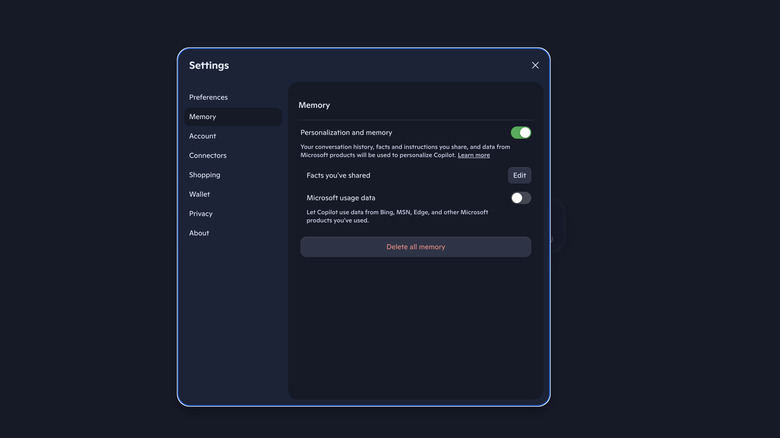
If you want to turn off the new memory usage functionality, then you’ll need to navigate to the Copilot website in your browser. From there, you’ll need to sign into your Microsoft account by selecting the profile icon in the bottom left of the screen. Once signed in, navigate to the Memory section of the Settings menu.
The toggle that you’re looking for now is called Microsoft usage data. Make sure the toggle is turned off, and this will keep Copilot from gathering the data. You can also delete any data that Copilot has already gathered on you by selecting Delete all memory at the bottom of this Settings page. Keep in mind that if you do use Copilot, then deleting that memory could make the chatbot less effective at completing tasks that specifically relate to your data.

