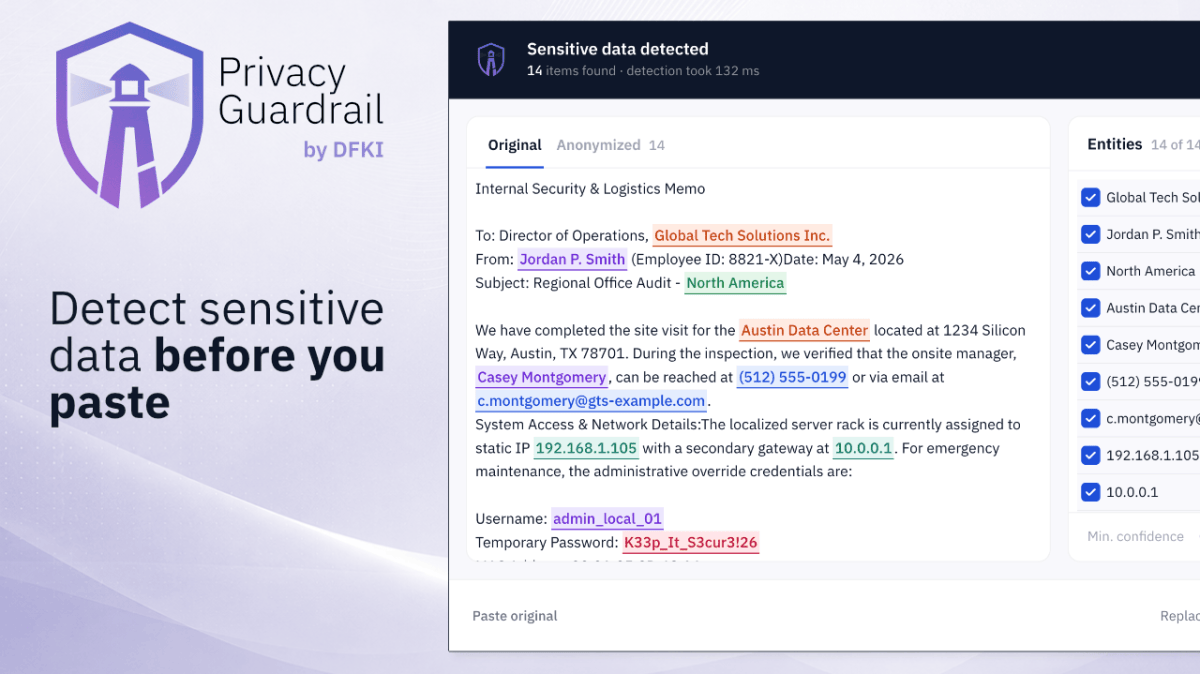
Anyone who wants to protect personal data from being inserted into AI chat services can use a new extension for Chromium-based web browsers such as Google Chrome. It’s called Privacy Guardrail and comes from the German Research Center for Artificial Intelligence (DFKI) and the RPTU Kaiserslautern-Landau. The extension is intended to recognize and anonymize personal data locally in the browser. Privacy Guardrail is currently in public beta testing (version 0.2.0).
Read more after the ad
Placeholders instead of plain data
When pasting text, the extension intercepts the clipboard paste event and parses the content locally. The system then replaces information that is recognized as worthy of protection – before it is sent to the AI service. In the settings, users can choose between two replacement modes: either sensitive areas are replaced with typed placeholders such as (EMAIL_1) or (PERSON_1) replaced, or the system uses synthetic, realistic but clearly fictitious values - such as neutral fantasy names or standardized test values for credit card numbers, IBANs or IP addresses. The advantage of synthetic values: The AI service receives naturally readable text instead of conspicuous placeholder tokens.


“Privacy Guardrail” shows the sensitive data detected using regex and local AI. The threshold values for detection can be individually adjusted in the settings.
According to the source code, the synthetic mode deliberately uses placeholders for particularly sensitive categories such as passwords, URLs and dates, as generating realistic fake passwords or URLs is considered too risky. The extension manages the mapping between the original value and replacement value in a local “Identity Vault” in the browser profile – without synchronization via Chrome Sync. This will allow AI responses to be de-anonymized locally later, and replacements will remain consistent across sessions and platforms.
Two levels of detection
Technically, Privacy Guardrail combines two processes. A rules-based engine – implemented in Rust and compiled to WebAssembly – recognizes structured data such as email addresses, credit card numbers, IBANs or IP addresses. Optionally, a local AI model supplements the recognition with context-dependent information such as names, organizations or addresses. According to the repository, a multilingual NER model based on XLM-RoBERTa is used, which is intended to cover 24 European languages and 36 entity classes. The model runs via ONNX Runtime Web directly in the browser and uses WebGPU for acceleration when available. Without GPU support, execution takes place via CPU or WASM, which, according to DFKI, can be significantly slower.
High hardware requirements
Read more after the ad
The local AI component places comparatively high demands on the hardware. The DFKI recommends at least 16 GB of RAM and a WebGPU-capable GPU. Below 8 GB of RAM, the extension automatically deactivates AI recognition and only works with rule-based pattern recognition.
The DFKI expressly points out limitations. The detection could overlook sensitive content or incorrectly mark harmless content. Short names, ambiguous terms, tables, code blocks or unusual formatting reduced the recognition quality. Privacy Guardrail is therefore not a DLP or compliance solution, but an assistive protection layer.
In addition, the expansion is limited to three platforms in the current beta: ChatGPT, Claude and Gemini. Other AI chat services, browser-based tools, or internal business applications are not supported.
The development team plans to support smaller models, more efficient inference paths for low-resource devices, and additional browsers and mobile platforms. The source code of the Privacy Guardrail browser extension is available on GitHub under the Apache 2.0 license; The finished extension can be installed directly from the Chrome Web Store.
(v.a.z.a.)