Microsoft’s free, open-source set of utilities, known as PowerToysonce again asserts itself as an almost essential companion for advanced users. With the deployment of the version 0.99.0the Redmond firm does not just fix bugs; it introduces features so effective that they deserve native integration into the operating system. This massive update brings in its baggage two new tools major ones as well as a host of optimizations for the modules already in place, further strengthening the value proposition of this software suite.
How is window management inspired by Linux?
The first flagship novelty is called Grab And Move (Grasp and move) and draws its inspiration directly from the Linux universe, a affiliation that Microsoft fully embraces. The principle is terribly simple but terribly effective. No more hunting for the title bar to move a window. Once the function is activated, simply hold the ALT key (configurable to the Windows key if necessary) and use the left mouse click anywhere on the window to move it freely on the screen.
Grab and Move
Credits: Microsoft
Likewise, the tool simplifies resizing. By holding the ALT key and this time using the right click, the user can adjust the size of the window on the fly, without aiming precisely at one of its edges. This intuitive approach considerably streamlines interactions with the interface and demonstrates the desire to integrate proven mechanics from other systems to enrich the PowerToys experience.
What contribution does Power Display make to screen management?
The second piece of this update is Power Display. This new module is housed discreetly in the notifications area, near the clock, and offers centralized control over the settings of your monitors. A simple click on its icon, or using the keyboard shortcut “Windows + Ctrl + Shift + P”, opens a small window allowing you to finely adjust the brightness, contrast or even the volume for each connected screen, without ever having to touch the often impractical physical buttons of the devices.
Particularly useful for multi-monitor setups, Power Display also allows you to create and save profiles personalized. You can instantly switch from a “work” configuration to a “game” or “film” configuration. The tool is also compatible with Light Switch, another PowerToys utility, to automatically adjust profiles according to the theme (light or dark) of Windows. It’s one more step Microsoft to provide granular control to its users.
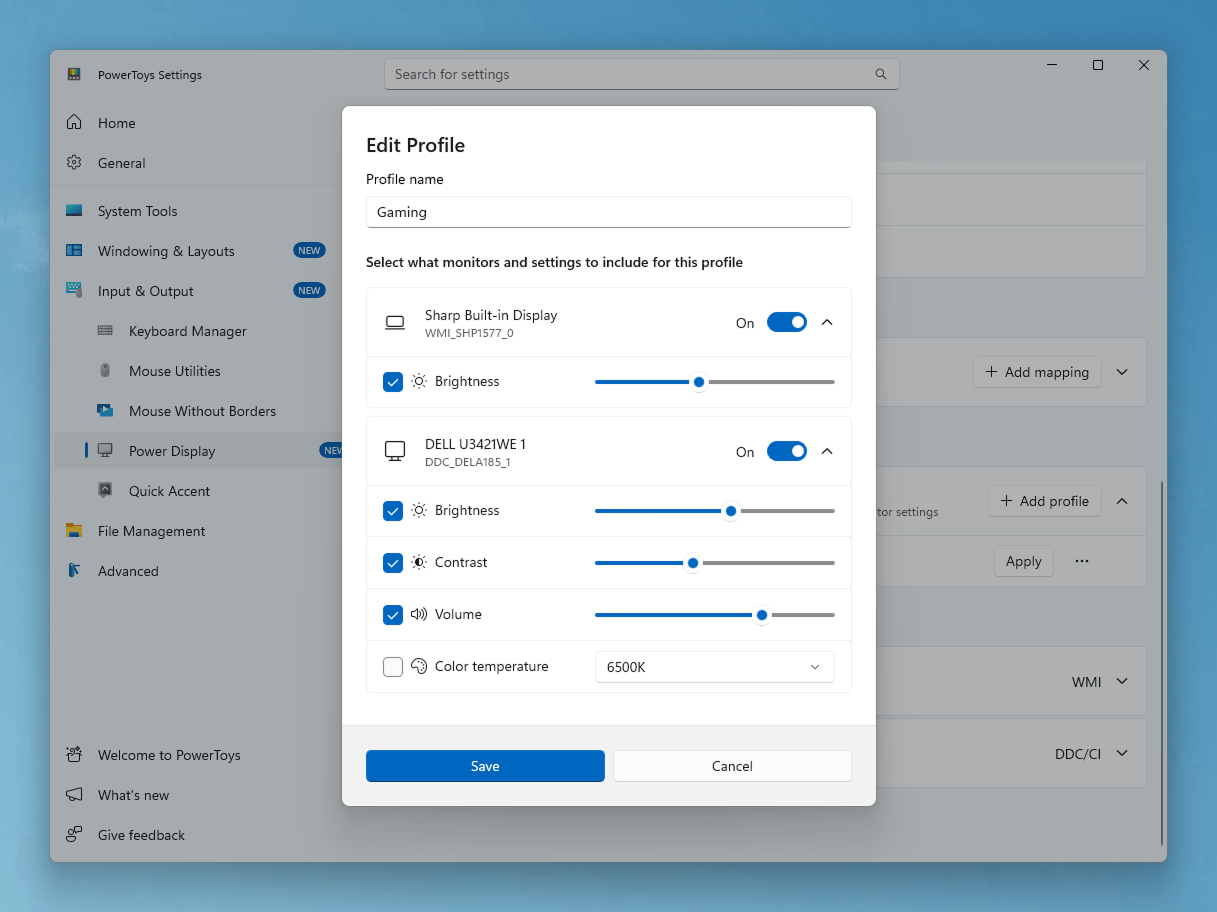

Power Display
Credits: Microsoft
What are the other notable improvements in this version?
Beyond these two major additions, historical tools are not left out. THE Command Palette Dock benefits from significant improvements, with the appearance of a compact mode 28 pixels high and the possibility of forcing it to always stay on top of other windows. The Calculator extension, for its part, is enriched with a persistent historyallowing you to save, reuse or delete previous entries. New, more comprehensive pinning options are also appearing.
Among other improvements, we note that the utility Zoomin now includes support for scrolling screenshots and direct text extraction. The Image Resizer tool has begun its migration to WinUI 3, aligning with the design language of Windows 11 for a more consistent and modern experience. Finally, a multitude of fixes and performance optimizations solidify the entire suite.