Key Takeaways
- Social media scheduling tools help you plan and publish posts across platforms, keeping your content consistent.
- Scheduling posts ahead of time reduces mistakes, makes teamwork easier, and frees you up to focus on engaging with your audience.
- Tools like Hootsuite go beyond scheduling with features for content creation, social ads, and performance tracking.
Scheduling tools can be a real lifesaver. They help you plan ahead, stay organized, and avoid last-minute scrambles.
In this post, we’ll share our picks for the best social media scheduling tools for whatever you need.
Social media scheduling tools are software platforms that help you plan and automate your social media posts.
Instead of posting in real-time, these tools let you create and schedule content for automatic publication at the optimal time. They save time and help you stay consistent with your social media strategy.
Most social media platforms have some basic native scheduling and auto-publishing options. However, third-party tools provide greater flexibility, functionality, and the ability to schedule content for multiple social media channels from one dashboard.
Social media tools actually help with a lot more than scheduling by creating extra time in the content creation workflow.
The best scheduling tools make social content marketers’ work lives easier in multiple ways. They:
- Save time: Create and schedule content in designated blocks of time rather than as disruptive one-offs throughout the day.
- Reduce the risk of mistakes: Set custom permissions and approval workflows and allow time for reviewing content before it goes live.
- Streamline multi-platform posting: Customize posts and crossposting for multiple social media accounts, all on one screen.
- Improve posting performance: Make sure you post at the best time and tap into your audience demographics to create irresistible content.
- Make collaboration easier: Work more effectively with content creators, influencers, team members, and other stakeholders.
- Plan ahead: Easily plan, curate, review, and edit an integrated schedule of social content across platforms and social media campaigns.
- Offer reliable customer support: Troubleshoot issues and keep your publishing workflow running smoothly.
The table below compares popular options by team fit, platform support, and analytics depth.
| Tool | Best for | Supported platforms | Team features | Analytics depth |
| Hootsuite | Large teams & enterprises | Facebook, Instagram, X, TikTok, YouTube, Pinterest, LinkedIn, and Threads | Yes | Advanced |
| Small teams | Facebook, Instagram, X, TikTok, YouTube, Pinterest, and LinkedIn | Moderate | Moderate | |
| Buffer | Simple scheduling | Facebook, Instagram, X, TikTok, YouTube, LinkedIn, Threads, and Mastodon | Limited | Basic |
| Canva | Design-forward teams | Facebook, Instagram, X, and LinkedIn | Yes | Basic |
| MeetEdgar | Busy freelancers, creators, & entrepreneurs | Facebook, Instagram, X, TikTok, Pinterest, LinkedIn, and Threads | Limited | Basic |
1. Hootsuite
Best for: Large teams and enterprises managing multiple social media accounts.
Why it stands out: Hootsuite is an all-in-one social media management platform designed to support everything from basic scheduling to enterprise-level collaboration and advanced analytics.
It’s built for teams that need structure, approvals, and visibility across multiple channels.
Key scheduling features:
- Auto-posting and bulk scheduling
- Custom best-time-to-post recommendations based on your unique social media analytics
- Ability to customize one post for multiple platforms from a single screen
- Ability to track key metrics in one dashboard
- Built-in AI-powered writing assistance (say hi to OwlyWriter AI), which acts as an AI assistant to help generate captions and hashtags faster
- Manage comments, DMs, and conversations across platforms in one unified inbox
- 100+ app integrations (like Canva, Notion, Slack, Bluesky, and more)
Hootsuite has the added bonus of offering powerful content curation tools, including a simple drag-and-drop calendar view that makes content planning across all your accounts easy.

Platforms supported: Instagram (Posts, Stories, and Reels), Facebook, X (Twitter), Pinterest, LinkedIn, YouTube, TikTok, and Threads
Pricing: Plans start at $99 per month.

#1 Social media tool
Create. Schedule. Publish. Engage. Measure. Win.
Free 30-day trial
2.
Best for: Smaller creators and brands that like to visualize social content before publishing.
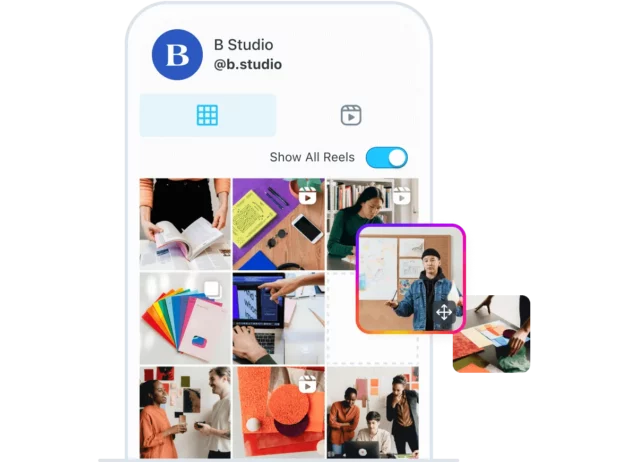
Why it stands out: focuses on visual content planning, making it appealing to creators and smaller brands that want to preview and plan how their social feeds will look before publishing.
If you want to give your Instagram feed a little razzle-dazzle, has some neat extras. They offer an Instagram feed planner that lets you visualize exactly how your Instagram grid will look after you post.
Be sure to read our guide to Hootsuite vs. for more on how these platforms compare.
Key scheduling features:
- Visual Instagram feed planner
- Basic post scheduling tools
- Content calendar with previews
Platforms supported: Facebook, Instagram, X, TikTok, YouTube, Pinterest, and LinkedIn
Pricing: Plans start at $25/month.
3. Canva
Best for: Design-led content teams.
Why it stands out: If you work in social, chances are Canva is already open in another tab. But did you know Canva includes a social media scheduler and planner?
With a Canva Pro account, you can design and publish posts in one flow, no platform hopping required. It supports publishing to Facebook, Instagram, X, and LinkedIn, making it easy to take a post from idea to live without breaking your rhythm.

Key scheduling features:
- Schedule posts directly from the design dashboard
- Basic performance tracking, including likes, clicks, impressions, and more
- Built-in design templates
- Integration with Hootsuite for expanded workflows
Platforms supported: Facebook, Instagram, X, and LinkedIn.
Pricing: Canva Pro costs $120/year per user
P.S. Canva is built directly into the Hootsuite dashboard with ready-to-use templates inside Composer.
4. HubSpot
Best for: Marketing teams using a CRM-based workflow.
Why it stands out: HubSpot’s social media scheduler is part of its broader marketing platform, helping teams to manage social content alongside CRM, email, and campaign data.
It allows you to publish content to LinkedIn, Facebook, Instagram, and Twitter and schedule your content to go live at the best possible time.

Key scheduling features:
- Schedule posts across major platforms
- Centralized campaign management
- Social reporting tied to marketing performance
Platforms supported: Instagram, Facebook, X (Twitter), LinkedIn
Pricing: HubSpot’s Marketing Hub Professional plan includes 3 seats at $890/month.
5. Buffer
Best for: Straightforward social media scheduling.
Why it stands out: Buffer’s user-friendly dashboard is simple and straightforward, making it great for social media managers and small teams who just want to get in, schedule, and get out.
It allows you to schedule posts to Instagram, Facebook, X, TikTok, LinkedIn, YouTube, and Mastodon. You can also use it to reply to comments on Facebook Pages and Instagram business accounts.
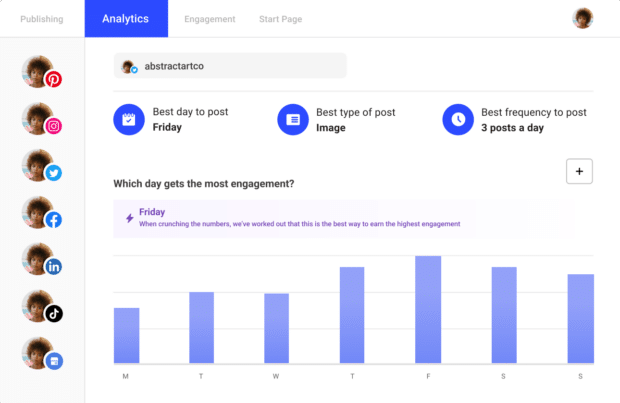
When it comes to all-in-one platforms, Buffer is relatively light on features. It doesn’t offer analytics for all platforms and doesn’t come with any social listening capabilities.
Be sure to read our guide to Hootsuite vs. Buffer for more on how these platforms compare.
Key scheduling features:
- Schedule posts across major social platforms
- Easy onboarding
- Customize posts for different platforms
- Reply to comments on supported networks
Platforms supported: Instagram, Facebook, X (Twitter), LinkedIn, TikTok, YouTube, Mastodon
Pricing: Buffer has a (limited) free plan and offers scheduling for 1 channel starting at $5/month.
6. Meta Business Suite
Best for: Native Facebook and Instagram scheduling.
Why it stands out: Meta Business Suite is a free, native tool for scheduling Facebook and Instagram content. It’s available on both desktop and as a mobile app.
Because it’s a native tool, it has some limits. When you schedule Stories, you won’t get the full set of creative features you’d see in the Instagram app. However, you can still add text, crop images, and use a few basic stickers.

7. Tailwind
Best for: Pinterest-focused scheduling.
Why it stands out: Tailwind remains one of the strongest options for scheduling and optimizing Pinterest content. It offers a personalized posting schedule, interval planning, and the ability to schedule to multiple boards.
And now, it also supports scheduling on Instagram and Facebook.

Key scheduling features:
- Personalized posting schedules
- Multi-board scheduling
- Content optimization features for Pinterest
Platforms supported: Pinterest, Instagram, Facebook
Pricing: Tailwind’s Advanced plan allows you to connect up to two accounts for $29.99/month.
8. RSS Autopublisher
Best for: Automatically sharing RSS-based content.
Why it stands out: RSS Autopublisher takes posting off your plate by automatically sharing new content from your RSS feeds to LinkedIn, X, and Facebook.
If you publish on a regular basis (like blog posts or podcast episodes) this tool keeps your social channels in sync without any extra work. Once your content goes live, the social post will also be sent out.
In other words, set it up once and let it run in the background.
Key scheduling features:
- Automatic posting from RSS feeds
- Scheduled link sharing
- Hands-off publishing workflows
Platforms supported: Facebook, LinkedIn, X (Twitter)
Pricing: $6.99/month (and free for Hootsuite Enterprise users!)
9. Airtable
Best for: Automation-driven scheduling.
Why it stands out: Airtable isn’t your typical social scheduler. It’s a behind-the-scenes engine that helps teams plan, organize, and automate how content gets created and published.
Instead of clicking “schedule” on every post, you build workflows. You can track goals, timelines, and tasks in one place, then use Airtable to trigger posts to go live on platforms like X or Facebook when conditions are met.
It’s a smart option for teams that care as much about process as they do about publishing.

Key scheduling features:
- Custom content calendars
- Automation-based posting triggers
- Workflow and task management
- Integration with Hootsuite via apps
Platforms supported: Facebook, X (Twitter); more via integrations
Pricing: Airtable’s Team plan starts at $20/month per seat.
10. KAWO
Best for: Scheduling content on Chinese social platforms.
Why it stands out: KAWO is a social media scheduler specifically for the Chinese social media platforms WeChat, Weibo, Kuaishou, and Douyin (the Chinese version of TikTok).
It includes a clear content calendar, scheduling tools, and recommendations on best times to post.
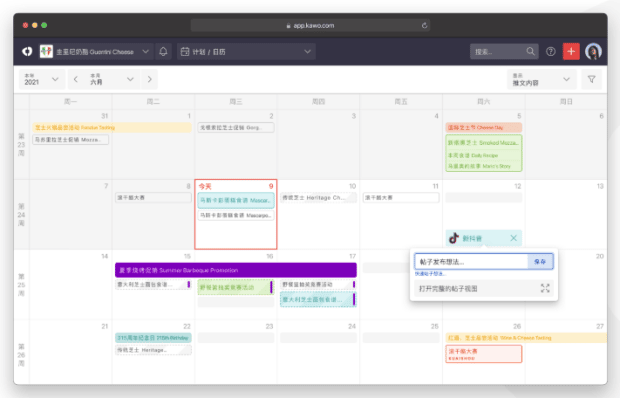
You can also connect KAWO to Hootsuite, so your WeChat and Weibo content lives alongside your other social channels in one dashboard.
Key scheduling features:
- Calendar-based scheduling
- Best-time-to-post recommendations
- Content management for Chinese platforms
Platforms supported: WeChat, Weibo, Kuaishou, Douyin
Pricing: Plans start at $4,000/year.
11. MeetEdgar
Best for: Freelancers, entrepreneurs, and small businesses.
Why it stands out: MeetEdgar is a social media scheduling tool designed for people who want their social presence to run in the background while they focus on everything else.
Its standout feature is that it automatically recycles evergreen posts, so your feeds never go quiet even when you’re not creating something new.
MeetEdgar can schedule and repurpose content for Facebook, Instagram, Twitter, Pinterest, and LinkedIn. However, it lacks some of the more advanced features needed for larger organizations.

Key scheduling features:
- Evergreen content libraries
- Automated content recycling
- Schedule content weeks and months in advance
Platforms supported: Instagram, Facebook, X (Twitter), LinkedIn, Pinterest, TikTok, and Threads
Pricing: MeetEdgar’s Edgar plan costs $499/year (when billed annually)
12. Post Studio – Social Auto Post
Best for: Shopify stores.
Why it stands out: The Post Studio Auto Post app is made for Shopify sellers who want promotion to happen on autopilot.
It lets you schedule daily or weekly posts that automatically pull in a new or random product, so your store stays visible without constant planning. You can automatically schedule posts to go live at the same time every day, or on selected days of the week.
It works with Instagram, Facebook, X, and Pinterest, and it’s great at keeping your feeds active when content ideas run dry. Just know it’s purpose-built for product posts, so it’s best as a supporting tool rather than a full social scheduling solution.
Key scheduling features:
- Automated product posting
- Randomized or recurring schedules
- Minimal setup for ecommerce workflows
Platforms supported: Pinterest, Instagram, Facebook, and X (Twitter)
Pricing: Post Studio’s Pro plan comes in at just $7.99/month.
Psst: If you’d like to integrate your ecommerce store with Hootsuite to access more robust scheduling features, check out the Shopview Hootsuite apps for Shopify, BigCommerce, WooCommerce, or Magento.
13. Mailchimp
Best for: Scheduling social posts alongside email campaigns
Why it stands out: If you already use Mailchimp for your email campaigns, it’s also a great tool for scheduling social media posts. It integrates with Twitter, Facebook, and Instagram, so you can create and schedule content for these platforms within the Mailchimp interface.
One especially useful feature is tying social posts directly to an email campaign, so everything goes live at the same time. It’s an easy way to keep your social content in sync with your email marketing without juggling another tool.
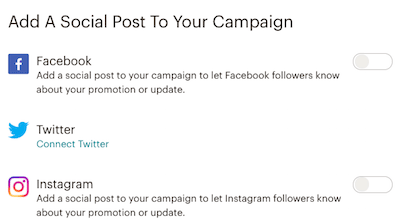
You can also connect Mailchimp to Hootsuite to share campaigns to your social channels directly from the dashboard.
Key scheduling features:
- Schedule posts tied to email campaigns
- Cross-channel campaign coordination
- Basic social publishing tools
Platforms supported: Instagram, Facebook, and X (Twitter)
Pricing: Mailchimp’s Standard plan costs $20 USD/month.
Scheduling tools connect to each social network through its API, or application programming interface. Think of the API as a secure handshake that lets the scheduling tool talk to each platform, pass along your content, and publish it on your behalf.
Scheduling tools connect all of your social media accounts to a central platform you can use to schedule content for posting according to your social media content calendar.
You choose what to publish and when, and the tool takes care of posting at the scheduled time. That means you can batch a day, a week, or even months of content in one sitting and still show up consistently, even when you’re not at your desk (or on your phone).
How to post using a scheduling tool for social media
Here’s a quick breakdown of how scheduling tools for social media generally work on the main social platforms.
- Link your accounts to a social media scheduling tool.
- Compose your social content and choose which account(s) you want to post to. A good social media scheduling tool will allow you to customize one post for multiple social accounts on various networks, all from one screen.
- Choose the schedule for later option and select your preferred time. The best social media scheduling platforms will provide customized recommendations for the best time to schedule your post for the most response.
- That’s it for posts or Tweets. For Instagram Stories, there’s one more step. You’ll get a push notification at the scheduled time to complete the process.

The process for scheduling videos to YouTube is slightly different. Remember those APIs we mentioned? The YouTube API behaves differently, which requires a slightly different process.
When you import your video to your social media scheduling tool, mark it as private and use the scheduling option to set a time for it to go public.
How to schedule multiple posts at once using a social media scheduling tool
One huge advantage of using a scheduling tool for social media is the ability to schedule multiple posts at once. This is also known as bulk scheduling.
Here’s how it works.
- Add the posting dates and social content for multiple posts to a CSV file that conforms to the requirements of your social media scheduling tool. Hootsuite allows you to bulk schedule up to 350 posts.
- Upload the file to your social media scheduling tool.
- Review your posts, make any desired additions or tweaks, and click Schedule.

FAQ: Social media scheduling tools
What are the best social media scheduling tools for enterprise teams?
The best social media scheduling tool for enterprise teams is Hootsuite. Hootsuite lets teams schedule posts across multiple platforms, set up approval steps, manage user access, and keep everything organized in one place.
How should large organizations compare social media scheduling tools?
Large organizations should compare scheduling tools based on how well they support teamwork, scale, and security. Look for tools that handle high volumes of content, offer clear permissions, and work well across multiple platforms.
What features do enterprise marketers need in a social media scheduling tool?
Enterprise marketers need scheduling tools with strong collaboration features, approval workflows, and reporting. Support for multiple users, regions, and brands is also important, along with tools that help reduce mistakes.
How do scheduling tools streamline global social content workflows?
Scheduling tools help global teams work faster by keeping all social media marketing content in one place. Teams can plan, review, approve, and publish posts without long email threads or last-minute changes.
How can teams evaluate scheduling tools for governance and approvals?
To evaluate scheduling tools for governance, look for clear approval steps, role-based access, and audit trails. These features help teams stay compliant and make sure the right people review content before it goes live.
Use Hootsuite to manage your digital marketing in one place. Schedule all of your social media posts, engage with your followers, and track the success of your social marketing efforts. Sign up for a free trial today.