LinkedIn may be built on personal connections, but it’s also the platform where brands are expected to join the conversation.
With more than a billion members (that hold twice the buying power of the average online user), it’s a prime space to generate leads and drive business growth.
Keep on reading to discover the new strategies and tools redefining LinkedIn marketing in 2026.
Key Takeaways
- Video views on LinkedIn have grown 36% year-over-year. To keep up with this moment, LinkedIn has introduced new video tools.
- The LinkedIn algorithm favors meaningful conversation over likes and shares.
- The LinkedIn algorithm also rewards human expertise and originality over low-quality, generic writing.
- LinkedIn’s upgraded ad tools give marketers far more control, better forecasting, and stronger performance across campaigns.
- A complete Company Page, strong executive profiles, and employee advocacy all play a major role in boosting trust and brand visibility on LinkedIn.
What’s new in LinkedIn marketing in 2026?
In 2026, LinkedIn has doubled down on video, AI, and smarter ad tools. Let’s dive in:
1. Short-form video
Last year, LinkedIn started experimenting with a TikTok-like short-form video feed. And that experiment seems to be paying off.
Video views on LinkedIn have grown 36% year-over-year, and video creation is now growing 2x faster than all other post types.
To keep up with all that momentum, LinkedIn rolled out a bunch of new video features, including:
- A “Videos For You” section in your feed, packed with personalized video recommendations you can scroll through horizontally
- A full-screen video mode on mobile — just tap a video and it opens an immersive, full-screen player
- A CapCut integration, so you can edit in CapCut and send your videos straight to LinkedIn
Hootsuite’s own data shows that video content has the highest rate of engagement among content types on LinkedIn.
And LinkedIn is just getting started: they’re planning to show even more videos in search results.

Source: LinkedIn
2. BrandLink: LinkedIn’s upgraded video ad program
LinkedIn’s Wire Program has officially been renamed and expanded into BrandLink.
With BrandLink, marketers can place in-stream video ads right before:
- Trusted publisher content (think: Forbes and Business Insider)
- Top creator videos from names like Steven Bartlett, Rebecca Minkoff, Gary Vaynerchuk, and more
Creators now get a cut of the ad revenue (cut unknown), marking LinkedIn’s first real step toward creator monetization.
And the early performance? Pretty impressive:
- Viewers are 18% more likely to become a lead
- 130% higher video completion rate than standard video ads
- 23% higher view rate

Source: LinkedIn
3. New Campaign Manager features
LinkedIn has rolled out a suite of upgrades to help marketers plan, optimize, and measure performance more effectively.
These features include:
- Marketing Overview: A full account-level snapshot across campaigns.
- Media Planner: This new tool helps forecast reach, impressions, and average frequency, so you can estimate ROI before you launch an individual ad campaign. You can tinker with factors like targeting and budget to see how they should impact your results.
- Ads Duplication: Quickly duplicate or test variations of high-performing ads.
- Dynamic UTMs: An automated tool for generating consistent UTMs across campaigns.
- Measurement Insights: A new Insights dashboard that provides deeper, journey-level analytics.
- Campaign Performance Digest: AI-powered, actionable insights and benchmarks

Source: LinkedIn
4. AI-powered content moderation
LinkedIn has quietly rolled out new AI systems that scan every post before it hits the feed — and they’re pretty serious about quality.
Here’s what the algorithm is looking for:
- Original ideas
- Real expertise
- Actual human perspective
- Posts that play by community rules
And here’s what it does with that info:
- Demotes low-effort writing and anything that feels “AI-generic”
- Flags duplicate or plagiarized content
- Boosts posts that provide real value
Long story short: if a post reads like it was generated in seconds with no personal point of view, it’s probably not going far. The more you can tap into real stories, data, and expertise, the better your content will perform.
5. LinkedIn games
40% of those who play a LinkedIn game each day do so because someone in their network shared the game. And LinkedIn says 84% of players come back the next day.
Are LinkedIn games a marketing tool? Not directly. But they are something marketers should pay attention to.

Source: LinkedIn
For one, they nudge people to log in more often, which naturally creates more moments for your brand and your content to show up in their feed.
Second, they provide opportunities for salespeople, executives, and anyone else who represents the brand to raise their profile and develop deeper connections through gameplay. Players can see which of their connections have played that day, making it a built-in excuse to say hello.
6. New capabilities for LinkedIn Live Event Ads and Accelerate ads

Source: LinkedIn
Here’s what’s new for each of these ad types:
Live Event ads. Brands can now use Thought Leader ads to promote a member’s post about an event and link directly to the event, use a live 30-second sneak-peek video ad during and after the event, and regionally target their event ads.
Accelerate ads. LinkedIn began testing Accelerate AI-powered campaigns in 2023 and rolled the beta for lead generation and website visit objectives out to everyone late last year.
They’ve slowly been adding more functionality, including the ability to add video and document ads, rather than only single-image creative. They’re also rolling out new objectives, including brand awareness, engagement, website conversions, and video views.
7. New AI capabilities in Sales Navigator
LinkedIn has added AI tools for finding prospects and leads. These also provide rich insights to personalize communication throughout the sales process.

Source: LinkedIn
How to build a smart LinkedIn marketing strategy
A smart LinkedIn marketing strategy starts with clear goals, a deep understanding of your audience, a strong presence, valuable content, and ongoing optimization.
Follow these steps to get started:
1. Set specific goals based on the right metrics
Take a moment to think about the bigger (marketing) picture. What do you want this platform to do for your brand? How will LinkedIn fit into your overall marketing strategy? What specific goals do you want to reach?
On other social platforms, people focus on entertainment and keeping up with friends.
But LinkedIn is primarily a professional and business-oriented platform. In fact, it’s the top platform for B2B marketing, since it works so well for lead development and relationship building.
For B2C companies, LinkedIn might serve primarily as a recruiting platform. Only you and your team can decide what makes the most sense for you.
Don’t know where to start? Check out our blog post on how to set goals for social media marketing. Once you set your goals, craft specific LinkedIn KPIs to keep things on track.
2. Dive deep into audience research
LinkedIn’s demographics look a little different from what you’ll find on other platforms. Users tend to skew older and have a higher income.
But that’s just a starting point. What really matters is understanding your audience and what they actually want from you on LinkedIn.
LinkedIn analytics are a good way to find the demographics specific to your audience. Within your Visitor and Follower dashboards, you can see what industries your followers are in, their job functions, seniority, location, and company size.
You can also use Audience Insights within Campaign Manager to research your target audience. AI-powered buyer groups can help you identify the most important decision-makers for your products.
Or, you can choose your own audience characteristics. Then the tool provides insights including what types of content your audience is interested in.

Source: LinkedIn Campaign Manager
From there, social listening can take your understanding to the next level. It helps you tap into how people are feeling—about your brand, your competitors, and your industry.
Finally, don’t sleep on AI tools. For example, try feeding ChatGPT sample posts or comments from your ideal target audience. Add a description of who you’re trying to reach. Then drill down into needs, preferences, pain points, and so on.
LinkedIn research shows that using AI for sales research can yield more qualified leads and save sales reps more than 1.5 hours per week, too.

#1 for LinkedIn marketing
Schedule posts, answer messages, and manage ads from one spot. Then, show off your results in beautiful reports. It’s so easy.
Start free 30-day trial
3. Optimize your Company Page and executive Profiles
LinkedIn data shows that complete Pages get 30% more weekly views.
No matter what goals you’re working towards, make sure your LinkedIn Company Page is fully filled out with all the tabs and sections available to you.
For larger organizations, Showcase Pages can help keep your content marketing focused on the right audience. Try setting them up for different initiatives or programs within your company.

Source: Destination Canada
And whatever you do, don’t let your main Page sit untouched for months at a time. LinkedIn recommends updating your cover image at least twice a year, which is an easy cue to give your Page a quick refresh.
Your executive team’s profiles deserve the same love. We’ll dig into the why a bit later, but for now, make sure each exec’s profile feels complete: strong profile and background images, a clear headline, and a summary that actually sounds like a human.
Don’t forget to complete the summary section! This is an important resource for sharing your leaders’ passion, expertise, and experience. It’s a powerful tool to explain why people should follow your exec team.
4. Develop your content strategy
LinkedIn is, at its core, a place for connection. People show up there to learn, share ideas, and build relationships, so your content should feel like part of that ecosystem/
A good rule of thumb from LinkedIn: For every piece of content that talks about your brand, share one update from an external source and four pieces of content from others. Just be sure to add your own perspective.
When you’re creating content for LinkedIn, keep these best practices in mind:
- Use eye-catching visuals to help your posts stand out.
- Share relevant content, including industry trends, news, or timely insights.
- Give a quick recap of a campaign you ran or a lesson you recently learned.
- Use hashtags strategically to reach the right people or group related posts.
- Add SEO-friendly titles, descriptions, and tags so more users can find your content.
- Spotlight and celebrate your team. People love seeing the real humans behind a brand.

Source: Google
“Don’t be afraid to test new formats,” says Trish Riswick, Hootsuite’s team lead, social marketing.
“Try polls, short videos, carousels, and branded memes. The algorithm rewards experimentation and activity and so does your audience.”
5. Analyze and refine
Rome wasn’t built in a day, and the same goes for your LinkedIn strategy. The smartest LinkedIn strategies evolve. Tracking how your content performs helps you double-click on what’s working, and fix what’s not.
Start with LinkedIn’s native analytics for a solid read on your Page and post performance. It gives you a clear overview of what your specific audience is responding to.
If you want a deeper layer of detail, Hootsuite’s LinkedIn analytics can show how your content fits into your larger social strategy and how it stacks up against your other channels.
This makes it easier to understand which marketing efforts are actually moving the needle.

Once you start looking at the numbers, patterns usually show up pretty quickly. If performance starts to drop, look at what changed.
Did you test a new content format? Launch a campaign that didn’t land the way you expected? Was there an algorithm update? Or has engagement slowed because your team hasn’t been as active in the comments or direct messages?
All of these clues help you adjust your approach and stay aligned with what your audience wants. They aren’t just data points. They’re direction.
And don’t forget to share your results. Social media doesn’t live in a vacuum, after all. Bringing your LinkedIn performance to your stakeholders helps build trust in your strategy and makes it easier to secure buy-in for future investment.
Hootsuite offers LinkedIn report templates you can customize and schedule to keep everyone in the loop.
5 LinkedIn marketing best practices
The strongest LinkedIn strategies focus on learning from your community, jumping into real conversations, sharing content that invites engagement, posting at the right moments, and spotlighting the people behind your brand.
1. Learn from the community
LinkedIn used to have a bit of a notice-board feel, full of announcements. But it has evolved into a truly social platform.
“LinkedIn, in many ways, functions like a professional version of Reddit,” says Eileen Kwok, Hootsuite’s social & influencer marketing strategist. “It’s filled with niche discussions, expert insights, and unfiltered conversations happening in the comments.”
All those conversations provide great learning opportunities for both employees and the brand. There are real strategic learnings to be found when you follow leaders and LinkedIn groups within your niche.
Which leads us to…
2. Get involved in conversations
LinkedIn is prioritizing conversations in a big way.
The algorithm now prioritizes meaningful interactions over surface-level engagement. Instead of boosting posts with the most likes, it’s looking for posts that spark real discussion.
What does that look like in practice?
- Posts with thoughtful, back-and-forth comments outperform posts with hundreds of quick emojis
- Time spent matters. People who read your full post or watch your whole video help push your content further
- Questions, reflections, and real storytelling are algorithm gold
- Shallow “post and pray” updates don’t go far anymore
The shift is noticeable.
“We’re seeing a shift from passive engagement (likes and reshares) to active participation,” Kwok says. “More users are jumping into the comment section, sparking meaningful discussions, and debating ideas, turning LinkedIn into a true community-driven platform rather than just a feed of corporate updates.”

3. Format your posts for engagement
LinkedIn comments increased 37% year-over-year in January 2025. That’s partly because — as we said above — the nature of content on the platform is changing.
“We’re seeing more users treat LinkedIn how users used X back in the day,” Kwok says.
Instead of overly polished, corporate-sounding posts, LinkedIn is getting more human: “More short posts, off-the-cuff posts, and reactive content that makes scrolling more dynamic and fun.”
A few best practices to keep in mind:
- Short is powerful. When you’re linking out, LinkedIn actually recommends keeping your post to 150 characters or less.
- Linkless posts work. Standalone content (aka, posts that don’t point anywhere) are a strong way to increase on-platform engagement.
- Lead with a hook. One format that performs especially well is a single punchy sentence above the fold (your hot take, question, or insight), followed by a tight, thoughtful breakdown of a lesson, experience, or story.
Speaking of conversation…
4. Post (and engage) at the right time
Hootsuite’s research shows that, overall, the best time to post on LinkedIn is early in the morning on weekdays. When you’re first getting started with the platform, that’s a good place to start.
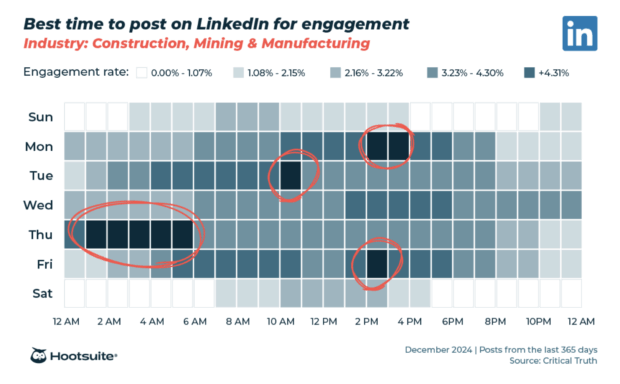
But the best time to post for your particular brand (and engage on others’ content) depends on your particular audience.
Hootsuite’s Best Time to Post feature recommends specific posting times based on your content goals.
5. Lean into the personalities behind your brand
“People want to connect with people, not faceless companies that are just trying to sell them on something,” Riswick says. “Spotlight your team or partners, and give your brand a relatable voice.”
This can start anywhere in your organization — from early-career employees to the CEO. Sharing real perspectives from real people helps your brand feel more human and builds trust faster. It also strengthens each leader’s personal brand, which boosts overall visibility.
On the employee side, an employee advocacy program makes it easy for your team to share and personalize content about your brand.
LinkedIn research shows employee networks have an average of 10 times more connections than a company has followers. And content gets twice as many click-throughs when posted by an employee rather than on the company’s business page.

Source: LinkedIn
Hootsuite’s CEO, Irina Novoselsky, has more than 20,000 followers on LinkedIn. She regularly shares insights from behind the scenes at Hootsuite, alongside news about the company’s latest research, product developments, and case studies.
The value is immense. Novolselsky calculated that four weeks of her posts drove impressions equivalent to $133K in ad spend and $1 million in potential revenue.

Source: Irina Novoselsky
Thought leader LinkedIn ads are a good way to extend this reach even further. Beyond your internal team, also consider expanding the personalities talking about your brand with an influencer partnership or KOL campaign.
How to manage a successful LinkedIn presence with Hootsuite
So far we’ve primarily focused on native LinkedIn tools. But using a social media management platform like Hootsuite can make the process of managing your LinkedIn presence significantly easier (especially if you’re juggling multiple Pages and Profiles).
With Hootsuite, you can easily manage and grow all aspects of your LinkedIn presence alongside all of your other social accounts.
1. Schedule posts at the optimum times
Hootsuite’s Composer and Planner allow you to create, edit, and collaborate on LinkedIn posts in advance. Then, schedule them at the optimum times for your audience. (The Best Time to Publish feature tells you exactly when those times are, too.)

Need inspiration? The built-in OwlyWriter AI tool helps you create solid content for your post, along with relevant hashtags.
The collaboration tools and approval workflows built into Hootsuite are especially useful for helping out on your exec team’s LinkedIn profiles. Set up approvals and easily collaborate on post drafts to always post approved content and keep the quality of your conversations with followers on brand.
2. Analyze and report on your results
LinkedIn has solid native analytics tools. But Hootsuite Analytics lets you easily track the performance of all your social channels in one place. You can see your LinkedIn results in the context of your larger social strategy.
You can set up custom reporting dashboards for an overview of your most important metrics at a glance, over a select period of time. You’ll also be able to look up much more granular information, down to the performance of every individual post you published.
3. Get ahead of trends with Hootsuite Listening
Hootsuite Listening allows you to gain in-depth insights into your customers, competitors, and the bigger conversation happening on LinkedIn. You can uncover trending hashtags, and track what people are saying about you and your competitors. Enhanced sentiment analysis can even tell you how they really feel about your brand.

If you want to take social listening to the next level on LinkedIn, Hootsuite’s upgraded listening can show you sentiment over time, top influencers and KOLs in your space, audience demographics, and much more. Interested in a free demo? Book one now.
4. Manage organic and paid social together
Hootsuite Social Advertising is especially useful for brands that use both organic and paid tools on LinkedIn. Rather than managing these campaigns separately, you can create and schedule ads, and review organic and paid content side by side. You can easily pull actionable analytics and build custom reports.

This unified reporting helps you act fast to make data-informed adjustments to live campaigns — and get the most out of your budget.
5. Stay on top of engagement and messaging
We’ve talked several times about the importance of engaging with the community on LinkedIn.
Hootsuite Inbox ensures you never miss an opportunity to engage on LinkedIn. It collects all your private and public messages in one place. This allows you to handle messages as a team. Intuitive message queues, task assignments, statuses, and filters make it easy to stay on top of the conversation, even when messages and comments are flying.

Plus, Inbox comes with handy automations like:
- Automated message routing
- Auto-responses and saved replies
- Automatically triggered customer satisfaction surveys, and
- AI-powered chatbot features
All of this creates more time for thoughtful engagement where it really counts.
6. Manage your employee advocacy program
Hootsuite Amplify makes it easy for your employees to share brand-approved content on LinkedIn with just a click. This is especially useful for growing your employer brand and showcasing company culture, while vastly extending the reach of company news and product launches.

FAQ: LinkedIn Marketing
What is the best LinkedIn marketing strategy for enterprise B2B brands?
The best LinkedIn strategy for enterprise B2B brands is to lead with thought leadership and helpful, buyer-focused content that supports decision-making at every stage. Focus on creating content that helps your buyers make informed decisions and amplify it through your leaders.
How do enterprise teams scale LinkedIn content across regions?
Enterprise teams scale best when they build a shared content base and let each region tailor it for their audience. Create shared asset libraries and clear publishing guidelines, then empower regional teams to customize messaging without losing brand consistency.
Which LinkedIn analytics matter most for proving executive-level ROI?
Executives care most about metrics that show business impact. Prioritize reach, profile views, engagement rate, and follower growth for thought leadership, combined with downstream indicators like referral traffic, lead quality, and pipeline influence. Together, these metrics show both visibility and tangible contribution to business goals.
How do top brands use LinkedIn for demand generation?
Top brands use LinkedIn to show up early with content that teaches and builds trust, then nurture interest with a mix of organic posts, targeted ads, retargeting, and event promotions. They also tap into LinkedIn’s AI audience tools to spot high-intent prospects, which helps bring in quality leads who already understand the brand and are more ready to take the next step.
What tools help automate and manage a LinkedIn marketing strategy?
Enterprise teams lean on tools like Hootsuite to plan content, schedule posts, monitor conversations, and track results across regions and profiles. On top of that, Hootsuite Amplify supports employee advocacy at scale, which keeps messaging consistent and helps more people share the brand story with confidence.
Easily manage your LinkedIn Page and all your other social channels using Hootsuite. From a single dashboard, you can schedule and share content (including video), reply to comments, and engage your network. Try it free today.