By using this site, you agree to the Privacy Policy and Terms of Use.
Accept
World of SoftwareWorld of SoftwareWorld of Software
  • News
  • Software
  • Mobile
  • Computing
  • Gaming
  • Videos
  • More
    • Gadget
    • Web Stories
    • Trending
    • Press Release
Search
  • Privacy
  • Terms
  • Advertise
  • Contact
Copyright © All Rights Reserved. World of Software.
Reading: 4 Essential Roku TV Settings And Tips That Can Speed Up Your Device – BGR
Share
Sign In
Notification Show More
Font ResizerAa
World of SoftwareWorld of Software
Font ResizerAa
  • Software
  • Mobile
  • Computing
  • Gadget
  • Gaming
  • Videos
Search
  • News
  • Software
  • Mobile
  • Computing
  • Gaming
  • Videos
  • More
    • Gadget
    • Web Stories
    • Trending
    • Press Release
Have an existing account? Sign In
Follow US
  • Privacy
  • Terms
  • Advertise
  • Contact
Copyright © All Rights Reserved. World of Software.
World of Software > News > 4 Essential Roku TV Settings And Tips That Can Speed Up Your Device – BGR
News

4 Essential Roku TV Settings And Tips That Can Speed Up Your Device – BGR

News Room
Last updated: 2025/11/10 at 7:15 AM
News Room Published 10 November 2025
Share
4 Essential Roku TV Settings And Tips That Can Speed Up Your Device – BGR
SHARE


renata colella/Shutterstock

Roku has a solid portfolio of streaming media players that seamlessly add smart TV functionality to your old TV or give you an alternative to your TV’s operating system. These streamers have a lot to like, including an easy-to-use and intuitive interface, apps for popular streaming and services, access to local TV channels, and a bunch of helpful but hidden features. However, these are not the most powerful streamers you can find on the market, and every once in a while, you may encounter your Roku TV Stick becoming laggy and sluggish. While a slow interface or subpar app performance is frustrating, it can often be fixed. Unfortunately, though, there isn’t one specific magic pill setting that can make all your problems go away.

Before we dive deeper into steps that actually require some effort, you can start with a simple restart. While it’s not the most technical step, a reboot can often clear out temporary memory glitches, clear the cache of your slow Roku TV, and restart background services and system processes. There are a couple of ways to reboot a Roku TV Stick. The easiest is to press Home on your Roku remote and navigate to Settings > System > Power > System restart. If you don’t see the Power sub-menu in System, the System Restart option should be available directly under the System menu. If your Roku TV is still laggy and slow after the restart, here’s what you can try next.

Troubleshooting your Roku TV
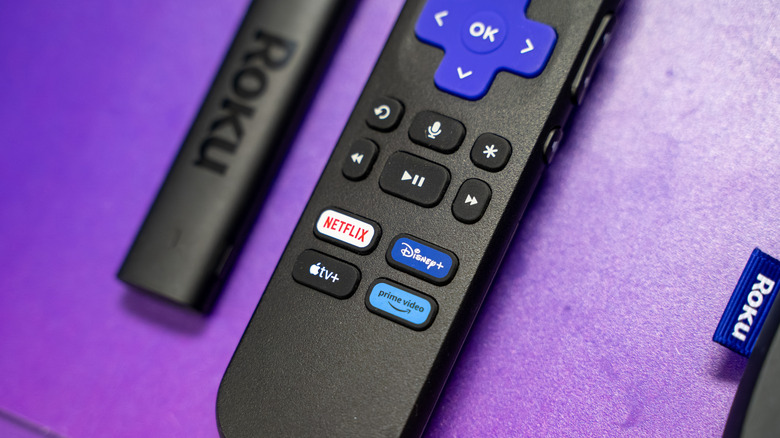

Roku remote control with the streaming stick placed on a purple surface
Erman Gunes/Shutterstock

If you are seeing slow performance across multiple apps or channels, the company suggests resetting the network connections, as pretty much all apps on your Roku need an internet connection. To do so, press Home on your remote and navigate to Settings > Advanced system settings > Network connection reset > Reset connection. Once you reset the network, your device will restart, and you’ll have to set up Wi-Fi again. Another good idea to ensure you get the best performance out of your Roku device is to ensure you’re running the latest version of Roku OS. Although all software updates are automatically applied, you can check for them manually for confirmation. You can find any available updates by navigating to Settings > System > Software update and tapping on Check Now.

If nothing else seems to be working, your best bet is to factory reset your Roku device. Notably, a factory reset will erase all your data, downloaded apps, and any saved preferences, and revert it to the state you got it when you purchased it. To perform a factory reset, open Settings and navigate to System > Advanced system settings > Factory reset, and select Factory reset everything. This will wipe everything and restart your Roku device, bringing back the same snappy performance from when the Roku TV Stick was brand-new. Some Roku devices also have a physical reset button that you can press for 10 seconds to revert the device to its factory state.



Sign Up For Daily Newsletter

Be keep up! Get the latest breaking news delivered straight to your inbox.
By signing up, you agree to our Terms of Use and acknowledge the data practices in our Privacy Policy. You may unsubscribe at any time.
Share This Article
Facebook Twitter Email Print
Share
What do you think?
Love0
Sad0
Happy0
Sleepy0
Angry0
Dead0
Wink0
Previous Article Gartner Symposium 2025: The AI opportunity for CIOs | Computer Weekly Gartner Symposium 2025: The AI opportunity for CIOs | Computer Weekly
Next Article The OnePlus 12 has started getting Android 16…sort of The OnePlus 12 has started getting Android 16…sort of
Leave a comment

Leave a Reply Cancel reply

Your email address will not be published. Required fields are marked *

Stay Connected

248.1k Like
69.1k Follow
134k Pin
54.3k Follow

Latest News

Budgie 10.10.1 Released With Better Stability & Improved Labwc Integration
Computing
Amazon Kindle Scribe (2025) Review: Subtle Enhancements, Steep Price
News
The HackerNoon Newsletter: The Crypto Sellout (1/31/2026) | HackerNoon
Computing
Samsung Galaxy Z TriFold Phone quickly sells out online despite near ,000 pricetag
Samsung Galaxy Z TriFold Phone quickly sells out online despite near $3,000 pricetag
News

You Might also Like

Amazon Kindle Scribe (2025) Review: Subtle Enhancements, Steep Price
News

Amazon Kindle Scribe (2025) Review: Subtle Enhancements, Steep Price

6 Min Read
Samsung Galaxy Z TriFold Phone quickly sells out online despite near ,000 pricetag
News

Samsung Galaxy Z TriFold Phone quickly sells out online despite near $3,000 pricetag

2 Min Read
Netflix top 10 movies — here’s the 3 worth watching right now (Jan. 31-Feb. 1)
News

Netflix top 10 movies — here’s the 3 worth watching right now (Jan. 31-Feb. 1)

7 Min Read
Don’t Throw Out Your Old Keyboard, Do This Instead – BGR
News

Don’t Throw Out Your Old Keyboard, Do This Instead – BGR

9 Min Read
//

World of Software is your one-stop website for the latest tech news and updates, follow us now to get the news that matters to you.

Quick Link

  • Privacy Policy
  • Terms of use
  • Advertise
  • Contact

Topics

  • Computing
  • Software
  • Press Release
  • Trending

Sign Up for Our Newsletter

Subscribe to our newsletter to get our newest articles instantly!

World of SoftwareWorld of Software
Follow US
Copyright © All Rights Reserved. World of Software.
Welcome Back!

Sign in to your account

Lost your password?