Megan Ellis / Android Authority
Over the past few weeks, I’ve started making an effort to get back into my hobbies. Some of my favorite things to do include gardening and restoring or refurbishing furniture.
But since it has been a while since I last did these activities, I’ve enlisted the help of AI to make things a bit easier for me — and I’ve actually been surprised by all the useful ways I’ve been able to use it.
Do you use AI to help you with your hobbies?
0 votes
1. Getting help on projects and plant care

Megan Ellis / Android Authority
DIY projects include a lot of research, as well as watching plenty of YouTube tutorials to figure out how to get things done. Sometimes I need a refresher on how to do something or just need to be pointed in the right direction for further research.
Brave Search’s summaries give me useful roadmaps for my projects, as well as plant care tips.
I’ve used these search summaries as a starting point for all types of tasks, from diagnosing a problem with a plant to figuring out what steps I’ll need to follow when working with a specific type of furniture.
Essentially, summaries provide a roadmap that I can follow, as well as links to helpful sites that relate to my question.
Using images to get tailored feedback

Megan Ellis / Android Authority
While I’d prefer to get human input on problems I’m facing, the reality is that it’s not always possible. Reddit posts can easily get drowned out by other posts, and I don’t know anyone else who is interested in my hobbies.
This has made Gemini’s ability to analyze images really useful. I can upload images of what I’m dealing with on a project, and it can provide me with guidance. This works much better than text searches in some cases.
Gemini’s ability to analyze image means that it can often give better feedback than text searches for certain issues.
For example, I’m currently restoring a table that has a cracked veneer due to water damage. However, whenever I tried a text search for this issue, the results focused on water stains and swelling.
Eventually, I uploaded an image to Gemini, and it was able to suggest a course of action to repair the veneer.
Gemini came in handy again when I was dealing with an ineffective paint stripper. I uploaded images of the table with spotty patches after applying the stripper, as well as how the substance looked when applied.
I already suspected that the batch I had bought was faulty as it had not reacted to two different tables I had used it on, but Gemini was able to identify that it was failing.
I have also used it to get feedback on the best way to approach the restoration of a cabinet I’m working on. I need to remove some shelves that were originally used for records, and Gemini has identified the best way to figure out how the shelves are attached to the unit and how to safely remove them.
While the chatbot has been useful in helping me approach certain projects, it can be hit-and-miss with certain tasks. I also tried using it for plant identification, but it didn’t successfully identify the plants in the images I had uploaded.
Reimagining projects with different finishes

Joe Maring / Android Authority
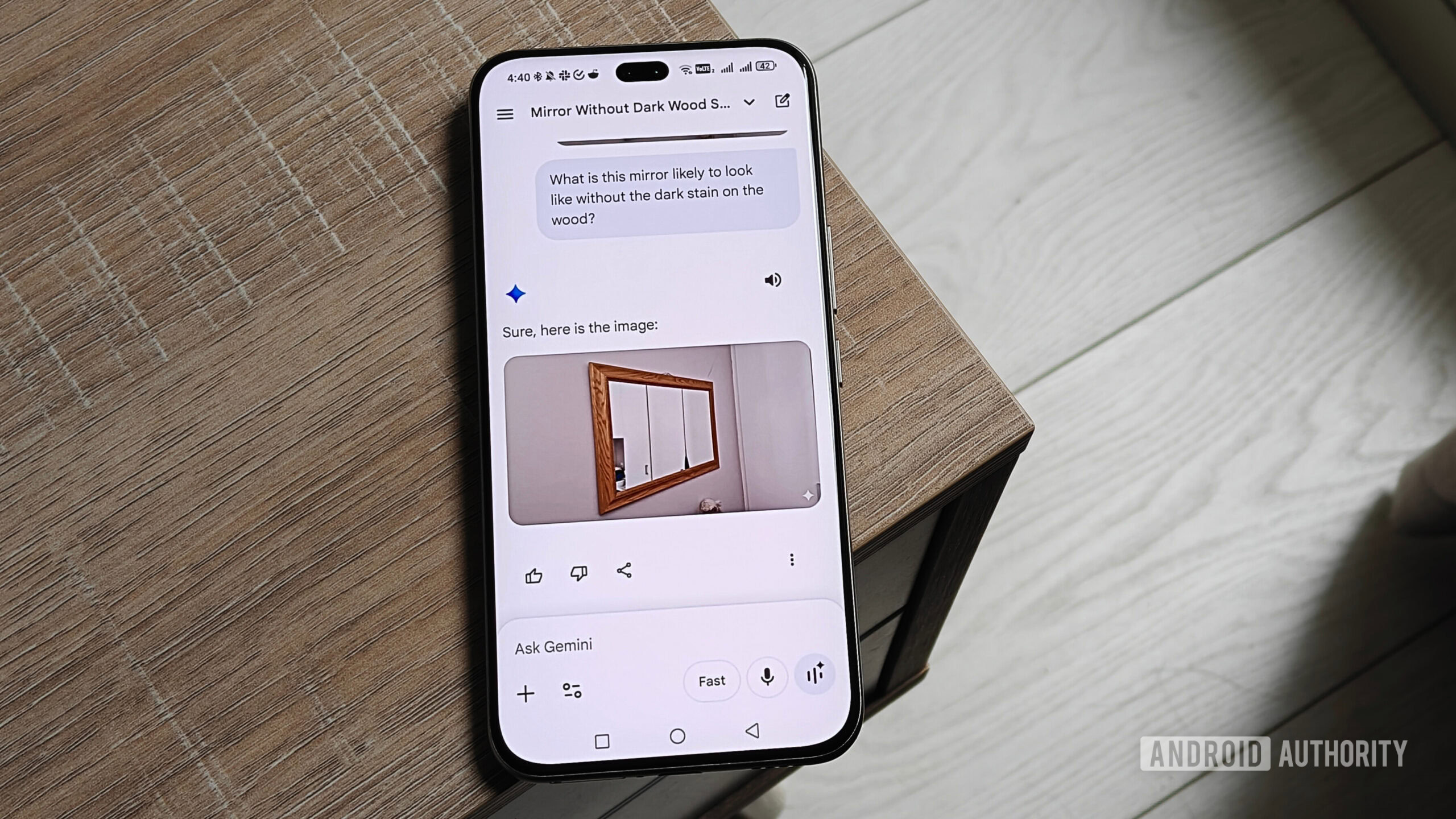
I don’t use image generation tools much, but I have found the perfect use for Nano Banana in Gemini when it comes to restoring furniture.
I prefer my furniture to have a natural wood finish rather than a painted surface. So when I refurbish my old furniture or restore second-hand items, I usually strip the original finish and coat it with a clear finish or a medium stain.
However, it can sometimes be difficult for me to visualize exactly how I would like a piece of furniture to appear. That’s where Gemini’s ability to rework images proves really useful.
I use this feature to create a reference for how a piece of furniture will look with a clear or medium wood finish. This helps me decide the look I want to achieve. For example, while I like that my dining room table has a bare wood look, I realized that I prefer a medium stain for some of my other pieces.
With Nano Banana, I can more easily visualize how a project will look once I’m done with it.
Thanks to Gemini, I don’t have to decide based on a vague image in my head. I can get a pretty good idea of how I want it to look before ever touching the item.
Of course, the AI isn’t always accurate when predicting the natural tone of the stripped wood. But it does give me a better idea of how the piece looks without the dark stain that’s often applied to antique pieces.
Saving manuals and information to revisit later

Andy Walker / Android Authority
It’s an understatement to say that I have a bad memory. There are entire skills I’ve forgotten, and researching how to do things again takes a lot of time.
But I realized there’s a way to help keep some of this information in an easy-to-skim format: NotebookLM.
I’ve started uploading plant care information and product manuals to different NotebookLM notebooks so that I can find this information more easily when I need it again.

Megan Ellis / Android Authority
For my garden, this includes information on the types of plants I have in my yard, as well as the amount of watering they require. I recently replanted grass and uploaded the maintenance information for my lawn to this notebook.
When it comes to the products I use for refurbishing furniture, I’ve created notebooks with safety information and instructions. This saves me time, especially when I no longer have the original packaging.
It’s like having a personal, interactive search engine. I still have to upload more manuals and useful links to my notebooks, but so far the system is proving helpful.
Don’t want to miss the best from Android Authority?


Thank you for being part of our community. Read our Comment Policy before posting.