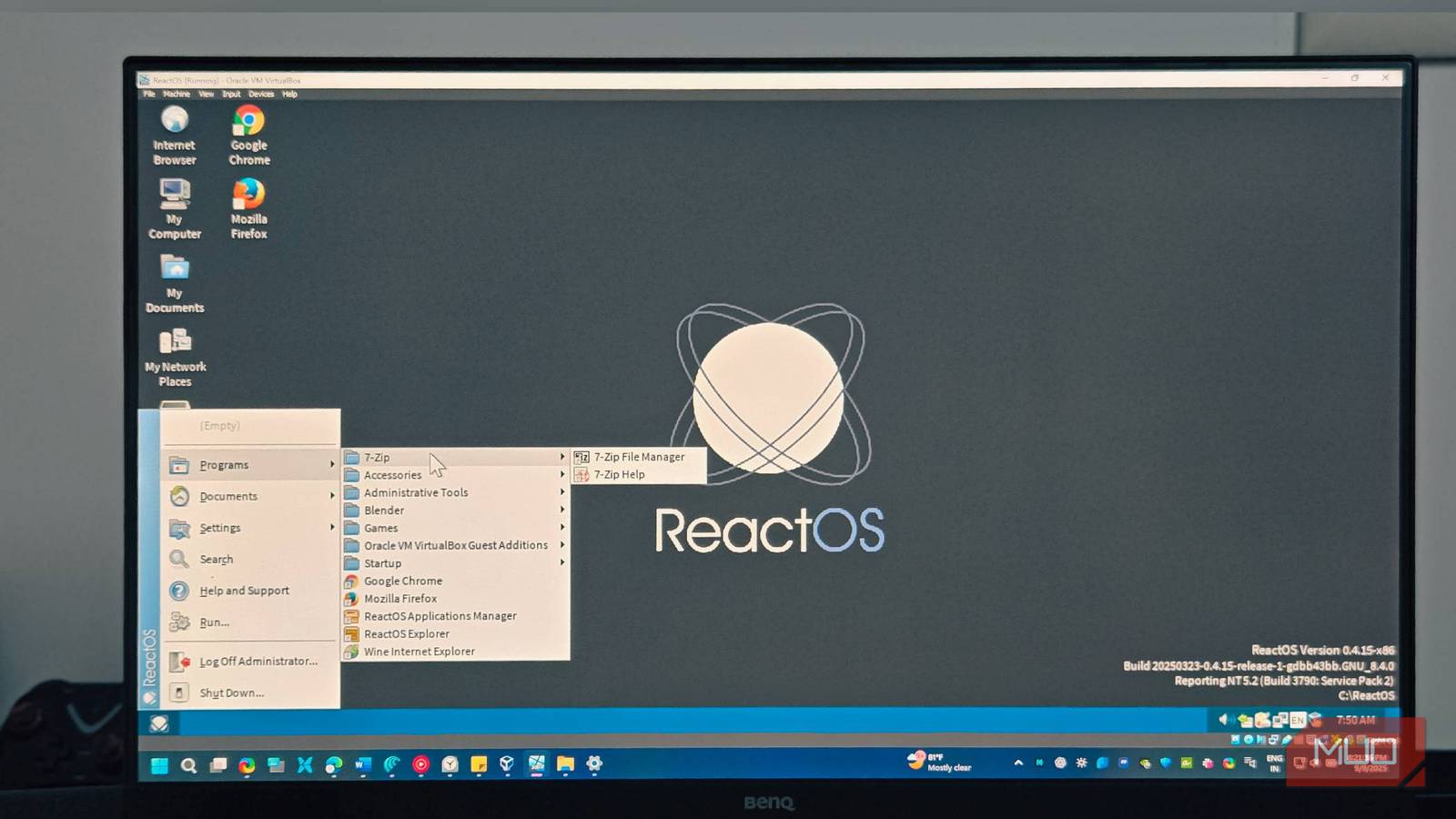
I spent a weekend using a version of Windows that isn’t Windows—an operating system that runs Windows programs but contains zero Microsoft code. ReactOS has been in development since 1998, with developers reverse-engineering Windows from scratch to build a completely open-source OS that runs Windows applications.
Every menu, dialog box, and system call has been recreated by volunteers who watched Windows in action and built their own version. After 26 years of development, I had to see if this open-source spin on Windows could actually work.
To my surprise, it does, but not in the way you’d expect. While there are many free alternatives to Windows, ReactOS takes a unique approach by mimicking Windows itself. It’s definitely not for everyone, but for the right use case, ReactOS might surprise you.
The setup
Getting it running took some patience
I tested ReactOS on my virtual machine because the bootable USB kept throwing errors on my Ryzen 5 test system. But you might have better luck if you have an old computer with a dual-core processor from AMD or Intel.
To install the OS, we need an ISO. Go to the ReactOS download page to download the ISO. Once you’ve done this, follow these steps:
- Create a new virtual machine in VirtualBox. Load the ISO and allocate the memory and disk space. Since it’s a 32-bit operating system, allocating 4GB of memory and 10GB of storage should be enough. Once done, click Finish.
- Double-click to power on the ReactOS VM. In the Setup screen, select your language and press Enter to install ReactOS.
- Follow the on-screen instructions to choose your device settings, installation disk, and formatting options.
- The setup takes a few minutes to install the files. Once done, the VM reboots and asks you to configure your system preferences.
- In the ReactOS setup wizard, click Next, follow the on-screen instructions to create a user account, set the correct time and date, and choose themes. You can pick from four different themes—Mizu, Classic, Lautus, and Lunar—on the Appearance screen. After a few more selections, the installation finishes.
After the first startup, let the system install drivers automatically. If you’re running it in VirtualBox and the display looks blurry, you’ll need to install the Guest Additions CD Image to fix the resolution issues.
What apps can ReactOS run?
Old apps in a new home
ReactOS can run almost any older Windows 32-bit applications. It comes pre-installed with some legacy applications, such as ReactOS’s own version of Internet Explorer (Wine Internet Explorer), Command Prompt, an Application Manager, and other system utilities you’d expect from earlier Windows versions like XP.
The browser handles basic web browsing, but struggles when you try to watch YouTube or load anything resource-intensive. For third-party applications, I tried installing older versions of Adobe Photoshop, 7-Zip, Chrome, Blender, and Microsoft Office XP apps like Word and Excel.
For performance, the Office apps and 7-Zip worked smoothly, Photoshop and Blender ran with occasional hiccups, while Chrome struggled the most with modern websites. Installing apps works the same as on Windows—you can download installers from the web or use the built-in Application Manager, which serves as an app store for ReactOS.
However, most apps in Application Manager are seriously outdated. Chrome and Firefox have a hard time loading modern web pages, and YouTube flat-out refuses to load after detecting an outdated browser.
What’s the point of ReactOS?
More than just nostalgia
After using it for a few hours, my first reaction was: why bother? It has an old-school UI and can only run 32-bit applications that are also dated. Modern websites barely function. Why install this over a modern, fully functional Windows OS?
But the answers are more nuanced than a simple dismissal. For one, it’s an open-source project that runs Windows applications natively. While Linux has Windows-like distros such as KDE Plasma, these aren’t for everyone, especially if you are used to the Windows platform and apps.
ReactOS could also be invaluable for preserving old software or running commercial applications (like point-of-sale systems) that rely on specific Windows drivers that Wine on Linux doesn’t support.

Another appeal is the learning aspect. Since Windows is the most-used desktop OS, developers can actually see how NT works under the hood. Being able to compile the source code and understand (or at least get an idea of) how NT operates is genuinely valuable for anyone interested in system development.
But that’s not what the developers are going for. The idea is to create an open-source environment that can run all the Windows applications and drivers we love. Unfortunately, it’s a massive undertaking, and they’re nowhere near the finish line.
It’s still a work in progress
During the extensive few hours with ReactOS, I could see the potential in an open-source Windows operating system that’s not bound to Microsoft’s ecosystem. In its current form, though, it’s far from complete and would need major improvements to become a daily driver.
The project is likely constrained by a limited number of developers and contributors compared to other open-source projects like Linux. Without reliable resources, creating and maintaining anything close to Windows’s complexity would challenge even a decently sized dedicated team.
Still, it’s time we had solid alternatives to Windows without switching to macOS or Linux. ReactOS might not be the answer today, but its existence benefits the open-source community. And maybe, just maybe, it’ll surprise us all one day.