-
Last Updated :
23 Jul, 2025
In a computer system, the software is basically a set of instructions or commands that tell a computer to do a specific task that serves its users.
- A software is not a physical thing like hardware, it rather makes the hardware work as per user requirements by giving instructions.
- Examples of software are MS-Word, MS-Excel, PowerPoint and Web Browser
Types of Software
The chart below describes the types of software:
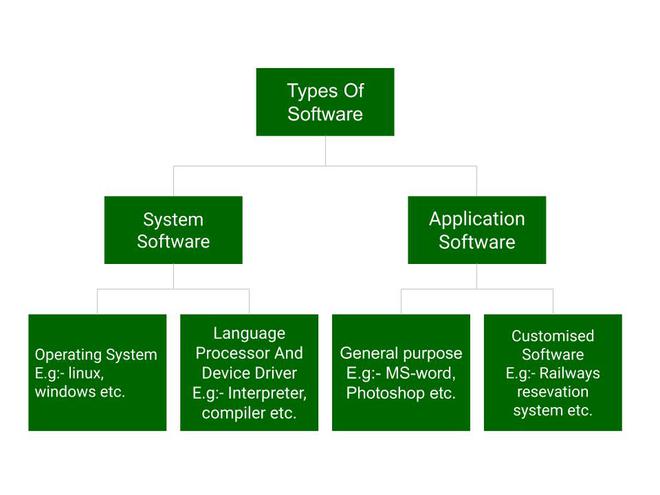
Above is the diagram of types of software. Now we will briefly describe each type and its subtypes:
- System Software
- Operating System (like Windows and Linux)
- Language Processor
- Device Driver
- Application Software
- General Purpose Software
- Customize Software
- Utility Software
System Software
System software is software that directly operates the computer hardware and provides the basic functionality to the users as well as to the other software to operate smoothly.
- System software basically controls a computer’s internal functioning and also controls hardware devices such as monitors, printers, and storage devices, etc.
- It is like an interface between hardware and user applications, it helps them to communicate with each other because hardware understands machine language(i.e. 1 or 0) whereas user applications are work in human-readable languages like English, Hindi, German, etc.
Types of System Software
It has two subtypes which are:
- Operating System: It is the main program of a computer system. When the computer system ON it is the first software that loads into the computer’s memory. Basically, it manages all the resources such as computer memory, CPU, printer, hard disk, etc., and provides an interface to the user, which helps the user to interact with the computer system.
- Language Processor: As we know that system software converts the human-readable language into a machine language and vice versa. So, the conversion is done by the language processor. It converts programs written in high-level programming languages like Java, C, C++, Python, etc(known as source code), into sets of instructions that are easily readable by machines(known as object code or machine code).
- Device Driver: A device driver is a program or software that controls a device and helps that device to perform its functions. Every device like a printer, mouse, modem, etc. needs a driver to connect with the computer system eternally. So, when you connect a new device with your computer system, first you need to install the driver of that device so that your operating system knows how to control or manage that device.
Features of System Software
Let us discuss some of the features of System Software:
- Closer to the computer system.
- Written in a low-level language in general.
- Difficult to design and understand.
- Fast in speed(working speed).
- Less interactive for the users in comparison to application software.
Application Software
Software that performs special functions or provides functions that are much more than the basic operation of the computer is known as application software.
- Application software is designed to perform a specific task for end-users. It is a product or a program that is designed only to fulfill end-users’ requirements.
- Examples include word processors, spreadsheets, database management, inventory, payroll programs, etc.
Types of Application Software
There are different types of application software and those are:
- General Purpose Software: This type of application software is used for a variety of tasks and it is not limited to performing a specific task only. For example, MS-Word, MS-Excel, PowerPoint, etc.
- Customized Software: This type of application software is used or designed to perform specific tasks or functions or designed for specific organizations. For example, railway reservation system, airline reservation system, invoice management system, etc.
- Utility Software: This type of application software is used to support the computer infrastructure. It is designed to analyze, configure, optimize and maintains the system, and take care of its requirements as well. For example, antivirus, disk fragmenter, memory tester, disk repair, disk cleaners, registry cleaners, disk space analyzer, etc.
Features of Application Software
Let us discuss some of the features of Application Software:
- Perform more specialized tasks like word processing, spreadsheets, email, etc.
- Mostly, the size of the software is big, so it requires more storage space.
- More interactive for the users, so it is easy to use and design.
- Easy to design and understand.
- Written in a high-level language in general.
Difference Between System Software and Application Software
Now, let us discuss some difference between system software and application software:
System Software
Application Software
It is designed to manage the resources of the computer system, like memory and process management, etc. It is designed to fulfill the requirements of the user for performing specific tasks. Written in a low-level language. Written in a high-level language. Less interactive for the users. More interactive for the users. System software plays vital role for the effective functioning of a system. Application software is not so important for the functioning of the system, as it is task specific. It is independent of the application software to run. It needs system software to run. For more Information you can refer to this article on – Difference between System Software and Application Software.
top_of_element && top_of_screen < bottom_of_element) ||
(bottom_of_screen > articleRecommendedTop && top_of_screen < articleRecommendedBottom) ||
(top_of_screen > articleRecommendedBottom)) {
if (!isfollowingApiCall) {
isfollowingApiCall = true;
setTimeout(function(){
if (loginData && loginData.isLoggedIn) {
if (loginData.userName !== $(‘#followAuthor’).val()) {
is_following();
} else {
$(‘.profileCard-profile-picture’).css(‘background-color’, ‘#E7E7E7’);
}
} else {
$(‘.follow-btn’).removeClass(‘hideIt’);
}
}, 3000);
}
}
});
}
$(“.accordion-header”).click(function() {
var arrowIcon = $(this).find(‘.bottom-arrow-icon’);
arrowIcon.toggleClass(‘rotate180’);
});
});
window.isReportArticle = false;
function report_article(){
if (!loginData || !loginData.isLoggedIn) {
const loginModalButton = $(‘.login-modal-btn’)
if (loginModalButton.length) {
loginModalButton.click();
}
return;
}
if(!window.isReportArticle){
//to add loader
$(‘.report-loader’).addClass(‘spinner’);
jQuery(‘#report_modal_content’).load(gfgSiteUrl+’wp-content/themes/iconic-one/report-modal.php’, {
PRACTICE_API_URL: practiceAPIURL,
PRACTICE_URL:practiceURL
},function(responseTxt, statusTxt, xhr){
if(statusTxt == “error”){
alert(“Error: ” + xhr.status + “: ” + xhr.statusText);
}
});
}else{
window.scrollTo({ top: 0, behavior: ‘smooth’ });
$(“#report_modal_content”).show();
}
}
function closeShareModal() {
const shareOption = document.querySelector(‘[data-gfg-action=”share-article”]’);
shareOption.classList.remove(“hover_share_menu”);
let shareModal = document.querySelector(“.hover__share-modal-container”);
shareModal && shareModal.remove();
}
function openShareModal() {
closeShareModal(); // Remove existing modal if any
let shareModal = document.querySelector(“.three_dot_dropdown_share”);
shareModal.appendChild(Object.assign(document.createElement(“div”), { className: “hover__share-modal-container” }));
document.querySelector(“.hover__share-modal-container”).append(
Object.assign(document.createElement(‘div’), { className: “share__modal” }),
);
document.querySelector(“.share__modal”).append(Object.assign(document.createElement(‘h1’), { className: “share__modal-heading” }, { textContent: “Share to” }));
const socialOptions = [“LinkedIn”, “WhatsApp”,”Twitter”, “Copy Link”];
socialOptions.forEach((socialOption) => {
const socialContainer = Object.assign(document.createElement(‘div’), { className: “social__container” });
const icon = Object.assign(document.createElement(“div”), { className: `share__icon share__${socialOption.split(” “).join(“”)}-icon` });
const socialText = Object.assign(document.createElement(“span”), { className: “share__option-text” }, { textContent: `${socialOption}` });
const shareLink = (socialOption === “Copy Link”) ?
Object.assign(document.createElement(‘div’), { role: “button”, className: “link-container CopyLink” }) :
Object.assign(document.createElement(‘a’), { className: “link-container” });
if (socialOption === “LinkedIn”) {
shareLink.setAttribute(‘href’, `https://www.linkedin.com/sharing/share-offsite/?url=${window.location.href}`);
shareLink.setAttribute(‘target’, ‘_blank’);
}
if (socialOption === “WhatsApp”) {
shareLink.setAttribute(‘href’, `https://api.whatsapp.com/send?text=${window.location.href}`);
shareLink.setAttribute(‘target’, “_blank”);
}
if (socialOption === “Twitter”) {
shareLink.setAttribute(‘href’, `https://twitter.com/intent/tweet?url=${window.location.href}`);
shareLink.setAttribute(‘target’, “_blank”);
}
shareLink.append(icon, socialText);
socialContainer.append(shareLink);
document.querySelector(“.share__modal”).appendChild(socialContainer);
//adding copy url functionality
if(socialOption === “Copy Link”) {
shareLink.addEventListener(“click”, function() {
var tempInput = document.createElement(“input”);
tempInput.value = window.location.href;
document.body.appendChild(tempInput);
tempInput.select();
tempInput.setSelectionRange(0, 99999); // For mobile devices
document.execCommand(‘copy’);
document.body.removeChild(tempInput);
this.querySelector(“.share__option-text”).textContent = “Copied”
})
}
});
// document.querySelector(“.hover__share-modal-container”).addEventListener(“mouseover”, () => document.querySelector(‘[data-gfg-action=”share-article”]’).classList.add(“hover_share_menu”));
}
function toggleLikeElementVisibility(selector, show) {
document.querySelector(`.${selector}`).style.display = show ? “block” : “none”;
}
function closeKebabMenu(){
document.getElementById(“myDropdown”).classList.toggle(“show”);
}