By using this site, you agree to the Privacy Policy and Terms of Use.
Accept
World of SoftwareWorld of SoftwareWorld of Software
  • News
  • Software
  • Mobile
  • Computing
  • Gaming
  • Videos
  • More
    • Gadget
    • Web Stories
    • Trending
    • Press Release
Search
  • Privacy
  • Terms
  • Advertise
  • Contact
Copyright © All Rights Reserved. World of Software.
Reading: Why There’s A Black Dot On Your iPhone’s Screen (And How To Turn It Off) – BGR
Share
Sign In
Notification Show More
Font ResizerAa
World of SoftwareWorld of Software
Font ResizerAa
  • Software
  • Mobile
  • Computing
  • Gadget
  • Gaming
  • Videos
Search
  • News
  • Software
  • Mobile
  • Computing
  • Gaming
  • Videos
  • More
    • Gadget
    • Web Stories
    • Trending
    • Press Release
Have an existing account? Sign In
Follow US
  • Privacy
  • Terms
  • Advertise
  • Contact
Copyright © All Rights Reserved. World of Software.
World of Software > News > Why There’s A Black Dot On Your iPhone’s Screen (And How To Turn It Off) – BGR
News

Why There’s A Black Dot On Your iPhone’s Screen (And How To Turn It Off) – BGR

News Room
Last updated: 2025/12/07 at 8:50 PM
News Room Published 7 December 2025
Share
Why There’s A Black Dot On Your iPhone’s Screen (And How To Turn It Off) – BGR
SHARE


We may receive a commission on purchases made from links.

Keeping up with your phone’s software updates is one of the best ways to ensure your device is operating at peak performance. Sometimes an update can introduce features and settings you’ve never seen before, just as those introduced on iPhones when iOS 18.4 hit the market earlier this year. In addition to the usual bug fixes and system improvements, the iOS build also introduced a new UI element: a black dot placed to the right of the Dynamic Island.

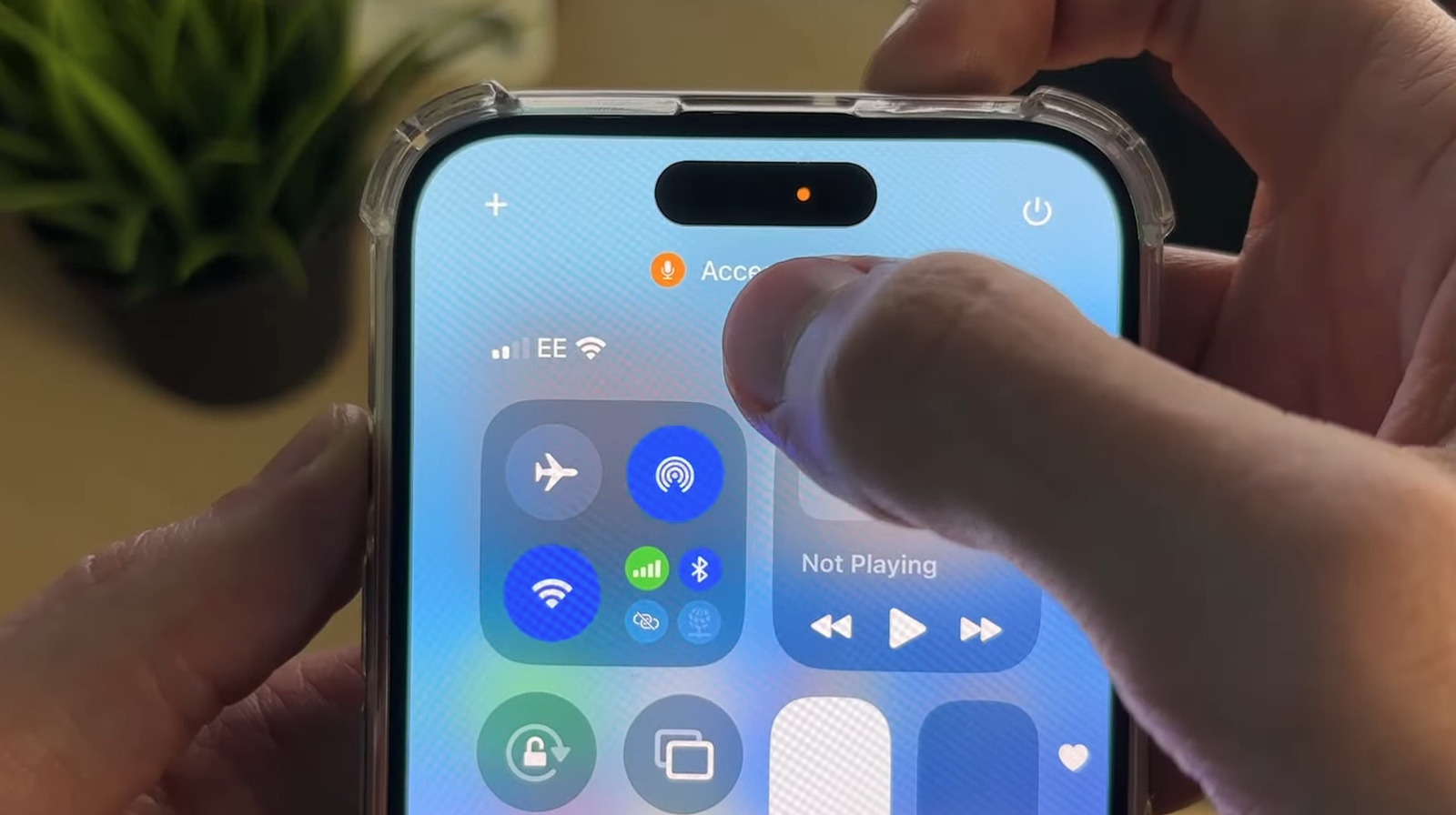
Believe it or not, the black dot is merely a cosmetic enhancement for two privacy indicators introduced with iOS 14, the orange and green dots. Green means that an iPhone app is using your camera, and orange means an app is using your phone’s built-in microphone. For iOS 18.4, developers simply moved the indicators out of the Dynamic Island and added a black background to both, making them easier to see.

To get rid of the green or orange dots with a black background, all you need to do is close the app that’s using your iPhone’s camera or microphone. If you’re not sure what software is causing these indicators to pop up, just pull down from the top-right of the screen to open Control Center. You should see usage information for active apps, including what software is using the camera or microphone.

You can’t disable the dots, but you can control your privacy

When checking for privacy indicators on phones, like the green dot on Android phone screens, it’s also good to pay attention to which apps your phone is running. Whether you’re using an iPhone or Android device, a privacy indicator might be your only tip that there’s malware running behind the scenes if you’re sure your apps aren’t triggering it.

How could it have gotten there in the first place? A myriad of methods, with one of the causes being a juice-jacked connection. This is why you should avoid using public USB charging ports, or at least start using a protective accessory like JSAUX’s USB Data Blocker if you desperately need to charge your phone and don’t have your own power bank.

Unfortunately, if the green or orange dot is a nuisance to your iOS experience, you won’t find a master kill switch for the indicators. That said, you can individually grant and revoke camera and microphone permissions. To do so, open Settings, then tap Privacy & Security, and select Camera or Microphone. Once you revoke an app’s camera or mic usage from the list, the indicator dots should no longer appear when you run this software, and they will stay off for apps you’ve never granted authorization.


Sign Up For Daily Newsletter

Be keep up! Get the latest breaking news delivered straight to your inbox.
By signing up, you agree to our Terms of Use and acknowledge the data practices in our Privacy Policy. You may unsubscribe at any time.
Share This Article
Facebook Twitter Email Print
Share
What do you think?
Love0
Sad0
Happy0
Sleepy0
Angry0
Dead0
Wink0
Previous Article Samsung could finally upgrade its rugged smartwatch with Galaxy Watch Ultra 2 Samsung could finally upgrade its rugged smartwatch with Galaxy Watch Ultra 2
Next Article Apple TV previews new F1 streaming deal, confirms driver onboard cams will be included – 9to5Mac Apple TV previews new F1 streaming deal, confirms driver onboard cams will be included – 9to5Mac
Leave a comment

Leave a Reply Cancel reply

Your email address will not be published. Required fields are marked *

Stay Connected

248.1k Like
69.1k Follow
134k Pin
54.3k Follow

Latest News

ExpressVPN’s New Privacy-Focused AI and Email Protection Features Could Be Game-Changers
News
We Are Rewind WE-001 Review
Gadget
MCP Explained: The Protocol That Unblocked Real AI Agent Ecosystems | HackerNoon
Computing
OnePlus Nord 6 could arrive later than expected: Here’s what’s changed
Mobile

You Might also Like

ExpressVPN’s New Privacy-Focused AI and Email Protection Features Could Be Game-Changers
News

ExpressVPN’s New Privacy-Focused AI and Email Protection Features Could Be Game-Changers

15 Min Read
Fintech platform protecting firms from currency volatility raises £18m
News

Fintech platform protecting firms from currency volatility raises £18m

2 Min Read
Here’s what Xbox is working on for 2026
News

Here’s what Xbox is working on for 2026

19 Min Read
Meta tests a standalone app for its AI-generated ‘Vibes’ videos |  News
News

Meta tests a standalone app for its AI-generated ‘Vibes’ videos | News

3 Min Read
//

World of Software is your one-stop website for the latest tech news and updates, follow us now to get the news that matters to you.

Quick Link

  • Privacy Policy
  • Terms of use
  • Advertise
  • Contact

Topics

  • Computing
  • Software
  • Press Release
  • Trending

Sign Up for Our Newsletter

Subscribe to our newsletter to get our newest articles instantly!

World of SoftwareWorld of Software
Follow US
Copyright © All Rights Reserved. World of Software.
Welcome Back!

Sign in to your account

Lost your password?