By using this site, you agree to the Privacy Policy and Terms of Use.
Accept
World of SoftwareWorld of SoftwareWorld of Software
  • News
  • Software
  • Mobile
  • Computing
  • Gaming
  • Videos
  • More
    • Gadget
    • Web Stories
    • Trending
    • Press Release
Search
  • Privacy
  • Terms
  • Advertise
  • Contact
Copyright © All Rights Reserved. World of Software.
Reading: Google Photos can make you custom highlight videos with its upgraded video editor
Share
Sign In
Notification Show More
Font ResizerAa
World of SoftwareWorld of Software
Font ResizerAa
  • Software
  • Mobile
  • Computing
  • Gadget
  • Gaming
  • Videos
Search
  • News
  • Software
  • Mobile
  • Computing
  • Gaming
  • Videos
  • More
    • Gadget
    • Web Stories
    • Trending
    • Press Release
Have an existing account? Sign In
Follow US
  • Privacy
  • Terms
  • Advertise
  • Contact
Copyright © All Rights Reserved. World of Software.
World of Software > News > Google Photos can make you custom highlight videos with its upgraded video editor
News

Google Photos can make you custom highlight videos with its upgraded video editor

News Room
Last updated: 2025/12/09 at 10:47 PM
News Room Published 9 December 2025
Share
Google Photos can make you custom highlight videos with its upgraded video editor
SHARE

Brady Snyder / Android Authority

TL;DR

  • The Google Photos has a new video editing interface with Material 3 Expressive design elements on iOS and Android.
  • The enhanced video editor includes a universal timeline, carousel toolbar, and large video previews.
  • Google Photos can now make “highlight videos” for you with text, music, and cuts automatically synced to a backing track.

Google Photos is rolling out a redesigned video editor with Material 3 Expressive elements on iOS and Android. The new-look editor supports both multi-clip editing and individual video editing, complete with a universal timeline. There’s a carousel that features eight tools with more granular editing options only a tap away. The upgraded Google Photos editor is widely available on Android following a server-side push.

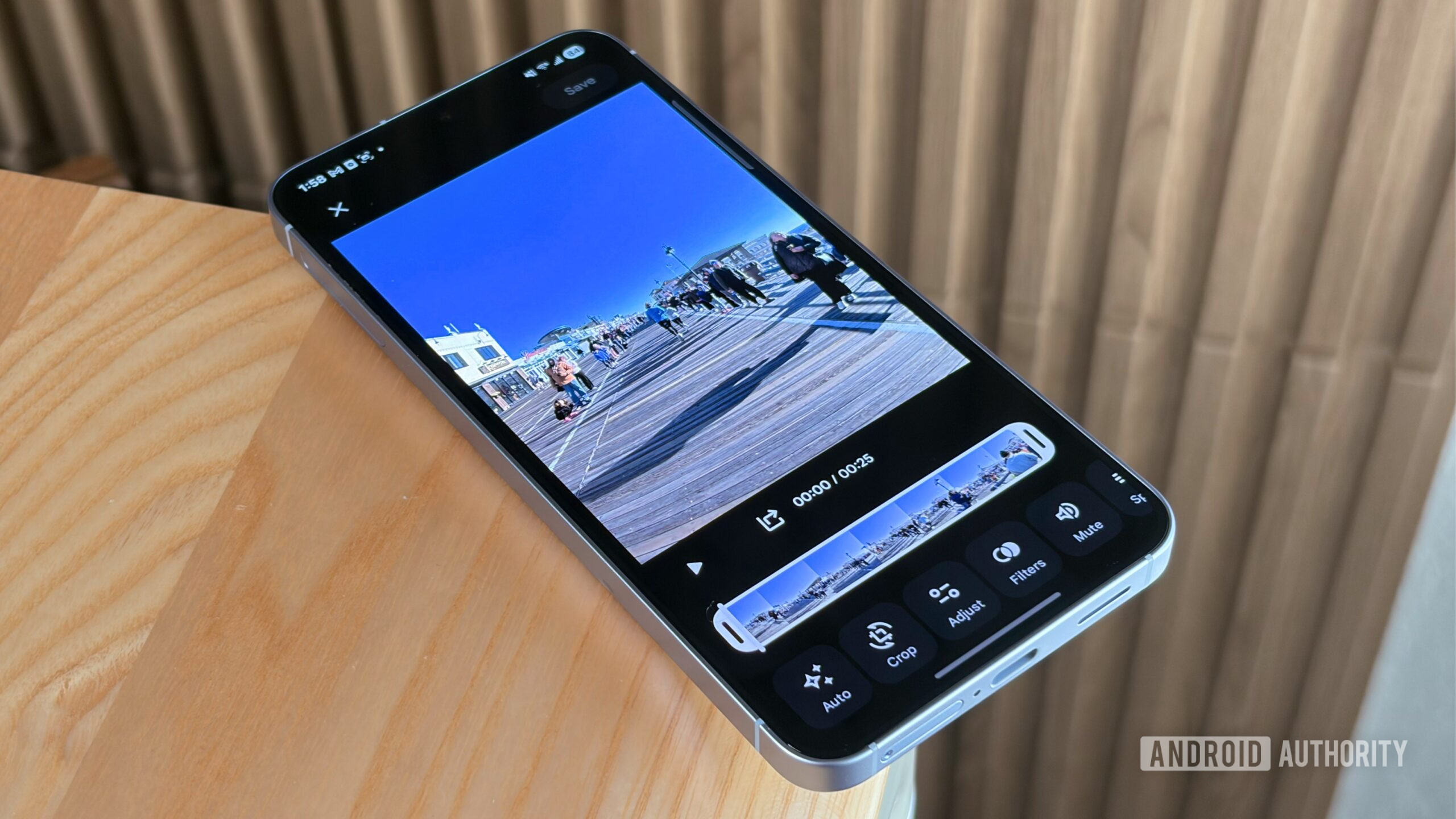
The fresh video editing interface includes a main video preview that takes up most of the screen, whereas the video timeline and editing toolbar are smaller. Above the video preview, Google Photos users will find an X button that exits the video editor without saving changes. On the opposite side, there’s a Save button to save the clip with your changes. Users will see a Material 3 Expressive squiggly progress bar while the video is being saved.

Don’t want to miss the best from Android Authority?

google preferred source badge light@2xgoogle preferred source badge dark@2x

Below the video preview, Google Photos users will find a play/pause button beside an export button that saves a specific frame as an individual photo. The redesign also features a compact video timeline underneath with a scrubbing tool and handles for trimming clips. Then, you have the carousel toolbar with Auto, Crop, Adjust, Filters, Audio, Speed, Music, and Text options.

The multi-clip editor works with “highlight videos,” which are custom video templates that add text, music, and cuts to a selection of photo and video clips. The visual redesign includes an “adaptive canvas” that adjusts as you move photo and video clips around. You can add new clips on the lefthand side and rearrange existing clips by holding and dragging them.

Google Photos’ new video editor is rolling out today, December 9, in the iOS and Android apps. Users can try the refreshed UI by expanding a video and tapping the Edit button. Highlight videos are available in the Create tab of the Photos app.

Thank you for being part of our community. Read our Comment Policy before posting.
Sign Up For Daily Newsletter

Be keep up! Get the latest breaking news delivered straight to your inbox.
By signing up, you agree to our Terms of Use and acknowledge the data practices in our Privacy Policy. You may unsubscribe at any time.
Share This Article
Facebook Twitter Email Print
Share
What do you think?
Love0
Sad0
Happy0
Sleepy0
Angry0
Dead0
Wink0
Previous Article Multiscale Design Analytics Offer Insight Into Students’ Creative Processes | HackerNoon Multiscale Design Analytics Offer Insight Into Students’ Creative Processes | HackerNoon
Next Article Tue, 12/09/2025 – 18:00 – Editors Summary
Leave a comment

Leave a Reply Cancel reply

Your email address will not be published. Required fields are marked *

Stay Connected

248.1k Like
69.1k Follow
134k Pin
54.3k Follow

Latest News

Alibaba challenges Meituan with Amap Street Stars · TechNode
Computing
I Tried the Galaxy Z TriFold at a Dubai Store, and Its Design Made Me a Fan
News
👨🏿‍🚀 Daily – Airtel Money is eating M-PESA’s lunch |
Computing
28% of Teens Use Chatbots Daily. You Can Probably Guess Which One They Like Best
News

You Might also Like

I Tried the Galaxy Z TriFold at a Dubai Store, and Its Design Made Me a Fan
News

I Tried the Galaxy Z TriFold at a Dubai Store, and Its Design Made Me a Fan

10 Min Read
28% of Teens Use Chatbots Daily. You Can Probably Guess Which One They Like Best
News

28% of Teens Use Chatbots Daily. You Can Probably Guess Which One They Like Best

7 Min Read
Unconventional AI confirms its massive 5M seed round |  News
News

Unconventional AI confirms its massive $475M seed round | News

1 Min Read
Google’s AI glasses are coming in 2026
News

Google’s AI glasses are coming in 2026

2 Min Read
//

World of Software is your one-stop website for the latest tech news and updates, follow us now to get the news that matters to you.

Quick Link

  • Privacy Policy
  • Terms of use
  • Advertise
  • Contact

Topics

  • Computing
  • Software
  • Press Release
  • Trending

Sign Up for Our Newsletter

Subscribe to our newsletter to get our newest articles instantly!

World of SoftwareWorld of Software
Follow US
Copyright © All Rights Reserved. World of Software.
Welcome Back!

Sign in to your account

Lost your password?