By using this site, you agree to the Privacy Policy and Terms of Use.
Accept
World of SoftwareWorld of SoftwareWorld of Software
  • News
  • Software
  • Mobile
  • Computing
  • Gaming
  • Videos
  • More
    • Gadget
    • Web Stories
    • Trending
    • Press Release
Search
  • Privacy
  • Terms
  • Advertise
  • Contact
Copyright © All Rights Reserved. World of Software.
Reading: Google Unveils New Tools and Libraries for Building AI Glasses Apps
Share
Sign In
Notification Show More
Font ResizerAa
World of SoftwareWorld of Software
Font ResizerAa
  • Software
  • Mobile
  • Computing
  • Gadget
  • Gaming
  • Videos
Search
  • News
  • Software
  • Mobile
  • Computing
  • Gaming
  • Videos
  • More
    • Gadget
    • Web Stories
    • Trending
    • Press Release
Have an existing account? Sign In
Follow US
  • Privacy
  • Terms
  • Advertise
  • Contact
Copyright © All Rights Reserved. World of Software.
World of Software > News > Google Unveils New Tools and Libraries for Building AI Glasses Apps
News

Google Unveils New Tools and Libraries for Building AI Glasses Apps

News Room
Last updated: 2025/12/15 at 7:34 AM
News Room Published 15 December 2025
Share
Google Unveils New Tools and Libraries for Building AI Glasses Apps
SHARE

With the release of the Android XR SDK Developer Preview 3, Google has introduced two new libraries to help developers create AI Glasses experiences, Jetpack Projected and Jetpack Compose Glimmer. ARCore for Jetpack XR has also been expanded to work with AI Glasses, adding motion tracking and geospatial capabilities.

The new libraries introduced with Android XR SDK Developer Preview 3 allow developers to extend existing mobile apps to interact with AI Glasses by leveraging their built-in speakers, camera, and microphone, as well as presenting information through the glasses’ display, where available.

There are many scenarios where your app might want to use AI glasses hardware. For example, a video conferencing app could add a UI control that allows the user to switch their video stream from the phone’s camera to the AI glasses’ camera, offering a first-person point of view.

The first library, Jetpack Projected, enables a host device, such as an Android phone, to project an app’s XR experience to AI Glasses using audio and/or video. The library allows apps to check whether the target device has a display and wait for it to become available for use. Before an app can access device hardware, it must request permission at runtime in accordance with the standard Android permission model.

You can access AI Glasses hardware from both an AI Glasses activity and a standard app, provided you get a valid projected context. Audio support is straightforward, as the AI Glasses audio device behaves as a standard Bluetooth audio device.

Capturing a photo or video with the glasses’ camera is a bit more complex, since it requires instantiating several classes to check hardware availability, setting it up, and binding the activity lifecycle to the camera so it opens and closes with the activity state.

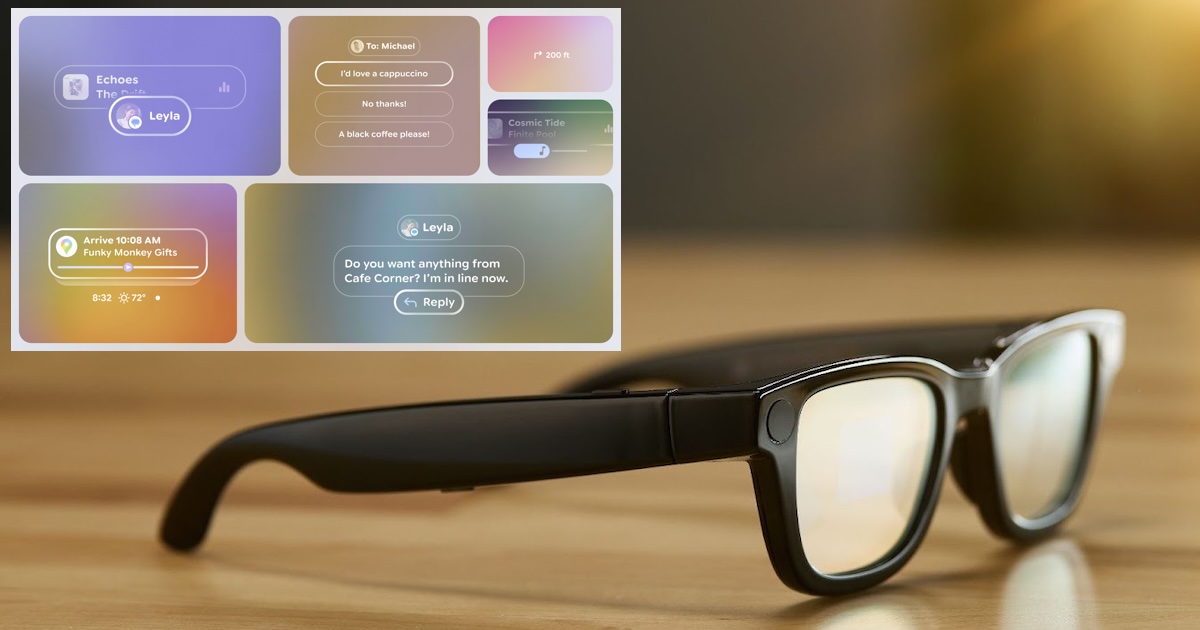
Jetpack Compose Glimmer, on the other hand, is a set of UI components and a visual language to create augmented experiences on AI glasses provided with a display. The new visual languages uses optical see-through to blend visuals with the environment, focusing on clarity, legibility, and minimal distraction. Supported components include text, icons, title chips, cards, list, and buttons. All components are built on the underlying concept of a surface, which developers can access to create non-standard components.

Glimmer components can be customized using modifiers to adjust layout, appearance, and behavior and can be stacked along the z-axis to provide a sense of depth through the use of shadows. Google also introduced an AI Glasses emulator in Android Studio for UI preview and to simulate user interactions, including touchpad and voice input.

As a final note on the latest Android XR SDK version, Google has expanded ARCore for Jetpack XR, a set of APIs to create augmented experiences that include the possibility of retrieving planar data, anchoring content to a fixed location in space, and more. The latest version adds support for motion tracking, so that glasses responds to user movements, and geospatial pose, allowing content to be anchored to locations covered by Google Street View.

Android XR SDK Preview 3 is available in Android Studio Canary after upgrading to the lastest emulator version (36.4.3 Canary or later).

Sign Up For Daily Newsletter

Be keep up! Get the latest breaking news delivered straight to your inbox.
By signing up, you agree to our Terms of Use and acknowledge the data practices in our Privacy Policy. You may unsubscribe at any time.
Share This Article
Facebook Twitter Email Print
Share
What do you think?
Love0
Sad0
Happy0
Sleepy0
Angry0
Dead0
Wink0
Previous Article Kindle app now answers questions about the book you’re reading Kindle app now answers questions about the book you’re reading
Next Article ⚡ Weekly Recap: Apple 0-Days, WinRAR Exploit, LastPass Fines, .NET RCE, OAuth Scams & More ⚡ Weekly Recap: Apple 0-Days, WinRAR Exploit, LastPass Fines, .NET RCE, OAuth Scams & More
Leave a comment

Leave a Reply Cancel reply

Your email address will not be published. Required fields are marked *

Stay Connected

248.1k Like
69.1k Follow
134k Pin
54.3k Follow

Latest News

iOS 26 leak details multiple unreleased Apple products
News
Nothing Raises 0M in Series C to Advance AI-Native Consumer Devices · TechNode
Nothing Raises $200M in Series C to Advance AI-Native Consumer Devices · TechNode
Computing
Pixel Watch 4 finally gets a Google-approved charging alternative
News
The Rise of Compliance-as-a-Service: Why Platforms Like Ospree Are The Future
Gadget

You Might also Like

iOS 26 leak details multiple unreleased Apple products
News

iOS 26 leak details multiple unreleased Apple products

1 Min Read
Pixel Watch 4 finally gets a Google-approved charging alternative
News

Pixel Watch 4 finally gets a Google-approved charging alternative

2 Min Read
Monday Night Football: How to Watch Dolphins vs. Steelers Tonight for Free
News

Monday Night Football: How to Watch Dolphins vs. Steelers Tonight for Free

8 Min Read
UPDF Offers Cross-Platform PDF Editing Without Subscription Fees
News

UPDF Offers Cross-Platform PDF Editing Without Subscription Fees

3 Min Read
//

World of Software is your one-stop website for the latest tech news and updates, follow us now to get the news that matters to you.

Quick Link

  • Privacy Policy
  • Terms of use
  • Advertise
  • Contact

Topics

  • Computing
  • Software
  • Press Release
  • Trending

Sign Up for Our Newsletter

Subscribe to our newsletter to get our newest articles instantly!

World of SoftwareWorld of Software
Follow US
Copyright © All Rights Reserved. World of Software.
Welcome Back!

Sign in to your account

Lost your password?