By using this site, you agree to the Privacy Policy and Terms of Use.
Accept
World of SoftwareWorld of SoftwareWorld of Software
  • News
  • Software
  • Mobile
  • Computing
  • Gaming
  • Videos
  • More
    • Gadget
    • Web Stories
    • Trending
    • Press Release
Search
  • Privacy
  • Terms
  • Advertise
  • Contact
Copyright © All Rights Reserved. World of Software.
Reading: Gemini stops making you manually hit ‘Ask about screen’
Share
Sign In
Notification Show More
Font ResizerAa
World of SoftwareWorld of Software
Font ResizerAa
  • Software
  • Mobile
  • Computing
  • Gadget
  • Gaming
  • Videos
Search
  • News
  • Software
  • Mobile
  • Computing
  • Gaming
  • Videos
  • More
    • Gadget
    • Web Stories
    • Trending
    • Press Release
Have an existing account? Sign In
Follow US
  • Privacy
  • Terms
  • Advertise
  • Contact
Copyright © All Rights Reserved. World of Software.
World of Software > News > Gemini stops making you manually hit ‘Ask about screen’
News

Gemini stops making you manually hit ‘Ask about screen’

News Room
Last updated: 2025/12/16 at 8:12 PM
News Room Published 16 December 2025
Share
Gemini stops making you manually hit ‘Ask about screen’
SHARE

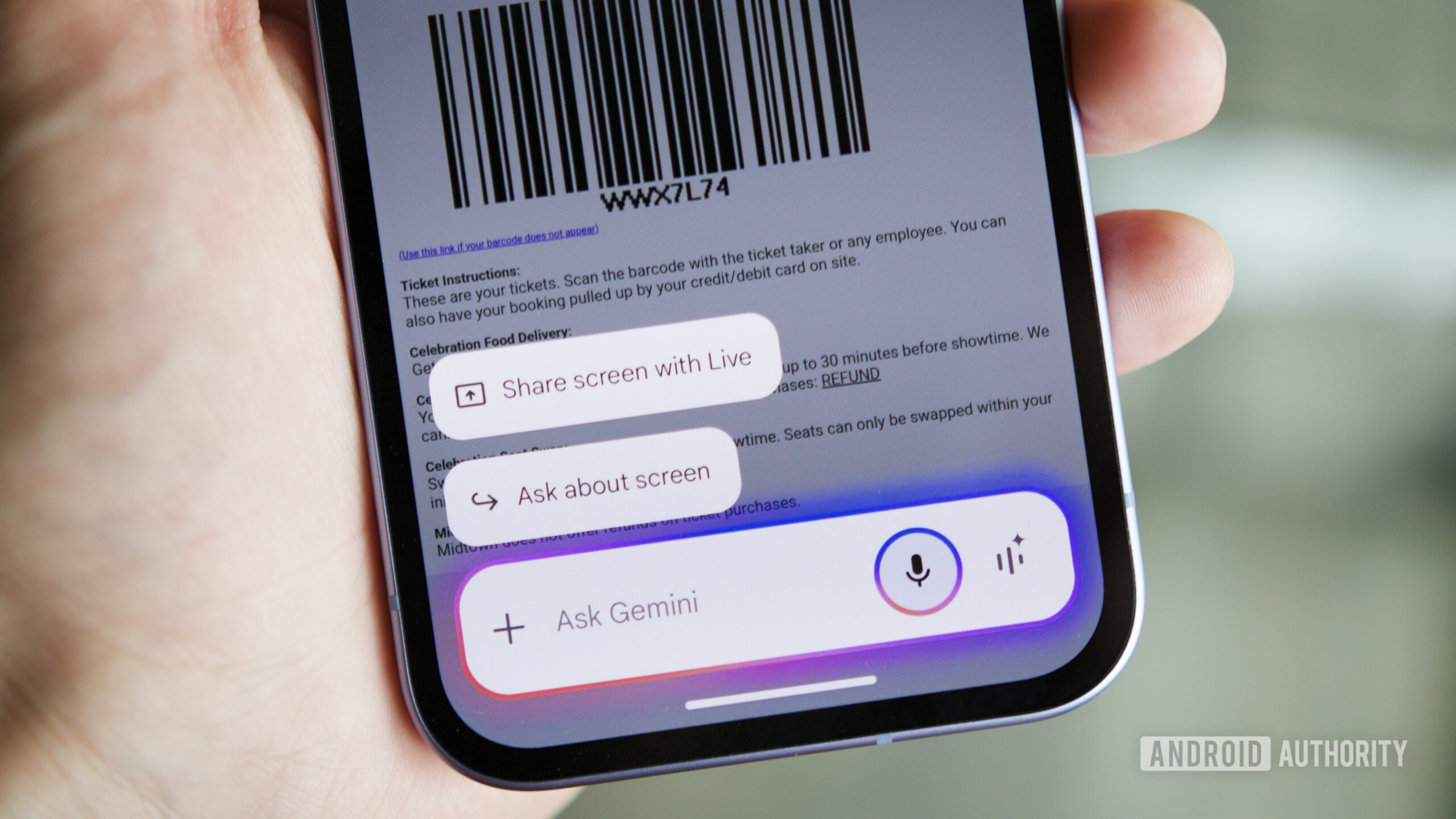
Joe Maring / Android Authority

TL;DR

  • Gemini is getting smarter about analyzing your device’s screen.
  • A new screen context feature allows Gemini to automatically look at what’s on your display, without needing to manually prompt it.
  • Users with privacy concerns can disable this automatic functionality.

Isn’t it great when Google’s able to use context to recognize what we were trying to do, and jumps in with a helping hand? Maybe you were about to send an email where you mention an attachment but never actually selected any file — Gmail is happy to prevent that embarrassment by offering a helpful reminder. A few months back we spotted Gemini working on a similar trick, and now it’s starting to enter public testing.

Don’t want to miss the best from Android Authority?

google preferred source badge light@2xgoogle preferred source badge dark@2x

Like Gmail, Gemini handles all sorts of attachments — maybe you want to edit an image, or ask it a question about a video. That extends to screenshots of what you’re actively working on, and to streamline that support, Gemini introduced its “Ask about screen” button.

So far, that’s all well and good. But back in September we identified early work on a new “Screen Context” option that wouldn’t even require you to hit that button and explicitly tell Gemini to start looking at your screen. Instead, the system would attempt to recognize when you were asking Gemini about something on your screen, and then automatically take a screenshot to analyze — no further interaction from you required.

This week, we’re finally starting to see access to this tool roll out, and it has started appearing on some of our devices (Thanks: Diego).

When it first arrives for you, you’ll be presented with that introductory message on the left. Just as we saw when initially covering work on this feature, Google gives you the ability to turn it off if you have privacy concerns.

Leave it on, though, and you can get started right away asking about your screen, and leaving Gemini to capture any screenshots it needs to process. If you’ve also gotten access, give it a try, and let us know how well it worked for you down in the comments. In our early testing, it’s about 50/50 on realizing we were asking about on-screen content, but we imagine your mileage may vary significantly based on individual prompts.

Thank you for being part of our community. Read our Comment Policy before posting.

Sign Up For Daily Newsletter

Be keep up! Get the latest breaking news delivered straight to your inbox.
By signing up, you agree to our Terms of Use and acknowledge the data practices in our Privacy Policy. You may unsubscribe at any time.
Share This Article
Facebook Twitter Email Print
Share
What do you think?
Love0
Sad0
Happy0
Sleepy0
Angry0
Dead0
Wink0
Previous Article release date, casting, plot… everything you need to know about the LIVE Action series release date, casting, plot… everything you need to know about the LIVE Action series
Next Article Apple is reportedly developing an iMac Pro powered by an M5 Max chip Apple is reportedly developing an iMac Pro powered by an M5 Max chip
Leave a comment

Leave a Reply Cancel reply

Your email address will not be published. Required fields are marked *

Stay Connected

248.1k Like
69.1k Follow
134k Pin
54.3k Follow

Latest News

General Motors says its China business is on a recovery path · TechNode
Computing
LG Teases Micro RGB evo Ahead of CES 2026, Chasing the Holy Grail of TV Color
News
Apple teams up with Baidu to launch AI services in China in 2025, faces user data dispute · TechNode
Computing
Best earbuds deal: Save  on Shokz OpenRun Pro 2
Best earbuds deal: Save $40 on Shokz OpenRun Pro 2
News

You Might also Like

LG Teases Micro RGB evo Ahead of CES 2026, Chasing the Holy Grail of TV Color
News

LG Teases Micro RGB evo Ahead of CES 2026, Chasing the Holy Grail of TV Color

8 Min Read
Best earbuds deal: Save  on Shokz OpenRun Pro 2
News

Best earbuds deal: Save $40 on Shokz OpenRun Pro 2

3 Min Read
OpenAI launches new GPT Image 1.5 model optimized for image editing –  News
News

OpenAI launches new GPT Image 1.5 model optimized for image editing – News

5 Min Read
The 4 Best Budgeting Apps To Replace Mint – BGR
News

The 4 Best Budgeting Apps To Replace Mint – BGR

7 Min Read
//

World of Software is your one-stop website for the latest tech news and updates, follow us now to get the news that matters to you.

Quick Link

  • Privacy Policy
  • Terms of use
  • Advertise
  • Contact

Topics

  • Computing
  • Software
  • Press Release
  • Trending

Sign Up for Our Newsletter

Subscribe to our newsletter to get our newest articles instantly!

World of SoftwareWorld of Software
Follow US
Copyright © All Rights Reserved. World of Software.
Welcome Back!

Sign in to your account

Lost your password?