For a long time, Windows Notepad was a program frozen in time. It received specific adjustments, such as font compatibility, status bar, zoom or new encoding options, but deep down it was still the same as always, the one that many of us return to precisely because of what it doesn’t have. A type of software that stands out more for its simplicity than for everything it could offer.
After all, when you need something more complete, there are always alternatives, free or paid. However, for some reason, Microsoft has decided that the time has come to transform Notepad into something much more ambitious. And for some of its users, this leap forward is experienced more as a renunciation of its essence than as a real improvement.
IA integrated in Block of Notes. It is not entirely clear why it would make sense to incorporate artificial intelligence functions in this program. If we are going to write an email, it is normal to do so in its corresponding application or web service. And if we want to write a text with a little more depth, within the Microsoft ecosystem the usual thing is to open Word.
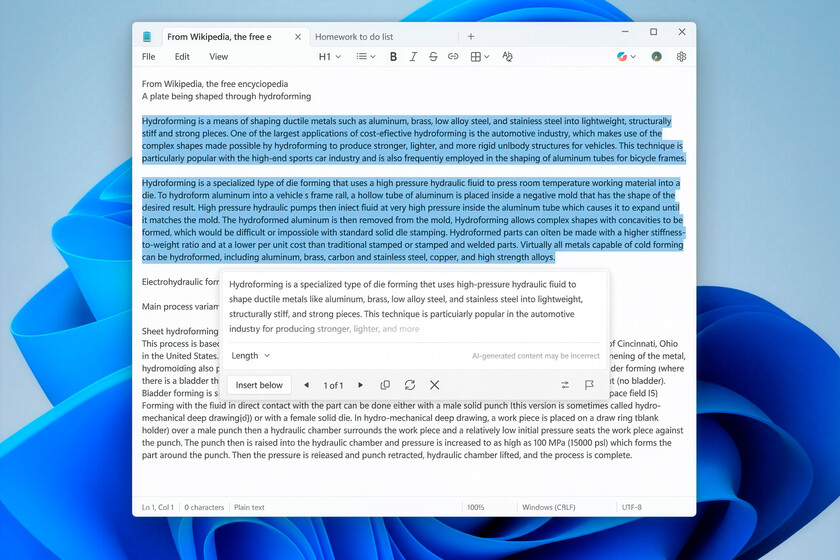
Even so, Microsoft recently announced that Notepad would have three integrated AI tools. Write, to generate text. Rewrite, to rewrite existing content. And Summarize, to summarize texts. Added to these is now a new feature called Streaming Results for AI text functions.
No, it has nothing to do with streaming platforms. This is an experimental feature that sends chunks of information continuously, rather than waiting for the entire response to be ready. Something similar to watching live content instead of downloading it completely before starting.
Until now, when we used Notepad’s AI functions, such as Write, Rewrite or Summarize, the system processed the request and displayed the final result in one go. With this change, content begins to be generated and displayed on the screen immediately after clicking, making the first fragments of text appear almost instantly.
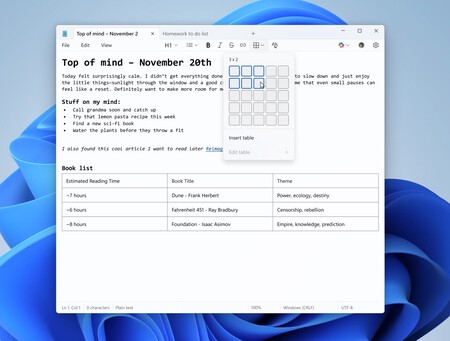
The tables also arrive. Again, if the idea is to work with tables, we will most likely use an application designed specifically for this. But Microsoft believes that Notepad should also cover that ground, and that is why it is already testing this function among users of the Windows Insider program. “Now you can easily insert tables into your document to structure your notes,” the company explains.

AI everywhere. What happens with Notepad is not an isolated case, but a fairly clear reflection of Microsoft’s strategy with artificial intelligence, which involves integrating it into practically everything. Your productivity applications already incorporate AI across the board, from Word and Excel to PowerPoint and OneNote, within Microsoft 365. The same is true for your business software, such as Microsoft Dynamics 365.
And the list continues to grow. AI is also present in Windows 11, in Microsoft Edge and, of course, in Microsoft Bing.
What path should you follow? The underlying question is which path Microsoft should follow from here. The expansion of Copilot fully fits into its strategy at a time when artificial intelligence has become the great axis of technological discourse. There will be users who celebrate these new features and others who receive them with much less enthusiasm.
Images | Microsoft
In WorldOfSoftware | Gemini 3 Flash has surpassed GPT-5.2 Extra High in several benchmarks: Google has just changed the rules of the lightweight model