![[Template] How to create a Facebook content calendar](https://socialbee.com/wp-content/uploads/2025/12/facebook-calendar.webp "[Template] How to create a Facebook content calendar")
Facebook content calendar example (with breakdown)
This example shows a social media content calendar filled out for one week. Nothing abstract. Every post has a clear purpose and supports the studio’s wider content strategy.
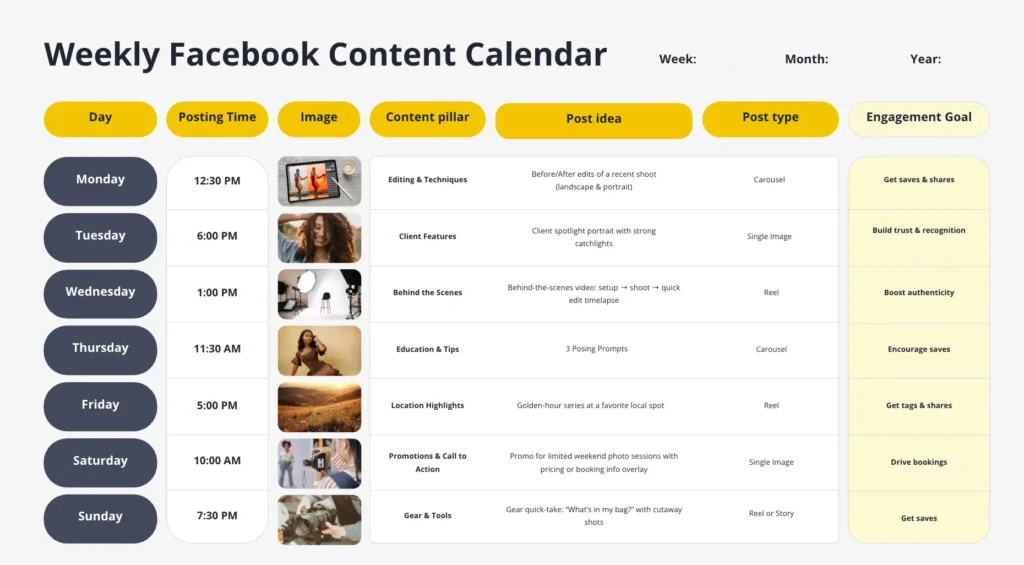
How this Facebook content calendar works in practice
Day and posting time
Posts are spaced out across the week at realistic moments, for example Tuesday evening or Saturday morning. This helps the studio stay visible, avoid overposting, and stay consistent without forcing daily posting. Posting at the right time also makes it easier to reach people when they’re actually scrolling.
Visual content
Each post includes a specific visual, planned in advance. That could be finished client portraits, behind-the-scenes phone shots, short setup videos, or simple location photos. Planning visuals early helps avoid last-minute scrambling and keeps visual content aligned with the brand. This is especially useful when you rely on product photos or client work.
Content pillar
The calendar rotates between clear themes to maintain content variety:
-
Client features and portraits
-
Behind-the-scenes studio work
-
Editing and posing tips
-
Location highlights
-
Limited-time offers or seasonal promos
This mix prevents repetition and supports larger campaigns without overwhelming the audience.
Post idea
Post ideas are specific and easy to execute:
-
“Before and after edit with a short caption explaining the process”
-
“Client spotlight with one quote from the shoot”
-
“Behind-the-scenes Reel showing lighting setup”
-
“Quick tip post on how to prepare for a photoshoot”
These ideas are tied directly to daily studio work, making it easier to post content without inventing new concepts each week.
Post type
Formats are chosen upfront so nothing is left to guesswork:
-
Carousels for before-and-after edits
-
Reels for behind-the-scenes moments
-
Single images for client features
-
Stories for quick updates or availability
This helps you plan multiple posts without repeating the same format over and over.
Engagement goal
Each post has one clear goal, for example:
-
Saves for educational tips
-
Shares for before-and-after edits
-
Tags for client features
-
Clicks or messages for booking posts
Tracking how posts performed makes it easier to see what works and adjust future posts.
Free Facebook content calendar template
To make planning easier, I’ve put together a free Facebook content calendar you can use right away. I built it to help you create a content calendar, plan ahead, and keep your social media posts in one place, without adding more admin to your week.
This social media content calendar makes it easier to schedule content and see what’s coming up at a glance. You can plan posts by date, platform, and content type, then simply click schedule when everything’s ready. It works as a social media calendar for Facebook, but you can also use it across other social channels if you manage Instagram posts, Stories, videos, links, events, or ads.
I’ve kept the template practical. There’s space for content ideas, post types, posting frequency, and short notes on how posts performed, so you can see what actually works. It’s useful whether you’re planning everyday posts or mapping out larger campaigns, and whether you’re sharing behind-the-scenes updates or product photos.
You can use it on your own or with a team. If you’re working with others, the calendar helps everyone stay organized and on the same page. If you manage your own account, it gives you a simple system to start building a routine that helps you stay consistent.
I’m sharing this as part of a set of free templates because the best tool is the one you’ll actually use. If your goal is to save time, post content more intentionally, and get a clearer picture of how your social media content is performing, this calendar is a solid place to start.
Frequently asked questions
1. How can you view scheduled content on Facebook?
You can view scheduled posts in Meta Business Suite by opening your Facebook Page and going to Content or Planner. This shows scheduled, published, and draft posts in a calendar view.
If you manage content across multiple platforms, tools like SocialBee also let you view and manage scheduled Facebook posts alongside other social media content in one place.
2. What is the difference between a content plan and a content calendar?
A content plan defines direction. It covers goals, audience, content types, and themes. A content calendar focuses on execution. It shows what gets published, on which date, on which platform, and in what format.
Many teams define the plan first, then organize posts in a calendar using Google Sheets, Google Calendar, or a scheduling tool like SocialBee.
3. Can you create a calendar on Facebook?
Facebook does not provide a dedicated planning calendar for long-term content strategy. You can schedule posts inside Meta Business Suite, but it’s designed for publishing rather than planning.
Many teams build their content calendar in Google Sheets or Google Calendar, or use tools like SocialBee to plan, schedule, and manage Facebook content alongside other platforms.
Time to create your Facebook content calendar!
A Facebook content calendar works when it’s actually used. That means planning ahead, keeping everything in one place, and making sure posting doesn’t depend on motivation or free time. When your calendar is clear, posting becomes routine instead of a weekly decision.
If you’re using a Facebook planner like SocialBee, the social media calendar becomes easier to maintain. You can plan posts in advance, group content by topic, and schedule everything in one place. SocialBee also helps with content creation by suggesting captions and variations, which cuts down manual work and speeds things up. For teams or busy businesses, that structure makes a real difference.
Instead of juggling documents, reminders, and last-minute drafts, you’re working from a system that supports consistency and visibility across your content.
Start your 14-day free SocialBee trial and build a Facebook content calendar you can actually stick to.