Ryan Haines / Android Authority
If I’m being honest, I’m terrible at tracking my nutrition. The minute you ask me to install another app and start logging everything I eat is the moment you tend to lose me. It’s not because I don’t care (I’m very conscious of what I eat), but rather because I don’t want to take the time when I already have apps for my steps, sleep, stress, and whatever else.
But when Garmin announced it would bring nutrition tracking into its Connect Plus experience, I decided I had to give it a try.
After all, if I no longer had to worry about MyFitnessPal or any other third-party plugin, I would be making my life easier. So, I updated my Garmin Connect app, added a nutrition tab to the bottom row, and started logging what I ate and drank for a week. Here’s how it went.
Would you trust Garmin with your nutrition data?
0 votes
If only you could taste a picture

Ryan Haines / Android Authority
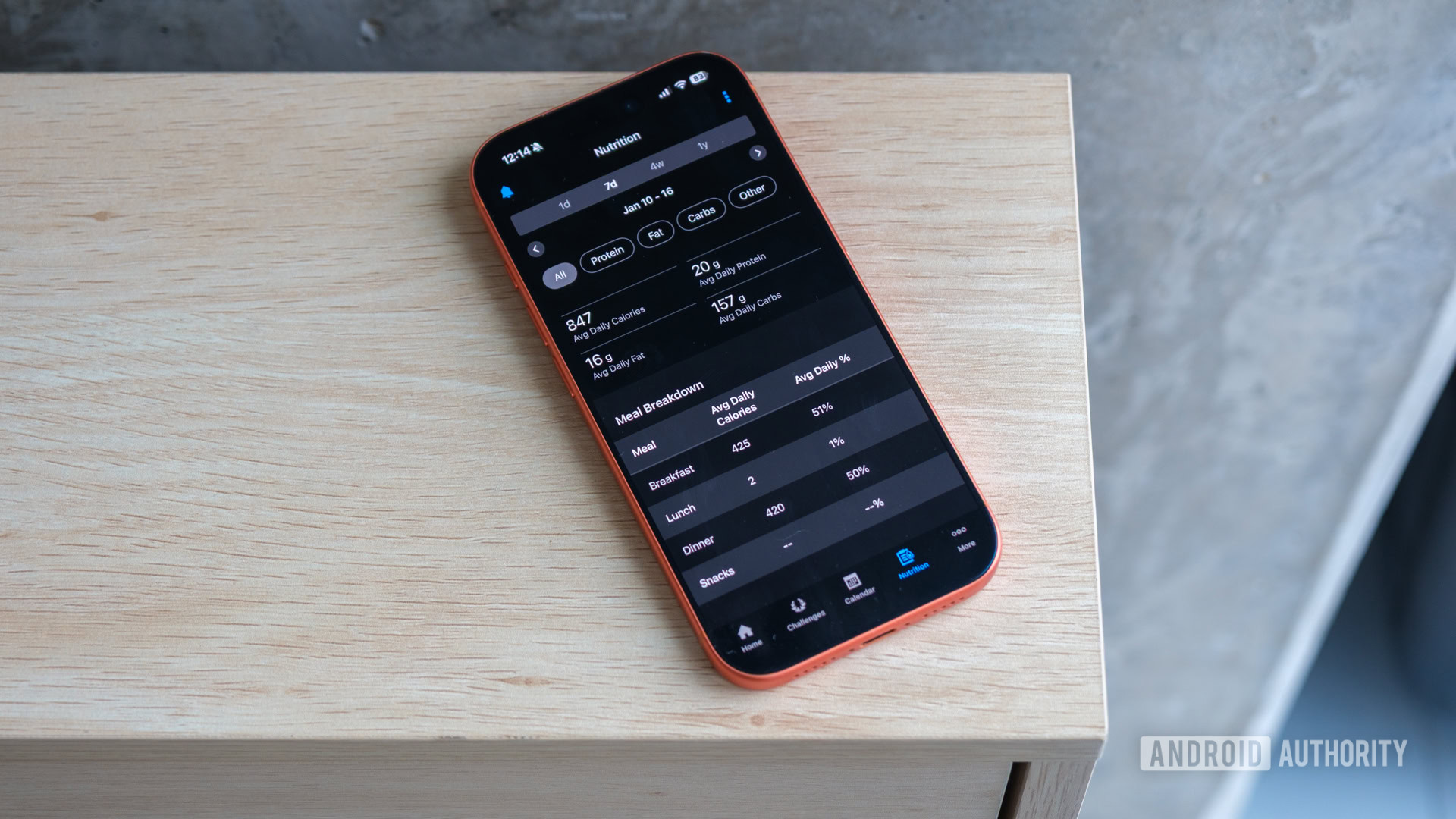
Right off the bat, Garmin tries to make its nutrition tracking as easy as can be. By shifting away from MyFitnessPal, you no longer need a separate app, and it’s pretty easy to trade one of the existing tabs in your Connect app for a dedicated nutrition interface. In true Garmin fashion, that means giving yourself one more data-rich display to track calories and macros just as easily as if you were tracking steps.
And, as someone who isn’t terribly familiar with tracking nutrition, I’ll admit I was a little confused at first. I’m a distance runner, which usually means that as long as I’m getting enough carbs and calories in me, I’m fine. I’ll run off everything else, so I keep a light eye on nutrition at best. But when faced with a Garmin interface that asked for photos or at least barcodes of everything I consumed, I realized I would have to lock in a bit more.

Ryan Haines / Android Authority
Thankfully, I quickly realized that’s where Garmin’s nutrition tracking is at its best: when you can snap a photo of your food and have Garmin’s AI models break it down. I’m not usually good at guessing ingredients, so when I can point my phone at a salad or a pizza and have Connect split it into ingredients, I’m happy to do so.
Also, when you scan a barcode, Connect defaults to a single serving, which is excellent news for pre-run Pop-Tarts but terrible news when I sit down to eat half a bag of chips. You can easily adjust that serving size before you log your meal, or rather, “meal.” I’m a big believer in girl dinner, what can I say?
It’s easy to log food in Garmin Connect, but double-check your servings.
Anyway, if you can’t get a good picture of your food, fear not. Just like you can modify your serving size, you can also look up and add ingredients and foods from a growing encyclopedia of eats, as I’ve taken to calling it. I’ve needed to do so several times over the last week or so, as Connect can’t always pick out a bed of rice if I’ve covered it too well, nor can it always tell cut, breaded fish apart from cut, breaded tofu. It usually nails the portion size, just not quite the ingredients.
As I got into the habit of logging my meals (and snacks, and everything else in between), I can certainly say I’ve gotten more comfortable with Garmin’s process. I still don’t think it feels quite natural, but I like that I can stay in one app from start to finish… though I keep running into kinks and hiccups.
The problem with a brand-new diet

Ryan Haines / Android Authority
Is it too generous to Garmin to say that trying its nutrition tracking feels like adopting any other diet? I mean, it’s kind of true — it takes a while to get used to anything. However, it’s pretty quickly apparent that the in-house database doesn’t have years of MyFitnessPal meals to draw on, nor does it have a standalone app’s worth of features.
For starters, the calories and macros that Garmin monitors are pretty rigid. Yes, calories can be pretty rigid as they’re just one metric, but you’d better like fats, proteins, and carbs, because that’s what Garmin is going to show you. And yes, it’s probably enough for most people, but it would be nice to swap those out based on other nutritional needs.
I now understand why most nutrition apps stand alone.
Garmin’s meal structure is rather strict, too. It currently shows breakfast, lunch, and dinner as two-hour windows, during which you can log whatever you consume. As you do so, the timeline for that hour gets bigger and more cluttered, forcing you to scroll further to reach the next meal. It’s kind of a messy way to handle what should probably just be dropdown menus to keep your timeline cleaner.
Also, if you’ve ever used MyFitnessPal, you’ll remember that it lets you enter recipes via URLs, making it much easier to get an accurate list of ingredients and serving sizes. Garmin’s native interface doesn’t do that. If it’s not available from a picture, it must be done by hand. I guess I can live with that while cooking, but because I started tracking my nutrition while eating out frequently at CES, there were several meals where I just had to accept what Garmin’s AI gave me.
Then, there’s the trouble with tracking calories burned (calories in, calories out, as they say). Right now, Garmin’s nutrition tracking only shows the calories you take in, leaving the calories you burn in another tab. I won’t lie, this is the most disappointing thing to me.
If I’m using Connect to monitor both my intake and my output, I should be able to balance the two and track just how many more calories I’d need after a big workout. Instead, my daily targets remain constant, even when I run more than 15 miles in a long run and put myself in a deep calorie hole.
I can’t decide if I should keep going

Ryan Haines / Android Authority
Right now, I’m at that rough patch in a new diet. I know I should probably keep going as my body (or my mind) adjusts to its new way of eating (or logging what I eat). However, given Garmin’s current shortcomings, it often feels like I’m just filling my app with data for someone else. Sure, the small graphs of my macros are nice, but I don’t feel as though they’re providing much guidance for my planning just yet.
Of course, I have to remind myself that this is still a brand-new feature. No, it doesn’t have the fleshed-out interface of MyFitnessPal, nor should it, because it’s only been around for a week. Yes, the AI-powered food identification still struggles, but that’s because it probably has the eating experience of a five-year-old. It’s seen a lot of Pop-Tarts, maybe some Starbucks, and a few home-cooked meals, but it doesn’t know what’s what yet.
Garmin’s nutrition tracking might be great, but it’s not there yet.
And yet, I’m torn between giving Garmin the benefit of the doubt or trying something else. I could go back to something like MyFitnessPal or dig up a free nutrition tracker and start all over. While I’d probably have some of the same sticking points in my first week, I wouldn’t mind a dedicated app that lets me get into the weeds of what I’m eating and how it’s impacting me.
Besides, if I’m not really sure that I want to keep paying for Garmin’s premium Connect Plus insights (and might go back to Strava), why would I keep filling its database with my eating habits?
Thank you for being part of our community. Read our Comment Policy before posting.