
Getting social media shares can feel unpredictable. One post takes off. Another? Crickets. You keep refreshing your social apps, waiting for social buzz, and asking yourself what went wrong.
But if you look at the data, you’ll find that social shares actually aren’t random.
There’s a pattern to it.
People share content because they align with it in some way. They find it helpful and want to pass along the knowledge. Or they relate to it and want to share it to build community.
And evergreen content is especially helpful for shares because it stays relevant long after it’s published.
Evergreen content doesn’t depend on trends, breaking news, or algorithm timing. It works because it answers questions people keep asking. That makes it perfect for social sharing, long-term brand awareness, and steady social traction across social media sites.
This guide shows you how to build evergreen content with built-in sharing triggers and the right structure so readers feel motivated to share it. 👇
Choose evergreen topics people want to send to others
Conduct audience research to uncover evergreen topics for your posts.
These are topics people in your target audience routinely talk about year-round.
Start where people already explain themselves …
Check comments on popular social media posts and video content
Peruse comments from your target audience across social media platforms.
For helpful evergreen topics: Pay attention to repeated clarifying questions and responses. (E.g., “How can I set up a project timeline?” Or “In what order do I apply the products?”)
For relatable evergreen topics: Look for repeated comments that reveal a relatable identity. (E.g., “This is so me,” “This is exactly my friend,” or “Why is this so true?”)
Record these topics in a Google Doc or spreadsheet. Name it “Evergreen shareable topic list for social media posts.”
Scan Reddit threads in your niche
Look for questions that get asked repeatedly on Reddit. If someone keeps explaining the same thing, there’s an opportunity for content. Check out the Reddit posts below from online users asking how to make a sourdough starter.
(Image Source)
Reddit Posts
If you search “how to make sourdough starter” on Reddit, you’ll find posts like these — and many others. They span recent and older threads, from weeks ago to several years back. This repetition shows the topic is evergreen.
Add these Reddit topics to your list, too.
Read reviews
Check product reviews, course feedback, and service testimonials to uncover what people struggled with before buying and how they describe the problem now. These make great “Before and After” infographics you can share.
Again, add these to your topic list.
You can also look through customer tickets, user forms, and any other customer data you have. Highlight all repeated questions and add them to your list.
Encourage employee advocacy
Create a culture where employees feel part of the bigger conversation. (When teams feel informed and involved, they’re more likely to reshare your content.)
To involve your team, use solutions for employee engagement. Share useful guides, insights, and resources to make internal knowledge-sharing natural, and part of everyday work.
Here’s a solution called Blink that has its own newsfeed and sets the scene for internal knowledge sharing:
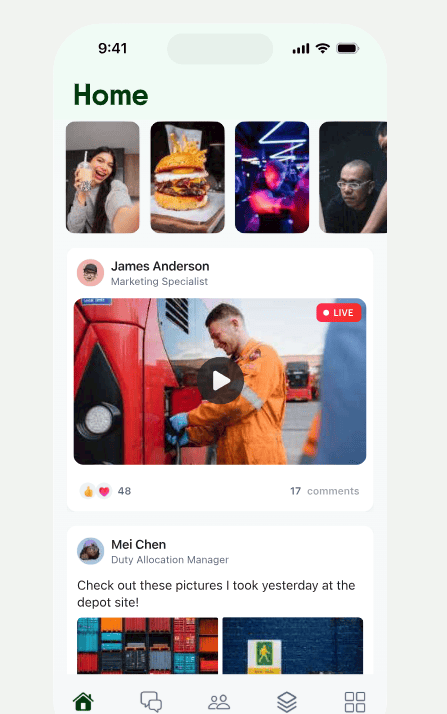
(Image Source)
Blink App
When you’ve nurtured a knowledge-sharing culture, follow and engage with your employees on LinkedIn.
Post thought leadership content on LinkedIn that ties into the topics you cover with your team at your company. LinkedIn will share these in the newsfeed, and your employees will be more likely to see, engage with, and reshare them with their own networks.
Write hooks that signal “share-worthy” value
Be picky about your opening hooks.
Hooks are your first (and sometimes only) chance to grab attention on social media. In a crowded social feed, a strong hook tells people immediately why your post is worth sharing.
Use an AI writing assistant to brainstorm and list out hooks to test.
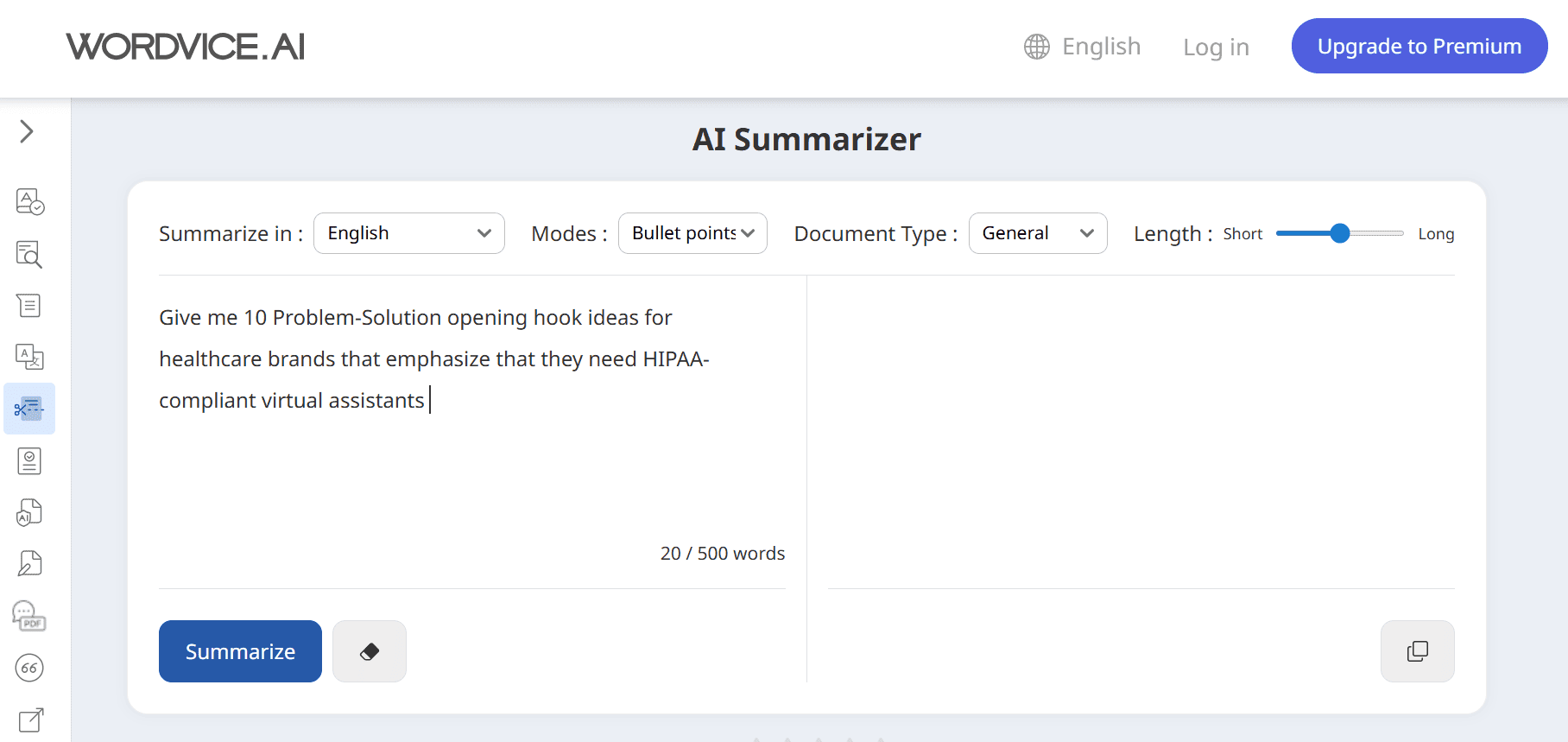
(Image Source)
AI Writing Tool
Try these hook frameworks and note which ones lead to the most shares:
Problem + solution
- Highlight a problem your audience repeatedly faces, then hint at a solution.
- Example: “Still wasting hours on spreadsheets? Here’s a faster way to track sales.”
Curiosity gap
- Tease information that makes people want to click or share to learn more.
- Example: “You’re making this common mistake in your morning routine — most people don’t even notice it.”
- Example: “Only people who … will get this.”
Surprising statistic or insight
- Numbers grab attention and make content feel credible.
- Example: “85% of small businesses fail within the first five years. Here’s what the survivors do differently.”
Relatable situation/identity signal
- People share content that makes them say, “This is so me” or “This describes someone I know.”
- Example: “If your inbox looks like this by 10 am, you need to try this strategy.”
- Example: “Obsessed with strong espresso? Try these roasts for the winter.”
Actionable Tip or Shortcut
- Promise immediate value or time savings.
- Example: “Stop wasting time on outreach strategies that don’t work.”
When testing your hooks:
- Test multiple variations for each post and track engagement. Even small tweaks (changing a word or rearranging the sentence) can make a huge difference.
- Iterate based on patterns. Note which frameworks perform best with your audience: Problem-focused hooks? Curiosity hooks? Identity-based? Use these insights to guide your future posts to encourage more shares.
Add explicit reasons to share inside the content
Give people good reasons to share your social media evergreen content.
Tell the reader who this is useful for
Be clear about who your post helps.
For example, “Send this to a healthcare office that needs HIPAA-compliant virtual assistants.” Or, “Share this with small business owners struggling to manage their online bookings.”
Make sure to engage with users when they comment or mention that they shared your post. If you have high engagement, automate engagement workflows so you never miss a comment.
Create instantly actionable content
Make content that’s easy to pass along because it’s useful, clear, and instantly actionable. Highlight shareable checklists, rules, lists, guides, or warnings.
For instance:
- “Checklist: Everything you need before hosting your first dinner party.”
- “Warning: Don’t book your next flight without checking this tip.”
- “5 mistakes to avoid when starting your first garden.”
- “The one rule every coffee lover swears by.”
- “10 AI SEO tools our team uses every day.”
- “How to hire your first employee.”
Here’s a shareable content example by @forgoodcode on Instagram, that uses the hook “Don’t book your next flight until you try these!”
It includes a carousel with 7 prompts to help save money on flights. (A great resource users can share with fellow travel friends and tech enthusiasts.)
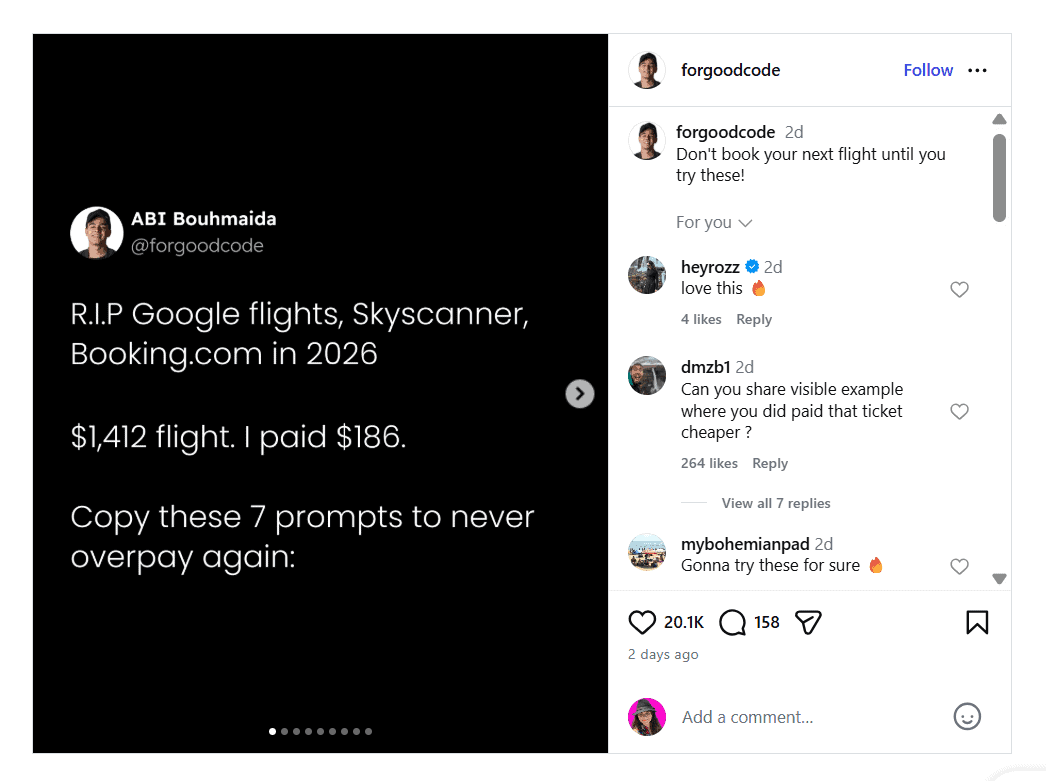
(Image Source)
Helpful Carousel
Make the content interactive
People love to share content they can participate in. Interactive posts (like quizzes, polls, challenges, and forms) give readers a reason to engage and share.
Try these interactive content types:
Quizzes: Create a fun, useful quiz that tells readers something about themselves.
- Example: “Test your home cooking skills: Are you a beginner, pro, or master chef?”
- Example: “Which productivity method fits your work style?”
Challenges: Encourage readers to try something and report back.
- Example: “Take the decluttering challenge: Post your before-and-after photos.”
- Example: “Try this 5-day wellness challenge and share your results.”
Forms and tools: Give readers templates or calculators they can use and pass along.
- Example: “Fill out this social media audit form and share it with your marketing team.”
- Example: “Use this budget calculator and share it with a friend planning a wedding.”
Polls and votes: Let readers weigh in and see how they compare with others.
- Example: “Vote for your favorite home office setup and tag a friend to see what they choose.”
Interactive content works because it makes sharing personal and participatory. Readers invite others to join in, try something, or see how they compare. This makes evergreen content more memorable and more likely to spread.
Structure evergreen content to support sharing
Use formatting that encourages sharing. When structuring your evergreen content, focus on frameworks, infographics, and carousels.
Visual or list-based structure increases sharing without extra explanation.
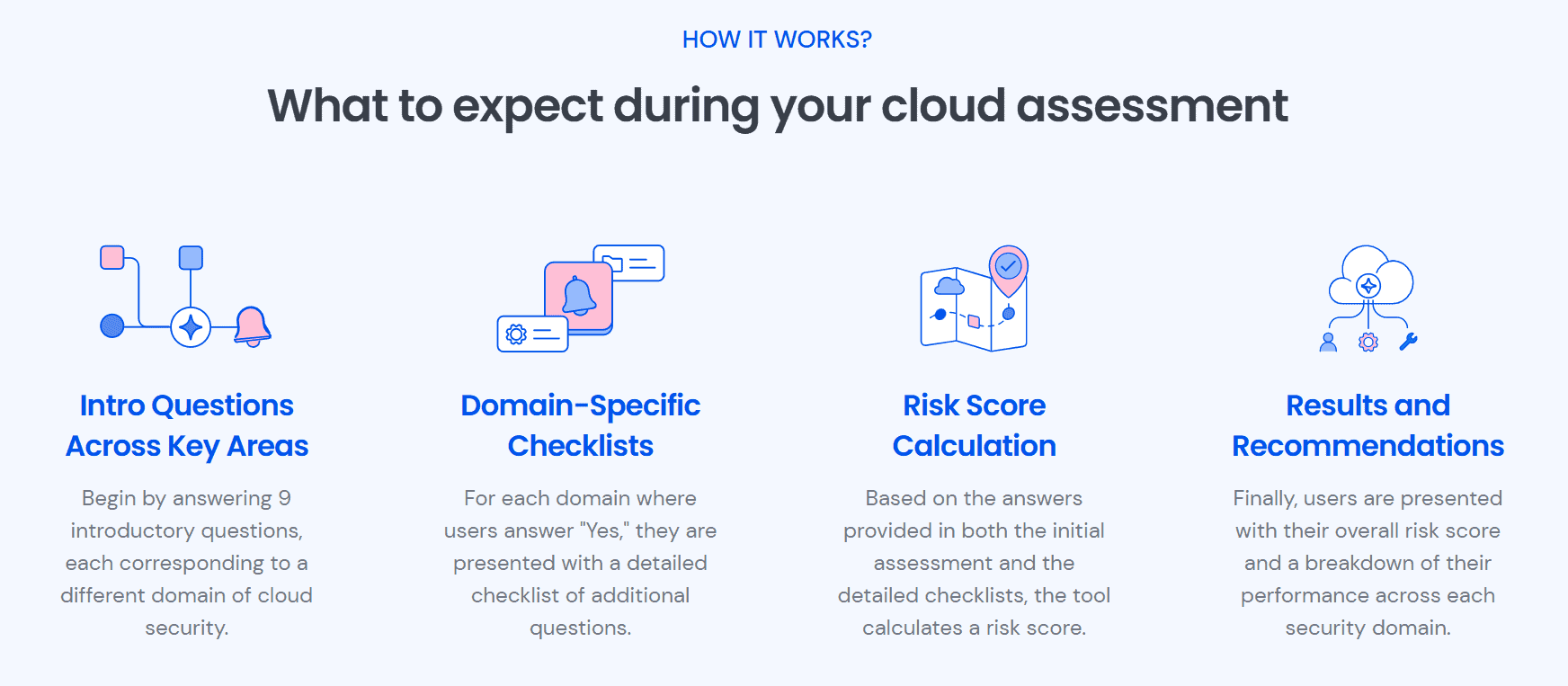
Look at this infographic that breaks down Wiz’s cloud security assessment framework:
(Image Source)
Infographic by Wiz
This works as a shareable asset because it organizes complex information into a single, digestible visual that anyone can forward or reference.
Note: If you already have graphics like these woven throughout your blog posts, re-share them on social media.
Add calls to action that prompt sharing
Tell social media users to share your posts.
Use calls to action in your evergreen posts like:
- “Send this to someone planning their next weekend getaway.”
- “Send this to your team before they start their next project.”
- “Tag a workout buddy who needs this quick fitness tip.”
- “Share this with your meal prep friends.”
- “Tag a friend who needs to see this.”
Measure success using sharing signals
Check social media analytics for sharing signals. Look for shares, saves, and reposts. These actions show people are passing your content along.
Check performance over weeks or months, because evergreen content grows over time. Track which angles, visuals, or sections get the most shares and use that to guide future posts.

(Image Source)
Social Media Analytics
Based on your results: Build a playbook with your top-performing hooks, CTAs, and formats so your team can replicate what works consistently. Over time, you’ll grow a content library that makes your evergreen strategy predictable and repeatable.
Repost high-performing evergreen content
Use your top-performing evergreen posts and give them a fresh angle. Frame them for a different audience or focus on a slightly different problem.
For example, repost a guide for small business owners and target freelancers facing the same challenge. Update examples, screenshots, and visuals to keep the post current. Highlight the sections people share most (lists, checklists, warnings, or frameworks).
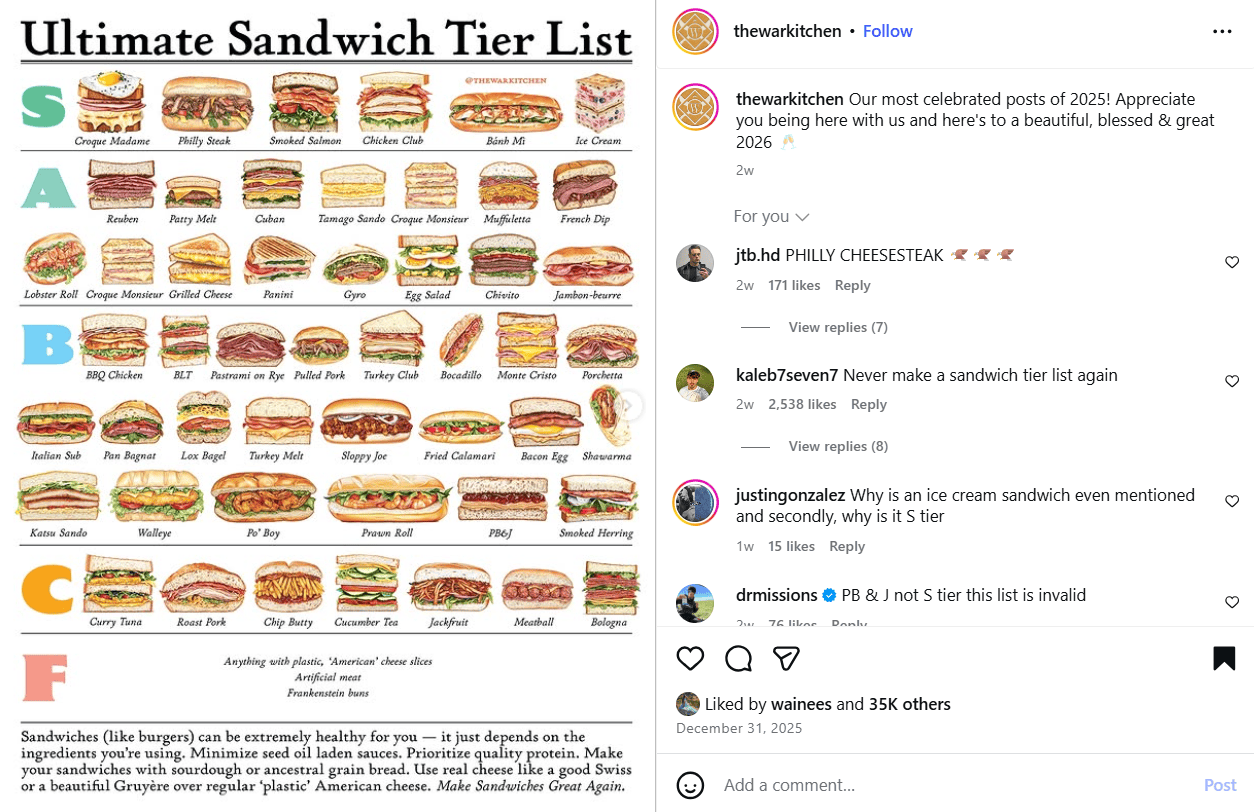
You can also repost your most shared graphics. Here’s one from @thewarkitchen on Instagram:
(Image Source)
Ultimate Sandwich List
Common mistakes that prevent content from being shared
Avoid these mistakes if you want to encourage evergreen sharing:
Don’t assume people will share your content automatically.
Always tell readers who will benefit and why it matters. For example, instead of solely posting “Tips for better email marketing,” frame it as “Share this with the team handling your next email campaign to avoid common mistakes.”
Don’t skip CTAs to appear “less promotional.”
Give specific instructions like “Forward this to a friend trying to set up their home office.” Or. “Tag a coworker who needs this checklist.”
Don’t treat evergreen content as a one-and-done effort
Refresh, reframe, and repost top-performing pieces with new visuals, examples, or audience angles. Highlight sections that naturally draw attention (lists, frameworks, warnings, or step-by-step guides) to give readers easy, tangible reasons to share.
Wrap up
Evergreen content increases social media shares when it gives readers a reason, a prompt, and a low-risk way to share.
Design content that can be forwarded, referenced, and reused using this helpful guide.
And if you need an easier way to grow your reach and schedule your posts across platforms, use Bulky. Get started with now.
PS: Share this guide with your team to start planning your next evergreen social media campaign.
FAQs about evergreen social media shares
Why do some posts get more shares than likes?
Shares help others, while likes are just personal reactions. Content that benefits someone else gets shared more.
Does evergreen content get more shares?
Yes. Evergreen content stays relevant, so people keep sharing it long after it’s published.
How important are shares for social media growth?
Shares put your content in front of new audiences, helping your reach and organic growth.
What type of content is most shareable?
How-tos, frameworks, checklists, and anything that solves a clear problem.
Do hashtags increase shares?
Hashtags make content easier to find, but they don’t make people share it on their own.
How often should you repost evergreen content?
Post it regularly if it still solves the same problem and stays accurate.
Why do educational posts get shared more?
They save time, reduce confusion, and give people something they can recommend.
Are shares more important than comments when it comes to social media engagement metrics?
Shares show people trust and endorse your content. Comments show engagement. Both matter, but shares help your reach more.
Can old posts still get shares?
Yes. Evergreen posts can get shares months after they go live.