2. NapoleonCat
NapoleonCat is a fantastic tool that’s perfectly suited for small businesses, e-commerce entrepreneurs, agencies, marketers, and digital influencers. It not only boasts a visually appealing design but also provides a seamless user experience that you’ll love.
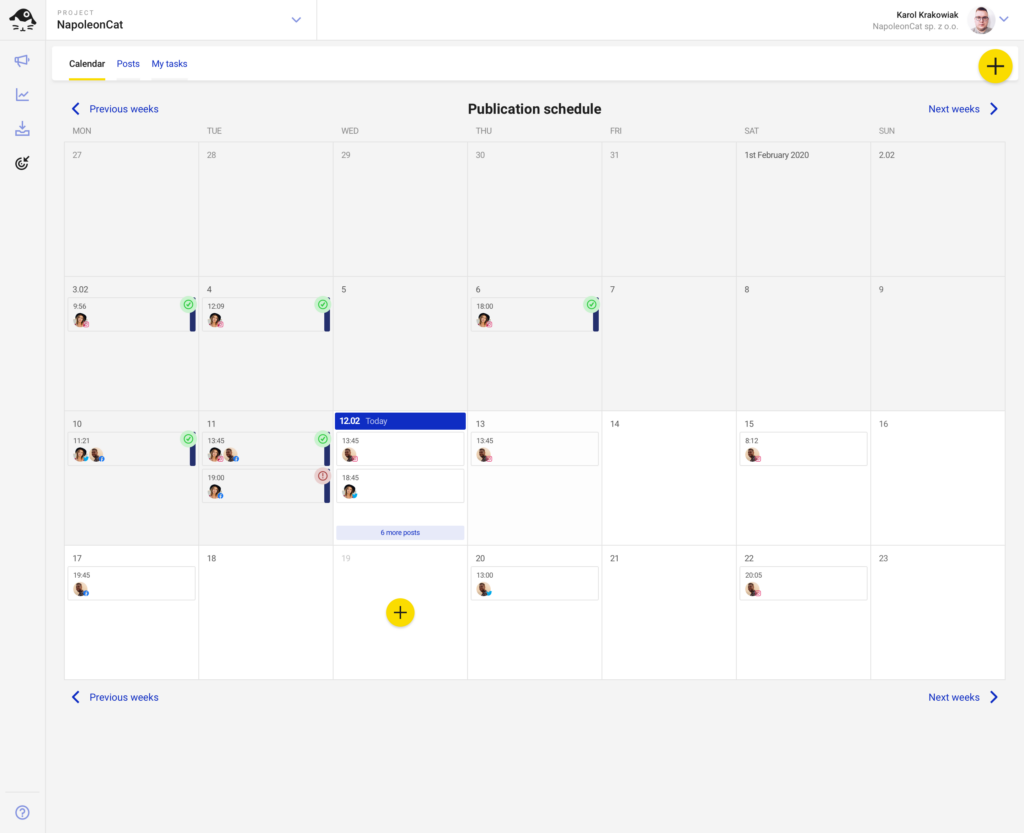
Using NapoleonCat feels like working with a tool you can rely on day in and day out, making it an ideal choice for full-time use.
Pros:
|
Cons:
|
Pricing:
|
NapoleonCat vs Sprout Social: A Feature Comparison
Here’s a side-by-side feature comparison of NapoleonCat and Sprout Social:
|
Features |
NapoleonCat | SproutSocial |
|
Supported Platforms |
Facebook, Messenger, Twitter, TikTok, Instagram, LinkedIn, YouTube, and Google Business Profile |
Facebook, Instagram, LinkedIn, Pinterest, TikTok, Twitter, YouTube, Google Business Profile, WhatsApp |
| AI-Powered Content Creation | ❌ |
✅ |
| Content Categories | ✅ |
❌ |
|
Content Scheduling |
✅ | ✅ |
| Bulk Scheduling | ✅ |
✅ |
|
Evergreen Posting |
❌ |
❌ |
| Social Media Calendar | ✅ |
✅ |
|
RSS Feed Import |
✅ |
✅ |
| Hashtag Generator | ❌ |
❌ |
|
Visual Integrations (e.g., Canva, Unsplash, GIPHY) |
❌ |
✅ |
|
Multiple URL shorteners |
✅ | ✅ |
| Social Media Analytics | ✅ |
✅ |
|
PDF Reports |
✅ |
✅ |
| Team Collaboration Features | ✅ |
✅ |
| Multiple Workspaces | ✅ |
❌ |
| Social Inbox |
✅ |
✅ |
|
Free Trial |
14-day free trial |
30-day free trial |
| Starting Price |
$31/month |
$249/month |
3. Statusbrew
Statusbrew has 1:1 feature parity in terms of full-fledged social media with Sprout Social at a fair investment.
You can plan and schedule posts, engage with your audience, collaborate, and track performance—all from a single, centralized platform just like Sprout Social.
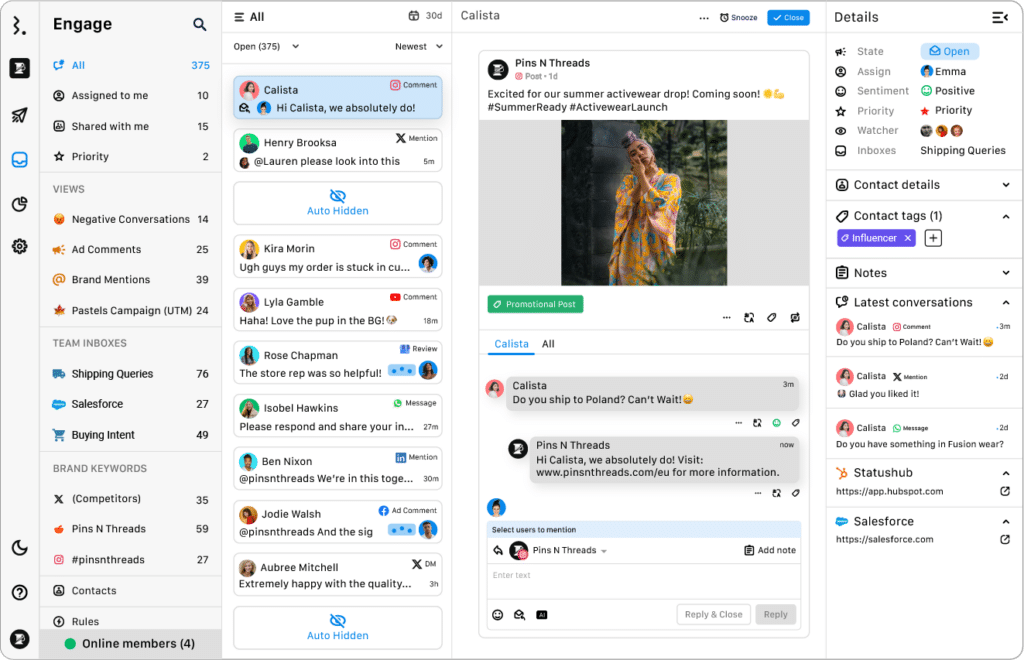
Statusbrew simplifies social media management and provides actionable insights through advanced analytics. Its AI-powered sentiment analysis helps you understand what content resonates with your audience, enabling data-driven decisions to enhance engagement and outcomes.
Pros:
|
Cons:
|
Pricing:
|
Statusbrew vs Sprout Social: A Feature Comparison
| Features | Statusbrew | Sprout Social |
| Supported Platforms | Facebook, Instagram, LinkedIn, Pinterest, TikTok, X(Twitter), YouTube, Google Business Profile, WhatsApp | Facebook, Instagram, LinkedIn, Pinterest, TikTok, Twitter, YouTube, Google Business Profile, WhatsApp |
| AI-Powered Content Creation | ✅ | ✅ |
| Content Categories | ✅ | ❌ |
| Content Scheduling | ✅ | ✅ |
| Bulk Scheduling | ✅ | ✅ |
| Evergreen Posting | ✅ | ❌ |
| Social Media Calendar | ✅ | ✅ |
| RSS Feed Import | ✅ | ✅ |
| Hashtag Generator | ❌ | ❌ |
| Visual Integrations (e.g., Canva, Unsplash, GIPHY) | ✅ | ✅ |
| Multiple URL shorteners | ❌ (Bitly only) | ✅ |
| Social Media Analytics | ✅ | ✅ |
| PDF Reports | ✅ | ✅ |
| Team Collaboration Features | ✅ | ✅ |
| Multiple Workspaces | ✅ | ❌ |
| Social Inbox | ✅ | ✅ |
| Free Trial | 14-day free trial | 30-day free trial |
| Starting Price | $129/month | $249/month |
4. Planable
Planable is a platform dedicated to making content collaboration processes smoother for teams and brands.

Planable empowers you to plan, collaborate on, and approve a wide range of content, including blogs, newsletters, social media posts, emails, and campaigns. A standout feature of Planable is its user-friendly interface, which provides a seamless experience and supports various content types through its Universal Content feature.
Pros:
|
Cons:
|
Pricing:
|
Planable vs Sprout Social: A Feature Comparison
Here’s a comparison table to help you choose between Planable and Sprout Social:
|
Features |
Planable | Sprout Social |
| Supported Platforms | Facebook, Twitter, LinkedIn, Instagram, YouTube, Google Business Profile, Pinterest, TikTok, long-form content |
Facebook, Instagram, LinkedIn, Pinterest, TikTok, Twitter, YouTube, Google Business Profile, WhatsApp |
|
AI-Powered Content Creation |
✅ | ✅ |
| Content Categories | ✅ |
❌ |
|
Content Scheduling |
✅ | ✅ |
| Bulk Scheduling | ❌ |
✅ |
|
Evergreen Posting |
✅ | ❌ |
| Social Media Calendar | ✅ |
✅ |
|
RSS Feed Import |
❌ | ✅ |
| Hashtag Generator | ❌ |
❌ |
|
Visual Integrations (e.g., Canva, Unsplash, GIPHY) |
✅ | ✅ |
| Multiple URL shorteners | ✅ |
✅ |
|
Social Media Analytics |
✅ | ✅ |
| PDF Reports | ❌ |
✅ |
|
Team Collaboration Features |
✅ | ✅ |
| Multiple Workspaces | ✅ |
❌ |
|
Social Inbox |
❌ | ✅ |
| Free Trial | Free plan for 50 posts |
30-day free trial |
|
Starting Price |
$13/month/user |
$249/month |
5. Hootsuite
Hootsuite was made for organizations looking to improve their customers’ social media experiences.
With its wide array of features, this platform allows businesses to effectively manage all of their social media channels: create, plan, and schedule posts. Plus, it’s convenient, as everything can be done from one centralized management console.
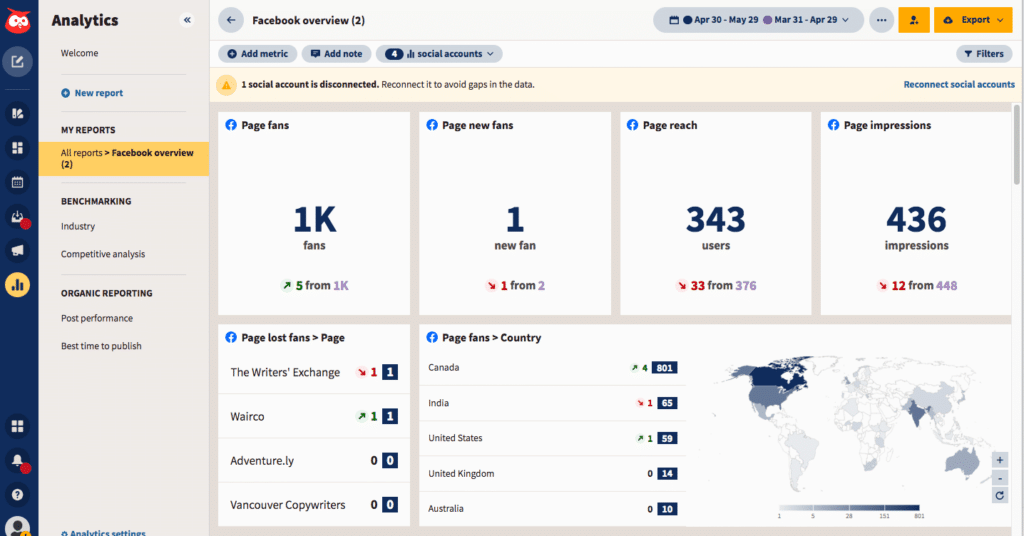
Image source
But it’s not just about convenience: Hootsuite is also great for optimizing your social media efforts. With real-time insights and reports, you can get a better understanding of what content and ads are resonating with your audience and make data-driven decisions to improve engagement and outcomes.
Pros:
|
Cons:
|
Pricing:
|
Hootsuite vs Sprout Social: A Feature Comparison
Here’s what Hootsuite can offer compared to Sprout Social:
|
Features |
Hootsuite | Sprout Social |
| Supported Platforms | Twitter, Facebook, LinkedIn, Instagram, Pinterest, YouTube, TikTok |
Facebook, Instagram, LinkedIn, Pinterest, TikTok, Twitter, YouTube, Google Business Profile, WhatsApp |
|
AI-Powered Content Creation |
✅ | ✅ |
| Content Categories | ❌ |
❌ |
|
Content Scheduling |
✅ | ✅ |
| Bulk Scheduling | ✅ |
✅ |
|
Evergreen Posting |
❌ | ❌ |
| Social Media Calendar | ✅ |
✅ |
|
RSS Feed Import |
✅ | ✅ |
| Hashtag Generator | ✅ |
❌ |
|
Visual Integrations (e.g., Canva, Unsplash, GIPHY) |
✅ | ✅ |
| Multiple URL shorteners | ❌ |
✅ |
|
Social Media Analytics |
✅ | ✅ |
| PDF Reports | ✅ |
✅ |
|
Team Collaboration Features |
✅ | ✅ |
| Multiple Workspaces | ✅ |
❌ |
|
Social Inbox |
✅ | ✅ |
|
Free Trial |
30-day free trial |
30-day free trial |
| Starting Price | $99/month |
$249/month |
6. Khoros Marketing
Khoros Marketing is great for businesses looking to boost their social media marketing efforts. It not only helps companies stay organized but also provides valuable insights through detailed analytics.
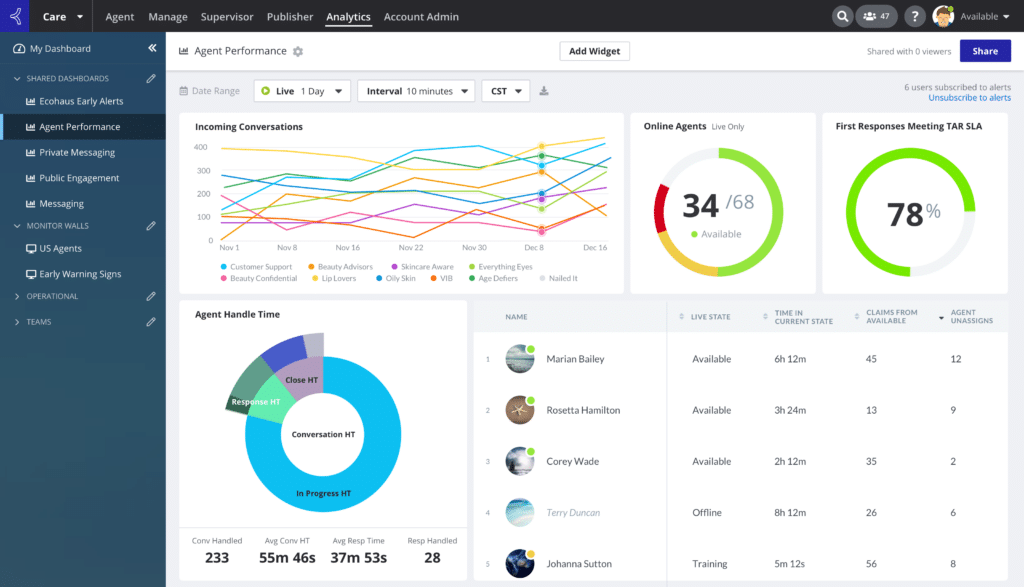
Image source
With features like scheduling, collaboration tools, risk management, calendar integration, content labeling, real-time alerts and notifications, and robust access control, Khoros Marketing is a comprehensive solution for maximizing the success of sales campaigns.
Pros:
|
Cons:
|
Pricing: |
Khoros Marketing vs Sprout Social: A Feature Comparison
Here are the differences between Khoros Marketing and Sprout Social:
|
Features |
Khoros | Sprout Social |
| Supported Platforms | Facebook, Instagram, LinkedIn, TikTok, Twitter, WhatsApp, Google Business Profile |
Facebook, Instagram, LinkedIn, Pinterest, TikTok, Twitter, YouTube, Google Business Profile, WhatsApp |
|
AI-Powered Content Creation |
❌ | ✅ |
| Content Categories | ✅ |
❌ |
|
Content Scheduling |
✅ | ✅ |
| Bulk Scheduling | ✅ |
✅ |
|
Evergreen Posting |
❌ | ❌ |
| Social Media Calendar | ✅ |
✅ |
|
RSS Feed Import |
❌ | ✅ |
| Hashtag Generator | ❌ |
❌ |
|
Visual Integrations (e.g., Canva, Unsplash, GIPHY) |
❌ | ✅ |
| Multiple URL shorteners | ✅ |
✅ |
|
Social Media Analytics |
✅ | ✅ |
| PDF Reports | ✅ |
✅ |
|
Team Collaboration Features |
✅ | ✅ |
| Multiple Workspaces | ✅ |
❌ |
|
Social Inbox |
✅ | ✅ |
| Free Trial | ❌ |
30-day free trial |
|
Starting Price |
Custom |
$249/month |
7. Loomly
Loomly is a user-friendly tool that offers a wide range of features to help you effectively manage every aspect of your social media marketing strategy.
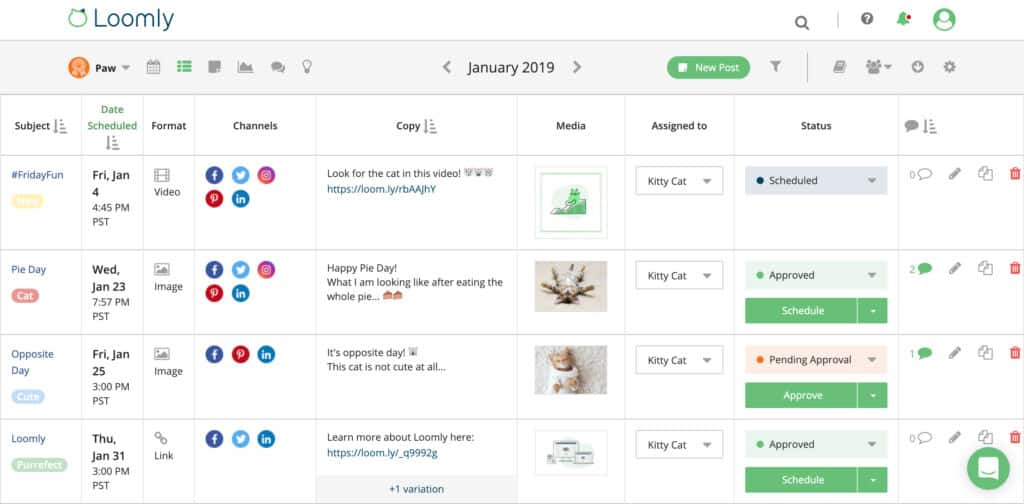
Image source
Their Library feature allows you to easily organize and access all your brand assets, making it a breeze to manage your visual content. Plus, Loomly offers native scheduling, post targeting, and sponsoring capabilities to help you reach and engage with your target audience to the fullest.
Pros:
|
Cons:
|
Pricing:
SocialBee is a more affordable alternative to Loomly. It starts at just $29/month, supports posting on more platforms (including Bluesky), and includes more advanced AI tools for content creation and planning. Check out the full comparison here. |
Loomly vs Sprout Social: A Feature Comparison
Here’s a comparison between the features of these two social media management platforms – Loomly and Sprout Social:
|
Features |
Loomly | Sprout Social |
| Supported Platforms | Facebook, Google Business Profile, Instagram, LinkedIn, Pinterest, Snapchat, TikTok, Twitter, YouTube |
Facebook, Instagram, LinkedIn, Pinterest, TikTok, Twitter, YouTube, Google Business Profile, WhatsApp |
|
AI-Powered Content Creation |
✅ | ✅ |
| Content Categories | ❌ |
❌ |
|
Content Scheduling |
✅ | ✅ |
| Bulk Scheduling | ❌ |
✅ |
|
Evergreen Posting |
❌ | ❌ |
| Social Media Calendar | ✅ |
✅ |
|
RSS Feed Import |
✅ | ✅ |
| Hashtag Generator | ✅ |
❌ |
|
Visual Integrations (e.g., Canva, Unsplash, GIPHY) |
✅ | ✅ |
| Multiple URL shorteners | ✅ |
✅ |
|
Social Media Analytics |
✅ | ✅ |
| PDF Reports | ✅ |
✅ |
|
Team Collaboration Features |
✅ | ✅ |
| Multiple Workspaces | ❌ |
❌ |
|
Social Inbox |
✅ | ✅ |
| Free Trial | 14-day free trial |
30-day free trial |
|
Starting Price |
$65/month |
$249/month |
8. MavSocial
MavSocial is a handy tool designed for businesses that have multiple locations and profiles on social media. With MavSocial, you can efficiently handle all your publishing, advertising, engagement, reviews, and reporting tasks from a single platform.
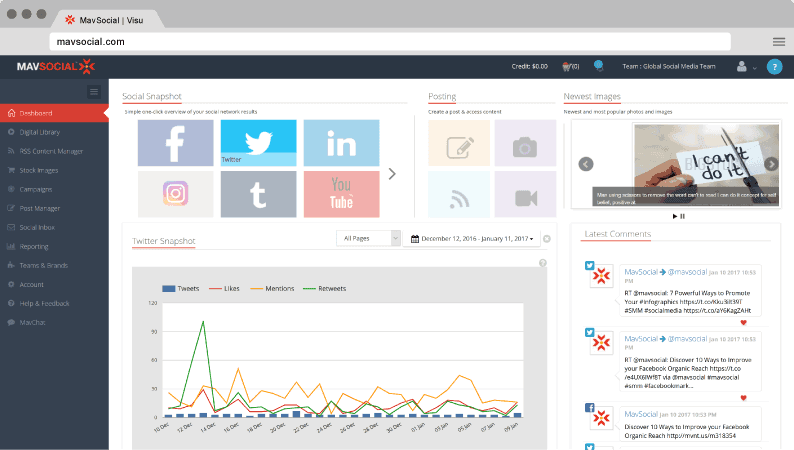
Image source
One of its standout features is the ability for businesses with various locations to effortlessly create Facebook ads that are geo-targeted.
Pros:
|
Cons:
|
Pricing:
|
MavSocial vs Sprout Social: A Feature Comparison
Here are the main feature differences between MavSocial and Sprout Social:
|
Features |
MavSocial | Sprout Social |
| Supported Platforms | Facebook, Instagram, Twitter, YouTube, LinkedIn, Google Business Profile, and Tumblr |
Facebook, Instagram, LinkedIn, Pinterest, TikTok, Twitter, YouTube, Google Business Profile, WhatsApp |
|
AI-Powered Content Creation |
❌ | ✅ |
| Content Categories | ✅ |
❌ |
|
Content Scheduling |
✅ | ✅ |
| Bulk Scheduling | ✅ |
✅ |
|
Evergreen Posting |
✅ | ❌ |
| Social Media Calendar | ✅ |
✅ |
|
RSS Feed Import |
✅ | ✅ |
| Hashtag Generator | ❌ |
❌ |
|
Visual Integrations (e.g., Canva, Unsplash, GIPHY) |
✅ | ✅ |
| Multiple URL shorteners | ✅ |
✅ |
|
Social Media Analytics |
✅ | ✅ |
| PDF Reports | ✅ |
✅ |
|
Team Collaboration Features |
✅ | ✅ |
| Multiple Workspaces | ✅ |
❌ |
|
Social Inbox |
✅ | ✅ |
| Free Trial | 14-day free trial |
30-day free trial |
|
Starting Price |
$78/month |
$249/month |
9. MeetEdgar
MeetEdgar caters specifically to small businesses and entrepreneurs, making it perfect for your future social media campaigns.

Image source
With its array of features for scheduling and organizing social media posts, MeetEdgar makes automating the publishing process across different platforms a breeze.
Pros:
|
Cons:
|
Pricing:
|
MeetEdgar vs Sprout Social: A Feature Comparison
Let’s help you get an idea of the similarities and differences between MeetEdgar and Sprout Social:
|
Features |
MeetEdgar | SproutSocial |
| Supported Platforms | Facebook, Google Business Profile, Instagram, LinkedIn, Pinterest, TikTok, Twitter |
Facebook, Instagram, LinkedIn, Pinterest, TikTok, Twitter, YouTube, Google Business Profile, WhatsApp |
|
AI-Powered Content Creation |
❌ | ✅ |
| Content Categories | ✅ |
❌ |
|
Content Scheduling |
✅ | ✅ |
| Bulk Scheduling | ❌ |
✅ |
|
Evergreen Posting |
✅ | ❌ |
| Social Media Calendar | ✅ |
✅ |
|
RSS Feed Import |
✅ | ✅ |
| Hashtag Generator | ❌ |
❌ |
|
Visual Integrations (e.g., Canva, Unsplash, GIPHY) |
✅ | ✅ |
| Multiple URL shorteners | ✅ |
✅ |
|
Social Media Analytics |
✅ | ✅ |
| PDF Reports | ❌ |
✅ |
|
Team Collaboration Features |
❌ | ✅ |
| Multiple Workspaces | ❌ |
❌ |
|
Social Inbox |
✅ | ✅ |
| Free Trial | 7-day free trial |
30-day free trial |
|
Starting Price |
$29/month |
$249/month |
10. Emplifi
Emplifi is a great Social Marketing Cloud designed for modern businesses. It empowers brands to create and manage effective social media strategies, analyze trends, and boost performance, all in one place.

Image source
Emplifi simplifies the process of transforming scattered social media data into actionable insights. This will guide you in creating content that resonates with your audience, leading to more engaging and empathetic social experiences that truly stand out. This way, you can launch powerful social media campaigns that make a lasting impact.
Pros:
|
Cons:
|
Pricing:
|
Emplifi vs Sprout Social: A Feature Comparison
Here is a side-by-side comparison between Emplifi and Sprout Social:
| Features | Emplifi | Sprout Social |
| Supported Platforms |
Facebook, Google Business Profile, Instagram, LinkedIn, Pinterest, TikTok, Twitter, YouTube |
Facebook, Instagram, LinkedIn, Pinterest, TikTok, Twitter, YouTube, Google Business Profile, WhatsApp |
|
AI-Powered Content Creation |
✅ | ✅ |
| Content Categories | ✅ |
❌ |
| Content Scheduling | ✅ |
✅ |
|
Bulk Scheduling |
✅ | ✅ |
| Evergreen Posting | ❌ |
❌ |
|
Social Media Calendar |
✅ | ✅ |
|
RSS Feed Import |
✅ | ✅ |
|
Hashtag Generator |
✅ | ❌ |
|
Visual Integrations (e.g., Canva, Unsplash, GIPHY) |
❌ |
✅ |
| Multiple URL shorteners | ✅ |
✅ |
| Social Media Analytics | ✅ |
✅ |
|
PDF Reports |
✅ |
✅ |
|
Team Collaboration Features |
✅ | ✅ |
| Multiple Workspaces | ✅ |
❌ |
| Social Inbox | ✅ |
✅ |
|
Free Trial |
Free trial | 30-day free trial |
| Starting Price | $200/year |
$249/month |
11. Zoho Social
Zoho Social is a fantastic social media management platform that offers a wide range of features such as post scheduling, mention monitoring, and the ability to create personalized dashboards.
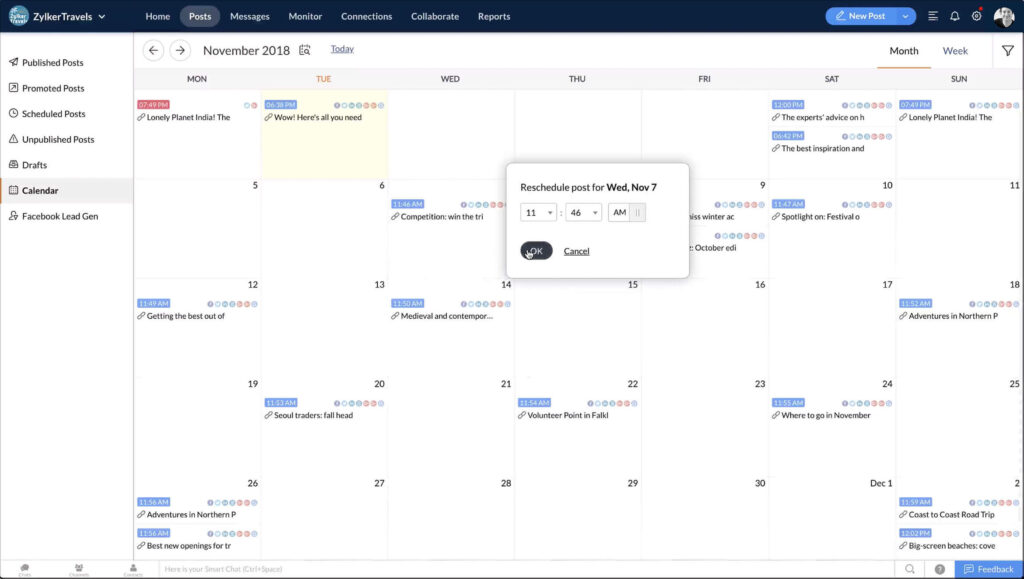
Image source
With Zoho Social, you have everything you need to successfully manage your social media presence, especially if you work for an agency.
Pros:
|
Cons:
|
Pricing:
|
Zoho Social vs Sprout Social: A Feature Comparison
Check out the feature comparison between Zoho Social and Sprout Social:
|
Features |
Zoho | Sprout Social |
| Supported Platforms | Facebook, Google Business Profile, Instagram, LinkedIn, Pinterest, TikTok, Twitter, YouTube |
Facebook, Instagram, LinkedIn, Pinterest, TikTok, Twitter, YouTube, Google Business Profile, WhatsApp |
|
AI-Powered Content Creation |
✅ | ✅ |
| Content Categories | ❌ |
❌ |
|
Content Scheduling |
✅ | ✅ |
| Bulk Scheduling | ✅ |
✅ |
|
Evergreen Posting |
❌ | ❌ |
| Social Media Calendar | ✅ |
✅ |
|
RSS Feed Import |
✅ | ✅ |
| Hashtag Generator | ❌ |
❌ |
|
Visual Integrations (e.g., Canva, Unsplash, GIPHY) |
✅ |
✅ |
|
Multiple URL shorteners |
✅ | ✅ |
| Social Media Analytics | ✅ |
✅ |
|
PDF Reports |
✅ | ✅ |
| Team Collaboration Features | ✅ |
✅ |
|
Multiple Workspaces |
✅ | ❌ |
| Social Inbox | ✅ |
✅ |
|
Free Trial |
15-day free trial |
30-day free trial |
| Starting Price | €10/month |
$249/month |
12. HubSpot
HubSpot’s Social Media Management Software offers roughly similar features to Sprout Social. But the platform’s social media features are part of HubSpot’s Marketing Hub.
That means you get access to tons of other multi-channel marketing tools: email marketing automation, cross-channel advertising management, email and site A/B testing, and more.
This makes HubSpot ideal for enterprise-level companies looking to unify all their marketing efforts.
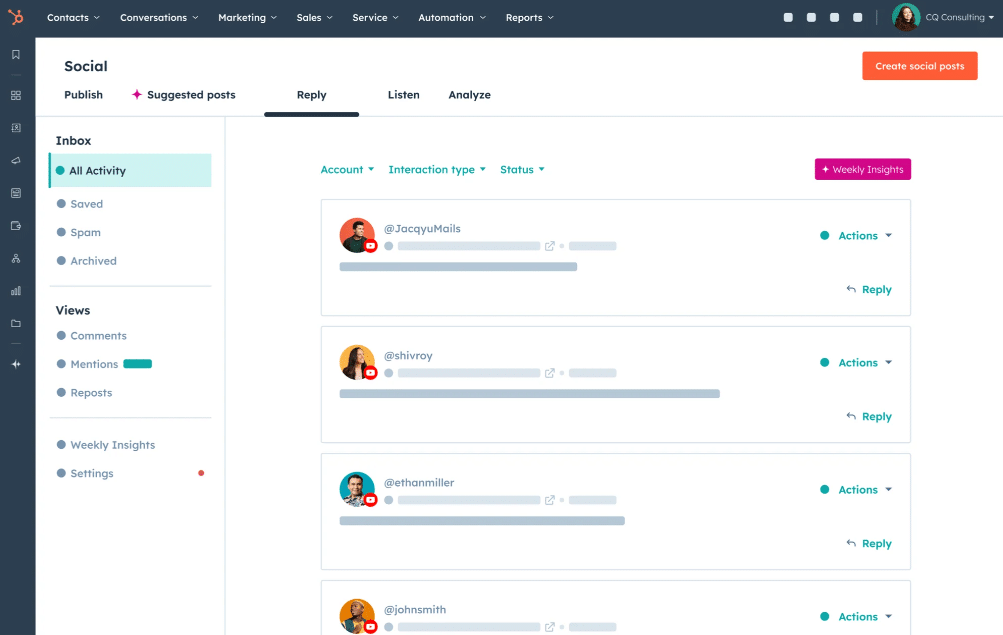
As for the social media management platform itself, HubSpot offers social listening via keyword monitoring streams, sentiment analysis, and a unified inbox that tracks comments, mentions, and DMs.
Plus, you have the option to add followers to your contact database through HubSpot’s integrated CRM. Its AI assistant also summarizes weekly social performance and offers optimization suggestions in terms of content topics and ideal posting times.
Pros:
|
Cons:
|
Pricing:
|
HubSpot vs Sprout Social: A Feature Comparison
Here’s how HubSpot and Sprout Social stack up against each other:
|
Features |
HubSpot |
Sprout Social |
|
Supported Platforms |
Facebook, Instagram, LinkedIn, Twitter, YouTube |
Facebook, Instagram, LinkedIn, Pinterest, TikTok, Twitter, YouTube, Google Business Profile, WhatsApp |
|
AI-Powered Content Creation |
✅ |
✅ |
|
Content Categories |
❌ |
❌ |
|
Content Scheduling |
✅ |
✅ |
|
Bulk Scheduling |
✅ |
✅ |
|
Evergreen Posting |
❌ |
❌ |
|
Social Media Calendar |
✅ |
✅ |
|
RSS Feed Import |
❌ |
✅ |
|
Hashtag Generator |
✅ |
❌ |
|
Visual Integrations (e.g., Canva, Unsplash, GIPHY) |
✅ |
✅ |
|
Multiple URL shorteners |
✅ |
✅ |
|
Social Media Analytics |
✅ |
✅ |
|
PDF Reports |
✅ |
✅ |
|
Team Collaboration Features |
✅ |
✅ |
|
Multiple Workspaces |
❌ |
❌ |
|
Social Inbox |
✅ |
✅ |
|
Free Trial |
14-day free trial |
30-day free trial |
|
Starting Price |
$800/month (for 3 users) |
$249/month |