Most AI agents, ML pipelines, AI enrichment workflows, deep research systems, and data-driven decision engines don’t fail because the models are bad. They fail because the data is! 🤯
Specifically, the data tend to be outdated, out of context, unverifiable, or all three at once. That’s the core problem. And the “Search and Extract” AI pattern exists to fix that! 🔍 ✨
In this article, you’ll see what Search and Extract actually means, how it works under the hood, why it matters way more than most people think, and how to implement it end-to-end with a concrete example!
The Need for Fresh, Contextual, and Trusted, Verifiable Information
According to Statista, roughly 402.74 million terabytes of data are generated every single day 🌊
That data pours into the web, data warehouses, analytics stacks, and pipelines at a scale that’s honestly hard to reason about.
But here’s the catch: more data doesn’t mean better data! 🎯
At that volume, it’s unrealistic to assume everything reflects reality—or that it can even be trusted in the first place…
Enterprises still make business decisions, automations, and AI-driven calls based on that data.
And when the source is outdated, incomplete, or just plain wrong… the insights built on top of it can’t be reliable. They just look confident, but they’re probably wrong! 😬
This is exactly why LLMs hallucinate, AI agents give convincing but incorrect answers, and data pipelines quietly fail in production.
In most real-world cases, the problem isn’t the model, the tooling, or the implementation. It’s the input data!
Whether you’re running a classic analytics workflow or a fully autonomous AI agent, everything hinges on the quality of the source data. You need data that is:
- Fresh 🕒
- Contextual 🧠
- Verifiable 🔎
After all, if you don’t know where the data came from or when it was collected, you can’t realistically trust the outcome.
That’s the real question.
How do you reliably retrieve information that is up to date, relevant to a specific task, and provably tied back to its source?
That’s where the Search and Extract pattern comes in! Let’s break it down.
Search and Extract: What It Is and Why It’s the Solution
“Search and Extract” is a de facto standard process for retrieving up-to-date, verifiable, and context-rich information from the web 🌐. It’s simple in structure, but extremely effective in practice.
At a high level, it operates in two distinct steps:
- Search: The system performs a live web search on search engines like Google to find the most relevant and trustworthy sources for a given query. This helps the data pipeline start with information that is current and comes from clear sources.
- Extract: From the search results, the system identifies the most relevant URLs, visits those pages, and retrieves the most useful content or data from them. This may include facts, statistics, definitions, or structured information parsed from the page. The retrieved data then becomes the grounded, trusted basis for the downstream steps in the pipeline.
This pattern is particularly useful in AI-related applications, such as AI agents, agentic RAG systems, and enterprise-grade AI workflows. Also, it’s applicable to traditional machine learning, fact-checking, and data enrichment pipelines.
The end goal of the “Search and Extract” pattern is to address the modern data challenges by ensuring the collected information is:
- Fresh 🕒, as the scraped public web data comes from recent web searches, which can include the latest information and news.
- Contextual 🧠, as the information is closely aligned with the topics specified in the search query.
- Verifiable 🔎, as the data originates directly from specific web pages, with URLs that anyone can visit and check.
How Does Search and Extract Work?
At a high level, “Search and Extract” can be summarized with the following workflow:
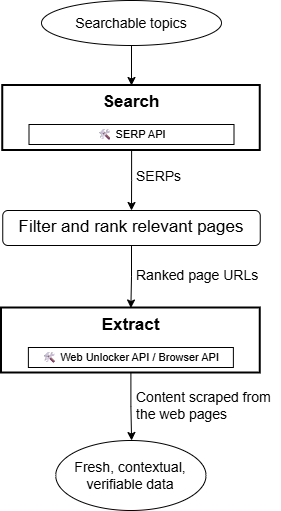
The input for this workflow is a list of searchable topics. These are generally contextually extracted from documents, datasets, or given information sources using AI/ML. That’s what commonly occurs in AI enrichment, data verification, RAG workflows, or deep research applications.
Regardless of the source, the searchable topics are passed to the “Search” component, where a SERP API solution performs automated web searches on the target search engines. After retrieving the search results, you can either consider all returned web pages or filter only the most relevant ones using AI/ML or strict rules (e.g., keeping pages from specific domains, languages, or other criteria).
When targeting multiple search queries at once (whether different queries or multiple pages for the same query), you may need to run a custom re-ranking algorithm. The ranking provided by Google or any search engine is optimized for SEO, which may not reflect what matters for your use case. In practice, you often want to reorder the selected pages based on your specific goals.
The selected URLs are then sent to the “Extract“ node, where a web scraping service accesses each page and extracts the main information. This extracted data is fresh, contextual, and verifiable, as desired.
Next, let’s explore the services that come into play in the “Search” and “Extract” phases, respectively!
Search 🔍
Search engines like Google, Bing, DuckDuckGo, Baidu, and Yandex protect their SERPs (Search Engine Results Pages) with rate limits and CAPTCHAs to prevent automated scraping. Because of that, scraping bots that try to fetch SERPs directly are often blocked. 🚫
The most reliable way to perform the “Search” phase is by using a SERP API solution. These services expose endpoints to trigger search tasks in the cloud using infrastructure designed to handle scalability and anti-bot measures for you.
Bright Data’s SERP API is one of the most complete web search services available. It supports global searches through a proxy network of more than 150 million IPs across 195 countries, can return fully parsed SERP data in JSON, offers many pagination options, and supports integration into any data or ML pipeline using standard HTTP requests, as well as over 50+ AI agent frameworks and workflows.
Plus, Bright Data’s SERP API lets you run an unlimited number of search queries in parallel. This means you can retrieve thousands of results during the “Search” phase. Then, you can filter and re-rank them according to your needs in the later stages of the overall “Search and Extract” process (as mentioned earlier).
Extract ⛏️
Web data extraction is the harder part. The reason is that every website is different, and even pages within the same domain can follow different rendering, data-visualization, and retrieval logic. This makes programmatically accessing their content quite difficult. On top of that, sites tend to adopt anti-scraping measures to protect their valuable public web data.
That calls for third-party services that allow you to reliably access the content of web pages, regardless of how protected they are, and no matter your scalability needs. In this regard, Bright Data is one of the best web-scraping solution providers on the market, thanks to tools such as:
- Web Unlocker API: An API that accesses any public web page effortlessly, handling blocks, CAPTCHAs, fingerprinting, and proxy rotation automatically.
- Browser API: A fully hosted cloud browser compatible with Puppeteer, Selenium, Playwright, and other automation frameworks, featuring built-in CAPTCHA solving and automated proxy management.
Web Unlocker is ideal for retrieving page content, either in raw HTML or AI-ready Markdown (a great data format for LLM ingestion). For dynamic sites that require interaction or automation to access the data you need, Browser API is the better fit.
Together, these two solutions cover everything required for the “Extract” stage of a “Search and Extract” workflow.
How to Implement a Search and Extract Workflow in Python
Learn how to implement a realistic “Search and Extract” workflow in Python:
- For the Search phase, you’ll use Bright Data’s SERP API to run live web searches.
- For the Extract phase, you’ll rely on the Web Unlocker API to retrieve and parse content from the selected pages.
Follow the introduction below! 👇
Prerequisites
To follow along with this tutorial section, make sure you have:
- Python 3.9+ installed locally.
- A Bright Data account configured with a SERP API zone and a Web Unlocker API zone, along with your API key.
If you’re unfamiliar with how to get started with Bright Data’s SERP API or Web Unlocker API products, follow the official documentation:
- Introduction to SERP API
- Introduction to Bright Data’s Unlocker API
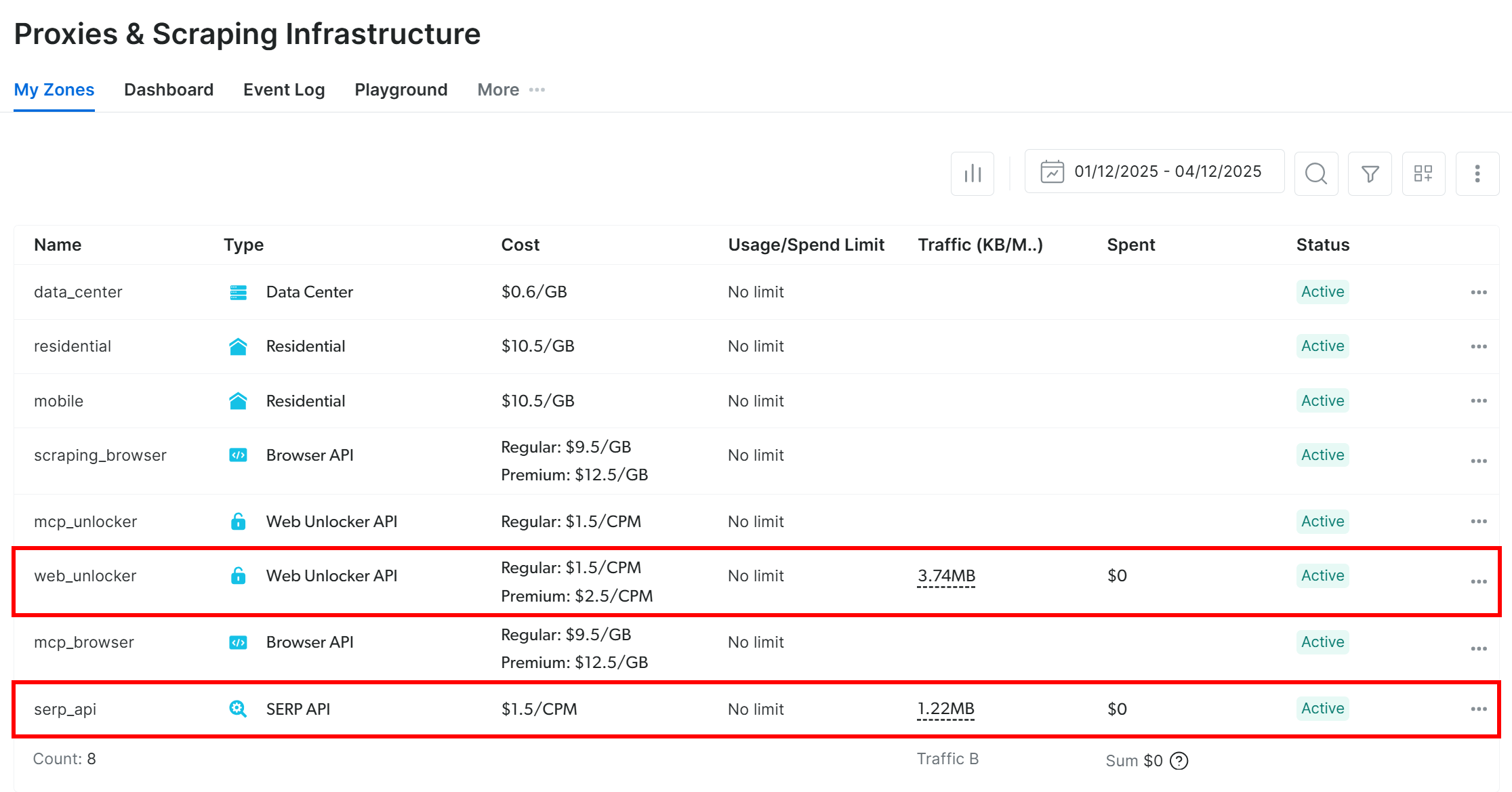
From now on, we’ll refer to your SERP API zone as serp_api and to your Web Unlocker API zone as web_unlocker:
Also, make sure the serp_apizone is configured in “Full JSON” mode in the “Data Format” section inside the configuration table:
n
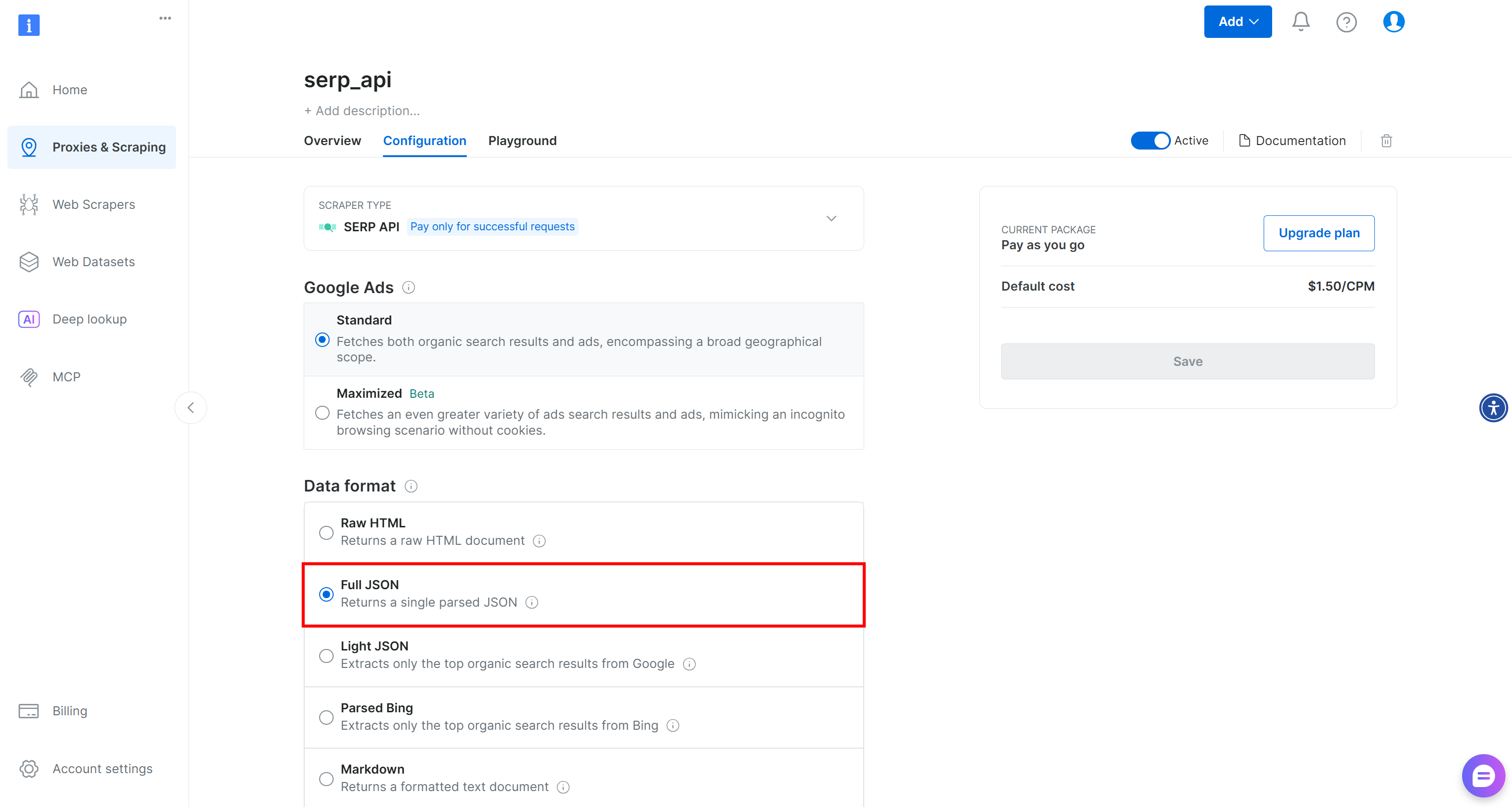
This way, Bright Data SERP API will return parsed SERP results in JSON format, making them easier to filter and re-rank.
Lastly, generate your Bright Data API key 🔑. That’ll be used to authenticate requests to the services mentioned above!
To speed up the process, we’ll presume you already have a Python project set up with a virtual environment in place.
Step #1: Prepare to Access Bright Data Services via API
The easiest way to connect to Bright Data services is directly through its API. First, install an async-ready HTTP client like AIOHTTP:
pip install aiohttp
Next, define the following two functions to call the SERP API and Web Unlocker API, respectively:
# Replace these with your Bright Data API token and zone names
BRIGHT_DATA_API_TOKEN = "<YOUR_BRIGHT_DATA_API_TOKEN>"
SERP_ZONE = "serp_api"  # Your SERP API zone
WEB_UNLOCKER_ZONE = "web_unlocker"  # Your Web Unlocker API zone

HEADERS = {
    "Authorization": f"Bearer {BRIGHT_DATA_API_TOKEN}", # To authenticate the API requests to Bright Data
    "Content-Type": "application/json"
}

async def fetch_serp(session, query, location="us", language="en"):
    url = "https://api.brightdata.com/request"
    data = {
        "zone": SERP_ZONE,
        "url": f"https://www.google.com/search?q={urllib.parse.quote_plus(query)}&hl={language}&gl={location}",
        "format": "json"
    }
    async with session.post(url, json=data, headers=HEADERS) as resp:
        response_data = await resp.json()
        return json.loads(response_data["body"])

async def fetch_page(session, page_url, data_format="markdown"):
    url = "https://api.brightdata.com/request"
    data = {
        "zone": WEB_UNLOCKER_ZONE,
        "url": page_url,
        "format": "raw",
        "data_format": data_format
    }
    async with session.post(url, json=data, headers=HEADERS) as resp:
        return await resp.text()
The fetch_serp() function connects to the Bright Data SERP API to perform Google searches and retrieve parsed JSON SERP results (as configured in your account).
Similarly, fetch_page() connects to the Bright Data Web Unlocker API to fetch web pages. Configuring the output as Markdown, which is ideal for ingestion into LLMs.
For more information on the arguments, parameters, and how to call those two APIs, refer to the docs! 📖
Note: In production, avoid hardcoding your Bright Data API key. Instead, load it from an environment variable.
Great! Now you have the building blocks to implement the “Search” and “Extract” phases in async function:
import asyncio

async def main():
    # "Search and Extract" logic...

# Run the async main function
asyncio.run(main())
Step #2: Perform the Extract Phase
Suppose you have AI agents relying on MCP integrations and want to produce a report showing how future changes in the protocol could affect them, which new features will be available, and so on.
Regular LLMs cannot help much with that task, as MCP is relatively new and most models were trained on older data. Thus, you need a search topic like:
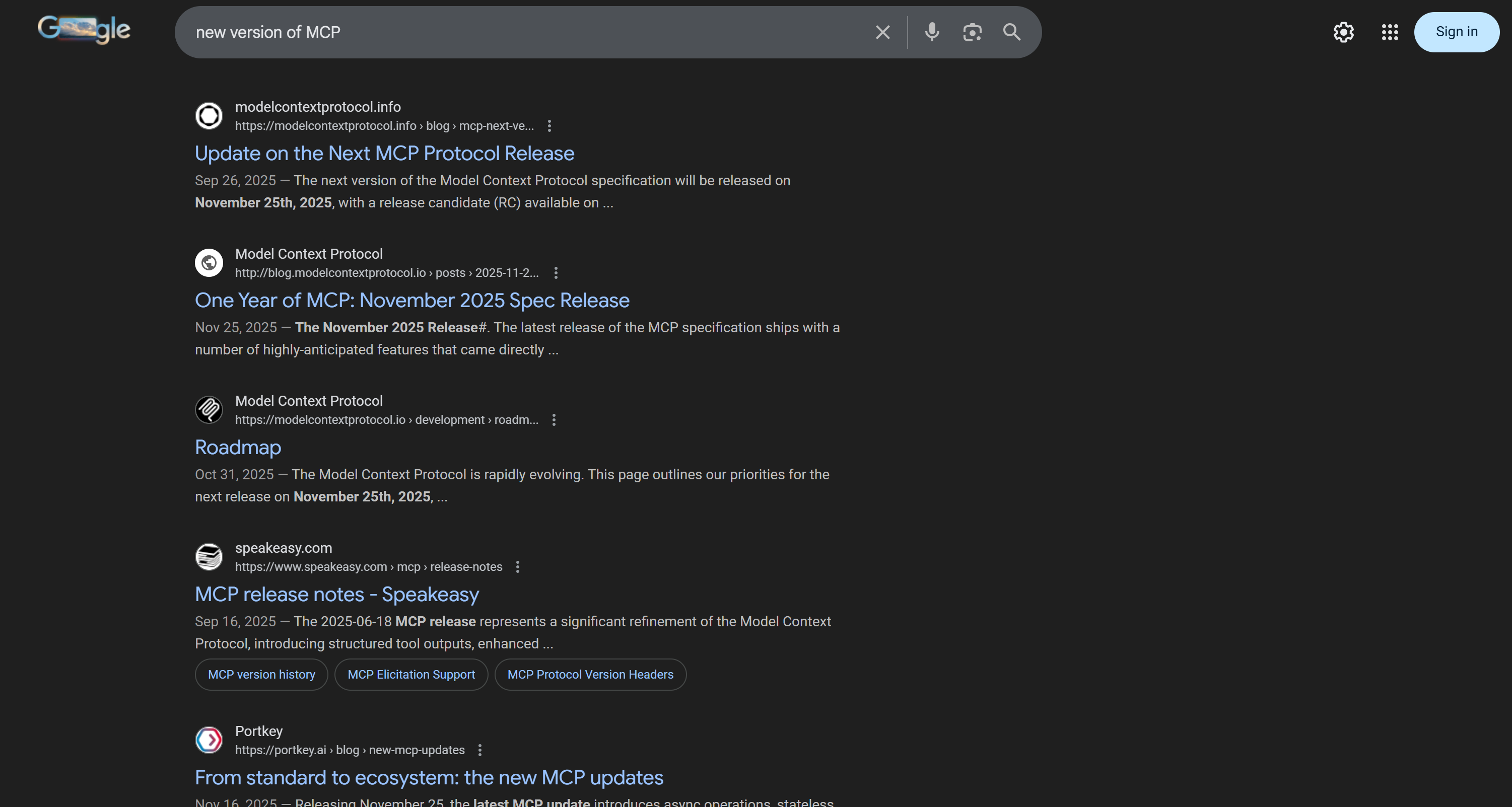
"new version of MCP"
Call the SERP API to retrieve parsed Google SERP results for that search query:
# Topics to search
input_topic = "new version of MCP"

async with aiohttp.ClientSession() as session:
    # Search phase: Get SERP results
    serp_results = await fetch_serp(session, input_topic)
Behind the scenes, the fetch_serp() function calls the SERP API using the provided search query. If you need to handle multiple queries, you can call fetch_serp() concurrently using asyncio.gather().
Note: By default, the SERP API returns 10 results per query, but it can be configured to return up to 100 results.
fetch_serp() returns parsed Google SERP results as a Python dictionary. Access the ranking using the organic attribute:
serp_ranking_results = serp_results.get("organic", [])
Print the search results, and you should get output similar to this: n 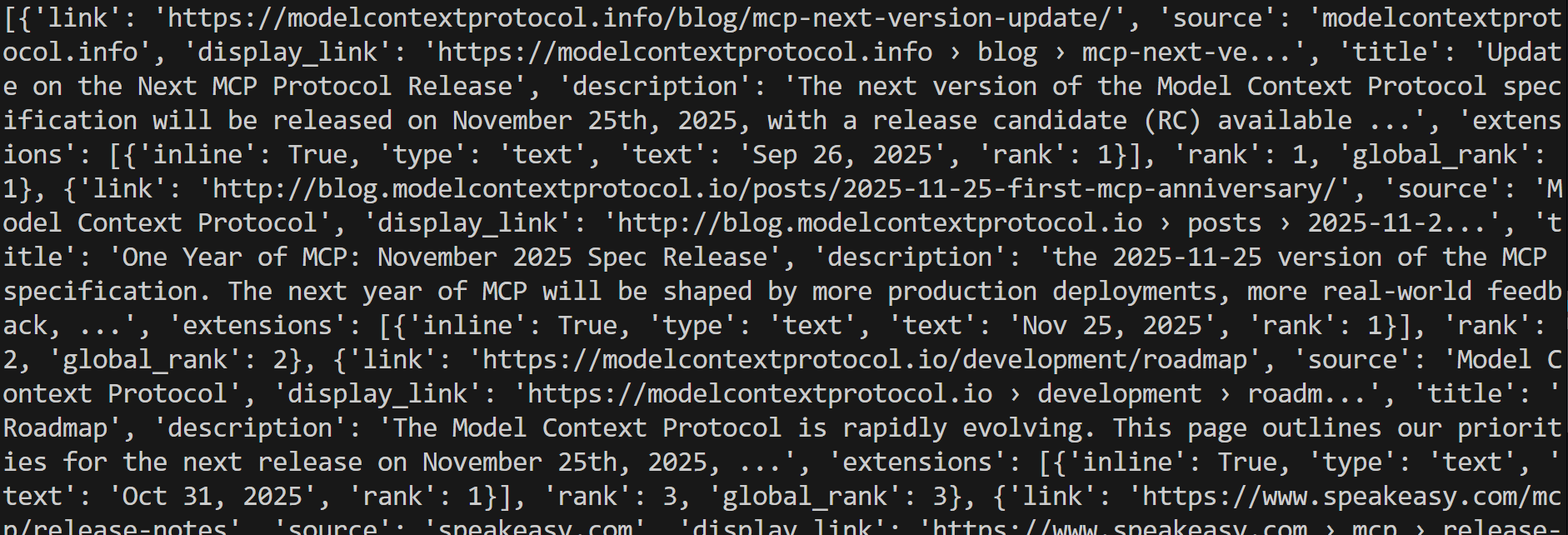
Step #3: Filter the URLs of Interest
Out of all SERP results returned by the SERP API call, assume you’re interested in up to the top 3 results from the “modelcontextprotocol.io” domain (the official domain for the MCP specification). Also, let’s consider Google’s original ranking as the ranking you want to preserve.
Filter them as follows:
# Where to store the page URLs to scrape in the "Extract" phase
pages_of_interest = []

# Iterate over results and filter for URLs containing "modelcontextprotocol.io"
for result in serp_data_results:
    page_url = result.get("url")
    if "modelcontextprotocol.io" in page_url:
        pages_of_interest.append(page_url)
    # Stop once reaching 3 results
    if len(page_url) == 3:
        break
The result will be a list of URLs to access during the “Extract” phase. In this run, the identified URLs are:
[
  "http://blog.modelcontextprotocol.io/posts/2025-11-25-first-mcp-anniversary/",
  "https://modelcontextprotocol.io/development/roadmap",
  "https://modelcontextprotocol.io/specification/2025-11-25"
]
Time to extract information from these pages!
Step #4: Perform the Extract Phase
Use the fetch_page() function to call the Web Unlocker API and scrape the three selected pages in parallel:
tasks = [fetch_page(session, url) for url in pages_of_interest]
web_page_results = await asyncio.gather(*tasks)
Note: If you’re dealing with a dynamic site that requires user interaction, extract data from it using a browser automation technology like Playwright, integrated with the Browser API. For more guidance, take a look at the docs.
The result will be an array containing the content of each target page. Access the unlocked Markdown content from each page with:
markdown_pages = [page for page in web_page_results]
Verify that the array actually contains the Markdown of the target pages:
for markdown_page in markdown_pages:
    print(markdown_page[:300] + "...n---n")
In this case, the output is:
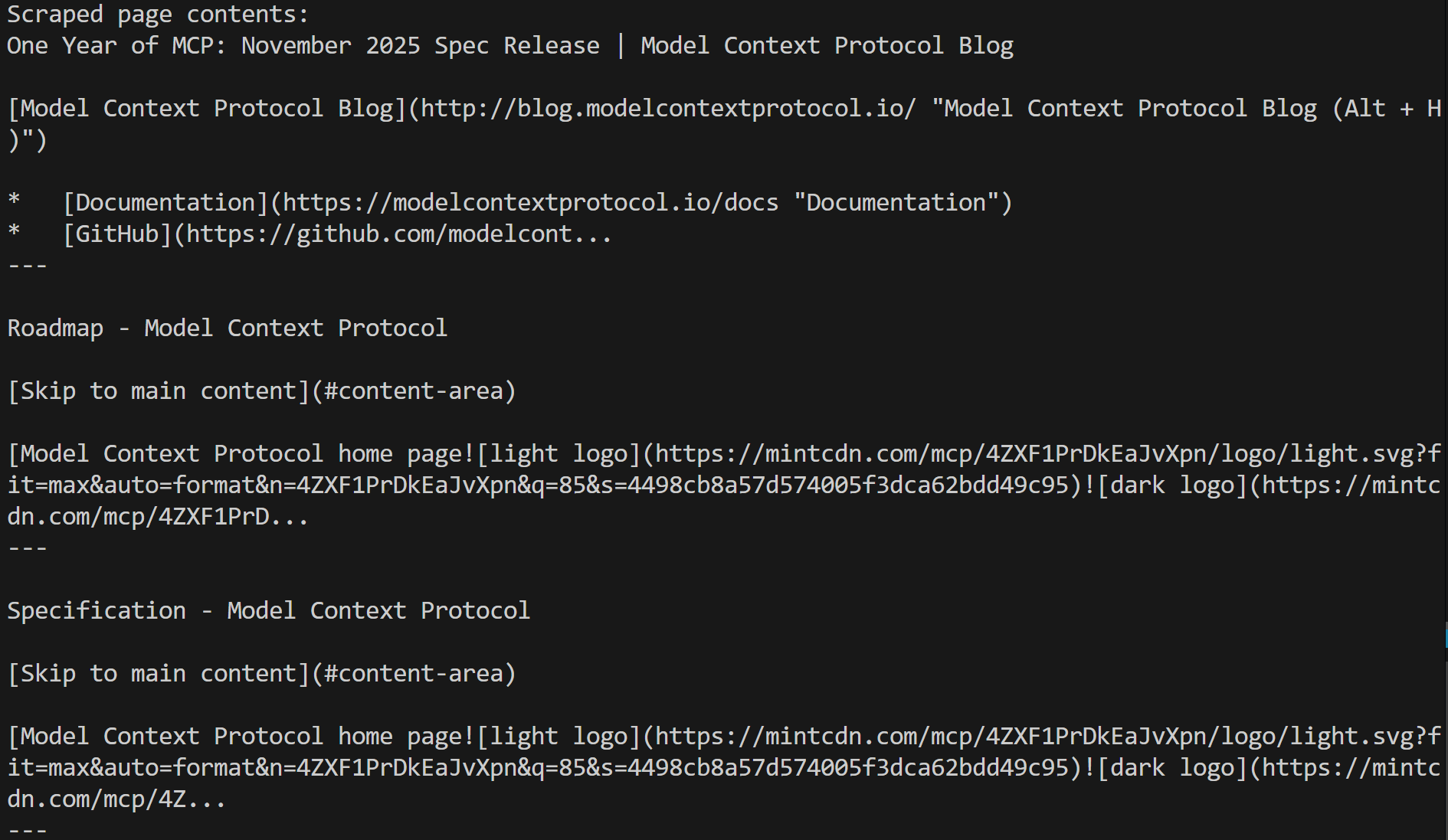
That corresponds to the Markdown version of each targeted page, which means the Web Unlocker API was able to perform web data extraction successfully, regardless of any anti-bot or anti-scraping measures in place.
Given this fresh, contextual, and verifiable data, store it for further analysis, pass it to an LLM for processing, use it to detect additional topics of interest, continue with deeper research, or apply it to many other use cases. Mission complete!
Step #5: Complete Code
The final version of the example is:
# pip install aiohttp

import asyncio
import aiohttp
import urllib.parse
import json

# Replace these with your Bright Data API token and zone names
BRIGHT_DATA_API_TOKEN = "<YOUR_BRIGHT_DATA_API_KEY>"
SERP_ZONE = "serp_api"  # Your SERP API zone
WEB_UNLOCKER_ZONE = "web_unlocker"  # Your Web Unlocker API zone

HEADERS = {
    "Authorization": f"Bearer {BRIGHT_DATA_API_TOKEN}", # To authenticate the API requests to Bright Data
    "Content-Type": "application/json"
}

async def fetch_serp(session, query, location="us", language="en"):
    url = "https://api.brightdata.com/request"
    data = {
        "zone": SERP_ZONE,
        "url": f"https://www.google.com/search?q={urllib.parse.quote_plus(query)}&hl={language}&gl={location}",
        "format": "json"
    }
    async with session.post(url, json=data, headers=HEADERS) as resp:
        response_data = await resp.json()
        return json.loads(response_data["body"])

async def fetch_page(session, page_url, data_format="markdown"):
    url = "https://api.brightdata.com/request"
    data = {
        "zone": WEB_UNLOCKER_ZONE,
        "url": page_url,
        "format": "raw",
        "data_format": data_format
    }
    async with session.post(url, json=data, headers=HEADERS) as resp:
        return await resp.text()


async def main():
    # Topics to search
    input_topic = "new version of MCP"

    async with aiohttp.ClientSession() as session:
        # Search phase: Get SERP results
        serp_results = await fetch_serp(session, input_topic)

        # Where to store the page URLs to scrape in the "Extract" phase
        pages_of_interest = []

        # Iterate over results and filter for URLs containing "modelcontextprotocol.io"
        for result in serp_results.get("organic", []):
            page_url = result.get("link")
            if page_url and "modelcontextprotocol.io" in page_url:
                pages_of_interest.append(page_url)
            if len(pages_of_interest) == 3:
                break

        print("Pages to scrape:", pages_of_interest)

        # Extract phase: Scrape pages concurrently
        tasks = [fetch_page(session, url) for url in pages_of_interest]
        web_page_results = await asyncio.gather(*tasks)

        # Access the content from each page
        markdown_pages = [page for page in web_page_results]

        print("Scraped page contents:")
        for markdown_page in markdown_pages:
            print(markdown_page[:300] + "...n---n")

        # AI processing, RAG pipelines, or further workflows...

# Run the async main function
asyncio.run(main())
Thanks to Bright Data API-ready products, you can implement an effective, enterprise-grade, production-ready “Search and Extract” workflow in less than 50 lines of Python code!
Conclusion
In this post, you looked at why data pipelines and AI workflows depend on up-to-date, contextual, and trustworthy information. At the end of the day, better inputs lead to better outputs, especially in AI-driven systems!
One reliable way to collect that data is through the Search and Extract AI pattern, which has effectively become a standard approach for accessing high-quality, verifiable web data. The Search 🔍 phase automates discovery across search engines, while the Extract ⛏️ phase pulls structured information from the most relevant results.
As shown throughout this article, using an AI-ready web scraping platform like Bright Data makes implementing this workflow both practical and scalable.
Start a Bright Data free trial today and explore all its web data solutions!
:::info
This article is published via HackerNoon Business Blogging program.
:::