A step-by-step guide to containerizing a FastAPI application with Docker and deploying it to the cloud for consistent, production-ready delivery.
Modern applications rarely live in isolation. They move between laptops, staging servers, and production environments.
Each environment has its own quirks, missing libraries, or slightly different configurations. This is where many “works on my machine” problems begin.
Docker was created to solve this exact issue, and it has become a core skill for anyone building and deploying software today.
In this article, you will learn how to Dockerize a LogAnalyzer Agent project and prepare it for deployment.
We will first understand what Docker is and why it matters. Then we will walk through converting this FastAPI-based project into a Dockerized application. Finally, we will cover how to build and upload the Docker image so it can be deployed to a cloud platform like Sevalla.
You only need a basic understanding of Python for this project. If you want to learn Docker in detail, go through this detailed tutorial.
What is Docker
Docker is a tool that packages your application together with everything it needs to run. This includes the operating system libraries, system dependencies, Python version, and Python packages. The result is called a Docker image. When this image runs, it becomes a container.
A container behaves the same way everywhere. If it runs on your laptop, it will run the same way on a cloud server. This consistency is the main reason Docker is so widely used.
For the LogAnalyzer Agent, this means that FastAPI, LangChain, and all Python dependencies will always be available, regardless of where the app is deployed.
Why Docker Matters
Without Docker, deployment usually involves manually installing dependencies on a server. This process is slow and error-prone. A missing system package or a wrong Python version can break the app.
Docker removes this uncertainty. You define the environment once, using a Dockerfile, and reuse it everywhere. This makes onboarding new developers easier, simplifies CI pipelines, and reduces production bugs.
For AI-powered services like the LogAnalyzer Agent, Docker is even more important. These services often rely on specific library versions and environment variables, such as API keys. Docker ensures that these details are controlled and repeatable.
Understanding the Project
Before containerizing the application, it is important to understand its structure. The LogAnalyzer Agent consists of a FastAPI backend that serves an HTML frontend and exposes an API endpoint for log analysis.
The backend depends on Python packages like FastAPI, LangChain, and the OpenAI client. It also relies on an environment variable for the OpenAI API key.
From Docker’s point of view, this is a typical Python web service. That makes it an ideal candidate for containerization.
At this stage, you should clone the project repository to your local machine. You can run the app using the command python app.py
Writing the Dockerfile
The Dockerfile is the recipe that tells Docker how to build your image. It starts with a base image, installs dependencies, copies your code, and defines how the application should start.
For this project, a lightweight Python image is a good choice. The Dockerfile might look like this.
FROM python:3.11-slim

WORKDIR /app
COPY requirements.txt .
RUN pip install --no-cache-dir -r requirements.txt
COPY . .
EXPOSE 8000
CMD ["uvicorn", "main:app", "--host", "0.0.0.0", "--port", "8000"]
Each line has a purpose. The base image provides Python. The working directory keeps files organized.
Dependencies are installed before copying the full code to improve build caching. The expose instruction documents the port used by the app. The command starts the FastAPI server.
This file alone turns your project into something Docker understands.
Handling Environment Variables in Docker
The LogAnalyzer Agent relies on an OpenAI API key. This key should never be hardcoded into the image. Instead, Docker allows environment variables to be passed at runtime.
During local testing, you can still use a .env file. When running the container, you can pass the variable using Docker’s environment flags or your deployment platform’s settings.
This separation keeps secrets secure and allows the same image to be used in multiple environments.
Building the Docker Image
Once the Dockerfile is ready, building the image is straightforward. From the root of the project, you run a Docker build command.
docker build -t loganalyzer:latest .
Docker reads the Dockerfile, executes each step, and produces an image.
This image contains your FastAPI app, the HTML UI, and all dependencies. At this point, you can run it locally to verify that everything works exactly as before.
Running the container locally is an important validation step. If the app works inside Docker on your machine, it is very likely to work in production as well.
Testing the Container Locally
After building the image, you can start a container and map its port to your local machine. When the container starts, Uvicorn runs inside it, just like it did outside Docker.
docker run -d -p 8000:8000 -e OPENAI_API_KEY=your_api_key_here loganalyzer:latest
You should be able to open a browser, upload a log file, and receive analysis results. If something fails, the container logs will usually point you to missing files or incorrect paths.
This feedback loop is fast and helps you fix issues before deployment.
Preparing the Image for Deployment
At this stage, the Docker image is ready to be uploaded to a container registry. A registry is a place where Docker images are stored and shared. Your deployment platform will later pull the image from this registry.
We will use DockerHub to push our image. Create an account and run docker login command to authenticate it with your terminal.
Now, let’s tag and push your image to the repository.
docker tag loganalyzer:latest your-dockerhub-username/loganalyzer:latest
docker push your-dockerhub-username/loganalyzer:latest
Adding the Docker Image to Sevalla
The final step is to upload the Docker image for deployment.
You can choose any cloud provider, like AWS, DigitalOcean, or others, to run your application. I will be using Sevalla for this example.
Sevalla is a developer-friendly PaaS provider. It offers application hosting, database, object storage, and static site hosting for your projects.
Every platform will charge you for creating a cloud resource. Sevalla comes with a $20 credit for us to use, so we won’t incur any costs for this example.
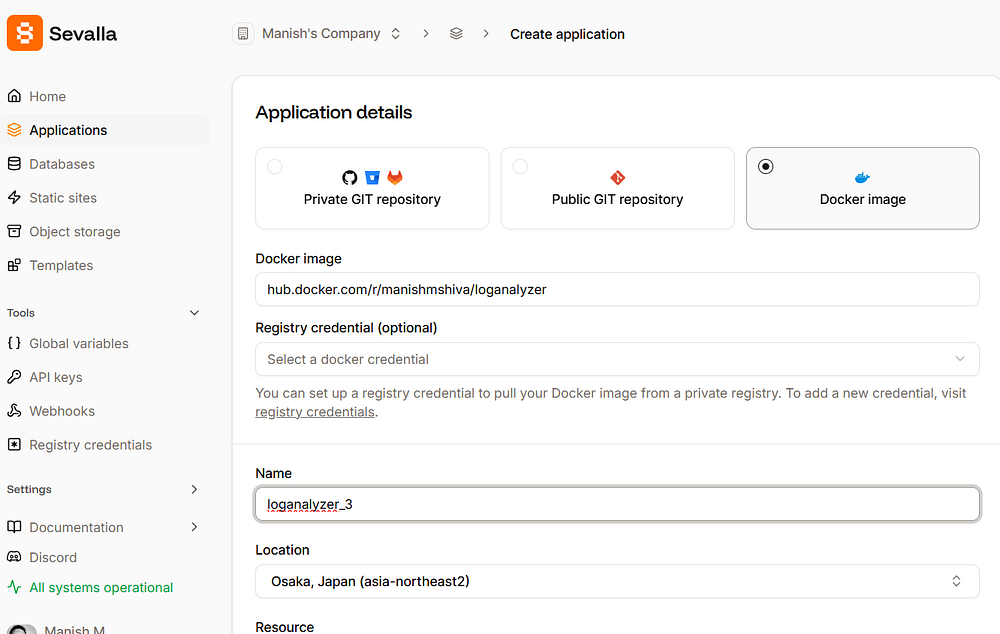
Log in to Sevalla and click on Applications -> Create new application.
You can see the option to link your container repository. Use the default settings. Click “Create application.”
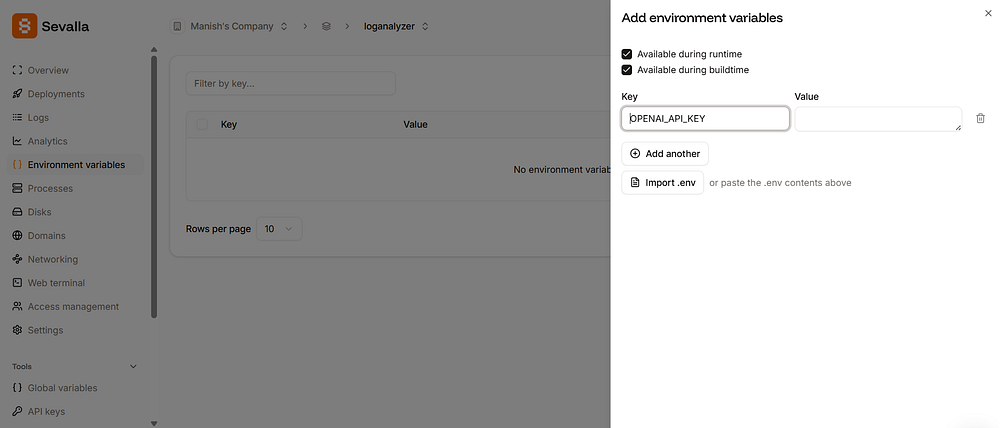
Now, we have to add our OpenAI API key to the environment variables. Click on the “Environment variables” section once the application is created, and save the OPENAI_API_KEY value as an environment variable
We are now ready to deploy our application. Click on “Deployments,” and click “Deploy now”. It will take 2–3 minutes for the deployment to complete.
Once done, click on “Visit app”. You will see the application served via a URL ending with sevalla.app .
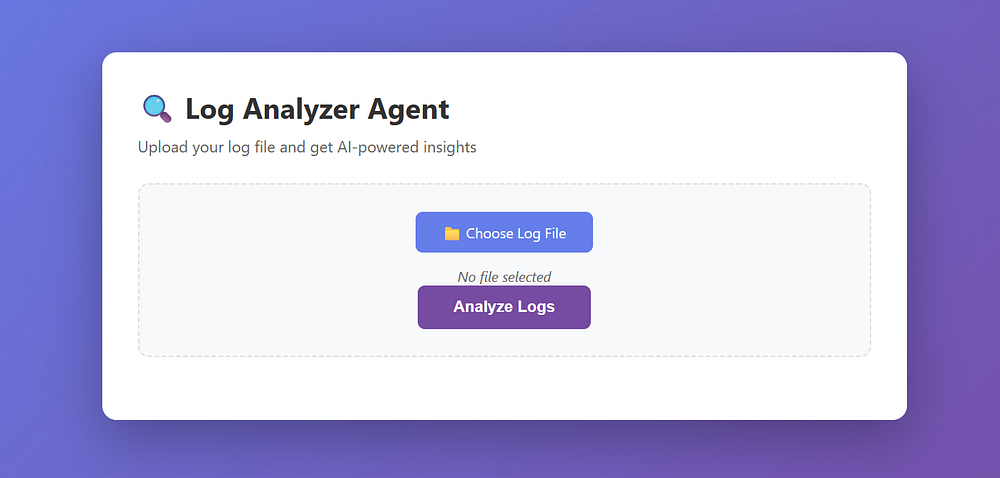
Congrats! Your log analyser service is now Dockerized and live.
From this point on, deployment becomes simple. A new version of the app is just a new Docker image. You can push an image to the repository, and Sevalla will pull it automatically.
Final Thoughts
Docker turns your application into a portable, predictable unit. For the LogAnalyzer Agent, this means the AI logic, the FastAPI server, and the frontend all move together as one artifact.
By cloning the project, adding a Dockerfile, and building an image, you convert a local prototype into a deployable service. Uploading that image to Sevalla completes the journey from code to production.
Once you are comfortable with this workflow, you will find that Docker is not just a deployment tool. It becomes a core part of how you design, test, and ship applications with confidence.
Hope you enjoyed this article. Learn more about me by visiting my website.