By using this site, you agree to the Privacy Policy and Terms of Use.
Accept
World of SoftwareWorld of SoftwareWorld of Software
  • News
  • Software
  • Mobile
  • Computing
  • Gaming
  • Videos
  • More
    • Gadget
    • Web Stories
    • Trending
    • Press Release
Search
  • Privacy
  • Terms
  • Advertise
  • Contact
Copyright © All Rights Reserved. World of Software.
Reading: You Can Easily Convert Your Old Telephone Wiring Into An Ethernet Jack – Here’s How – BGR
Share
Sign In
Notification Show More
Font ResizerAa
World of SoftwareWorld of Software
Font ResizerAa
  • Software
  • Mobile
  • Computing
  • Gadget
  • Gaming
  • Videos
Search
  • News
  • Software
  • Mobile
  • Computing
  • Gaming
  • Videos
  • More
    • Gadget
    • Web Stories
    • Trending
    • Press Release
Have an existing account? Sign In
Follow US
  • Privacy
  • Terms
  • Advertise
  • Contact
Copyright © All Rights Reserved. World of Software.
World of Software > News > You Can Easily Convert Your Old Telephone Wiring Into An Ethernet Jack – Here’s How – BGR
News

You Can Easily Convert Your Old Telephone Wiring Into An Ethernet Jack – Here’s How – BGR

News Room
Last updated: 2026/02/07 at 5:05 AM
News Room Published 7 February 2026
Share
You Can Easily Convert Your Old Telephone Wiring Into An Ethernet Jack – Here’s How – BGR
SHARE


IZE-5tyle/Shutterstock

If you struggle to get good wireless signals throughout your house, you’ve done everything you can to improve those Wi-Fi speeds, and even the most reliable mesh systems aren’t working, going full wired LAN is a good choice. The biggest hurdle will likely come from limited access to the router and its outlets, but newer technologies being applied to older wiring connections are making this less of an issue.

For hardwired connections, you’re restricted by proximity to the router or the length of any Ethernet cords you plug in. But there is one little trick you can take advantage of if you have telephone wiring and RJ11 jacks around your home. It’s not as simple as plugging a random node in, of course. Yes, that essentially needs to be done, making way for RJ45 outlets for Ethernet compatibility, but you also need a device to convert the signal at both ends.

Converting telephone wiring to Ethernet is possible with the help of a specialized modem
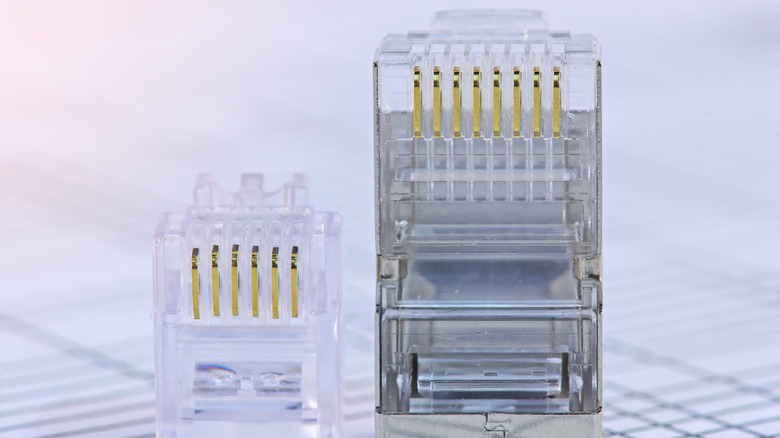

An RJ11 telephone jack plug next to an RJ45 Ethernet plug.
nelikdulatov/Shutterstock

The device you’ll need for this is a specialized modem, like the GIGA Copper G4201TM, that uses the G.hn standard (Gigabit Home Networking) to send network data over your existing phone wiring. In other words, it turns the existing wiring into a fast cable network. You connect the GIGA modem’s Ethernet port to the router via a standard Ethernet cable, then plug the telephone line output into the RJ11 port. From there, any other outlets in the home you want to use would need to be set up similarly, except they’ll be acting as a gateway or bridge. You would use other GIGA devices, like the G4202T to connect to the telephone outlet in another room and convert the incoming signal into a usable LAN for computers and other devices.

The reason this works is simple: The adapters translate Ethernet so it can travel over the copper pairs already in your walls, then translate it back at the other end. A resourceful tech enthusiast was able to achieve this for low-latency gaming with better bandwidth than what his powerline adapters provided. Alternatively, you can convert all the existing wiring, but that’s a lot of work. The above method is more of a plug-and-play solution that uses what you already have installed in your walls, as long as your house’s phone runs terminate cleanly and aren’t daisy-chained from jack to jack.

Are there other ways to achieve wired LAN without Ethernet cables?
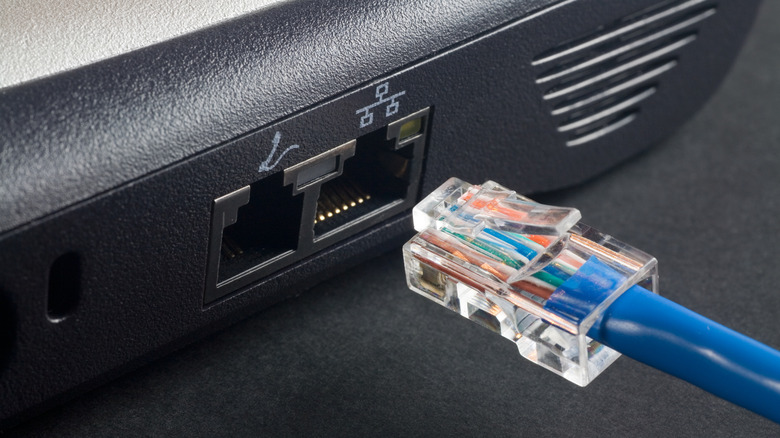

Blue Ethernet cable about to be plugged into socket.
Visualfield/Getty Images

It requires a little manual work, but you can convert RJ11 telephone ports into RJ45 Ethernet ports, provided the wires used were Cat 5e cables. While some newer houses have Cat 5e cables running between their phone jacks, earlier builds typically have older types of phone lines that aren’t compatible with this mod. But if you live in an older house or simply one built without Ethernet cabling installed, you’re not entirely out of luck — you can actually get wired internet without installing those cables yourself. 

To do this, you could use powerline adapters, for example, which convert and transmit the internet signal over your home’s electrical wiring. Then you just plug adapters into power outlets. Similarly, MoCA adapters convert your coaxial cables into a network-friendly connection. These two options are also relevant, considering the GIGA Copper devices are European and may need to be imported.

If you’re just looking to speed up your internet, in general, there are several things you can do before replacing your router. But ultimately, your choices are to rewire your house — presumably having it professionally done — running an Ethernet wire the old-fashioned way from room-to-room out in the open, using the GIGA Copper devices over old telephone connections, MoCA for coaxial conversions, or powerline adapters. It’s going to come down to which makes the most sense for you and your home.



Sign Up For Daily Newsletter

Be keep up! Get the latest breaking news delivered straight to your inbox.
By signing up, you agree to our Terms of Use and acknowledge the data practices in our Privacy Policy. You may unsubscribe at any time.
Share This Article
Facebook Twitter Email Print
Share
What do you think?
Love0
Sad0
Happy0
Sleepy0
Angry0
Dead0
Wink0
Previous Article Seven great ideas to give technology as a gift (for less than 100 euros) this Valentine’s Day Seven great ideas to give technology as a gift (for less than 100 euros) this Valentine’s Day
Next Article Sapiom reels in .75M to equip AI agents with payment features –  News Sapiom reels in $15.75M to equip AI agents with payment features – News
Leave a comment

Leave a Reply Cancel reply

Your email address will not be published. Required fields are marked *

Stay Connected

248.1k Like
69.1k Follow
134k Pin
54.3k Follow

Latest News

Maya Hautefeuille believes Africa can’t be understood remotely
Computing
This  PC Transfer Kit Handles Migration, Backup, and Secure Deletion
This $35 PC Transfer Kit Handles Migration, Backup, and Secure Deletion
News
This Pixel bug has existed since the COVID era, and some people now think it’s actually a Pixel feature
News
CutePetPal Earns a 23 Proof of Usefulness Score by Building an All-In-One Pet Care Management System | HackerNoon
Computing

You Might also Like

This  PC Transfer Kit Handles Migration, Backup, and Secure Deletion
News

This $35 PC Transfer Kit Handles Migration, Backup, and Secure Deletion

4 Min Read
This Pixel bug has existed since the COVID era, and some people now think it’s actually a Pixel feature
News

This Pixel bug has existed since the COVID era, and some people now think it’s actually a Pixel feature

4 Min Read
Love ChatGPT caricatures? 9 more image prompts to try in 2026.
News

Love ChatGPT caricatures? 9 more image prompts to try in 2026.

14 Min Read
The First Live-Action Movie To Use CGI Also Spawned An Emmy-Winning HBO Series – BGR
News

The First Live-Action Movie To Use CGI Also Spawned An Emmy-Winning HBO Series – BGR

4 Min Read
//

World of Software is your one-stop website for the latest tech news and updates, follow us now to get the news that matters to you.

Quick Link

  • Privacy Policy
  • Terms of use
  • Advertise
  • Contact

Topics

  • Computing
  • Software
  • Press Release
  • Trending

Sign Up for Our Newsletter

Subscribe to our newsletter to get our newest articles instantly!

World of SoftwareWorld of Software
Follow US
Copyright © All Rights Reserved. World of Software.
Welcome Back!

Sign in to your account

Lost your password?