When it comes to video games, I love story-driven RPGs. Or story-driven side-scrolling games. Give me any game with a solid storyline and I’m hooked. It’s no surprise, then, that my favorite games (right now) are Baldur’s Gate 3 and Clair Obscur: Expedition 33, two titles with phenomenal storytelling. And I’ll be honest, I’ve never been a massive fan of racing games.
That’s primarily because they don’t have the most compelling storylines, but also because I’ve never been particularly good at them. Although Need for Speed was a big part of my childhood, my interest in the series faded as I got older. As a Formula One aficionado, I tried the F1 games but again, I wasn’t very good at them… that was true until I tested the Turtle Beach Racer Wireless, and I finally “got gud” at F1 25.
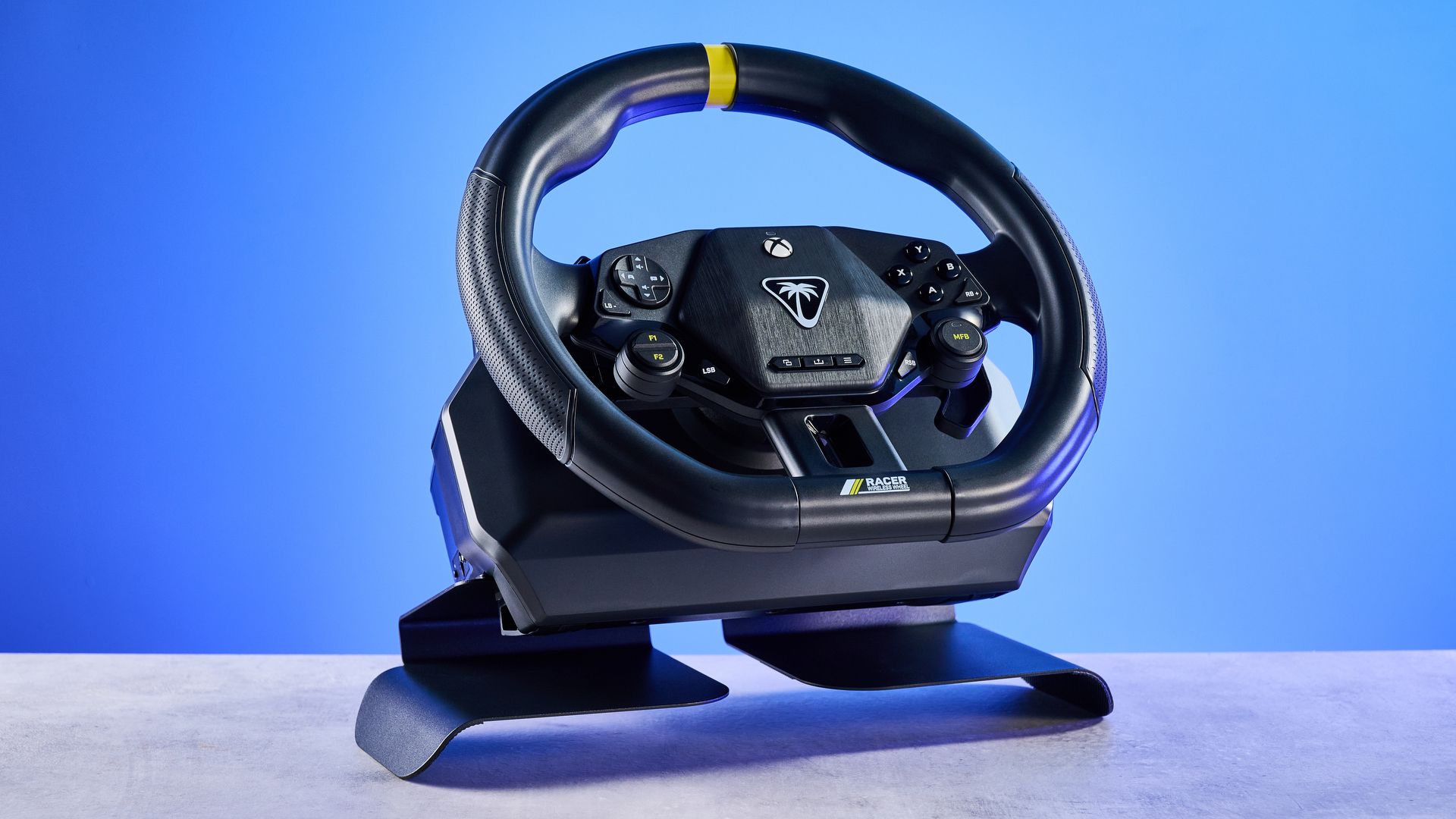
Though I’ve used racing wheels at arcades, testing the Racer Wireless was the first time I actually spent a substantial amount of time with one — and it’s the one thing that has been missing from my gaming setup. It’s affordable, accessible, compact, versatile, and boy, is it fun to use! I’ve raced over 600 (virtual) miles with the Racer Wireless, and I’m here to tell you that if you’re a fan of racing games, you need this wheel in your life.
Stupendous ergonomics
Even though the Turtle Beach Racer Wireless is a budget-friendly racing wheel, Turtle Beach hasn’t compromised on the build quality or the ergonomics. This is a very versatile racing wheel, as there are two ways of using it with your Windows 11/10 machine, Xbox Series X, Xbox Series S and Xbox One: wireless via the 2.4GHz dongle, or wired via the USB-A to USB-C cable.
There are two ways to place it too. You can either use the built-in desk clamp to mount the wheel on to the edge of a table, or you can install the metal lap rests to use it… well, in your lap. The latter is my favorite way to use the Racer Wireless as it enables you to use the wheel while you’re sitting on your couch and playing on your console which is connected to your TV. And though the lap rests are made of metal, they don’t poke into your clothes or skin, so they’re very comfortable.
I also love the wheel’s layout. Its face buttons are inspired by the Xbox controller’s ABXY layout, and all the buttons are within easy reach. The wheel itself is comfortable to hold and use, and even when your hands get sweaty, they never slip off the wheel. I didn’t notice any fingerprints being left behind on the wheel either. Overall, you’re getting bang for your buck and then some.
Pressure-sensitive and immersion-inducing paddles

Let’s talk about what I consider one of the biggest wins for the Turtle Beach Racer Wireless: its pressure-sensitive paddles. These are located behind the wheel so your fingers naturally fall on them when you’re gripping the wheel. I absolutely adore these. As they’re pressure-sensitive, throttle and braking can be done gradually, which gives you more control over the car you’re driving.
When I played F1 25, for instance, the gradual throttle application aided me in long-term tire management. Being able to brake slightly rather than fully meant that I could easily turn tight corners and ensure I wasn’t bumping tires with another racer when we went wheel-to-wheel.
The Racer Wireless is really snappy too, which I appreciated while weaving through Mexican traffic in Forza Horizon 5. Close calls didn’t feel like close calls anymore as I could make last-minute swerves to get past NPCs. I like how the face buttons give good tactile feedback when pressed too, which I instantly noticed when hitting X to do a 360-degree spin to take down rivals’ cars in Asphalt Legends.

If you want to be able to shift gears manually in the likes of F1 25 and Forza Horizon 5, there are two remappable F1 and F2 function buttons under the navigation ones on the Racer Wireless’ left-hand side. I did this to feel more immersed and have more control over my car, especially in F1 25, and it worked like a charm. I found the buttons easy to hit with my left thumb without taking my hand off the wheel.
If you want a snappy racing wheel that makes you better at racing games, the Racer Wireless is your port of call. I’ve absolutely loved racing with this wheel and it’s left me wondering how and why I’ve gone so long without it!
An all-in-one package

The Turtle Beach Racer Wireless is an all-in-one package. Well, with a couple of caveats. It doesn’t come with peddles for acceleration and braking — that’s what the aforementioned pressure-sensitive paddles are for. There’s also no force feedback, which ruins your immersion a little bit as you can’t feel the track you’re racing on. But is that such a bad thing? I don’t think so.
This is a budget, entry-level racing wheel. The Racer Wireless costs $179 / £139 at Amazon, and it’s designed for those new to sim racing. The lack of peddles and force feedback isn’t a massive drawback because this wheel is here to give you a taste for sim racing, and you can always upgrade to a proper setup later down the line.
For those who want an easy, compact, affordable racing wheel that can be used from the couch with just your hands, there’s no better recommendation than the Racer Wireless, in my humble opinion. It’s made me a better gamer at racing titles, and if I, an RPG aficionado, can “git gud,” I’m certain anyone can.

Follow Tom’s Guide on Google News and add us as a preferred source to get our up-to-date news, analysis, and reviews in your feeds.