By using this site, you agree to the Privacy Policy and Terms of Use.
Accept
World of SoftwareWorld of SoftwareWorld of Software
  • News
  • Software
  • Mobile
  • Computing
  • Gaming
  • Videos
  • More
    • Gadget
    • Web Stories
    • Trending
    • Press Release
Search
  • Privacy
  • Terms
  • Advertise
  • Contact
Copyright © All Rights Reserved. World of Software.
Reading: Live Activities Taking Over Your Apple Watch? Here’s the Fix
Share
Sign In
Notification Show More
Font ResizerAa
World of SoftwareWorld of Software
Font ResizerAa
  • Software
  • Mobile
  • Computing
  • Gadget
  • Gaming
  • Videos
Search
  • News
  • Software
  • Mobile
  • Computing
  • Gaming
  • Videos
  • More
    • Gadget
    • Web Stories
    • Trending
    • Press Release
Have an existing account? Sign In
Follow US
  • Privacy
  • Terms
  • Advertise
  • Contact
Copyright © All Rights Reserved. World of Software.
World of Software > News > Live Activities Taking Over Your Apple Watch? Here’s the Fix
News

Live Activities Taking Over Your Apple Watch? Here’s the Fix

News Room
Last updated: 2026/02/16 at 2:14 AM
News Room Published 16 February 2026
Share
Live Activities Taking Over Your Apple Watch? Here’s the Fix
SHARE

In watchOS 26, the Smart Stack for your Apple Watch is pretty clever. The collection of widgets can be pulled up with a scroll of the Digital Crown, and shows you relevant information throughout your day. But sometimes, its eagerness to help can be a bit much, especially when it comes to Live Activities.

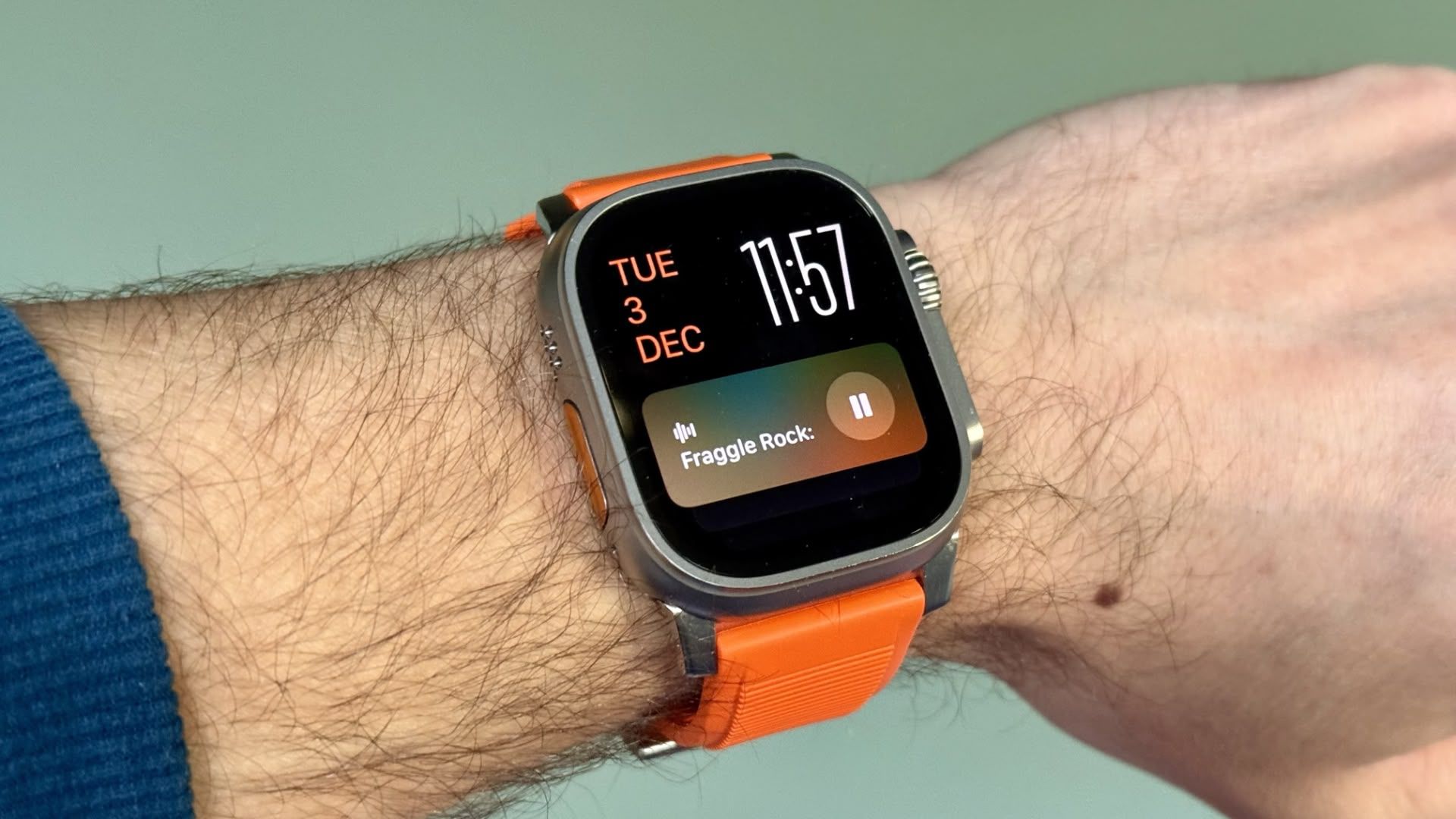
You’re probably familiar with this scenario: You raise your wrist expecting to see your customized watch face, but it’s been replaced by media playback controls because someone’s watching your Apple TV, or a timer you set earlier for cooking that still has ages left to run. Live Activities in the Smart Stack can clearly be useful, but having them automatically take over your display isn’t always ideal. Here’s how to take back control:

  1. Open Settings on your Apple Watch.
  2. Tap Smart Stack.
  3. Select Live Activities.
  4. Toggle off the switch next to Auto-Launch Live Activities.

settingssettings

After disabling auto-launch, Live Activities will still be available in your Smart Stack when you want them – you’ll just need to manually scroll to see them instead of having them pop up automatically.

If you want more granular control, you’re in luck. From the same settings screen you can control which Apple apps display Live Activities. Using the Watch app on your iPhone, you can also manage Live Activities settings for third-party apps. This lets you keep the notifications you find useful while preventing the less important ones from interrupting your watch face.

Pro Tip: If it’s just those persistent media controls that bug you, head to Media Apps in the same settings menu and turn off Live Activities completely, or alternatively under “Auto-Launch,” select Off or Smart Stack for a more focused watch face experience.

Sign Up For Daily Newsletter

Be keep up! Get the latest breaking news delivered straight to your inbox.
By signing up, you agree to our Terms of Use and acknowledge the data practices in our Privacy Policy. You may unsubscribe at any time.
Share This Article
Facebook Twitter Email Print
Share
What do you think?
Love0
Sad0
Happy0
Sleepy0
Angry0
Dead0
Wink0
Previous Article Done With the iPhone? iOS 26.3 Makes It Super Simple to Switch to Android Done With the iPhone? iOS 26.3 Makes It Super Simple to Switch to Android
Next Article Match vs. Tinder: Which Dating App Will Save Your Valentine’s Day? Match vs. Tinder: Which Dating App Will Save Your Valentine’s Day?
Leave a comment

Leave a Reply Cancel reply

Your email address will not be published. Required fields are marked *

Stay Connected

248.1k Like
69.1k Follow
134k Pin
54.3k Follow

Latest News

T-Mobile workers share survival tips with incoming hire
News
Walmart is running a huge Presidents Day sale — find live deals on TVs, Apple, laptops, and more
News
I didn’t think foldables were for me. After two months with the Galaxy Z Fold 7, I was wrong
News
Today's NYT Mini Crossword Answers for Feb. 16 – CNET
News

You Might also Like

T-Mobile workers share survival tips with incoming hire
News

T-Mobile workers share survival tips with incoming hire

3 Min Read
Walmart is running a huge Presidents Day sale — find live deals on TVs, Apple, laptops, and more
News

Walmart is running a huge Presidents Day sale — find live deals on TVs, Apple, laptops, and more

7 Min Read
I didn’t think foldables were for me. After two months with the Galaxy Z Fold 7, I was wrong
News

I didn’t think foldables were for me. After two months with the Galaxy Z Fold 7, I was wrong

12 Min Read
Today's NYT Mini Crossword Answers for Feb. 16 – CNET
News

Today's NYT Mini Crossword Answers for Feb. 16 – CNET

2 Min Read
//

World of Software is your one-stop website for the latest tech news and updates, follow us now to get the news that matters to you.

Quick Link

  • Privacy Policy
  • Terms of use
  • Advertise
  • Contact

Topics

  • Computing
  • Software
  • Press Release
  • Trending

Sign Up for Our Newsletter

Subscribe to our newsletter to get our newest articles instantly!

World of SoftwareWorld of Software
Follow US
Copyright © All Rights Reserved. World of Software.
Welcome Back!

Sign in to your account

Lost your password?