By using this site, you agree to the Privacy Policy and Terms of Use.
Accept
World of SoftwareWorld of SoftwareWorld of Software
  • News
  • Software
  • Mobile
  • Computing
  • Gaming
  • Videos
  • More
    • Gadget
    • Web Stories
    • Trending
    • Press Release
Search
  • Privacy
  • Terms
  • Advertise
  • Contact
Copyright © All Rights Reserved. World of Software.
Reading: What Is The Optical Audio Port On TVs Actually For? – BGR
Share
Sign In
Notification Show More
Font ResizerAa
World of SoftwareWorld of Software
Font ResizerAa
  • Software
  • Mobile
  • Computing
  • Gadget
  • Gaming
  • Videos
Search
  • News
  • Software
  • Mobile
  • Computing
  • Gaming
  • Videos
  • More
    • Gadget
    • Web Stories
    • Trending
    • Press Release
Have an existing account? Sign In
Follow US
  • Privacy
  • Terms
  • Advertise
  • Contact
Copyright © All Rights Reserved. World of Software.
World of Software > News > What Is The Optical Audio Port On TVs Actually For? – BGR
News

What Is The Optical Audio Port On TVs Actually For? – BGR

News Room
Last updated: 2026/02/17 at 6:14 AM
News Room Published 17 February 2026
Share
What Is The Optical Audio Port On TVs Actually For? – BGR
SHARE


Toa55/Shutterstock

You’ve got a nice new TV and a slick, high-end soundbar (such as the Sonos Beam, which we recently reviewed), and you’re ready to plug it in and start watching your favorite movies. You look at the back and see a variety of ports, including a little square-ish one that seems to be glowing and blinking. This is the optical port, and it is one of the standard options if you want your TV to send sound to an external speaker. But how does it work, and what applications is it best used for?

The port itself actually carries a digital signal, using fiber optic technology, like a simplified version of the fiber optic internet coming into your house. This means that it’s a great port for audio itself, but also to carry extra digital features to make sure that you’re getting the best, most polished sound out of your TV. It’s also great if you want a simple plug-and-play way to use surround sound receivers, and more.

How the optical port carries audio for your TV setup
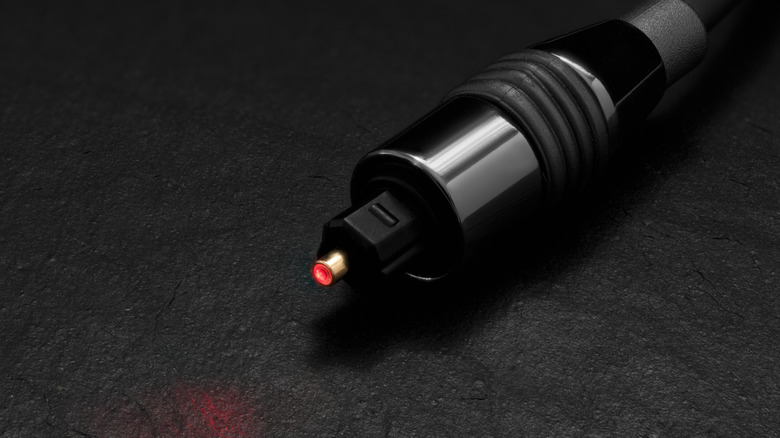

An optical audio cable sitting on a surface with the center glowing red
Spaxiax/Getty Images

The optical cable (also known as TOSLINK, originally supported by Toshiba) is a digital cable that is capable of carrying several audio channels at decently high resolution to your setup. This means that it can carry the audio, but also any processing or routing information for that audio with a single port.

This is particularly interesting if you have a surround sound receiver, which takes in digital audio data and interprets that data to know which speakers to send the audio to. Your TV, then, doesn’t have to do a whole lot of routing or processing on its end, and it can lead to a really nice all-in-one solution. When you compare this to the analog auxiliary port, you’ll notice that the port only really carries what your TV can already process — and the audio won’t come with extra processing or routing. For many users, having the data to support multiple audio setups and processing options, such as Dolby or surround sound, is important to ensure they’re getting the most out of their TV. The optical port also allows you to connect to wireless speakers, which we’ve already covered as a reliable audiophile option.

When to use the optical port vs. a different one
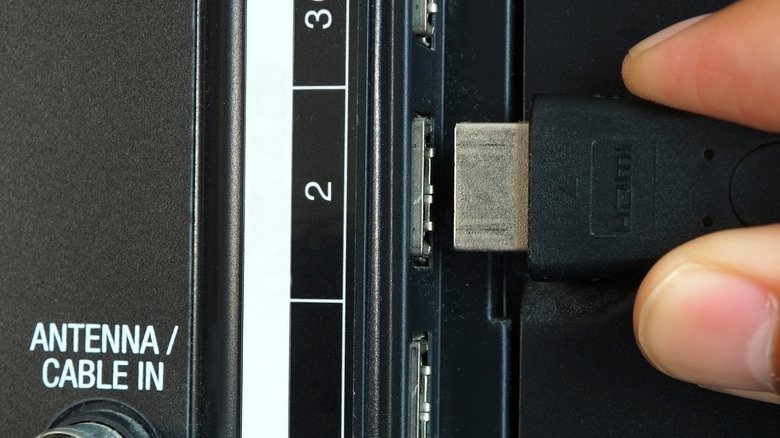

A hand plugging in an HDMI cable to the back of a TV
Paradise On Earth/Shutterstock

In today’s world of connected devices and universal control, you may wonder if using the optical port — a comparably older technology — is even the right choice. It is true that HDMI offers similar digital support, and offers device control through eARC and CEC technology (check out a recent primer we wrote comparing HDMI and optical). So you could get comparable performance out of this cable. In essence, if you want your TV’s extra control features unlocked (such as using your TV remote to turn soundbars on and off or adjust volume), HDMI ARC technology can be a more seamless way to do this.

However, many audio devices, even just a few years old, don’t support full ARC/eARC functionality. If you use an HDMI pass-through for this, you may also be sacrificing video quality if that device doesn’t support full frame rate or resolution. The optical port can simplify this for older devices and setups, ensuring that the solid stereo receiver from 10 years ago still works and still provides the format and quality you’ll need for multiple entertainment applications.



Sign Up For Daily Newsletter

Be keep up! Get the latest breaking news delivered straight to your inbox.
By signing up, you agree to our Terms of Use and acknowledge the data practices in our Privacy Policy. You may unsubscribe at any time.
Share This Article
Facebook Twitter Email Print
Share
What do you think?
Love0
Sad0
Happy0
Sleepy0
Angry0
Dead0
Wink0
Previous Article Backed by  million, Points Africa wants to unify loyalty rewards Backed by $2 million, Points Africa wants to unify loyalty rewards
Next Article Lilith Games’ AFK Journey climbs to the top of China iOS charts · TechNode Lilith Games’ AFK Journey climbs to the top of China iOS charts · TechNode
Leave a comment

Leave a Reply Cancel reply

Your email address will not be published. Required fields are marked *

Stay Connected

248.1k Like
69.1k Follow
134k Pin
54.3k Follow

Latest News

Best mini PC deal: Save .02 on the Kamrui Hyper H1 Mini Gaming PC at Amazon
Best mini PC deal: Save $90.02 on the Kamrui Hyper H1 Mini Gaming PC at Amazon
News
Introducing 360: One View for All Your Influencer Marketing Data
Computing
Wallarm warns APIs are fueling AI-era breaches at machine speed –  News
Wallarm warns APIs are fueling AI-era breaches at machine speed – News
News
Mind gone blank? This Apple Music update will build playlists from your mood – all from a simple text prompt | Stuff
Gadget

You Might also Like

Best mini PC deal: Save .02 on the Kamrui Hyper H1 Mini Gaming PC at Amazon
News

Best mini PC deal: Save $90.02 on the Kamrui Hyper H1 Mini Gaming PC at Amazon

3 Min Read
Wallarm warns APIs are fueling AI-era breaches at machine speed –  News
News

Wallarm warns APIs are fueling AI-era breaches at machine speed – News

5 Min Read
What Happens When Your Hybrid Car Battery Dies? – BGR
News

What Happens When Your Hybrid Car Battery Dies? – BGR

5 Min Read
Apple is finally testing RCS encryption, but there’s a catch for Android users
News

Apple is finally testing RCS encryption, but there’s a catch for Android users

2 Min Read
//

World of Software is your one-stop website for the latest tech news and updates, follow us now to get the news that matters to you.

Quick Link

  • Privacy Policy
  • Terms of use
  • Advertise
  • Contact

Topics

  • Computing
  • Software
  • Press Release
  • Trending

Sign Up for Our Newsletter

Subscribe to our newsletter to get our newest articles instantly!

World of SoftwareWorld of Software
Follow US
Copyright © All Rights Reserved. World of Software.
Welcome Back!

Sign in to your account

Lost your password?