By using this site, you agree to the Privacy Policy and Terms of Use.
Accept
World of SoftwareWorld of SoftwareWorld of Software
  • News
  • Software
  • Mobile
  • Computing
  • Gaming
  • Videos
  • More
    • Gadget
    • Web Stories
    • Trending
    • Press Release
Search
  • Privacy
  • Terms
  • Advertise
  • Contact
Copyright © All Rights Reserved. World of Software.
Reading: Your iPhone Might Soon Enable An Anti-Theft Feature That Used To Be Optional – BGR
Share
Sign In
Notification Show More
Font ResizerAa
World of SoftwareWorld of Software
Font ResizerAa
  • Software
  • Mobile
  • Computing
  • Gadget
  • Gaming
  • Videos
Search
  • News
  • Software
  • Mobile
  • Computing
  • Gaming
  • Videos
  • More
    • Gadget
    • Web Stories
    • Trending
    • Press Release
Have an existing account? Sign In
Follow US
  • Privacy
  • Terms
  • Advertise
  • Contact
Copyright © All Rights Reserved. World of Software.
World of Software > News > Your iPhone Might Soon Enable An Anti-Theft Feature That Used To Be Optional – BGR
News

Your iPhone Might Soon Enable An Anti-Theft Feature That Used To Be Optional – BGR

News Room
Last updated: 2026/02/17 at 6:14 PM
News Room Published 17 February 2026
Share
Your iPhone Might Soon Enable An Anti-Theft Feature That Used To Be Optional – BGR
SHARE


Georgeclerk/Getty Images

The arrival of iOS 26.4 may not bring the Siri revamp iPhone owners are waiting for, but it will deliver other noteworthy features, including automatically enabling an iPhone anti-theft feature that users currently have to turn on manually. Called Stolen Device Protection, the feature is available on devices running iOS 17 and later. Apple released it in early 2024 in response to a particular iPhone theft technique. Some thieves relied on social engineering techniques to steal the lockscreen passcode of an iPhone owner, obtain brief access to their device, and then steal the handset knowing they could unlock it.

A report from The Wall Street Journal in late October explained the sort of havoc that would follow. A thief would be able to access everything on the iPhone and perform consequential actions, like changing someone’s Apple Account password. Apple devised Stolen Device Protection to help protect victims. The feature requires the use of biometrics, like Face ID or Touch ID, to safeguard sensitive actions on the handset. A thief with knowledge of the screen password would not be able to bypass this added security layer. The iPhone locks key settings, ensuring the victim doesn’t lose access to critical logins, like their Apple Account.

More than two years later, iPhones are still highly prized commodities, with some thieves preferring the iPhone over the Android. It’s unclear why Apple may have now decided to enable Stolen Device Protection by default on all iPhones. If you haven’t used Stolen Device Protection before, you should get yourself acquainted with the feature to avoid disruptions.

What does Stolen Device Protection do?
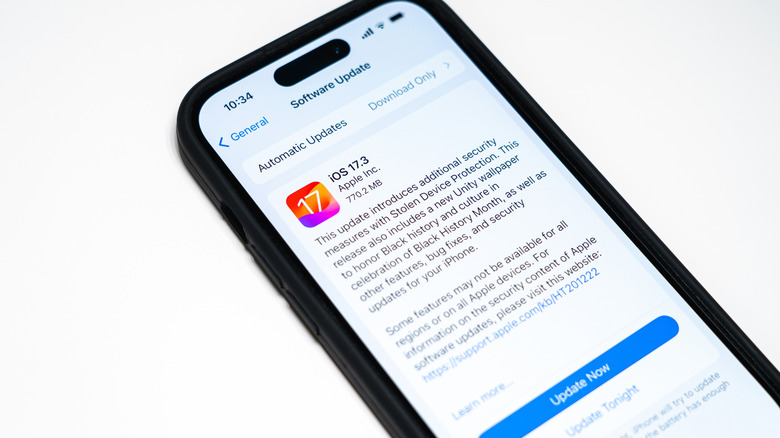

The iOS 17 update that introduced Stolen Device Protection.
Eudaimonic Traveler/Shutterstock

You’ll find Stolen Device Protection in the Face ID & Passcode section of the Settings app. To turn it on manually, you need to enable two-factor authentication on your Apple Account, and enable biometrics and the Find My feature. To protect your phone, Stolen Device Protection relies on biometrics as well as location data to determine whether you’re trying to make a sensitive change, like setting a new Apple Account password, in an unfamiliar location.

According to Apple, once Stolen Device Protection is enabled, iPhone owners will have to use Face ID or Touch ID to authenticate every time they try to perform certain actions — such as using passwords saved in Keychain, opening a locked app, applying for an Apple Card, or transferring an eSIM – outside of a familiar location.

On top of that, Stolen Device Protection also enables a security delay for settings changes initiated in an unfamiliar location. That means users will have to wait an hour between two successful Face ID/Touch ID authentications to change settings such as signing out of an Apple Account, adding or removing Face ID or Touch ID, changing a passcode, or turning off Stolen Device Protection.

Some questions remain


A concept image of a thief stealing a phone on public transit.
Skynesher/Getty Images

While MacRumors discovered the change in the first iOS 26.4 developer beta, it’s unclear when it will reach the general public. Also, given how Stolen Device Protection works, as of this writing, Apple may make some waves for iPhone users who prefer not to use Face ID or Touch ID, or those who have Find My disabled. If Apple enables Stolen Device Protection on all iPhones that support the iOS 26.4 update, it’ll have to nudge users to also enable biometrics and Find My. It’s unclear if Apple can force users to use these iPhone features if they don’t want to.

Keeping Stolen Device Protection, Face ID or Touch ID, and Find My enabled are good ways to protect your data. If you don’t want Stolen Device Protection enabled, you may be able to turn it off again. Another way to avoid the feature is to delay updating the iPhone until you’re comfortable with the changes. Interestingly, Google did something similar with its newest Android 16 anti-theft features, but the company is targeting only a single market as of this writing: Theft Detection Lock and Remote Lock are turned on automatically on new Android devices activated in Brazil.



Sign Up For Daily Newsletter

Be keep up! Get the latest breaking news delivered straight to your inbox.
By signing up, you agree to our Terms of Use and acknowledge the data practices in our Privacy Policy. You may unsubscribe at any time.
Share This Article
Facebook Twitter Email Print
Share
What do you think?
Love0
Sad0
Happy0
Sleepy0
Angry0
Dead0
Wink0
Previous Article Lumen targets AI bottlenecks with cloud gateway and metro expansion | Computer Weekly Lumen targets AI bottlenecks with cloud gateway and metro expansion | Computer Weekly
Next Article Don’t take success for granted: Seattle Chamber CEO Joe Nguyen on tech’s evolving storyline Don’t take success for granted: Seattle Chamber CEO Joe Nguyen on tech’s evolving storyline
Leave a comment

Leave a Reply Cancel reply

Your email address will not be published. Required fields are marked *

Stay Connected

248.1k Like
69.1k Follow
134k Pin
54.3k Follow

Latest News

GNOME 50 Merges “sdr-native” Color Mode Support For Wide Color Gamut Displays
Computing
Apple Car Key support now available on the 2026 Toyota Rav4
News
Pixel 9 officially joins Pixel 10 with Quick Share-AirDrop support
News
Ant Group launches Lingguang, first AI assistant to generate full-code multimodal content · TechNode
Computing

You Might also Like

Apple Car Key support now available on the 2026 Toyota Rav4
News

Apple Car Key support now available on the 2026 Toyota Rav4

1 Min Read
Pixel 9 officially joins Pixel 10 with Quick Share-AirDrop support
News

Pixel 9 officially joins Pixel 10 with Quick Share-AirDrop support

2 Min Read
5 Dietitian-Approved Air Fryer Recipes for Quick Meals and Snacks
News

5 Dietitian-Approved Air Fryer Recipes for Quick Meals and Snacks

11 Min Read
The Best Photo Editing Software We’ve Tested for Macs in 2026
News

The Best Photo Editing Software We’ve Tested for Macs in 2026

28 Min Read
//

World of Software is your one-stop website for the latest tech news and updates, follow us now to get the news that matters to you.

Quick Link

  • Privacy Policy
  • Terms of use
  • Advertise
  • Contact

Topics

  • Computing
  • Software
  • Press Release
  • Trending

Sign Up for Our Newsletter

Subscribe to our newsletter to get our newest articles instantly!

World of SoftwareWorld of Software
Follow US
Copyright © All Rights Reserved. World of Software.
Welcome Back!

Sign in to your account

Lost your password?