Welcome to Home Hacks
Home Hacks is my new Tom’s Guide column where I detail the small but meaningful improvements I’ve made around my home. From adding useful new accessories to my desk setup to using smart home gadgets in unexpected ways and of course, repurposing old devices, I hope I can give you some inspiration for your next project.
Sometimes it’s the small things that make a big difference when it comes to whether or not something feels premium. For instance, let’s say you just picked up the new MacBook Pro M5 or even the more affordable MacBook Neo, both of those Apple laptops come with a braided cable in the box to give you that high-end, premium feel.
Even if you’re not in the market for a new laptop, you can easily and very cheaply give your existing devices that same touch of elegance by switching to braided cables. Whether it’s in your car, at your desk or even on your bedside table, braided cables just look and feel a whole lot better than their cheaper and flimsy rubber counterparts.
I switched to braided cables years ago and in the time since, they’ve really come down in price. However, since braided cables are wrapped in fabric, they often arrive with kinks in them from being folded in their packaging or they can feel very stiff. Unfortunately, you won’t know how your new cable feels and whether or not it’s flexible until you take it out of the box.
Article continues below
If you’ve ever had a braided cable that just refuses to lie flat, you know firsthand just how annoying this can be. I’ve found myself in that same situation countless times but recently, I learned a trick that can not only straighten out your braided cables but can also make them a whole lot more flexible. Here’s how I finally tamed the bends in my braided cables for good, all without spending a dime.
Braided but not equal

In the same way that some USB-C cables can be used for video out while others are just for charging, not every braided cable is the same. Case in point, I recently picked up the white USB-C to USB-C cable on the left to color match one of my desk setups while the black one on the right came bundled with the Steelseries Aerox 3 wireless gaming mouse I tested out a few years ago.
Although I still prefer my trusty trackball mouse, I couldn’t get over the braided Aerox 3 Super Mesh cable that came with the Aerox 3 as that was my first time coming across an incredibly lightweight and very flexible braided cable. It’s my go-to cable for plugging in the best PC game controllers, webcams and pretty much any other accessory I add to my desk setups. At $20 a pop though, it’s not the cheapest cable and I didn’t even realize Steelseries sold them separately until just now.
I do like the look of that all-white iHome cable I picked up but as you might have guessed, it was stiff as a board when I took it out of the packaging. Fortunately though, I learned a new trick recently that can make even the most stubborn braided cables a bit more flexible.

By submerging a braided cable in hot water for three to five minutes, you can make the plastic covering its actual wires pliable. I used a Mason Jar here just for illustration purposes but the first time I tried this, I used a coffee mug instead.
You do want to make sure you don’t get the ends of the cable wet though. To avoid this, I found that having the cable wrapped up and secured with a reusable cable tie to be the perfect way to keep the ends separated and on either side of the jar or mug you’re submerging it in.

Soaking in hot water alone isn’t enough to make your cables more flexible. Instead, after three to five minutes is up, you want to take the cable out and pull it taut. Now with a cable like this one that you just want to make a bit more flexible, I found that keeping it wrapped up and twisting it does the trick. You can also resubmerge your cable and repeat this process a few times if you find that the first dunk in hot water didn’t loosen up its internal plastic enough.
With other cables where you want them completely flat though — especially if they’re longer — this process takes a bit more work. Either way, once you’re done, you want to lay out your cable on a towel and make sure it’s completely dry before using it.
Longer, kinkier but still tamable

After successfully loosening up two braided USB-C cables, it was finally time to try out this trick with the one kinked cable in my house that’s been driving me nuts.
As my game room used to be a garage, there aren’t any power outlets on its far wall. Now that I’ve learned how to run electrical cables and install my own outlets — like I did behind the Coyzla Calendar 2+ in my last home hack — I plan to eventually wire this side of the room. In the meantime though, I have a surge protector with a long, braided cable that runs along that wall.
It is temporary as you’re not actually supposed to leave extension cords plugged in permanently. This is because unlike with in-wall wiring, they’re not built to handle long-term wear, heat or environmental exposure. Instead, they shouldn’t be left out like this for no longer than 30 to 90 days. Still, even if this surge protector is temporary, that doesn’t mean it can’t also be kink-free and look a whole lot better.

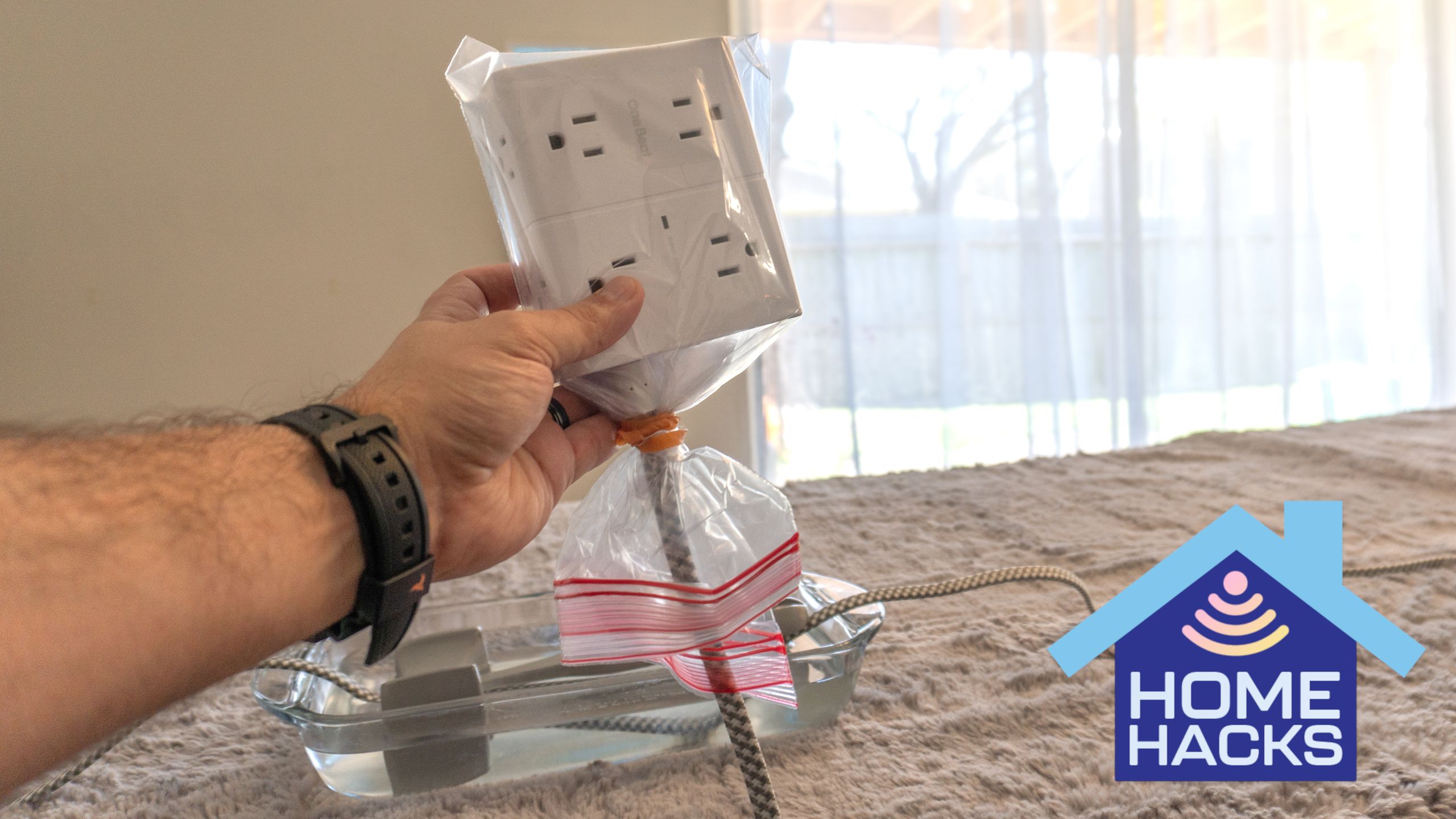
To that end, I unplugged it and laid the whole cable across my kitchen table to give it the same hot water treatment I did with those USB-C cables. Since you can’t easily submerge a cord that long at the same time, you have to do so in parts. Before getting started though, I covered the outlets on one end and the plug on the other with plastic bags and made sure everything was sealed shut by wrapping a rubber band around the bags.
So that I could see the part of the cable I was currently working on, I used a rectangular glass baking dish that I filled with warm water. To keep the cable submerged, I held it down with two metal spoons at first before switching to a heavier stainless steel meat mallet. That way, I could have my hands free while ensuring each section of that longer 15 foot surge protector remained under the water long enough to make its plastic inner shell pliable. Any heavy kitchen utensil will do though.

As I mentioned before, once three to five minutes is up, you want to take the cable out and pull it taut. To do so, I held the front of the cable with one hand while I used the other and my thumb to press down on it and pull. Even though the surge protector’s cable and its braided fabric were a lot thicker, I saw its kinks disappear as I repeated this process over and over again.
By the time I was done, my surge protector’s cable was a whole lot straighter. To cap things off though, I hung it vertically from one of the rafters in my garage and put some small weights — like one to two pounds — on either end. Remember those rubber bands holding the plastic bags on at each end? Well I actually used those to hold the weights and to my surprise, they did an excellent job of adding a bit of extra force as the cable dried.
Straight at last

After letting my 15-foot surge protector fully dry and set overnight, I finally brought it back to my game room. Instead of multiple kinks that made it appear like a zigzag across my floor, its cable was now straight and perfectly parallel with the back wall, exactly how I imagined it would be when I first bought it.
My favorite part about this trick besides the fact that it doesn’t cost a thing is how it manages to solve a problem most of us just live with. Ironically, we spend more on braided cables for their look but due to how they’re packaged, many of them end up being less straight than the cheap, plastic cables they were intended to replace.
Sure the prep and actually straightening out this longer cable did take some time, but like every other DIY project I’ve done, the real payoff is seeing the end result of all of your hard work. If you do decide to follow in my footsteps, just remember to seal the ends of your own cable and to pull it taut after removing it from the hot water.
Whether you’re working with a shorter charging cable or a long, braided power cable from one of the best surge protectors, this trick will work for either. Then, instead of being annoyed every time you see a kinked cable, you too can proudly and fondly look at your now straightened cable knowing just how big of a difference a little extra work can make.
Now that I’ve tamed the most crooked cable in my collection, I’m off to devise a better way to store all of my various cables as the over-the-door shoe organizer I’ve used for years to keep my cords tidy is quickly running out of space, and it might be time for another home hack to make all my various cables and adapters even easier to find.

Follow Tom’s Guide on Google News and add us as a preferred source to get our up-to-date news, analysis, and reviews in your feeds.