By using this site, you agree to the Privacy Policy and Terms of Use.
Accept
World of SoftwareWorld of SoftwareWorld of Software
  • News
  • Software
  • Mobile
  • Computing
  • Gaming
  • Videos
  • More
    • Gadget
    • Web Stories
    • Trending
    • Press Release
Search
  • Privacy
  • Terms
  • Advertise
  • Contact
Copyright © All Rights Reserved. World of Software.
Reading: Mac Won’t Turn On but Is Charging: Fixed!
Share
Sign In
Notification Show More
Font ResizerAa
World of SoftwareWorld of Software
Font ResizerAa
  • Software
  • Mobile
  • Computing
  • Gadget
  • Gaming
  • Videos
Search
  • News
  • Software
  • Mobile
  • Computing
  • Gaming
  • Videos
  • More
    • Gadget
    • Web Stories
    • Trending
    • Press Release
Have an existing account? Sign In
Follow US
  • Privacy
  • Terms
  • Advertise
  • Contact
Copyright © All Rights Reserved. World of Software.
World of Software > News > Mac Won’t Turn On but Is Charging: Fixed!
News

Mac Won’t Turn On but Is Charging: Fixed!

News Room
Last updated: 2026/03/18 at 6:50 AM
News Room Published 18 March 2026
Share
Mac Won’t Turn On but Is Charging: Fixed!
SHARE

What to Know

  • If your MacBook is charging but won’t turn on, make sure your power cable and outlet are undamaged.
  • You can also try power cycling your Mac, and using the macOS Recovery process.

If your Mac won’t turn on but is charging, we can help. Read on to learn the troubleshooting steps you need to take if your Mac or MacBook won’t power on.

Jump To:

  • Mac Charging But Won’t Turn On? Easy Fixes
  • What to Do If You See Something on Your Mac Screen
  • What to Do If You See Nothing on Your Mac Screen
  • FAQ

Mac Charging But Won’t Turn On? Easy Fixes

Note:

This is a different issue than the “Rainbow Wheel of Death” or “Spinning Wheel of Death” on your Mac, though some of the fixes are similar.

What can you do if your Mac won’t turn on but is charging? There are a few easy things you can try first. To start, make sure the power cable you’re using doesn’t appear damaged, and that it’s plugged correctly into your Mac. Use another electrical device to make sure that the outlet you’re using is delivering power. If you have a different charging cable you can use, try it and see if your Mac turns on after charging for a while.

If your Mac doesn’t have a built-in display, check that the external display is turned on, connected to your Mac, and connected to a power source.

If the cables don’t appear to be a problem, try a power cycle: press and hold the power button on your Mac for around 10 seconds. If you have a MacBook with Touch ID, press and hold Touch ID for the same amount of time. After this, press and release the power button normally, and see if your Mac starts up.

Next, unplug any accessories that are connected to your Mac. This includes drives, printers, USB hubs, and any iPhones, iPads, etc that are charging. Once you’ve done this, repeat the power cycling process above.

If You See Something on Your Mac Screen

If your Mac screen shows the Apple logo, a circle with a line through it, a flashing question mark, or any other icons or symbols, it means your Mac is turning on, but not starting up. Apple Support has guidance for each icon.

Image courtesy of Apple

If You See Nothing on Your Mac Screen

If your Mac’s screen is blank even though it seems to be on, it’s most likely a software issue. Try the power cycling process in the first section again.

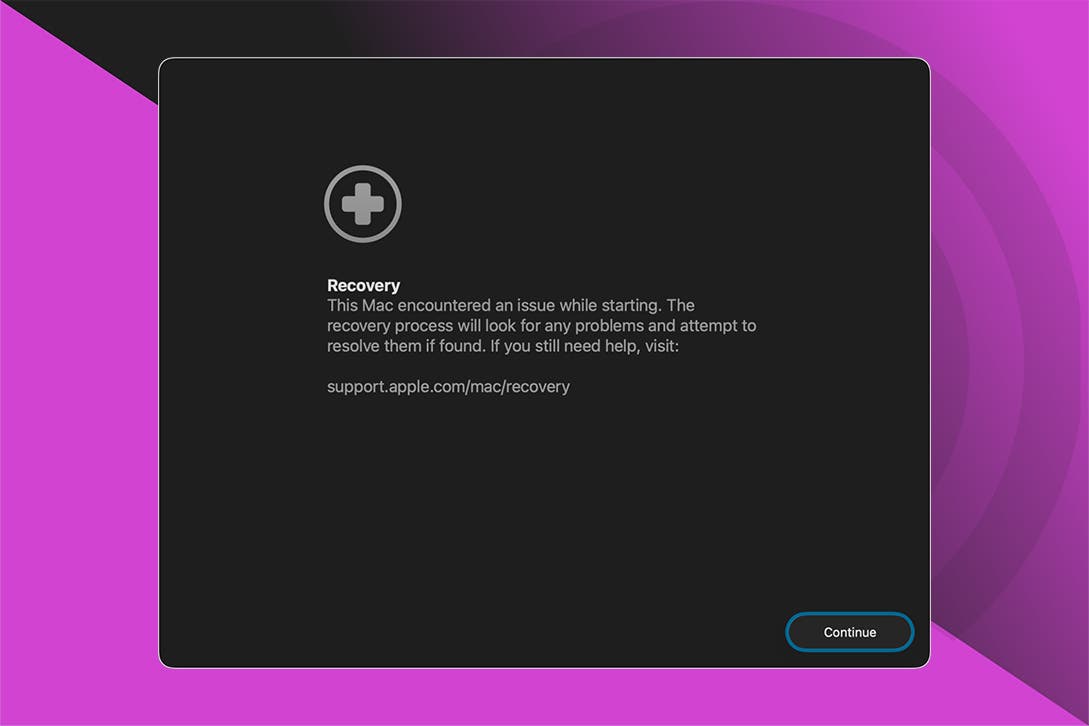
If power cycling didn’t get your Mac to start up, use Apple’s macOS Recovery process.


mac recovery mode

Image courtesy of Apple

If your Mac still isn’t starting after all these steps, it’s time to contact Apple Support. Now you know what to do if your MacBook or Mac won’t turn on but is charging. Be sure to check out our free Tip of the Day for more great Mac troubleshooting tutorials.

FAQ

  • What can I do if my iPhone or iPad won’t turn on? If your iPhone or iPad won’t turn on, it may be a software, hardware, or charging issue. We have a troubleshooting guide to help you.
  • My Apple Watch won’t charge; what could be wrong? If your Apple Watch won’t charge, it could be that the sensor and charging port are damaged or need to be cleaned. Hard rebooting your Apple Watch can also help.
  • How can I fix my AirPods when they aren’t working? If your AirPods aren’t working, you need to make sure they’re the default audio device, iOS may need to be updated, and more.

How-To
Mac
Troubleshooting
Device Management

Sign Up For Daily Newsletter

Be keep up! Get the latest breaking news delivered straight to your inbox.
By signing up, you agree to our Terms of Use and acknowledge the data practices in our Privacy Policy. You may unsubscribe at any time.
Share This Article
Facebook Twitter Email Print
Share
What do you think?
Love0
Sad0
Happy0
Sleepy0
Angry0
Dead0
Wink0
Previous Article Google Engineers Launch “Sashiko” For Agentic AI Code Review Of The Linux Kernel Google Engineers Launch “Sashiko” For Agentic AI Code Review Of The Linux Kernel
Next Article QCon London 2026: Use For QCon London 2026: Use For
Leave a comment

Leave a Reply Cancel reply

Your email address will not be published. Required fields are marked *

Stay Connected

248.1k Like
69.1k Follow
134k Pin
54.3k Follow

Latest News

Black+Decker BCBL200L-QW Review
Gadget
Toyota sees growth in China in November after nine-month decline · TechNode
Computing
Fairphone surprises Gen 6 owners with early Android 16 rollout
News
What you need to know about SASSA grants payments
Computing

You Might also Like

Fairphone surprises Gen 6 owners with early Android 16 rollout
News

Fairphone surprises Gen 6 owners with early Android 16 rollout

2 Min Read
QCon London 2026: SBOMs Move From Best Practice to Legal Obligation as CRA Enforcement Looms
News

QCon London 2026: SBOMs Move From Best Practice to Legal Obligation as CRA Enforcement Looms

7 Min Read
Tim Cook dashes over to China for the latest Apple anniversary concert
News

Tim Cook dashes over to China for the latest Apple anniversary concert

1 Min Read
56 of the Best TV Shows on Netflix That Will Keep You Entertained
News

56 of the Best TV Shows on Netflix That Will Keep You Entertained

44 Min Read
//

World of Software is your one-stop website for the latest tech news and updates, follow us now to get the news that matters to you.

Quick Link

  • Privacy Policy
  • Terms of use
  • Advertise
  • Contact

Topics

  • Computing
  • Software
  • Press Release
  • Trending

Sign Up for Our Newsletter

Subscribe to our newsletter to get our newest articles instantly!

World of SoftwareWorld of Software
Follow US
Copyright © All Rights Reserved. World of Software.
Welcome Back!

Sign in to your account

Lost your password?