Key takeaways
- Content calendar tools centralize your publishing schedule, approvals, and analytics across every channel, so your team spends less time coordinating and more time creating.
- The best tool depends on your team size, workflow complexity, and whether you need features like governance controls, AI content generation, or CRM integrations.
- Enterprise teams should prioritize tools with approval workflows, role-based permissions, and multi-brand support to maintain brand consistency at scale.
- AI-powered features like automated caption generation and best-time-to-post recommendations are now standard in leading content calendar platforms.
What are content calendar tools?
Content calendar tools are software that allow you to plan, schedule, manage, and distribute your content across multiple platforms. They help you stay organized and streamline a flow of content across your blogs, social media accounts, and other marketing channels.
When you’re competing in a market of 5.44 billion social media users, you need to be at the top of your content game. A Google Sheet won’t cut it.
We spoke to Carolina Horna, Freelance Creative Director and Brand Strategist, to get some expert advice. She has spent over a decade in the social media trenches and knows her way around a content calendar.
“Using a dedicated tool as opposed to a Google Doc or spreadsheet adds a level of organization and clarity that is hard to achieve without it,” says Horna.
“With a content calendar tool, I’m able to see my strategy come to life, maintain my content pillar distribution, and collaborate easily with my team.”
“Within the content calendar tool I use, you’re able to toggle between different views (such as spreadsheet, calendar, kanban, etc.),” says Horna. “This helps me manage my team’s time effectively since I can create a view that suits their involvement in my project. They never need to see or sift through content that doesn’t apply to them.”
The best content calendar tools have features like:
- Bulk uploads or batch scheduling to save time
- Suggestions for the best time to publish, send, or post
- Customization options to help you tailor your posts for each platform
- AI-powered content generation
- Hashtag suggestions
- Built-in library assets for images, videos, or templates
- Integrations with other CRMs for smooth workflows
- Drag-and-drop interfaces for easy scheduling
- Centralized management of multiple brand accounts across regions or sub-brands
- Governance controls and role-based permissions to control who can draft, edit, or publish
- Approval workflows with version history and comments
- Automated reporting dashboards that track specific KPIs
- Intuitive mobile apps so you can work from anywhere
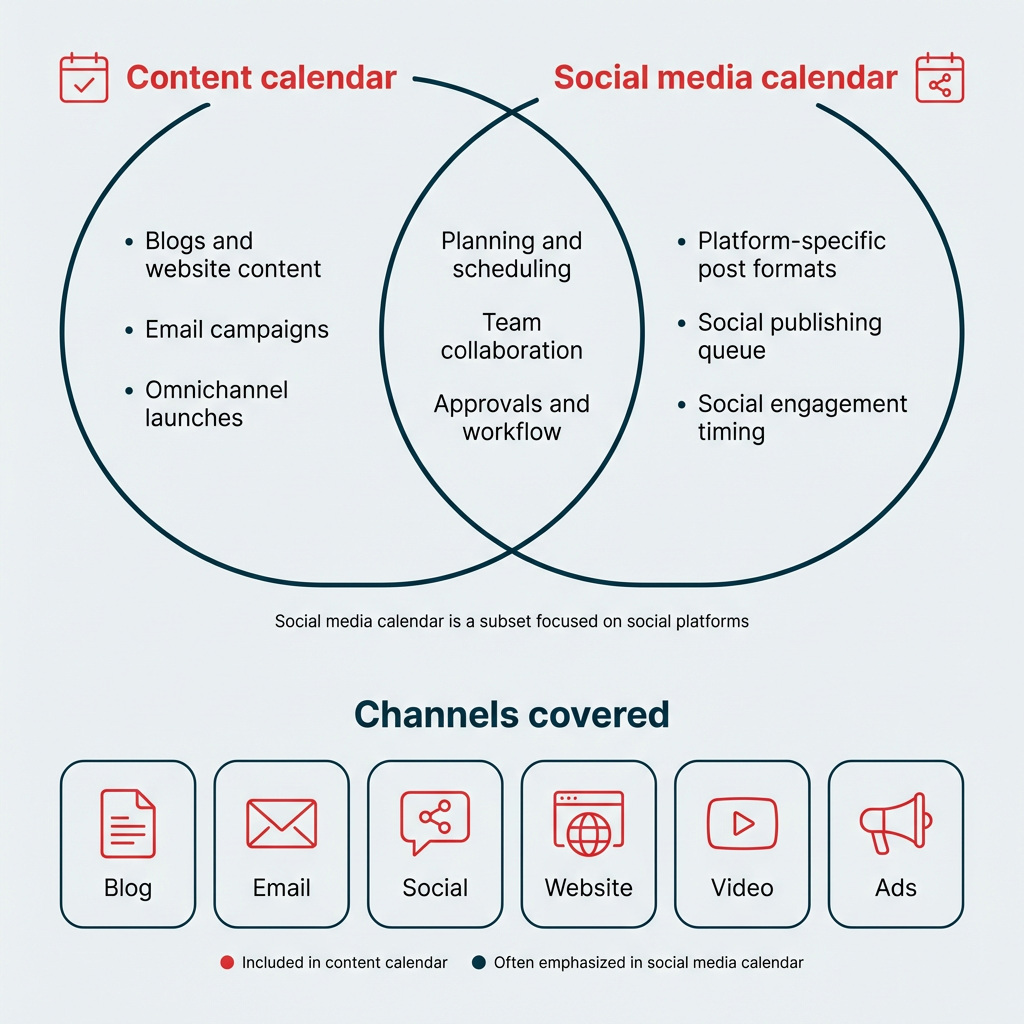
One important distinction: content calendars differ from social media calendars by focusing on all content and platforms, including email, blogs, and social media. A social media calendar focuses specifically on social media posts and platforms. If you need help specifically scheduling social media posts, try these social media scheduling tools.
What are the benefits of using a content calendar tool?
A content calendar tool can do more than keep your posts on schedule. Here’s why marketing teams at every level are making the switch from spreadsheets to dedicated content calendar software.
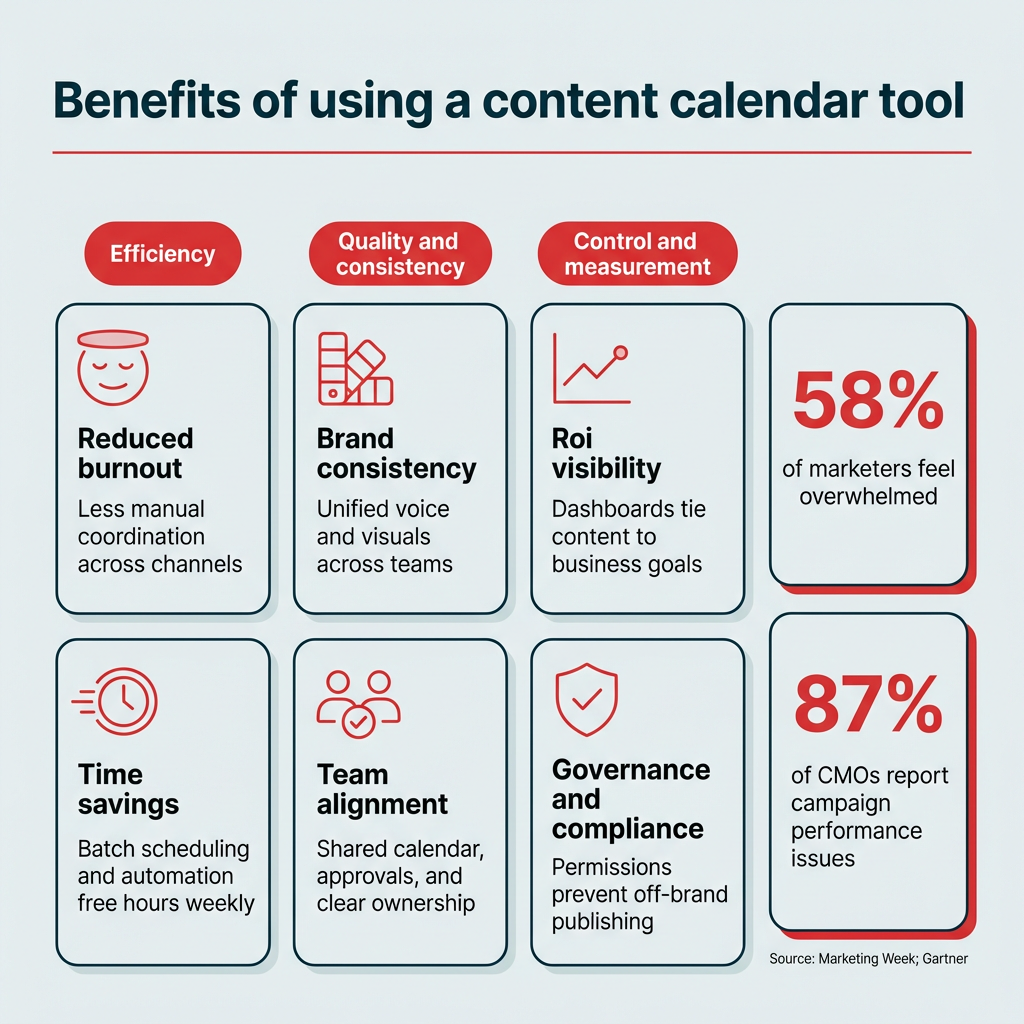
- Reduced burnout: Managing content across channels is exhausting. In fact, 58% of marketers reported feeling overwhelmed. A centralized tool takes the manual coordination off your plate so you can focus on strategy and creative work.
- Brand consistency: When every post, email, and blog lives in one calendar, it’s easier to maintain a unified voice and visual identity across channels and regions.
- Team alignment: Approval workflows, shared calendars, and role-based permissions keep everyone on the same page, whether your team is five people or fifty.
- Time savings: Batch scheduling, AI-generated captions, and automated publishing free up hours every week that would otherwise go to manual posting.
- ROI visibility: Built-in analytics and reporting dashboards let you tie content performance back to business goals, making it easier to prove value to stakeholders. This is critical when 87% of CMOs report campaign performance issues in the last year.
- Governance and compliance: For enterprise teams managing multiple brands or regions, governance controls prevent off-brand posting and ensure the right people approve content before it goes live.
In short, content calendar tools turn a chaotic publishing process into a repeatable, scalable system.
What are the best content calendar tools in 2026?
The best content calendar tools are the ones that match your workflow, team size, and the features you actually need. Here’s how the top 15 options compare.
|
Tool |
Best for |
Key features |
Pros |
Cons |
Pricing (as of 2026) |
|---|---|---|---|---|---|
|
Hootsuite |
Enterprise and all-in-one social media teams |
Social media calendar, scheduling, analytics, approvals, AI-powered tools |
Scales for teams, integrations, powerful reporting |
Higher cost than basic tools |
Starts at $199/mo |
|
Asana |
Mid-to-large marketing teams |
Project + workflow management, calendar view, task assignments |
Great for collaboration, scalable workflows |
Less specialized for content marketing |
Free–$24/mo |
|
Notion |
Flexible individual or team setups |
Customizable databases, calendar view, note-taking |
Highly customizable, affordable |
Requires setup, lacks automation |
Free–$10/mo |
|
Small marketing teams, creators, solopreneurs |
Visual content calendar, media library, preview for grid & feed, hashtag suggestions |
Intuitive visual planning, drag-and-drop calendar |
Weaker analytics or advanced workflows vs full suites |
$18.75 – $82.50/mo |
|
|
Buffer |
Solopreneurs and small marketing teams |
Scheduling, basic analytics, reuse options, browser extensions, content queueing |
Clean interface, easy to use, low learning curve |
Limited reporting, limited collaboration in lower tiers |
Free – $10/mo |
|
Airtable |
Mid to large marketing teams |
Spreadsheets + database hybrid, multiple views, automations, linked records |
Flexible data modelling, useful for content planning & asset management |
Doesn’t natively publish to social |
$20/mo per seat |
|
Sprinklr |
Enterprise-level organizations |
Publishing, engagement, listening, advertising, analytics, governance, omnichannel messaging |
Enterprise-grade features, strong compliance/permissions |
Very expensive; steep learning curve |
Not publicly listed (seats likely start at ~$299/mo) |
|
Canva Pro |
Solopreneurs, small marketing teams, freelancers |
Design templates, brand kits, content planner, team collaboration |
Strong for graphics, huge template library, intuitive |
Scheduling is basic; not a full social suite |
$19/mo |
|
HubSpot |
Mid to enterprise marketing teams, B2B orgs |
Social publishing, CRM integration, email campaigns, automation, analytics |
Unified marketing + sales view, strong automation |
Expensive; social features sometimes secondary |
Free – $4,700/mo |
|
Monday.com |
Mid to large marketing teams |
Boards, automations, dependencies, integrations, dashboards, forms |
Flexible for structuring content workflows; good as a central hub |
Not a dedicated social scheduler; requires integrations |
Free – $26/mo |
|
Trello |
Solopreneurs and small marketing teams |
Boards, lists, cards, checklists, labels, power-ups |
Intuitive; great for campaign ideation and lightweight planning |
Lacks native social features; can get messy with scale |
Free – $17.50/mo |
|
KAWO |
Enterprise & mid-size companies targeting Chinese social platforms |
Publishing to Chinese platforms, content calendar, analytics for Chinese networks |
Niche specialist for China; bridges gap for Western tools |
Less utility outside Chinese platforms; limited global use |
Starts at $4,000/year |
|
MeetEdgar |
Solopreneurs and very small teams |
Evergreen queues, content library, posting automation, variations generation |
Keeps profiles active with minimal effort; strong re-use |
Weaker analytics, limited collaboration |
$499/year |
|
Post Planner |
Small teams or solopreneurs needing curated content + scheduling |
Content suggestions & curation, scheduling, category queues, analytics |
Helps with ideation; decent hands-off scheduling |
Analytics & collaboration are basic; media features may lag |
Free – $79/mo |
|
Mailchimp |
Mid to enterprise teams |
Email marketing integration with social scheduling |
Impressive email features; good for teams wanting email + social |
Social scheduling limited; pricing scales quickly |
Free trial, then $27.85/mo |
Hootsuite
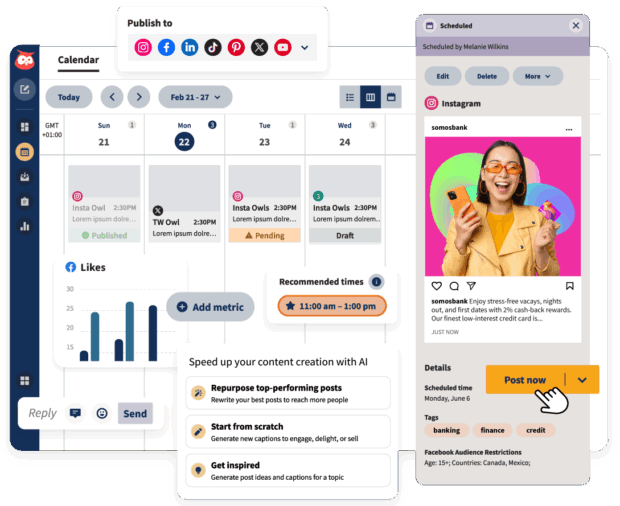
Hootsuite is a full-service social media management platform with one of the most robust content calendars on the market. It brings all of your social media channels and accounts into one place, which makes executing campaigns across platforms straightforward.
With Hootsuite, you’ll have an at-a-glance social media content calendar with all of your accounts in one place. You can drag-and-drop to organize scheduled posts, bulk schedule posts, and export your calendar. Your schedule will be updated in real-time.
Plus, it’s got automation built right into it, making it a superpowered social media content planner.
The AI-powered features (like OwlyWriter AI), content library, and integrations (like Canva) give your team a healthy assist when it comes to creating content in the platform. You can see the best time to post according to data from your followers.

You can assign approvals to certain team members and restrict other team members’ access, depending on their role. Workflows are pretty intuitive, so your team can create, schedule, approve, and publish posts without any bumps.
You’ve also got access to enterprise-level analytics tools that’ll help you optimize your social media strategy.

But don’t take our word on it alone. Hear from Witness Change on how switching to Hootsuite dramatically reduced their time spent scheduling and updating posts. Functionality like the all-in-one platform, where creation, scheduling, and publishing all take place on a single calendar, sure helped.
Or read how Stocksy had their best month ever using Hootsuite. “We’re using all the features of the platform,” says Christina Minshull, Head of Marketing at Stocksy.
“We’re publishing and scheduling, we use it for approval systems and crisis management, we use the content library to help with efficiency, tagging to make meaningful decisions, and use the listening platform to see what our audience is talking about and see where content gaps exist.”
Best for: Teams or midsize to enterprise brands that need an all-in-one social dashboard.
Top features:
Pros:
- Full feature set
- Smooth integrations
- Strong analytics and custom reporting
- AI social listening
Cons:
- Steep price jump for more advanced tiers
- Complexity not necessary for smaller operations
- Not the cheapest on the market
Pricing: Free 30-day trial, paid plans are from $199/mo

#1 Social Media Tool
Create. Schedule. Publish. Engage. Measure. Win.
Start your free trial
Asana

Source: Asana
Asana is a project management platform that doubles as a content calendar for teams that need to coordinate across departments. It’s especially useful when your content workflow involves multiple stakeholders, handoffs, and deadlines beyond just social media.
Best for: Mid-to-large marketing teams who also need project management tools, content planning workflows, and cross-team coordination.
Top features:
- Task boards and timelines visually laid out
- Custom fields available
- Can assign tasks assignments
- Communication via comment threads
- Integrations
Pros:
- Flexible
- Works for non-social work, like pipelines and project management
Cons:
- Not built specifically for social media
- Lacks native posting
- Lacks analytics
- Lacks social-specific features
Pricing: Starter plans are free, paid plans are $14.49/mo – $32.99/mo, and enterprise-level plans are available at request.
Notion

Source: Notion
Notion is a flexible workspace that lets you build a content calendar from scratch using customizable databases, templates, and linked pages. It’s a strong fit for teams that want full control over how their planning system looks and works.
Best for: Flexible individuals or teams who need to do lightweight content planning, knowledge bases, and hybrid editorial workflows.
Top features:
- Templates
- Relational databases
- Kanban or board views
- Embedded content
- Linking pages
- Collaborative editing
Pros:
- A very customizable, flexible structure
- Works for many use cases beyond social
- AI-powered assistance and content generation
- Easy to communicate in-platform using comments
Cons:
- Not specifically meant for social so no built-in scheduling or publishing
- No social-specific AI-features
- No data or analytics imported from social platforms
- No social reporting
Pricing: Starter plans are free, paid plans are $10/mo – $20/mo, and enterprise-level plans are available at request.

Source:
is a visual-first scheduling tool built around a drag-and-drop calendar and media library. It’s designed for creators and small teams who want to see exactly how their content will look before it goes live.
Best for: Small marketing teams, creators, solopreneurs who work in especially visual brands like fashion, food or lifestyle.
Top features:
- Visual content calendar
- Media library
- Preview for grids and feeds
- Hashtag suggestions
Pros:
- Intuitive visual planning
- Visual posting schedule
- Drag-and-drop calendar makes it easy to organize
- Good for content-first creators who need to see what their posts look like
Cons:
- Limited analytics
- Lacking in workflow capabilities
Pricing: Plans start at $18.75/mo – $82.50/mo
Buffer

Source: Buffer
Buffer is a lightweight scheduling tool with a clean interface and a low learning curve. It’s a solid entry point for solopreneurs or small teams that need basic scheduling without the complexity of a full social media suite.
Best for: Solopreneurs and small marketing teams looking for a starter tool that prioritizes simplicity and affordability.
Top features:
- Scheduling
- Basic analytics
- Reuse options
- Browser extensions
- Content queueing
Pros:
- Free features
- Clean interface
- Easy to use
- Lower learning curve
Cons:
- Limited reporting
- Limited collaboration features in lower tiers
- Lacking in-depth social media features
Pricing: Free plans with paid starting at $5/mo – $10/mo
Airtable

Source: Airtable
Airtable combines the familiarity of a spreadsheet with the power of a relational database. It’s a popular choice for marketing teams that want to build custom content planning systems with linked records, automations, and multiple views.
Best for: Mid to large marketing teams that want customizable content databases and can maintain the system.
Top features:
- Spreadsheets and database hybrid
- Multiple view options like grids, galleries, calendars
- Automations
- Linked records
- Customization
- Template library
- AI-powered generation capabilities
- App library and sandbox
Pros:
- Flexible data modelling
- Useful for content planning and asset management
- Plenty of content calendar templates available
Cons:
- Doesn’t natively publish to social
- Is not a social-specific platform, so lacking social features
Pricing: Free, with paid plans starting at $20/mo – $45/mo. Enterprise plans available upon request.
Sprinklr

Source: Sprinklr
Sprinklr is an enterprise-grade platform built for large organizations managing content, engagement, and advertising across dozens of channels. It’s one of the most feature-rich options available, but that depth comes with a steep learning curve and price tag.
Best for: Enterprise-level organizations that need to manage multiple consumer touch points across multiple channels.
Top features:
- Social publishing
- Engagement
- Social listening
- Advertising
- Comprehensive analytics
- Strong governance lets global companies manage sub-brands with regional permissions and approval workflows
- Omnichannel messaging
Pros:
- Enterprise-grade features
- Strong compliance and permissions
- Cross-channel depth
Cons:
- Very expensive
- Steep learning curve
Pricing: While Sprinklr does not list public prices for most of its products, they do offer a Self-Serve plan for smaller teams for around $299-$359/mo
Canva Pro

Source: Canva Pro
Canva Pro is primarily a design tool, but its built-in content planner lets you schedule posts directly from the platform where you create them. It’s a natural fit for teams that spend most of their time on visual content.
Best for: Solopreneurs, small marketing teams, freelancers who need support with design.
Top features:
- Premium stock content
- Design templates
- Brand kits
- Content planner for scheduling simple posts
- Team collaboration
Pros:
- Strong for graphics and social images
- Huge template library
- Intuitive design for non-designers
Cons:
- Scheduling is basic
- Not a full social media management suite
- No analytics
Pricing: Pro plans start at $19/mo per seat
HubSpot

Source: HubSpot
HubSpot includes social publishing tools as part of its broader marketing and CRM platform. If your team already uses HubSpot for email, lead tracking, or sales, adding social scheduling keeps everything in one ecosystem.
Best for: Mid to enterprise marketing teams, B2B organizations that already use HubSpot CRM and want everything in one ecosystem.
Top features:
- Social publishing
- CRM integration
- Linked email campaigns
- Automation
- Analytics and lead tracking
Pros:
- Unified marketing and sales view
- Strong automation
- Useful for tying together brand communications across email, CRM, and social
Cons:
- Social features are lacking
Pricing: Free, with paid accounts ranging from very basic at $15/mo to professional starting at $1,450/mo and enterprise starting at $4,700/mo
Monday.com

Source: Monday.com
Monday.com is a work management platform with customizable boards, automations, and dashboards that can be configured as a content calendar. It works well as a central hub when your marketing team needs to coordinate content alongside other projects.
Best for: Mid to large marketing teams managing multiple workflows and executing campaigns across multiple departments who need an organization tool.
Top features:
- Boards
- Forms
- Dashboards
- Integrates well with other platforms
Pros:
- Very flexible for structuring your content workflows
- Works well as a central hub for multiple marketing campaigns across different platforms and teams to stay organized
Cons:
- Not a dedicated social scheduler or publisher tool
- Requires integrations to push posts
Pricing:
- Free to start, paid plans start at $26/mo per seat with enterprise plans available at request.
Trello

Source: Hevo
Trello uses a simple board-and-card system that makes it easy to map out content ideas, track progress, and move posts through stages. It’s a low-barrier option for teams that want visual planning without a steep learning curve.
Best for: Solopreneurs and small marketing teams who need simple visual planning and a low barrier to entry.
Top features:
- Simple editorial boards
- Content idea pipelines
- Visual task tracking
- Templates
Pros:
- Intuitive
- Great for planning
Cons:
- Lacks social features like publishing
- Scaling can get messy
Pricing: Free with paid plans starting at $5/mo – $17.50/mo
KAWO

Source: KAWO
KAWO is a niche content calendar platform built specifically for publishing to Chinese social networks like WeChat, Weibo, and Douyin. It fills a gap that most Western tools can’t reach.
Best for: Enterprise and mid-size companies targeting Chinese social platforms like WeChat, Weibo, Douyin.
Top features:
- Social publishing to Chinese platforms
- Organized content calendar
- Analytics focused on Chinese social networks
Pros:
- Specific to social media marketing
- Great if you’re focused on Chinese apps
- Bridges gaps where Western tools don’t reach
Cons:
Pricing: While pricing isn’t publicly available, you can expect KAWO plans to range from $4,000 to $29,600/year
MeetEdgar

Source: MeetEdgar
MeetEdgar automates evergreen content by recycling your best posts on a set schedule. It’s a hands-off option for solopreneurs who want to keep their profiles active without daily manual effort.
Best for: Solopreneurs or very small teams who want “set it and forget it” evergreen scheduling.
Top features:
- Automated evergreen content queues
- Content library
- Posting automation
Pros:
- Minimal effort to keep your profile active
- Automatically reposts evergreen content
Cons:
- Automated reposting has strategic pitfalls
- Limited collaboration
- Narrow social feature set
Pricing: Free trial, paid plans start at $29.99 – $49.99/mo
Post Planner

Source: Post Planner
Post Planner combines content curation with scheduling, surfacing trending content ideas from across the web and letting you queue them up alongside your own posts. It’s a useful tool for teams that struggle with ideation.
Best for: Small marketing teams or solopreneurs needing curated content ideas and scheduling.
Top features:
- Content suggestions pulled from various sources
- Content curation
- Scheduling
- Wide suite of platforms to post to
- Category queues
Pros:
- Helps with ideation and finding trending content
- Hands-off scheduling
Cons:
- Basic analytics
- Limited collaboration
- Media library and advanced features may lag
Pricing: Free with paid plans at $7 – $57/mo
Mailchimp

Source: Mailchimp
Mailchimp is best known for email marketing, but it also includes social scheduling tools that let you plan posts alongside your email campaigns. It’s a good fit for teams that want to coordinate messaging across email and social from one platform.
Best for: Mid to enterprise teams focused on email marketing that want everything in one place.
Top features:
- Robust email marketing features and automations
- Generative AI features
- Audience segmentation within email lists
- Popups, landing pages, and other digital touchpoints
Pros:
- Scheduling capabilities for social posts to align with email campaigns
- Personalized onboarding
- Build social posts in the same place you build emails
- Robust email marketing features
Cons:
- Not social-specific
- Features are largely focused on email marketing
Pricing: Free 14-day trial, then plans scale up according to list size: 500 contacts $27.85/mo – 100,000 contacts $946.74/mo
How do you choose the right content calendar tool?
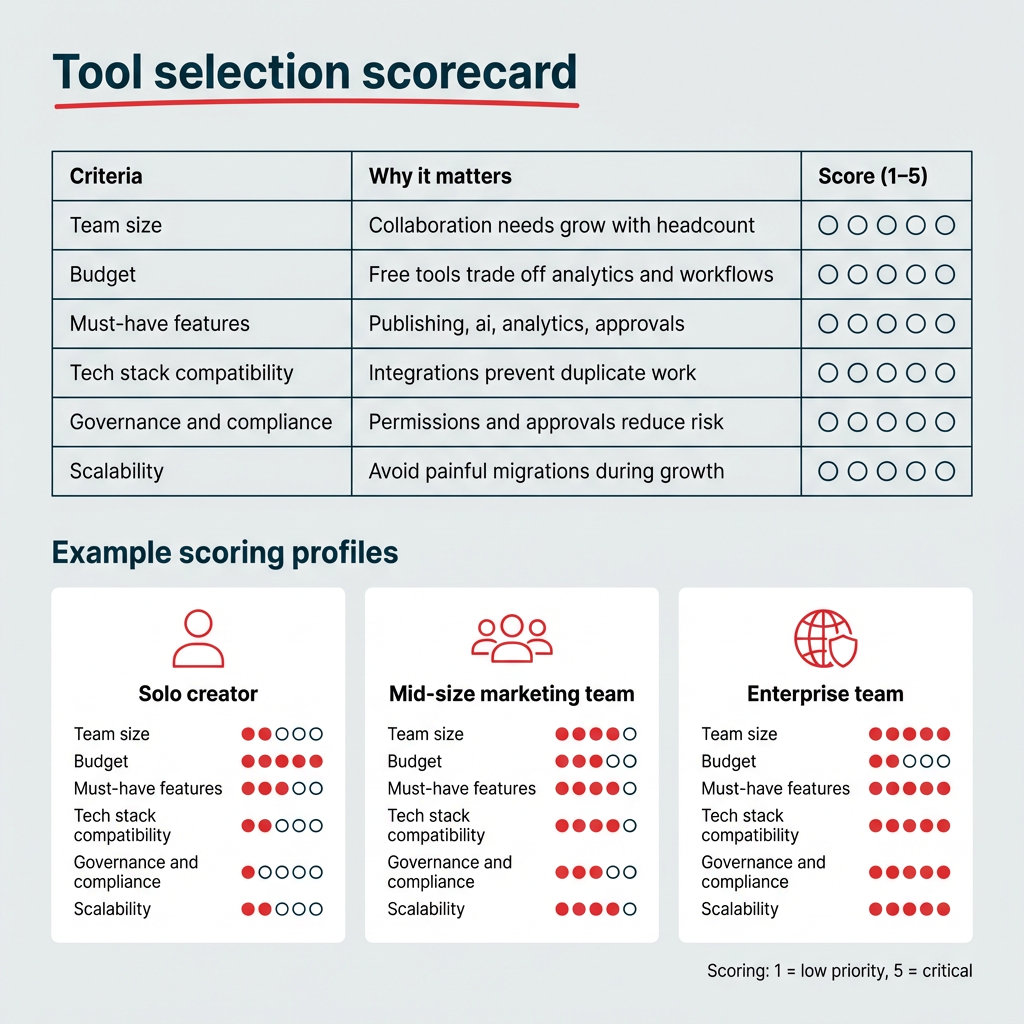
With 15 options on this list alone, picking the right content calendar tool can feel like its own project. The key is to start with your team’s actual needs rather than chasing the longest feature list.
Here’s a checklist to help you narrow it down:
- Team size: Solo creators and small teams can get by with lightweight tools like Buffer or Trello. Larger teams need approval workflows, role-based permissions, and multi-brand support.
- Budget: Free tools exist, but they come with trade-offs in analytics, collaboration, and publishing capabilities. Enterprise platforms like Hootsuite and Sprinklr cost more but deliver the governance and scale larger organizations need.
- Must-have features: Prioritize what matters most for your workflow. That might be scheduling, AI content generation, analytics, or CRM integrations.
- Tech stack compatibility: Check whether the tool integrates with your existing CRM, DAM, or project management platforms. A tool that doesn’t connect to your stack creates more work, not less.
- Governance and compliance: If you manage multiple brands, regions, or regulated content, look for tools with role-based permissions, approval chains, and version history.
- Scalability: Choose a tool that can scale with your team. Migrating platforms mid-growth is painful and expensive.
“Get your hands dirty and try out as many features as the tool has available,” says Horna. “If your tool offers free templates, explore how some of those setups could improve your own template and workflow.”
“In my content calendar tool, I’ve created sections in my content forms that correspond to copywriting and design requirements,” says Horna. “These are then filtered into separate spreadsheets for copywriters and designers to see tasks and revisions. It’s a game-changer because team members only have to go to one place to see which content needs their expertise.”
If you’re still unsure, free trials are the best way to test whether a tool actually fits your workflow before committing.
How do you create a content calendar?
Once you’ve picked your tool, building a content calendar is straightforward. Here’s a step-by-step process to get started.
- Define your goals
- Audit your existing content
- Set up your calendar structure
- Plan your content themes and pillars
- Schedule and assign
- Review and optimize
1. Define your goals
Start by clarifying what your content needs to accomplish. Are you driving brand awareness, generating leads, or supporting a product launch? Your goals shape everything from posting frequency to the types of content you prioritize.
2. Audit your existing content
Before planning new content, take stock of what you already have. Review past posts, blog articles, and campaigns to identify what performed well, what can be repurposed, and where there are gaps.
3. Set up your calendar structure
Choose your tool and configure it for your workflow. Set up columns or fields for key details like publish date, platform, content type, status, and assigned team member. Most tools offer ready-made templates to speed this up.
4. Plan your content themes and pillars
Map out recurring themes or content pillars that align with your brand and audience interests. This keeps your calendar balanced and prevents you from defaulting to the same type of post every day.
5. Schedule and assign
Batch your content creation and scheduling. Assign drafts to writers and designers, set review deadlines, and queue posts for publishing. Tools with approval workflows make this step much smoother for larger teams.
6. Review and optimize
Your calendar isn’t a set-it-and-forget-it document. Review performance data regularly, adjust your posting cadence, and update your themes based on what’s resonating with your audience.
A well-maintained content calendar turns ad hoc posting into a repeatable system that scales with your team.
How is AI changing content calendar tools?
AI features have moved from nice-to-have to standard across most leading content calendar platforms. Here’s where they’re making the biggest impact for marketing teams.
- Caption and copy generation: Tools like Hootsuite (with OwlyWriter AI), Notion, and Airtable now offer AI-powered writing assistance that can draft captions, suggest variations, and adapt copy for different platforms.
- Best-time-to-post recommendations: Instead of guessing when your audience is online (the vast majority of U.S. adults use YouTube (84%) and Facebook (71%)), AI analyzes your historical engagement data and recommends optimal publishing windows. Hootsuite’s best time to post feature does this automatically based on your followers’ activity.
- Content repurposing suggestions: Some platforms can identify high-performing content and suggest ways to repurpose it across channels, turning a blog post into social snippets or an email into a carousel.
- Social listening for content ideation: AI-powered social listening tools surface trending topics, audience sentiment, and competitive gaps that can feed directly into your content calendar.
These features don’t replace your content strategy, but they do remove a lot of the manual work that slows teams down. When evaluating tools, look at how AI is integrated into the actual workflow rather than just listed as a feature on the pricing page.
Frequently asked questions
What is a content calendar tool?
A content calendar tool is software that lets you plan, schedule, and manage content across multiple platforms from one place. It centralizes your publishing workflow so your team can see what’s going out, when, and on which channels. Most tools also include features like analytics, approval workflows, and AI-powered content suggestions.
What is the best content calendar tool?
The best content calendar tool for enterprise and mid-size marketing teams is Hootsuite. It combines scheduling, analytics, approval workflows, AI-powered content creation, and social listening in a single platform. For smaller teams or solo creators, lighter tools like Buffer or Trello can be a good starting point.
What’s the difference between a content calendar and a social media calendar?
A content calendar covers all content types and channels, including email, blogs, and social media. A social media calendar focuses specifically on social media posts and platforms. If your team manages content beyond social, a broader content calendar tool gives you a more complete view of your publishing schedule.
How do I create a content calendar?
To create a content calendar, start by defining your goals and auditing your existing content. Then choose a tool, set up your calendar structure with key fields like publish date and platform, plan your content themes, and begin scheduling and assigning posts. Review performance regularly and adjust your approach based on what’s working.
Is there a free content scheduler?
Yes, several content scheduling tools offer free plans. Buffer, Trello, and Notion all have free tiers with basic scheduling and planning features. Hootsuite also offers a free 30-day trial that gives you access to its full feature set, including AI tools and analytics.
What are the best free content calendar tools?
The best free content calendar tools include Buffer (free plan with basic scheduling), Trello (free boards for visual planning), and Notion (free tier with customizable databases). Hootsuite’s free 30-day trial is also worth trying if you want to test enterprise-level features before committing to a paid plan.
Does Canva have a content scheduler?
Yes, Canva Pro includes a content planner that lets you schedule posts directly from the design platform. It’s a convenient option if you create most of your visual content in Canva, though it lacks the analytics and collaboration features of dedicated social media management tools.
What features should I look for in a content calendar tool?
The most important features to look for in a content calendar tool are scheduling, multi-platform publishing, approval workflows, analytics, and AI-powered content suggestions. Enterprise teams should also prioritize role-based permissions, multi-brand support, and integrations with their existing tech stack.
Can I use a content calendar tool for more than social media?
Yes, most content calendar tools support planning across multiple channels including blogs, email campaigns, and social media. Tools like Hootsuite, HubSpot, and Mailchimp let you coordinate messaging across several channels from one calendar, which helps maintain brand consistency.
How do enterprise teams use content calendar tools differently?
Enterprise teams use content calendar tools to manage multi-brand, multi-region content programs with role-based permissions, approval workflows, and centralized governance controls. They also rely on automated reporting dashboards to track KPIs across dozens of accounts and share performance data with stakeholders.
Save time managing your social media presence with Hootsuite. Publish and schedule posts, find relevant conversions, engage your audience, measure results, and more — all from one dashboard. Try it free today.