By using this site, you agree to the Privacy Policy and Terms of Use.
Accept
World of SoftwareWorld of SoftwareWorld of Software
  • News
  • Software
  • Mobile
  • Computing
  • Gaming
  • Videos
  • More
    • Gadget
    • Web Stories
    • Trending
    • Press Release
Search
  • Privacy
  • Terms
  • Advertise
  • Contact
Copyright © All Rights Reserved. World of Software.
Reading: Why is Google killing its Assistant before Gemini is ready to handle the basics?
Share
Sign In
Notification Show More
Font ResizerAa
World of SoftwareWorld of Software
Font ResizerAa
  • Software
  • Mobile
  • Computing
  • Gadget
  • Gaming
  • Videos
Search
  • News
  • Software
  • Mobile
  • Computing
  • Gaming
  • Videos
  • More
    • Gadget
    • Web Stories
    • Trending
    • Press Release
Have an existing account? Sign In
Follow US
  • Privacy
  • Terms
  • Advertise
  • Contact
Copyright © All Rights Reserved. World of Software.
World of Software > News > Why is Google killing its Assistant before Gemini is ready to handle the basics?
News

Why is Google killing its Assistant before Gemini is ready to handle the basics?

News Room
Last updated: 2026/04/12 at 1:12 PM
News Room Published 12 April 2026
Share
Why is Google killing its Assistant before Gemini is ready to handle the basics?
SHARE
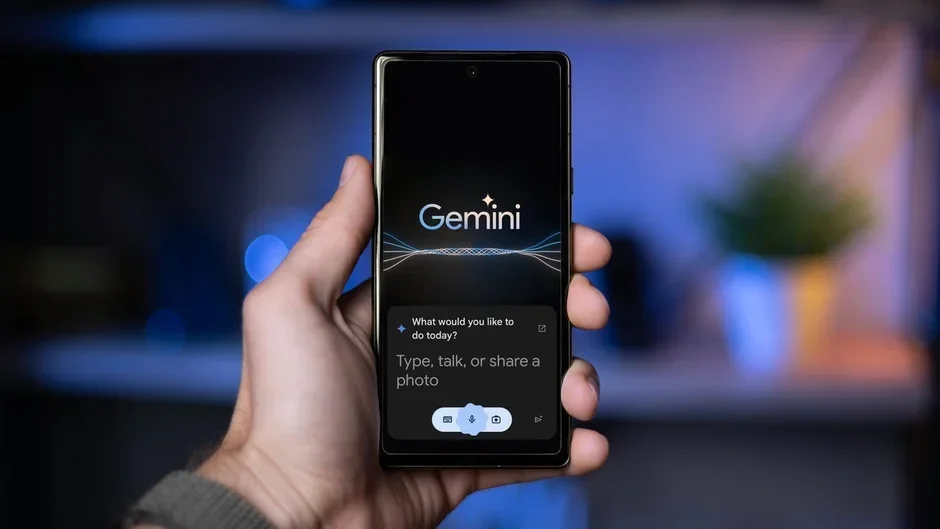
Google’s AI assistant Gemini can write you an entire essay, summarize a PDF, and hold a full conversation about your vacation plans. But ask it to set a kitchen timer, and there’s a decent chance it’ll tell you it failed, even when it actually worked. That’s the kind of problem that makes you wonder if Google is rushing the future before the present is ready.

Gemini is fumbling one of the most basic assistant tasks

As we recently covered, Pixel and Android users have been running into a frustrating bug where Gemini shows a false “Action failed” error after setting an alarm or timer. The alarm or timer actually gets created in the Clock app just fine, however, Gemini times out waiting for a confirmation signal from Clock, assumes something went wrong, and tells you it didn’t work.
Google has acknowledged this as a “known issue,” which is at least something. The official workaround is to go into your Gemini settings and toggle “Gemini Apps Activity” off and then back on to force a resync.

However, that is technically not a fix, but rather tech support triage for a feature Google Assistant handled without a hiccup for over a decade.

The timing could not be worse

But consider this: Google is actively killing Google Assistant, and by mid-2026, all new Android phones are expected to ship with Gemini as the only voice assistant. The escape hatch is closing.Also, on current Pixels, saying “Hey Google” opens Gemini regardless of what you’ve set as your default assistant. Then notice how Google has been stripping Assistant features for months now, from Driving Mode to Family Bell reminders.

This has me thinking that the whole point of this transition was that Gemini was supposed to be the upgrade, so it needs to be nailing the basics before Google pulls the plug on the thing it’s replacing.

A timer bug is actually a trust problem

This might sound like a minor inconvenience, but think about what people actually use voice assistants for every day. Cooking timers. Medication reminders. Morning alarms. These are tasks where reliability is not optional.

A timer that tells you it failed but actually fired is arguably worse than one that simply doesn’t work, because now you have no idea what to trust. It should be noted that this isn’t Gemini’s first stumble with the basics, either.

Google needs to earn this transition, not force it

I’ve experienced this kind of thing firsthand on my Google Home speaker. Gemini Live with screen sharing has also started failing at adding calendar events from screenshots I share with it, a task it used to handle without a hitch. Now, it just gaslights me and tells me it did something it clearly didn’t do.

It tells me the event was added, I check my calendar, and nothing is there. That kind of silent failure is a confidence killer, because at least an error message tells you something went wrong.

Nobody is arguing that Gemini isn’t impressive for complex queries and longer conversations. It genuinely is, and the leap from traditional Assistant responses to actual AI-powered interactions is real. But Google cannot keep pushing users toward an assistant that stumbles on the simple, boring, reliable stuff people depend on every single day.

The smart move would be to keep Assistant’s proven paths intact for system-level tasks like alarms, timers, and calendar events, while letting Gemini handle the open-ended queries it’s built for. One assistant surface, two execution engines under the hood. Until Google figures that balance out, this transition is going to keep frustrating the very users it’s supposed to win over.

Get Visible as low as $20/mo for 1 year. Limited time offer with code: FRESHSTART

Offer Ends 6.1.2026 at 11.59pm ET. New members get $5/mo off the $25/mg Visible plan, $35/mo Visible+ plan, or $45/mo Visible+ Pro plan for the first 12 months. Promo code FRESHSTART required at checkout.


Buy at Visible

Read the latest from Johanna Romero

Sign Up For Daily Newsletter

Be keep up! Get the latest breaking news delivered straight to your inbox.
By signing up, you agree to our Terms of Use and acknowledge the data practices in our Privacy Policy. You may unsubscribe at any time.
Share This Article
Facebook Twitter Email Print
Share
What do you think?
Love0
Sad0
Happy0
Sleepy0
Angry0
Dead0
Wink0
Previous Article Field of Dreams Was Wrong. And It’s Cost Founders Billions | HackerNoon Field of Dreams Was Wrong. And It’s Cost Founders Billions | HackerNoon
Next Article Here’s How Much Your Original iPhone Is Worth Today – BGR Here’s How Much Your Original iPhone Is Worth Today – BGR
Leave a comment

Leave a Reply Cancel reply

Your email address will not be published. Required fields are marked *

Stay Connected

248.1k Like
69.1k Follow
134k Pin
54.3k Follow

Latest News

Dell Pro Max Tower T2 Review: This Workstation Scales From Sensible to Savage
News
Rust + OpenGL: Rendering 250,000 Dynamic 3D Entities at 50 FPS on a Single CPU Thread | HackerNoon
Computing
Sunday Reboot: MacBook Neo upgrades, masses of Mac minis, and iPhone re-entry
News
11 Major Projector Brands Ranked, According To User Reviews – BGR
News

You Might also Like

Dell Pro Max Tower T2 Review: This Workstation Scales From Sensible to Savage
News

Dell Pro Max Tower T2 Review: This Workstation Scales From Sensible to Savage

3 Min Read
Sunday Reboot: MacBook Neo upgrades, masses of Mac minis, and iPhone re-entry
News

Sunday Reboot: MacBook Neo upgrades, masses of Mac minis, and iPhone re-entry

1 Min Read
11 Major Projector Brands Ranked, According To User Reviews – BGR
News

11 Major Projector Brands Ranked, According To User Reviews – BGR

18 Min Read
Apple Reportedly Testing Glasses AI in Several Frame Styles
News

Apple Reportedly Testing Glasses AI in Several Frame Styles

3 Min Read
//

World of Software is your one-stop website for the latest tech news and updates, follow us now to get the news that matters to you.

Quick Link

  • Privacy Policy
  • Terms of use
  • Advertise
  • Contact

Topics

  • Computing
  • Software
  • Press Release
  • Trending

Sign Up for Our Newsletter

Subscribe to our newsletter to get our newest articles instantly!

World of SoftwareWorld of Software
Follow US
Copyright © All Rights Reserved. World of Software.
Welcome Back!

Sign in to your account

Lost your password?