Chrome is part of the digital routine of millions of people to the point that we often stop wondering what exactly it does while we browse. We use it for almost everything, we trust it with sessions, extensions, passwords, searches and a good part of our life on the Internet. That is why it is so surprising to find a folder larger than 4 GB associated with an AI model downloaded by the browser itself. We are not talking about a minor update or a residual file, but rather a large component that many users probably did not expect to see there.
The conversation began to take shape from a post by Alexander Hanff on That Privacy Guy. Their finding, in essence, was simple to understand: according to its logs, Chrome had left a multi-gigabyte AI model on his computer without giving him a clear warning during the process. From that clue I did the checking on my own computer, used from Spain, and found the same folder that Hanff refers to: OptGuideOnDeviceModel, within Chrome’s internal files. In my case, macOS shows that folder as 4.27 GB in size, even though features like the Gemini sidebar are not yet available in this market.
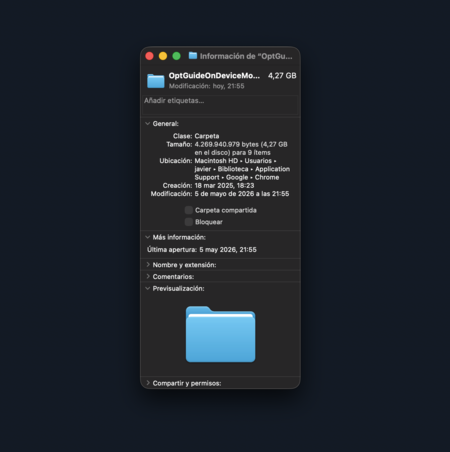
Gemini Nano downloaded to my computer
Gemini Nano does not work like a traditional download that we search for, accept and install manually. In Chrome’s developer documentation, the company explains that the built-in AI capabilities are intended to be seamless and that model management is done automatically in the background. It also notes that the initial download can be triggered when an AI feature built into the browser needs to use the Gemini Nano for the first time. In other words: the model can reach the computer as part of Chrome’s internal workings, not necessarily through a clear and recognizable action for the user.
An AI model that goes beyond an integrated chatbot
The model is not limited to promoting a browser with a chatbot integrated within Chrome. Google has already described uses of Gemini Nano on the device itself to detect technical support scams, a type of threat that often lasts a very short time online and can escape traditional tracking systems. In that scenario, Chrome can provide the model with content from the page the user is visiting to extract risk cues. AI, therefore, can also be part of the browser’s security layer.
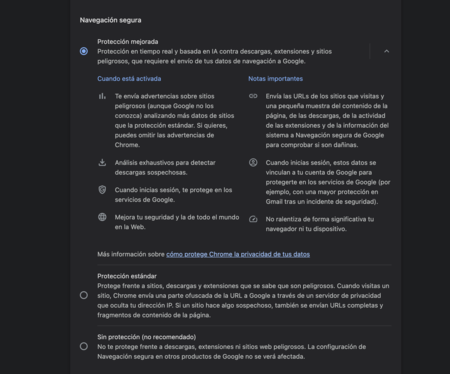
Gemini Nano also boosts security features in Chrome
That’s where a good part of the discomfort lies. AI in the browser can have reasonable uses, from helping detect fraud to powering writing, translation or summarization functions, but the problem arises when the user does not fully understand what has been downloaded, why it is there and how they can manage it. Hanff sums it up with a very direct criticism: “Chrome didn’t ask. Chrome does not show it to the user. If the user deletes it, Chrome downloads it again.”
There are also voices that reduce the seriousness of the case. On Reddit, a user defended that the model is only downloaded when someone tries to use an AI function that needs it and that it can also be disabled from the Chrome options. Hanff responded that his logs showed otherwise: the browser opened on schedule, stayed on a page for a few minutes without interaction, and still left a trace of the download. Beyond that specific discussion, Google’s own documentation points to a middle ground: the download can be triggered by built-in functions and continue in the background even if the tab that started it is closed.
Chrome does offer controls to reduce the presence of some AI features, but it doesn’t concentrate everything in a single, easy-to-understand panel. From settings can be disabled or hide certain visible pieces, such as Gemini in the markets where it is available, typing assistance, search history or AI-powered search. To go deeper, however, you have to get into more technical terrain, such as the experimental chrome://flags options. This jump changes the experience quite a bit: we are no longer talking about turning off a clear function, but rather touching internal parts that may also be linked to features that the user may want to keep.

Firefox offers an easy way to disable AI features
Firefox offers an interesting counterpoint because Mozilla has grouped its AI controls in its own section within the settings. Since Firefox 148, that section is now available as “AI Controls” and allows you to block current and future improvements from a visible place, without having to chase options spread throughout the browser. It also separates specific sections, such as on-device AI, translations, and chatbot providers in the sidebar. It is a more direct approach: the user not only sees that these functions exist, they also better understand what they can activate, block or leave available.

The arrival of Gemini Nano to Chrome is part of a broader movement: browsers want to become more than just a window to the Internet and start executing AI tasks within the computer itself. That direction can have real advantages, especially if it serves to strengthen security or make some functions more agile. But the case also leaves a visible panorama. Some users won’t mind at all that Chrome downloads local models automatically; others, instead, they will want to knowunderstand what it is for and have room to decide.
Images | with Grok | Screenshot
In | It doesn’t speak, it doesn’t climb stairs and it doesn’t even always obey: this is the robot that the creator of the Roomba has been wanting to develop for 30 years