Dhruv Bhutani / Android Authority
I’ve owned some version of a Kindle for well over a decade, and it remains one of the few pieces of technology that I use every single day. Between all its strengths like the unmatched e-ink screen, battery life measured in weeks, and the sheer portability, the Kindle is fundamentally a device built for content consumption. As a tool for reading with limited annotation capabilities, the Kindle lies squarely in Amazon’s walled garden. Over the years, Amazon has given it a limited additions like the ability to look up definitions using a dictionary that is useful but painfully isolated. Sure, there are features like X-Ray for deeper story insights, but those only work if you have bought a book from Amazon’s storefront. For the dedicated reader or an enthusiast like me, if you want to deeply engage with the source material, that consumption-only focus has always been the system’s biggest flaw. You essentially needed a smartphone alongside if you wanted to look up additional context.
Adding Gemini to the Kindle is the single biggest upgrade any reader can make to their reading experience.
My dream Kindle would be an active, intelligent research tool. One that could instantly answer questions about the book I was reading, summarising concepts, and even generating spoiler-free character lists based on my progress so far. Turns out, that’s entirely possible if you decide to take the plunge and jailbreak your Kindle. Recently, I discovered Assistant, a plugin for the powerful open-source reading application KOReader. This plugin lets you tap into popular AI language models like Google Gemini, ChatGPT, DeepSeek, and even Ollama if you want to keep things local. So, I did the obvious thing and dug deep into it as a fun weekend project. Suffice it to say, this is exactly what I’ve been missing my entire life. The plugin has fundamentally transformed my Kindle from a passive e-reader into an active, indispensable knowledge assistant, and I’m not going back. It’s the single biggest upgrade any serious reader can make to their reading experience. Here’s why.
Would you use AI tools that explain or summarise books on your Kindle?
0 votes
Solving the friction of external research

Dhruv Bhutani / Android Authority
As an avid reader of history and science fiction, the core problem with reading on a Kindle is that it forces a binary choice on you just like a real book. If you’re coming back to a book after a while, either you power through sections with limited understanding or use an alternate method like a smartphone to do research. In 2025, I expect more from a device that is expected to be a replacement for physical books.
The moment you encounter a complex theory in a science book, a deep historical reference, or even a character that hasn’t been referenced in a while in a fantasy novel, the Kindle’s built-in tools fall apart. There is no real way to catch up as the Kindle’s built-in dictionary is precisely that, a dictionary, that is wholly disconnected from the context of the book in your hands. To me, that’s the death of deep focus. When I pick up my smartphone to look up a character, I inevitably end up getting into a rabbit hole on Wikipedia, or fan accounts on Reddit. None of which is conducive to deep reading.
I went from losing minutes on Wikipedia rabbit holes to getting two sentence explanations on my e-ink screen.
The Assistant plugin for KOReader solves that by offering an AI Assistant within the reading experience. Instead of looking up singular words, you can highlight entire, dense paragraphs – let’s say a politically complex scene in Dune or maybe a quantum physics concept from a deep science fiction novel – and hit “explain this.” The plugin hooks into Google Gemini, or your AI model of choice, and returns a summarized explanation in simple language. Moreover, this explanation is framed specifically in the context of the book’s narrative. This ensures that you’re not just getting a low down on quantum physics, but quantum physics in the context of the book you are reading.
Recently, while reading The Historian by Elizabeth Kostova, a fantastic gothic horror novel filled with obscure references to military skirmishes and conflicts in Eastern Europe, I found myself spending long minutes on Wikipedia researching one-off mentions of wars and battles fought in the region. The Assistant plugin, on the other hand, gave me a two-sentence summary of the historical context delivered cleanly, directly on the Kindle’s e-ink screen. This ability to clarify information and simplify complex ideas within the reading environment is the primary reason why this setup completely transforms the reading experience.
Spoiler-free context when you need it

Dhruv Bhutani / Android Authority
For enthusiasts of large, sprawling narratives like The Wheel of Time, Dune, or even The Lord of the Rings series, the issue of forgetting minor characters, fictional terms, or minor locations is real. At least it is for me. Amazon’s native X-Ray tries to tackle this but is often a frustrating experience. For one, it relies on externally generated content and is prone to spoilers because it doesn’t know your reading progress. Moreover, it only works on books that you’ve purchased from Amazon’s storefront. That rules out side-loaded books altogether.
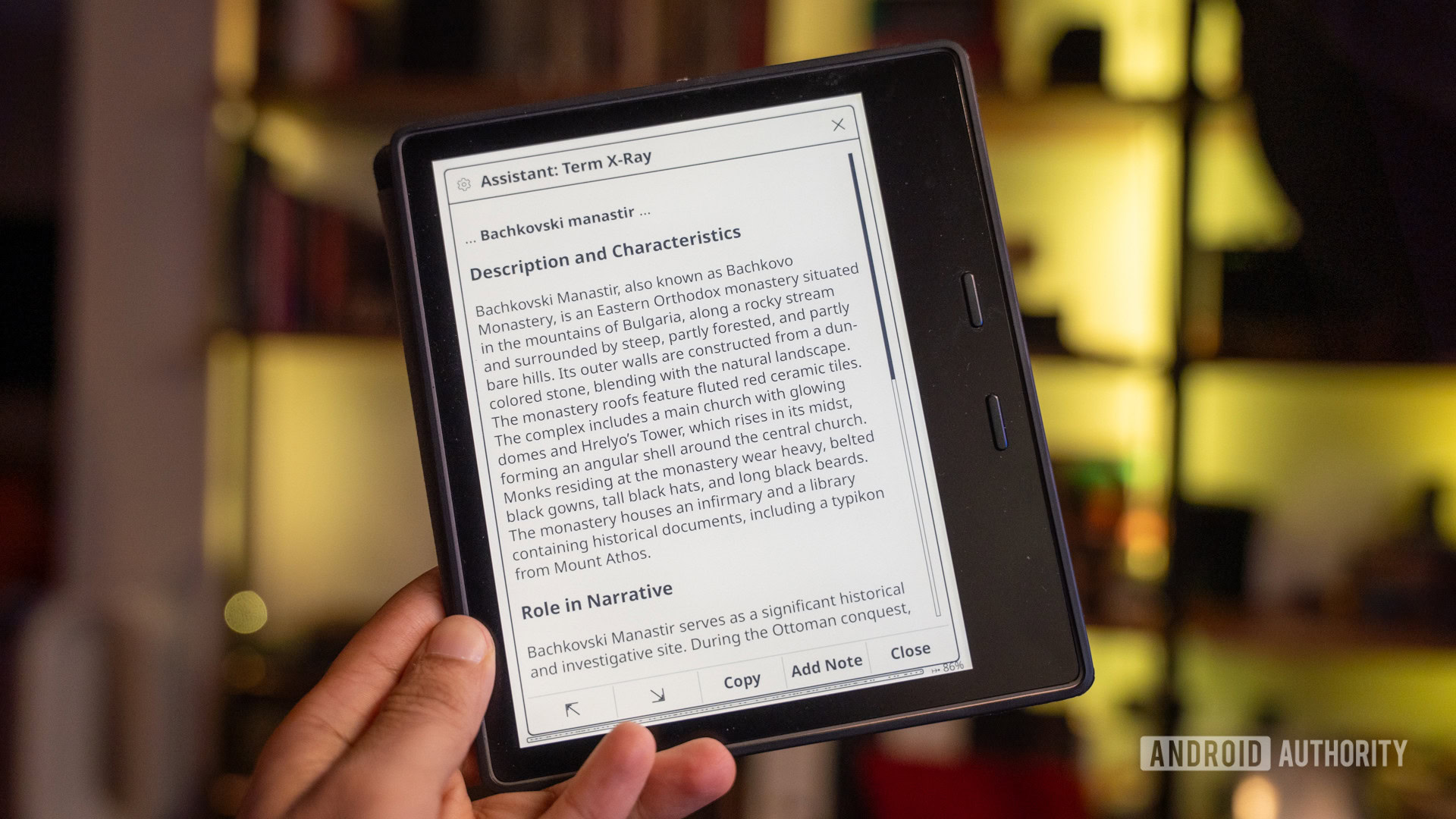
The Assistant plugin solves this with the Term X-Ray feature. If a secondary character reappears hundreds of pages into the book, you can just highlight the name, tap the Term X-Ray button, and the AI assistant scans through the text so far to generate a definition or character profile based only on the book’s contents up to that page. This guarantees a spoiler-free context engine that gets you up to speed in seconds. For readers of long fiction anthologies, this feature alone justifies the entire effort of jailbreaking and configuring the software.
Recap has saved me hours of backtracking when I return to long books months later.
The plugin also offers some excellent quality of life additions to the Kindle experience that address the realities of modern reading habits. The built-in Recap function is a lifesaver for someone like me who starts five books at a time and comes back to them months down the line. If I put down a massive tome for a few weeks or months, I can just use the built-in Recap function to request a custom summary of the book. The tool and its built-in prompts are smart enough to focus more on recent chapters and major plot points without getting into spoiler territory. It’s helped me eliminate hours of backtracking to catch up on the story to regain context. Similarly, the Book X-Ray generator offers a structured, detailed list of key characters in the book, locations, and a timeline up to the current page.

Dhruv Bhutani / Android Authority
For me, the ability to create custom prompts that run across the context of the book is the biggest upgrade. This feature allows you to effectively create Gemini Gems that get applied to any highlighted text, or even the entire book.
Here are a few examples that I’ve used already, but the sky is the limit. Let’s say you are reading Dostoyevsky; you can ask Gemini via the Assistant plugin to analyze a highlighted chapter and return a bulleted list detailing the most prominent themes present in the text. Or if you are reading an academic paper, you can generate an argumentative thesis that extracts the primary thesis and supporting evidence. All of which is framed in a simple-to-understand manner. I’ve found this useful when I want the cliff notes version of an interesting paper without getting into the nitty gritty.
And finally, if you’re on a Greek literature trip like me, I understand that Homer’s The Odyssey is no Sunday read. Custom prompts let you tap into Gemini to identify and explain the central literary device or metaphor used. Honestly, I’d say that the plugin has made me a better reader as I’m exploring more of the book I’m reading instead of skimming past sections that went over my head.
Setting up KOReader and the Assistant plugin

Dhruv Bhutani / Android Authority
The value of the Google Gemini integration goes far beyond contextual definitions. The plugin provides a comprehensive tool for active reading and comprehension, and the latter can be very useful if you read a lot of scientific or research material on your Kindle. But first, installation.
The first step towards getting the plugin up and running is jailbreaking the Kindle. Now, jailbreaking a Kindle isn’t a complicated process in itself, but it does void your warranty and can only be done on specific firmware versions, so you’ll want to keep that in mind. With that out of the way, your next step would be to install KOReader on your Kindle and download the Assistant plugin from the GitHub repository. The plugin’s GitHub page details the process of getting started quite well, but the long and short of that is that you’ll need to generate a personal API key from Google AI Studio. Google’s free use limits are generous enough that it is extremely unlikely that you’ll end up paying for summarising texts on your Kindle. That’s all it takes to add extensive AI capabilities to your Kindle.
So, you might be wondering how well the tool works on the spectacularly underpowered Kindle? The answer is astonishingly well, simply because none of the heavy lifting is done on-device. You can see Gemini’s thinking process in real-time, and all the processing happens in the cloud anyway. The text output gets streamed and generated on the Kindle’s e-ink screen in real time and gives you active feedback that the tool is in action.
The Kindle’s AI-powered evolution

Dhruv Bhutani / Android Authority
The Kindle, as it ships from Amazon, is a walled garden designed entirely for the consumption of e-books. But like I talked about earlier, the hardware is a lot more capable, and jailbreaking it unlocks a range of capabilities that truly elevate the reading experience. The combination of open-source software like KOReader and the contextual intelligence of Google Gemini, the Kindle comes into its own as not just a research device, but also a true step forward from physical books.
Jailbreaking unlocks what the Kindle hardware has always been capable of but never allowed.
As a huge fan of e-readers in general and Kindles in particular, the transformation from a passive content display into a powerful interactive tool for deep learning has made this upgrade essential. Simply put, it’s what the Kindle should be, and it is enough of a reason to jailbreak your Kindle even if you don’t care about the other benefits.
Don’t want to miss the best from Android Authority?


Thank you for being part of our community. Read our Comment Policy before posting.