By using this site, you agree to the Privacy Policy and Terms of Use.
Accept
World of SoftwareWorld of SoftwareWorld of Software
  • News
  • Software
  • Mobile
  • Computing
  • Gaming
  • Videos
  • More
    • Gadget
    • Web Stories
    • Trending
    • Press Release
Search
  • Privacy
  • Terms
  • Advertise
  • Contact
Copyright © All Rights Reserved. World of Software.
Reading: AI Coding Tip 001 – Commit Your Code Before Asking For Help From an AI Assistant | HackerNoon
Share
Sign In
Notification Show More
Font ResizerAa
World of SoftwareWorld of Software
Font ResizerAa
  • Software
  • Mobile
  • Computing
  • Gadget
  • Gaming
  • Videos
Search
  • News
  • Software
  • Mobile
  • Computing
  • Gaming
  • Videos
  • More
    • Gadget
    • Web Stories
    • Trending
    • Press Release
Have an existing account? Sign In
Follow US
  • Privacy
  • Terms
  • Advertise
  • Contact
Copyright © All Rights Reserved. World of Software.
World of Software > Computing > AI Coding Tip 001 – Commit Your Code Before Asking For Help From an AI Assistant | HackerNoon
Computing

AI Coding Tip 001 – Commit Your Code Before Asking For Help From an AI Assistant | HackerNoon

News Room
Last updated: 2026/01/06 at 6:57 PM
News Room Published 6 January 2026
Share
AI Coding Tip 001 – Commit Your Code Before Asking For Help From an AI Assistant | HackerNoon
SHARE

A safety-first workflow for AI-assisted coding

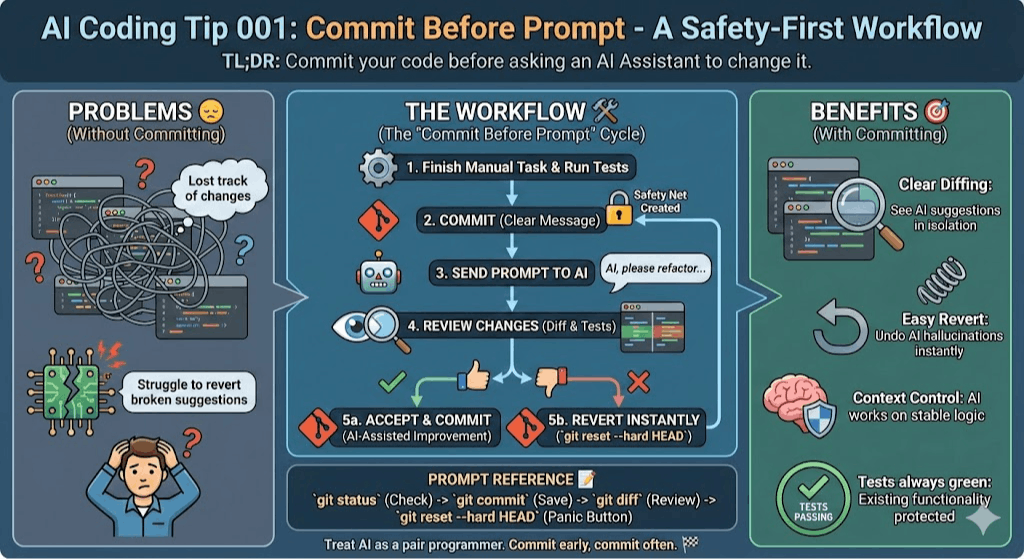
TL;DR: Commit your code before asking an AI Assistant to change it.

Common Mistake ❌

Developers ask the AI assistant to “refactor this function” or “add error handling” while they have uncommitted changes from their previous work session.

When the AI makes its changes, the git diff shows everything mixed together—their manual edits plus the AI’s modifications.

If something breaks, they can’t easily separate what they did from what the AI did and make a safe revert.

Problems Addressed 😔

  • You mix your previous code changes with AI-generated code.
  • You lose track of what you changed.
  • You struggle to revert broken suggestions.

How to Do It 🛠️

  1. Finish your manual task.
  2. Run your tests to ensure everything passes.
  3. Commit your work with a clear message like “feat: manual implementation of X”.
  4. You don’t need to push your changes.
  5. Send your prompt to the AI assistant.
  6. Review the changes using your IDE’s diff tool.
  7. Accept or revert: Keep the changes if they look good, or run git reset --hard HEAD to instantly revert.
  8. Run the tests again to verify AI changes didn’t break anything.
  9. Commit AI changes separately with a message like refactor: AI-assisted improvement of X.

Benefits 🎯

Clear Diffing: You see the AI’s “suggestions” in isolation.

Easy Revert: You can undo a bad AI hallucination instantly.

Context Control: You ensure the AI is working on your latest, stable logic.

Tests are always green: You are not breaking existing functionality.

Context 🧠

When you ask an AI to change your code, it might produce unexpected results.

It might delete a crucial logic gate or change a variable name across several files.

If you have uncommitted changes, you can’t easily see what the AI did versus what you did manually.

When you commit first, you create a safety net.

You can use git diff to see exactly what the AI modified.

If the AI breaks your logic, you can revert to your clean state with one command.

You work in very small increments.

Some assistants are not very good at undoing their changes.

Prompt Reference 📝

git status              # Check for uncommitted changes

git add .               # Stage all changes

git commit -m "msg"     # Commit with message

git diff                # See AI's changes

git reset --hard HEAD   # Revert AI changes

git log --oneline       # View commit history

Considerations ⚠️

This is only necessary if you work in write mode and your assistant is allowed to change the code.

Type 📝

[X] Semi-Automatic

You can enforce the rules of your assistant to check the repository status before making changes.

Limitations ⚠️

If your code is not under a source control system, you need to make this manually.

Tags 🏷️

  • Complexity

Level 🔋

[X] Beginner

Related Tips 🔗

  • Use TCR
  • Practice Vibe Test Driven Development
  • Break Large Refactorings into smaller prompts
  • Use Git Bisect for AI Changes: Using git bisect to identify which AI-assisted commit introduced a defect
  • Reverting Hallucinations

Conclusion 🏁

Treating AI as a pair programmer requires the same safety practices you’d use with a human collaborator: version control, code review, and testing.

When you commit before making a prompt, you create clear checkpoints that make AI-assisted development safer and more productive.

This simple habit transforms AI from a risky black box into a powerful tool you can experiment with confidently, knowing you can always return to a working state.

Commit early, commit often, and don’t let AI touch uncommitted code.

More Information ℹ️

https://hackernoon.com/git-explained-in-5-levels-of-difficulty?embedable=true

https://www.infoq.com/articles/test-commit-revert/?embedable=true

https://medium.com/@kentbeck_7670/test-commit-revert-870bbd756864?embedable=true

Tools 🧰

GIT is an industry standard, but you can apply this technique to any other version control software.


This article is part of the AI Coding Tip Series.

Sign Up For Daily Newsletter

Be keep up! Get the latest breaking news delivered straight to your inbox.
By signing up, you agree to our Terms of Use and acknowledge the data practices in our Privacy Policy. You may unsubscribe at any time.
Share This Article
Facebook Twitter Email Print
Share
What do you think?
Love0
Sad0
Happy0
Sleepy0
Angry0
Dead0
Wink0
Previous Article Samsung Galaxy Book 6 vs 6 Pro: Should you go for Pro? Samsung Galaxy Book 6 vs 6 Pro: Should you go for Pro?
Next Article January 6, 2026 – CES news January 6, 2026 – CES news
Leave a comment

Leave a Reply Cancel reply

Your email address will not be published. Required fields are marked *

Stay Connected

248.1k Like
69.1k Follow
134k Pin
54.3k Follow

Latest News

Amazon Bringing Its Zoox Robotaxi Testing to 2 New Cities
News
Nintendo Switch 2 launches in China with over 400,000 pre-orders on JD.com · TechNode
Computing
Best Crypto Presales in 2026 as Stablecoin Inflows Surged .7 Billion Last Week: One Project Is Where PEPE Was Before the  Billion Run, and the Entry Is Still Open Right Now
Best Crypto Presales in 2026 as Stablecoin Inflows Surged $1.7 Billion Last Week: One Project Is Where PEPE Was Before the $7 Billion Run, and the Entry Is Still Open Right Now
Gadget
Student support to become ‘primary focus’ amid AI rise – Peck
Software

You Might also Like

Nintendo Switch 2 launches in China with over 400,000 pre-orders on JD.com · TechNode
Computing

Nintendo Switch 2 launches in China with over 400,000 pre-orders on JD.com · TechNode

1 Min Read
Pop Mart’s Labubu craze drives  blind boxes to resell for over 7, empty box recycling takes off · TechNode
Computing

Pop Mart’s Labubu craze drives $13 blind boxes to resell for over $417, empty box recycling takes off · TechNode

2 Min Read
China’s Manus enters AI video race with text-to-video tool · TechNode
Computing

China’s Manus enters AI video race with text-to-video tool · TechNode

1 Min Read
Charts: NIO, Xpeng, and Li Auto report first quarter 2025 earnings · TechNode
Computing

Charts: NIO, Xpeng, and Li Auto report first quarter 2025 earnings · TechNode

3 Min Read
//

World of Software is your one-stop website for the latest tech news and updates, follow us now to get the news that matters to you.

Quick Link

  • Privacy Policy
  • Terms of use
  • Advertise
  • Contact

Topics

  • Computing
  • Software
  • Press Release
  • Trending

Sign Up for Our Newsletter

Subscribe to our newsletter to get our newest articles instantly!

World of SoftwareWorld of Software
Follow US
Copyright © All Rights Reserved. World of Software.
Welcome Back!

Sign in to your account

Lost your password?