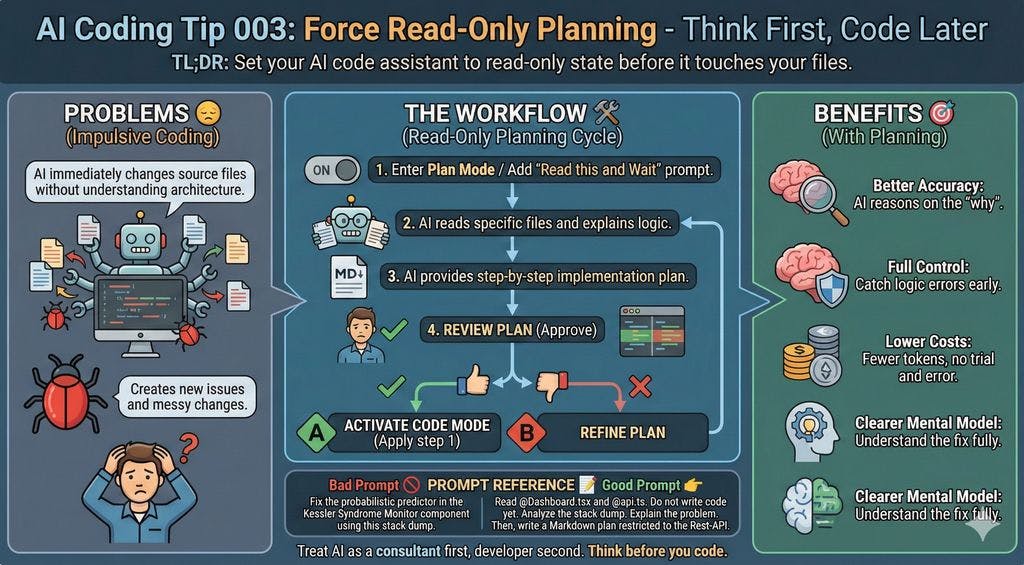
Think first, code later
TL;DR: Set your AI code assistant to read-only state before it touches your files.
Common Mistake ❌
You paste your failing call stack to your AI assistant without further instructions.
The copilot immediately begins modifying multiple source files.
It creates new issues because it doesn’t understand your full architecture yet.
You spend the next hour undoing its messy changes.
Problems Addressed 😔
The AI modifies code that doesn’t need changing.
The copilot starts typing before it reads the relevant functions.
The AI hallucinates when assuming a library exists without checking your package.json.
Large changes make code reviews and diffs a nightmare.
How to Do It 🛠️
Enter Plan Mode: Use “Plan Mode/Ask Mode” if your tool has it.
If your tool doesn’t have such a mode, you can add a meta-prompt
Read this and wait for instructions / Do not change any files yet.
Ask the AI to read specific files and explain the logic there.
After that, ask for a step-by-step implementation plan for you to approve.
When you like the plan, tell the AI: “Now apply step 1.”
Benefits 🎯
Better Accuracy: The AI reasons better when focusing only on the “why.”
Full Control: You catch logic errors before they enter your codebase.
Lower Costs: You use fewer tokens when you avoid “trial and error” coding loops.
Clearer Mental Model: You understand the fix as well as the AI does.
Context 🧠
AI models prefer “doing” over “thinking” to feel helpful. This is called impulsive coding.
When you force it into a read-only phase, you are simulating a Senior Developer’s workflow.
You deal with the Artificial Intelligence first as a consultant and later as a developer.
Prompt Reference 📝
Bad prompt 🚫
Fix the probabilistic predictor
in the Kessler Syndrome Monitor component
using this stack dump.
Good prompt 👉
Read @Dashboard.tsx and @api.ts. Do not write code yet.

Analyze the stack dump.

When you find the problem, explain it to me.

Then, write a Markdown plan to fix it, restricted to the REST API..

[Activate Code Mode]

Create a failing test representing the error.

Apply the fix and run the tests until all are green
Considerations ⚠️
Some simple tasks do not need a plan.
You must actively read the plan the AI provides.
The AI might still hallucinate the plan, so verify it.
Type 📝
[X] Semi-Automatic
Limitations ⚠️
You can use this for refactoring and complex features.
You might find it too slow for simple CSS tweaks or typos.
Some AIs go the other way around, being too confirmative before changing anything. Be patient with them.
Tags 🏷️
- Complexity
Level 🔋
[X] Intermediate
Related Tips 🔗
Request small, atomic commits.
Conclusion 🏁
You save time when you think.
You must force the AI to be your architect before letting it be your builder.
This simple strategy prevents hours of debugging later. 🧠
More Information ℹ️
Copilot ask, edit, and agent modes: What they do and when to use them
https://www.thepromptwarrior.com/p/windsurf-vs-cursor-which-ai-coding-app-is-better?embedable=true
https://aider.chat/docs/usage/modes.html?embedable=true
https://opencode.ai/docs/modes/?embedable=true
Also Known As 🎭
Read-Only Prompting
Consultant Mode
Tools 🧰
| Tool | Read-Only Mode | Write Mode | Mode Switching | Open Source | Link |
|—-|—-|—-|—-|—-|—-|
| Windsurf | Chat Mode | Write Mode | Toggle | No | https://windsurf.com/ |
| Cursor | Normal/Ask | Agent/Composer | Context-dependent | No | https://www.cursor.com/ |
| Aider | Ask/Help Modes | Code/Architect | /chat-mode | Yes | https://aider.chat/ |
| GitHub Copilot | Ask Mode | Edit/Agent Modes | Mode selector | No | https://github.com/features/copilot |
| Cline | Plan Mode | Act Mode | Built-in | Yes (extension) | https://cline.bot/ |
| Continue.dev | Chat/Ask | Edit/Agent Modes | Config-based | Yes | https://continue.dev/ |
| OpenCode | Plan Mode | Build Mode | Tab key | Yes | https://opencode.ai/ |
| Claude Code | Review Plans | Auto-execute | Settings | No | https://code.claude.com/ |
| Replit Agent | Plan Mode | Build/Fast/Full | Mode selection | No | https://replit.com/agent3 |
Disclaimer 📢
The views expressed here are my own.
I am a human who writes as best as possible for other humans.
I used AI proofreading tools to improve some texts.
I welcome constructive criticism and dialogue.
I shape these insights through 30 years in the software industry, 25 years of teaching, and writing over 500 articles and a book.
This article is part of the AI Coding Tip series.