
Modern digital platforms are rarely built using a single technology stack. At the architectural level, enterprise systems are increasingly composed of heterogeneous ecosystems, where services written in different programming languages must interoperate reliably under performance, scalability, and operational constraints. Designing such systems requires more than implementation skills—it demands architectural judgment around integration boundaries, execution models, and lifecycle control.
In large-scale digital systems, particularly those handling data-intensive workloads, existing capabilities are often distributed across multiple technology domains. Rather than re-implementing proven components, architects must evaluate how to orchestrate cross-platform interoperability in a way that preserves stability, performance, and maintainability. This is a common challenge in digital architecture, where long-lived systems evolve through integration rather than replacement.
This article presents an architectural pattern for enabling Java–.NET interoperability using .NET 8, focusing on a JAR-based execution model. The example demonstrates how Java components—such as libraries designed for high-volume Excel processing—can be operationalized within a .NET application while maintaining clear execution boundaries between platforms.
While API-level integration is the most common approach, it is not always the most appropriate from an architectural standpoint. In certain scenarios, process-level integration using runnable JARs offers a more controlled and decoupled execution strategy. This article explores that alternative and explains when and why such an approach can be valuable in enterprise-grade digital systems.
IDEs Used in This Project
- Eclipse
- Visual Studio
Building a Sample Java Project (Runnable JAR Mode)
1. Create a Java Project
Create a standard Java project in Eclipse.
2. Create the ExcelMain Class
public class ExcelMain {

    String fileName = "";
    String fileId;

    public static void main(String[] args) {
        ExcelMain excel = new ExcelMain(args);
        excel.display();
    }

    private ExcelMain(String[] args) {
        fileName = args[0];
        fileId = args[1];
    }

    private void display() {
        System.out.println("File Name: " + fileName);
        System.out.println("File Id: " + fileId);
    }
}
This Java program reads and displays parameters passed from the command line, such as the Excel file name and file ID.
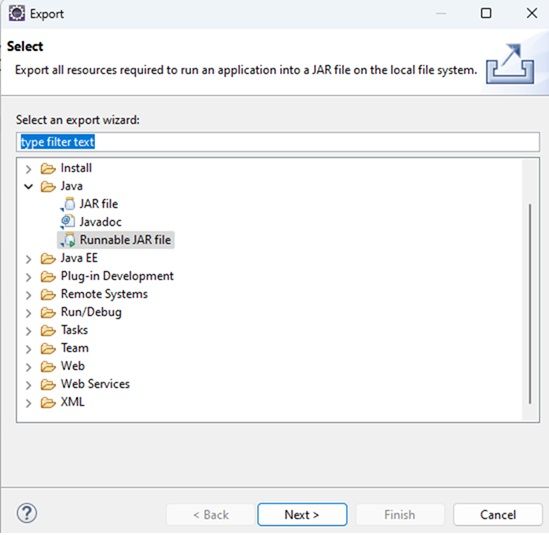
3. Export the Project as a Runnable JAR
Export the project as a runnable JAR file from Eclipse.
Calling the JAR File from a .NET 8 Console Application
Next, create a .NET 8 console application to execute the Java JAR file.
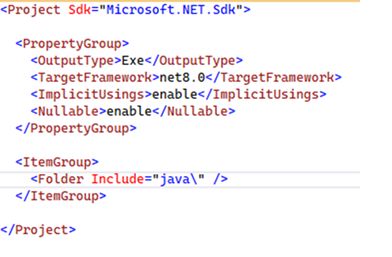
.NET Core Project File

Program.cs
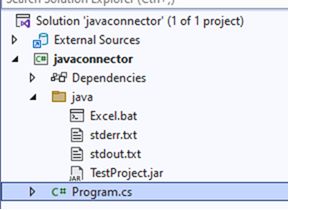
In this example, stdout and stderr are redirected to text files to capture Java execution output.
string javafilePath = @"""C:Program FilesJavajdk-11.0.8binjava.exe""";
string folderPath = @"C:javaconnectorjava";
string jarPath = @"""C:javaconnectorjavaTestProject.jar""";
string excelfileName = @"""cust_excel.xlsx""";
string excelfileId = @"""1234""";

string ping = @"ping -n 2 localhost ";
string unableToExecute = @"IF %errorlevel% NEQ 0 ECHO STATUS Unable to execute the Java process 1>> """
                         + folderPath + @"stdout.txt"" ";
string complete = @"ECHO COMPLETE %errorlevel% 1>> """
                  + folderPath + @"stdout.txt"" ";
string stdout = @" 1>> """ + folderPath + @"stdout.txt"" ";
string stderr = @"2>> """ + folderPath + @"stderr.txt"" ";

string cmdLine =
    javafilePath + " -jar " + jarPath + " " + excelfileName + " " + excelfileId +
    stdout + stderr + "n" +
    ping + "n" +
    unableToExecute + stderr + "n" +
    complete + stderr;

using (StreamWriter sw = new StreamWriter(folderPath + "\Excel.bat", false))
{
    sw.WriteLine(cmdLine);
}

Console.WriteLine("Calling JAR file...");
System.Diagnostics.Process proc = System.Diagnostics.Process.Start(folderPath + "\Excel.bat");
proc.WaitForExit();

Console.WriteLine("JAR executed successfully. Please review the output files.");
Console.ReadKey();
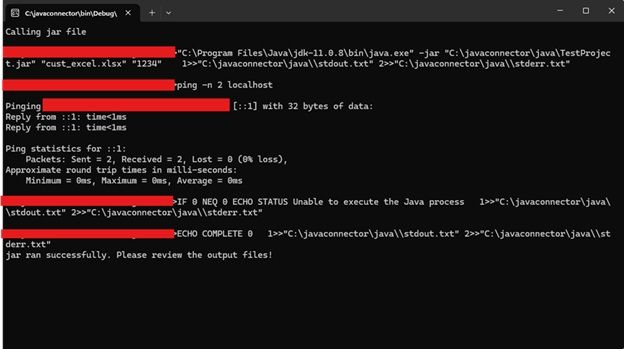
Output
-
stdout.txt contains the standard output from the Java process
-
stderr.txt captures any error output
Important Consideration
Since the JAR file runs independently, the .NET application does not have full lifecycle control over the Java process. If the JAR execution hangs or runs indefinitely, the process must be terminated manually (for example, using Task Manager).
Conclusion
Using this approach, you can consume Java functionality within a .NET application when API-based integration is not feasible or convenient. The JAR mode provides a simple and effective way to reuse existing Java components without rewriting them in .NET.
I hope you found this article useful. Happy coding!