By using this site, you agree to the Privacy Policy and Terms of Use.
Accept
World of SoftwareWorld of SoftwareWorld of Software
  • News
  • Software
  • Mobile
  • Computing
  • Gaming
  • Videos
  • More
    • Gadget
    • Web Stories
    • Trending
    • Press Release
Search
  • Privacy
  • Terms
  • Advertise
  • Contact
Copyright © All Rights Reserved. World of Software.
Reading: Android 16 QPR2 secret: How to turn off your Pixel’s annoying background blur
Share
Sign In
Notification Show More
Font ResizerAa
World of SoftwareWorld of Software
Font ResizerAa
  • Software
  • Mobile
  • Computing
  • Gadget
  • Gaming
  • Videos
Search
  • News
  • Software
  • Mobile
  • Computing
  • Gaming
  • Videos
  • More
    • Gadget
    • Web Stories
    • Trending
    • Press Release
Have an existing account? Sign In
Follow US
  • Privacy
  • Terms
  • Advertise
  • Contact
Copyright © All Rights Reserved. World of Software.
World of Software > News > Android 16 QPR2 secret: How to turn off your Pixel’s annoying background blur
News

Android 16 QPR2 secret: How to turn off your Pixel’s annoying background blur

News Room
Last updated: 2025/12/05 at 5:44 AM
News Room Published 5 December 2025
Share
Android 16 QPR2 secret: How to turn off your Pixel’s annoying background blur
SHARE

Joe Maring / Android Authority

If you recently updated your Pixel phone to Android 16 QPR2, you’ve probably noticed that there are a lot of new features for you to play with. With improved app icon customization, lock screen widgets, and more, QPR2 is a darn good update.

One of the more interesting changes is actually a reversal of something added in Android 16 QPR1 this past September. As part of the Material 3 Expressive interface added to Pixel phones with that update, one of the bigger UI tweaks was a blur effect in the app drawer and Quick Settings panel. I don’t mind it, but it’s something a lot of Pixel users have wanted Google to get rid of.

Thanks to Google’s latest Android update, you finally can. If you hate the background blur on your Pixel, there’s a new secret setting that lets you fully disable it. Here’s how.

Are you going to disable your Pixel’s background blur effects?

0 votes

How to disable all background blur in Android 16 QPR2

To get started, you first need to ensure your Pixel has the Android 16 QPR2 update. Once you’ve confirmed that it does, all you need to do next is open the Settings app and tap a few buttons. Here are the full steps to follow:

  1. Open the Settings app.
  2. Scroll to the bottom of the page and tap Accessibility.
  3. Tap Color & motion.
  4. Tap Reduce blur effects.

And that’s it! Once the toggle changes from an X to a check mark, you’ll know that the setting is enabled. You don’t have to restart your phone or wait for these changes to take effect — they happen immediately.

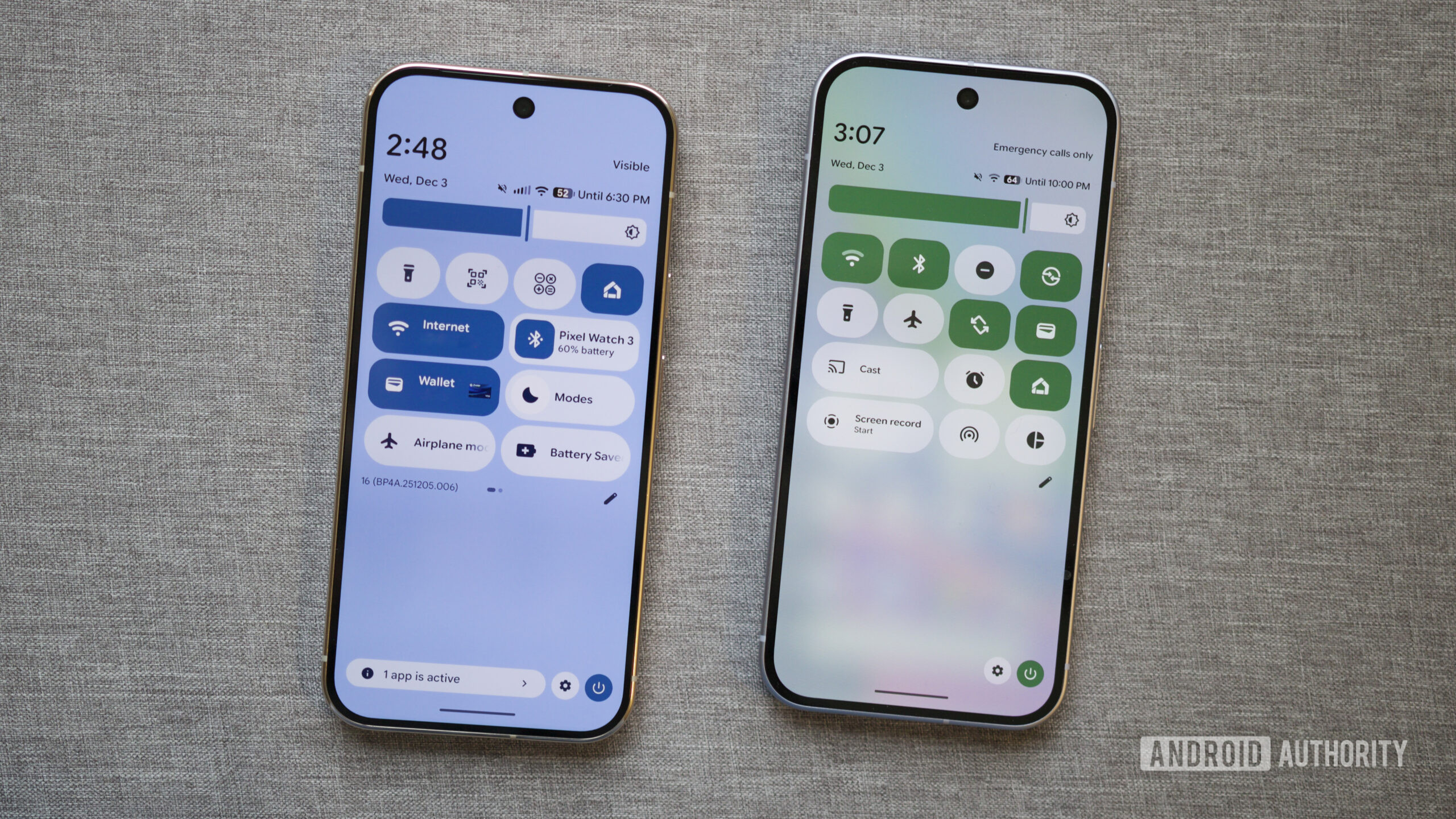
You can see in the screenshots the difference between having the background blur effect on vs. off. When it’s on, the background of the app drawer and Quick Settings has a glassy effect that lets some of your home screen wallpaper (or the app you’re using) peek through a bit. There’s also a blur transition effect whenever you open the app drawer or Quick Settings.

However, once you disable this with the “Reduce blur effects” setting, that all goes away. The background of your app drawer and Quick Settings becomes a solid, more saturated color, and the blur effect when opening either one is gone, too. You’ll also see a solid color for the recent apps background.

The best part is that it matches your phone’s accent colors, so it’s not just a random hue that clashes with everything else. For example, since my primary accent color is blue, that’s the background color I see once the blur effects are off. If your accent color is red, yellow, or something else, that’s what you’ll see.

Even as someone who doesn’t mind the blur effects, I have to admit that disabling them does look really nice. I’ll probably still keep them enabled, but I’m thrilled we now have the option to use them or not.

Which one are you choosing? Blur or no blur?

Don’t want to miss the best from Android Authority?

google preferred source badge light@2xgoogle preferred source badge dark@2x

Thank you for being part of our community. Read our Comment Policy before posting.

Sign Up For Daily Newsletter

Be keep up! Get the latest breaking news delivered straight to your inbox.
By signing up, you agree to our Terms of Use and acknowledge the data practices in our Privacy Policy. You may unsubscribe at any time.
Share This Article
Facebook Twitter Email Print
Share
What do you think?
Love0
Sad0
Happy0
Sleepy0
Angry0
Dead0
Wink0
Previous Article How Online Platforms Like TheSRD.co.za Are Helping South Africans Stay Updated on SASSA & SRD Grants How Online Platforms Like TheSRD.co.za Are Helping South Africans Stay Updated on SASSA & SRD Grants
Next Article Sam Altman Wants OpenAI To Go To Space, And He’s Not Talking About Mars – BGR Sam Altman Wants OpenAI To Go To Space, And He’s Not Talking About Mars – BGR
Leave a comment

Leave a Reply Cancel reply

Your email address will not be published. Required fields are marked *

Stay Connected

248.1k Like
69.1k Follow
134k Pin
54.3k Follow

Latest News

Best Gaming Monitor 2025: Stay on target with high resolution and frame rates
Gadget
Today's NYT Connections: Sports Edition Hints, Answers for Dec. 5 #438
News
The meteorological winter has already begun for the AEMET. And now we have another problem with the DGT beacons
Mobile
A Simple Hardware Question Exposes the Limits of Today’s LLMs | HackerNoon
Computing

You Might also Like

Today's NYT Connections: Sports Edition Hints, Answers for Dec. 5 #438
News

Today's NYT Connections: Sports Edition Hints, Answers for Dec. 5 #438

4 Min Read
Facebook and Instagram have a new hub to help get hijacked accounts back
News

Facebook and Instagram have a new hub to help get hijacked accounts back

2 Min Read
Walmart-backed PhonePe winds down its Pincode app in yet another e-commerce step back |  News
News

Walmart-backed PhonePe winds down its Pincode app in yet another e-commerce step back | News

4 Min Read
AI and chip funding can create a ‘radically better’ future for Wales – UKTN
News

AI and chip funding can create a ‘radically better’ future for Wales – UKTN

4 Min Read
//

World of Software is your one-stop website for the latest tech news and updates, follow us now to get the news that matters to you.

Quick Link

  • Privacy Policy
  • Terms of use
  • Advertise
  • Contact

Topics

  • Computing
  • Software
  • Press Release
  • Trending

Sign Up for Our Newsletter

Subscribe to our newsletter to get our newest articles instantly!

World of SoftwareWorld of Software
Follow US
Copyright © All Rights Reserved. World of Software.
Welcome Back!

Sign in to your account

Lost your password?