By using this site, you agree to the Privacy Policy and Terms of Use.
Accept
World of SoftwareWorld of SoftwareWorld of Software
  • News
  • Software
  • Mobile
  • Computing
  • Gaming
  • Videos
  • More
    • Gadget
    • Web Stories
    • Trending
    • Press Release
Search
  • Privacy
  • Terms
  • Advertise
  • Contact
Copyright © All Rights Reserved. World of Software.
Reading: Android 17 Beta 1 Now Available With 2 New Features – BGR
Share
Sign In
Notification Show More
Font ResizerAa
World of SoftwareWorld of Software
Font ResizerAa
  • Software
  • Mobile
  • Computing
  • Gadget
  • Gaming
  • Videos
Search
  • News
  • Software
  • Mobile
  • Computing
  • Gaming
  • Videos
  • More
    • Gadget
    • Web Stories
    • Trending
    • Press Release
Have an existing account? Sign In
Follow US
  • Privacy
  • Terms
  • Advertise
  • Contact
Copyright © All Rights Reserved. World of Software.
World of Software > News > Android 17 Beta 1 Now Available With 2 New Features – BGR
News

Android 17 Beta 1 Now Available With 2 New Features – BGR

News Room
Last updated: 2026/02/18 at 10:11 PM
News Room Published 18 February 2026
Share
Android 17 Beta 1 Now Available With 2 New Features – BGR
SHARE


Elvard project/Shutterstock

Google has made the Android 17 Public Beta available to select devices, particularly if you own a compatible Google Pixel handset. It’s not a stable release, so keep that in mind if you check it out. Android beta releases are initial, early builds of upcoming software updates meant for the bravest of users to test out new features before the big launch. They’re generally stable enough for daily use and shouldn’t be device-breaking, but beta users are still more likely to experience bugs and other issues.

If you’re interested in participating, head to the Google Android Beta release page, make sure you have an eligible device linked to your account, and then enroll accordingly. Most Pixel devices from the Pixel 6 up to the Pixel 10 Pro Fold are eligible. There aren’t any third-party devices supported from brands like Samsung or Motorola. Google’s new budget Android the Pixel 10a will likely support beta updates when it launches, too.

At any rate, this isn’t a significant update, so there aren’t a lot of notable features. But Google will probably add more to the Beta release over time before the official launch. Google regularly adds new features to the Android OS that improve everyone’s experiences. That said, here are some of the small improvements you can expect.

A more responsive user interface
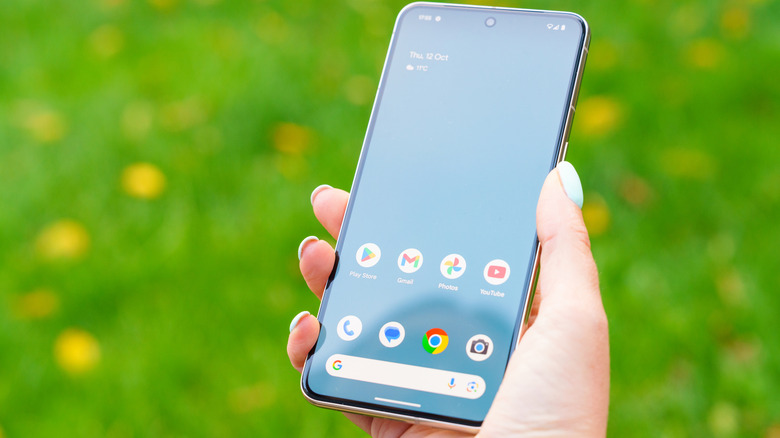

Close-Up of the home screen on a Google Pixel 8 Pro
Georgeclerk/Getty Images

Several changes have to do with the user experience and User Interface (UI). For example, the Pixel Launcher’s search bar on the home screen is slimmed down, with the “At a Glance Widget” now available to hide to offer more clean real estate. The settings app also features more compact and organized menus, with a new volume overflow button and a brightness icon that’s been flipped.

Mostly, these changes are minor adjustments to make the software feel more responsive, ensure it looks cleaner, and that various interactions flow better. Another great new feature kicks in when you rotate an app mid-interaction.

In the beta release, when this happens you don’t have to repeat certain actions — it can be frustrating when you rotate your device and have to complete a form a second time. A lot of the other changes that come with this beta release set the stage for Android-powered laptops using the Aluminum OS.

Large screen device improvements

Android logo on phone screen resting atop a laptop keyboard
Alex Photo Stock/Shutterstock

In Google’s blog post for Android 17 Beta 1, it explicitly mentions removing resizability restrictions for developers, a move to get the system ready for larger screen devices like laptops. “Android 17 (API level 37) removes the developer opt-out for orientation and resizability restrictions on large screen devices (sw > 600 dp).”

The goal is to allow the system to adapt based on the device people are browsing on, because they “expect the UI to fill the space and respect their device posture.” Ultimately, this should keep certain apps from remaining locked in a certain orientation on larger devices, like portrait mode, which doesn’t use the full screen. There’s no point in buying a laptop that functions like a mobile device or tablet anyway, especially when you already own those devices. Google devs are pushing for the Aluminum experience to work better in large resolutions.

Unfortunately, there’s no official word on when Aluminum OS will be available — Android for laptops — nor when devices using it will be purchasable. But it’s good to see Android developers making way for its arrival. It could prove for some exciting times on the Android front.


Sign Up For Daily Newsletter

Be keep up! Get the latest breaking news delivered straight to your inbox.
By signing up, you agree to our Terms of Use and acknowledge the data practices in our Privacy Policy. You may unsubscribe at any time.
Share This Article
Facebook Twitter Email Print
Share
What do you think?
Love0
Sad0
Happy0
Sleepy0
Angry0
Dead0
Wink0
Previous Article March madness: What Apple is getting ready to launch March madness: What Apple is getting ready to launch
Next Article How to Do Pinterest Affiliate Marketing How to Do Pinterest Affiliate Marketing
Leave a comment

Leave a Reply Cancel reply

Your email address will not be published. Required fields are marked *

Stay Connected

248.1k Like
69.1k Follow
134k Pin
54.3k Follow

Latest News

How to Make Money Streaming Video Games with BasicallyIDoWrk
Computing
Microsoft Copilot read confidential emails without permission
News
How MYX Plans to Become the Clearinghouse For .9 Trillion Onchain Derivatives Market  | HackerNoon
How MYX Plans to Become the Clearinghouse For $7.9 Trillion Onchain Derivatives Market | HackerNoon
Computing
5 Cheap Printers That Don’t Make You Spend A Fortune On Ink – BGR
News

You Might also Like

Microsoft Copilot read confidential emails without permission
News

Microsoft Copilot read confidential emails without permission

2 Min Read
5 Cheap Printers That Don’t Make You Spend A Fortune On Ink – BGR
News

5 Cheap Printers That Don’t Make You Spend A Fortune On Ink – BGR

12 Min Read
Here’s when the Galaxy Z TriFold is returning to the US
News

Here’s when the Galaxy Z TriFold is returning to the US

4 Min Read
Wallpaper Wednesday: More great phone wallpapers for all to share (February 18)
News

Wallpaper Wednesday: More great phone wallpapers for all to share (February 18)

6 Min Read
//

World of Software is your one-stop website for the latest tech news and updates, follow us now to get the news that matters to you.

Quick Link

  • Privacy Policy
  • Terms of use
  • Advertise
  • Contact

Topics

  • Computing
  • Software
  • Press Release
  • Trending

Sign Up for Our Newsletter

Subscribe to our newsletter to get our newest articles instantly!

World of SoftwareWorld of Software
Follow US
Copyright © All Rights Reserved. World of Software.
Welcome Back!

Sign in to your account

Lost your password?