By using this site, you agree to the Privacy Policy and Terms of Use.
Accept
World of SoftwareWorld of SoftwareWorld of Software
  • News
  • Software
  • Mobile
  • Computing
  • Gaming
  • Videos
  • More
    • Gadget
    • Web Stories
    • Trending
    • Press Release
Search
  • Privacy
  • Terms
  • Advertise
  • Contact
Copyright © All Rights Reserved. World of Software.
Reading: Android 17 finally brings custom shortcuts to the Pixel Launcher search bar
Share
Sign In
Notification Show More
Font ResizerAa
World of SoftwareWorld of Software
Font ResizerAa
  • Software
  • Mobile
  • Computing
  • Gadget
  • Gaming
  • Videos
Search
  • News
  • Software
  • Mobile
  • Computing
  • Gaming
  • Videos
  • More
    • Gadget
    • Web Stories
    • Trending
    • Press Release
Have an existing account? Sign In
Follow US
  • Privacy
  • Terms
  • Advertise
  • Contact
Copyright © All Rights Reserved. World of Software.
World of Software > News > Android 17 finally brings custom shortcuts to the Pixel Launcher search bar
News

Android 17 finally brings custom shortcuts to the Pixel Launcher search bar

News Room
Last updated: 2026/02/13 at 7:27 PM
News Room Published 13 February 2026
Share
Android 17 finally brings custom shortcuts to the Pixel Launcher search bar
SHARE

Joe Maring / Android Authority

TL;DR

  • While Google’s search widget has let users customize one of its shortcuts, the same option has not existed for the Pixel Launcher’s search bar.
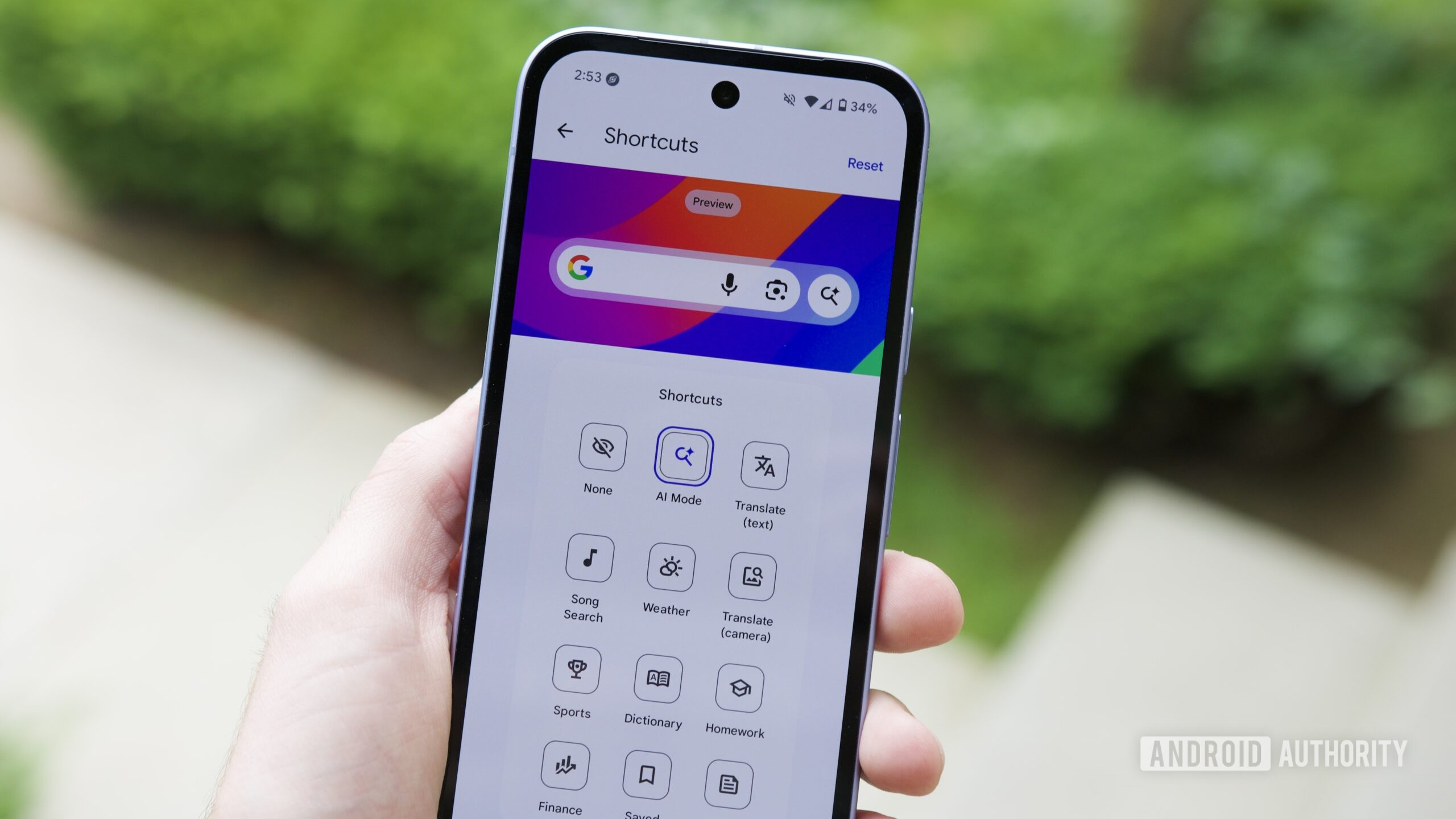
  • With Android 17 Beta 1, we finally see the Pixel Launcher pick up that same custom option .
  • Right now, though, implementation seems a bit glitchy, with not all options working correctly

No one’s ever going to accuse Google of not giving Android phones enough places to conduct searches. You can search with Chrome, search in the Google app, search from your app tray, ask Gemini to do a search… and we could keep going. On your home screen itself, we’ve got two major players in the search game: You can use the Pixel Launcher’s search bar down at the bottom of your screen, or you can position a Google widget search bar anywhere you like. And now with today’s Android 17 Beta 1 release, those two are becoming more similar than ever.

Don’t want to miss the best from Android Authority?

google preferred source badge light@2xgoogle preferred source badge dark@2x

Compared to the Pixel Launcher’s search bar, Google’s widget has existed as a more flexible alternative. Beyond being able to move it around, we’ve also had the option to reconfigure its shortcut.

By default, both bars offer the same set of buttons, connecting us with voice input, Google Lens, and AI Mode. But in the Google search bar widget, users have been able to swap that AI Mode shortcut out for another of their choosing. In Android 17 Beta 1, we’re now finally seeing that same option arrive for the launcher.

If you’re curious to get an early look along with us, you can download Android 17 Beta 1 for your own Pixel phone and start trying out changes like this one today.

Just be warned: Beta releases are designated as such for a good reason, and unintended glitches can and will interfere with device functionality. In this case, while we’re able to access that shortcut-changing UI, actually changing them doesn’t seem to work all the time — at least not yet. But hey, this is only Beta 1, and Google’s got plenty of time to work out the kinks.

Thank you for being part of our community. Read our Comment Policy before posting.

Sign Up For Daily Newsletter

Be keep up! Get the latest breaking news delivered straight to your inbox.
By signing up, you agree to our Terms of Use and acknowledge the data practices in our Privacy Policy. You may unsubscribe at any time.
Share This Article
Facebook Twitter Email Print
Share
What do you think?
Love0
Sad0
Happy0
Sleepy0
Angry0
Dead0
Wink0
Previous Article Exec from Chinese automaker GAC met Brazilian president, planning EV factory · TechNode Exec from Chinese automaker GAC met Brazilian president, planning EV factory · TechNode
Next Article Rumored Samsung Wide Fold pops up in early One UI 9 builds Rumored Samsung Wide Fold pops up in early One UI 9 builds
Leave a comment

Leave a Reply Cancel reply

Your email address will not be published. Required fields are marked *

Stay Connected

248.1k Like
69.1k Follow
134k Pin
54.3k Follow

Latest News

Grafana Labs reportedly raising funding at B valuation –  News
Grafana Labs reportedly raising funding at $9B valuation – News
News
Gboard might turn your keyboard into a trackpad with new cursor mode
News
The Ultimate Pinterest Toolkit for Marketers
Computing
Today's NYT Connections: Sports Edition Hints, Answers for Feb. 14 #509
News

You Might also Like

Grafana Labs reportedly raising funding at B valuation –  News
News

Grafana Labs reportedly raising funding at $9B valuation – News

5 Min Read
Gboard might turn your keyboard into a trackpad with new cursor mode
News

Gboard might turn your keyboard into a trackpad with new cursor mode

4 Min Read
Today's NYT Connections: Sports Edition Hints, Answers for Feb. 14 #509
News

Today's NYT Connections: Sports Edition Hints, Answers for Feb. 14 #509

3 Min Read
The Best Movies to Watch on Netflix Right Now (Feb. 13-20, 2026)
News

The Best Movies to Watch on Netflix Right Now (Feb. 13-20, 2026)

5 Min Read
//

World of Software is your one-stop website for the latest tech news and updates, follow us now to get the news that matters to you.

Quick Link

  • Privacy Policy
  • Terms of use
  • Advertise
  • Contact

Topics

  • Computing
  • Software
  • Press Release
  • Trending

Sign Up for Our Newsletter

Subscribe to our newsletter to get our newest articles instantly!

World of SoftwareWorld of Software
Follow US
Copyright © All Rights Reserved. World of Software.
Welcome Back!

Sign in to your account

Lost your password?