Smartphones come with several features baked into the operating system that can be useful during emergencies. These go above and beyond the simplest thing you’ll do in an emergency: call 911 or your local equivalent for help. Android devices and iPhones generally offer the same advanced features, including satellite support for emergency SOS, car crash detection, and fall detection. Starting Wednesday, both platforms also support live video streaming to first responders, as Google just announced a new Android Emergency Live Video feature that matches Apple’s existing Emergency SOS Live Video.
Like its iPhone counterpart, Android Emergency Live Video is a feature you’ll pray you’ll never have to use. Nobody wants to imagine an emergency situation so dangerous that first responders will want to initiate a live video call with you so they can see everything around you and provide better assistance. However, the feature may come in handy when you need help the most, a scenario that calls for precise communication with emergency personnel.
Unfortunately, the adrenaline rush in emergencies can impact communication, making it more difficult for first responders to understand your context. That’s why it’s important to be aware that Android Emergency Live Video is now available on Android devices running Android 8 or later, and know how the feature works.
How to start an Android Emergency Live Video stream
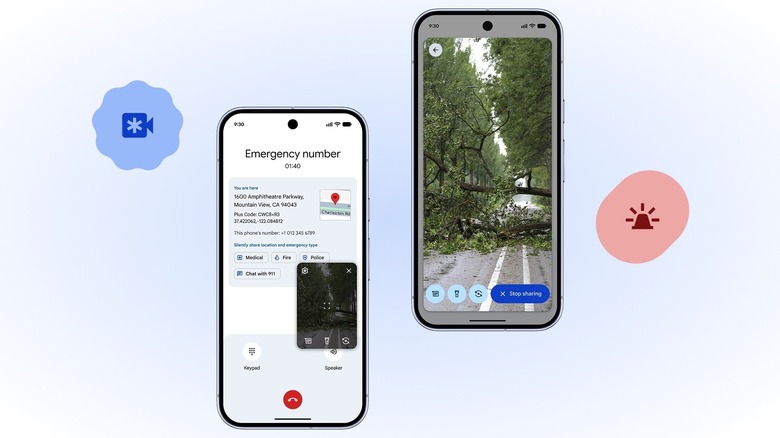
Google explained in a blog post that it designed the new safety feature to be “simple and secure.” Android Emergency Live Video requires no setup, as it’ll be available to all Android 8+ devices with Google Play services preinstalled. That means an Android phone that runs Google’s version of Android, rather than a custom Android OS with no Google apps preinstalled. Android Emergency Live Video calls are encrypted, and users can turn off the live stream at any point after accepting a video call from first responders.
That’s the key detail concerning Android Emergency Live Video. You won’t initiate the video call with authorities yourself during an emergency call or text. Instead, the responder will determine whether video access can be helpful and safe for the victim and send a request to your device, as seen in the images above. While you may be stressed about the events around you, that’s where you’ll have to tap the Share button that will appear in a prompt on the screen. Once you share your video, first responders will see what you see and provide guidance in real time.
The Android Emergency Live Video functionality hinges on a critical detail: You’ll need an internet connection, whether Wi-Fi or cellular, for that video call to connect. The other important limitation concerns your location. The feature will only work if first responders are equipped to handle the technology. That’s why Google is only rolling it out in the U.S., and select regions in Germany and Mexico. You won’t have access to Android Emergency Live Video support in other parts of the world, though Google is working on expanding the feature.