” alt=”AI-powered batch processing” style=”width:100%; border-radius:12px;”>
The High Cost of Digital Multitasking
In our hyper-connected world, the ability to multitask is often worn as a badge of honor. We juggle emails, instant messages, multiple browser tabs, and a constant stream of notifications, believing we are being highly productive. However, a growing body of neuroscience research reveals a starkly different reality: context switching, the act of rapidly shifting between unrelated tasks, comes at a significant cognitive price. This mental tax not only diminishes our overall output but also degrades the quality of our work and increases stress levels.
A seminal study led by the late Stanford professor Clifford Nass found that individuals who identified as heavy multitaskers were actually worse at task switching than their low-multitasking counterparts. They were more susceptible to distractions, had less control over their working memory, and were less able to filter out irrelevant information. As Nass bluntly put it, “They’re suckers for irrelevancy. Everything distracts them.” This is the core of the context switching problem: our brains are not designed for rapid, parallel processing of complex information. Instead, they operate most effectively when focused on a single task for a sustained period.
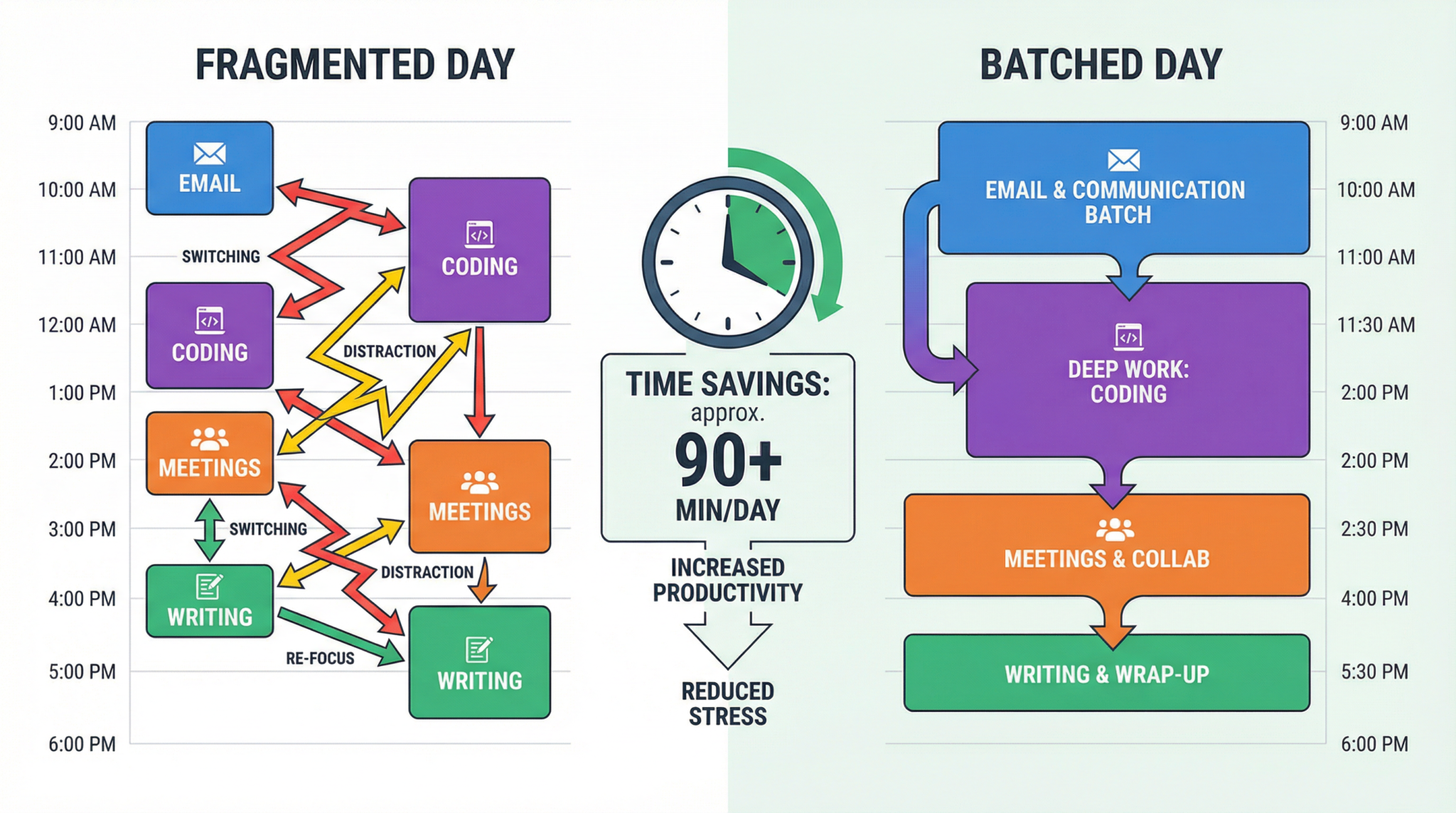
Each time we switch tasks, our brain incurs what psychologists call a “cognitive cost.” This isn’t just the few seconds it takes to open a new program; it’s the mental effort required to disengage from the previous task, load the new task’s context into our working memory, and re-focus our attention. Research published in the Journal of Experimental Psychology: Human Perception and Performance demonstrated that even brief mental blocks created by shifting between tasks can cost as much as 40 percent of someone’s productive time. For a knowledge worker, that can translate to losing over three hours of an eight-hour workday simply to the friction of task-switching.
This is where the principle of batch processing, supercharged by AI, offers a powerful antidote. By grouping similar tasks and executing them in dedicated, uninterrupted blocks, we can dramatically reduce cognitive overhead, minimize distractions, and enter a state of deep work. This article provides a comprehensive tutorial on how to leverage ChatGPT to implement a robust batch processing system, helping you reclaim your focus and double your productive output.
Categorizing Your Digital Life with ChatGPT
The first step to effective batch processing is to gain a clear understanding of where your time and mental energy are actually going. Most professionals vastly underestimate the number of times they switch contexts throughout the day. We might think we spent the morning “writing a report,” but in reality, we were writing, checking email, responding to a Slack message, browsing a news article, and then trying to find our place back in the report. To combat this, we can use ChatGPT as a productivity analyst to help us categorize our daily activities.
For one week, keep a rough log of your primary tasks. Don’t worry about being perfectly precise; just capture the main activities. Your log might look something like this:
- Responded to client emails
- Wrote a section of the quarterly report
- Attended the weekly team sync meeting
- Brainstormed ideas for the new marketing campaign
- Coded a new feature for the web app
- Reviewed a colleague’s presentation
- Scheduled meetings for next week
Once you have a representative list, you can feed it into ChatGPT with a specific prompt to help you identify batching opportunities. This is where leveraging an AI productivity guru comes in handy. The following prompt is designed to guide ChatGPT in providing a structured, actionable plan.
Act as a productivity guru guiding the adoption of batch processing. Your task is to provide a comprehensive guide on implementing batch processing, highlighting potential advantages, and suggesting ways to identify tasks suitable for this approach. Explain the concept of batch processing, detailing how it involves grouping similar tasks to increase efficiency. Share step-by-step instructions on incorporating batch processing into daily workflows and offer insights into the benefits it can bring. My first request is to analyze the following list of my weekly tasks and categorize them into logical batches. For each batch, explain the cognitive context it represents and why grouping these tasks is beneficial. Here are my tasks: [Insert your tasks/workflow here]
ChatGPT’s output will likely group your tasks into categories based on the type of cognitive function required. For example:
- Deep Work/Content Creation: Writing reports, coding features, designing presentations. These tasks require sustained, uninterrupted focus.
- Shallow Work/Communication: Responding to emails, answering Slack messages, scheduling. These are lower-focus tasks that can be handled in batches.
- Learning/Research: Reading industry articles, watching tutorials, analyzing competitor data.
- Meetings/Collaboration: Team syncs, client calls, brainstorming sessions.
This initial categorization is the foundation of your new, more productive workflow. It provides a clear map of your cognitive landscape, allowing you to strategically allocate your mental resources. For more on this, see our AI productivity prompts guide.
Creating Optimized Batch Schedules Aligned with Energy Peaks
Not all hours of the day are created equal. Our cognitive performance fluctuates according to our individual chronobiology—our natural, internal process that regulates the sleep-wake cycle. Some of us are “larks,” who are most alert and productive in the morning, while others are “owls,” who peak in the afternoon or evening. Aligning your task batches with these natural energy rhythms is a critical component of successful implementation.
Once you have your task categories, the next step is to schedule them. You can use ChatGPT to help you create an optimized schedule based on your personal energy patterns. Try this follow-up prompt:
“Based on the task batches we identified, help me create a daily schedule that aligns with my energy levels. I am most focused and creative in the morning, from roughly 9 AM to 12 PM. My energy dips after lunch, and I’m better at administrative or less demanding tasks in the afternoon. I get a second wind around 4 PM. Please create a template for a high-productivity day.”
ChatGPT might generate a schedule like this:
- 9:00 AM – 11:30 AM: Deep Work Batch. Turn off all notifications. Focus exclusively on your most important and cognitively demanding task (e.g., writing, coding).
- 11:30 AM – 12:00 PM: Communication Batch 1. Process your email inbox. Respond to urgent messages. Clear out your Slack notifications.
- 1:00 PM – 2:30 PM: Meeting Batch. Schedule all your calls and team syncs during this window to keep your focused morning block free.
- 2:30 PM – 3:30 PM: Shallow Work Batch. Handle administrative tasks, expense reports, file organization, or other low-energy activities.
- 3:30 PM – 4:00 PM: Communication Batch 2. A final check of email and messages before the end of the day.
- 4:00 PM – 5:00 PM: Planning/Learning Batch. Plan your tasks for the next day. Read industry news or work on professional development.
This structured approach ensures that you are tackling your most important work when you have the most mental energy, and it prevents the constant drain of context switching. For more advanced techniques, you might explore 25 Advanced ChatGPT Prompting Techniques.

Batch Processing in Action: Real-World Examples
Let’s explore how batch processing can be applied to specific domains to achieve dramatic productivity gains.
Email Management
Before: You keep your email client open all day. Every time a new message arrives, a notification pops up, and you immediately switch from your current task to read and possibly respond to the email. This happens 50-100 times a day, creating dozens of micro-interruptions that destroy your focus.
After: You schedule two or three 30-minute “email batches” per day. During these times, you process your inbox to zero. You read, respond, archive, and delete. Outside of these batches, your email client is closed, and notifications are off. You are in control, not your inbox.
Content Creation
Before: You try to write a blog post. You write a paragraph, then check Twitter for inspiration. You find an interesting link, which leads you down a rabbit hole of articles. You come back to your draft, write another sentence, and then decide to find the perfect image for the post. An hour has passed, and you have two paragraphs to show for it.
After: You break down content creation into distinct batches. You have a “research batch” where you gather all your information. You have an “outlining batch” where you structure the content. You have a “writing batch” where you do nothing but write the first draft. Finally, you have an “editing and formatting batch.” Each stage is a separate, focused activity.
Software Development
Before: A developer is working on a new feature. They write a few lines of code, then get a Slack message from a project manager asking for a status update. They switch to the project management tool to update the ticket, then see a notification for a new pull request that needs reviewing. They switch to GitHub to review the code, leaving comments. By the time they return to their original task, they have to spend 15 minutes re-familiarizing themselves with the code they were writing.
After: The developer schedules a two-hour “coding batch” in the morning. All notifications are silenced. They focus solely on writing and testing the new feature. In the afternoon, they have a “code review batch” where they review all pending pull requests. They also have a “communication batch” for responding to messages and updating tickets. This separation of concerns allows for long periods of the uninterrupted concentration required for complex problem-solving. For those interested in how AI is changing this field, our GPT-5.3 Codex: Revolutionizing Software Development guide is a great resource.
The Productivity Payoff: A Before-and-After Comparison
Let’s quantify the potential impact. Consider a knowledge worker, “Alex,” who is not using batch processing.
Before Batch Processing:
- Workday: 8 hours (480 minutes)
- Context Switches: Estimated 50 per day
- Time Lost per Switch (Cognitive Cost): Average 5 minutes
- Total Time Lost: 50 switches * 5 minutes/switch = 250 minutes
- Effective Productive Time: 480 minutes – 250 minutes = 230 minutes (approx. 3.8 hours)
After Implementing Batch Processing:
- Workday: 8 hours (480 minutes)
- Context Switches: Reduced to 5 (between major batches)
- Time Lost per Switch: 5 switches * 5 minutes/switch = 25 minutes
- Effective Productive Time: 480 minutes – 25 minutes = 455 minutes (approx. 7.6 hours)
The result is a near doubling of effective productive time. This isn’t about working longer hours; it’s about working smarter and aligning your workflow with how your brain operates most effectively. The “after” scenario also leads to a higher quality of work, reduced stress, and a greater sense of accomplishment at the end of the day.
Access 40,000+ AI Prompts for ChatGPT, Claude & Codex — Free!
Subscribe to get instant access to our complete Notion Prompt Library — the largest curated collection of prompts for ChatGPT, Claude, OpenAI Codex, and other leading AI models. Optimized for real-world workflows across coding, research, content creation, and business.
Access Free Prompt Library
Frequently Asked Questions (FAQ)
What is the biggest challenge when starting with batch processing?
The biggest challenge is breaking the habit of constant connectivity and immediate response. We have been conditioned to believe that being responsive is the same as being productive. The initial phase requires discipline to ignore notifications and stick to your scheduled batches. It can feel uncomfortable at first, but the long-term gains in focus and output are well worth the initial effort.
Can batch processing work for people in client-facing or support roles?
Absolutely, though it requires some adaptation. For roles that require high responsiveness, you can implement smaller, more frequent batches. For example, instead of two 30-minute email batches, you might have six 10-minute “communication sprints” throughout the day. The key principle remains the same: instead of being constantly reactive, you are intentionally dedicating specific blocks of time to communication, which still preserves larger blocks for other types of work.
How can I handle unexpected urgent tasks that disrupt my batches?
Urgent and important tasks will inevitably arise. The key is to have a system for handling them. A good practice is to have a “flex block” in your schedule, perhaps 30-60 minutes in the afternoon, reserved for these kinds of disruptions. If a truly urgent task comes up during a deep work block, quickly assess its importance. If it can wait until your next communication batch or the flex block, let it. If it is a genuine emergency, handle it, but then make a conscious effort to reset and return to your planned batch, rather than letting the interruption derail your entire day.