People are relying on AI more than ever to give them quick answers to any question they can think to ask. And while this may not be a problem for simple questions like how often to water your lawn or what not to feed your dog, it can get a little dicey when it comes to questions—or even strategy suggestions—about more complicated and nuanced topics such as SEO.
While AI-powered tools, like LLM (large language model) chatbots, all have disclaimers noting they may not have the most up-to-date or accurate information, many searchers take the outputs at face value. Unfortunately, with Google still far outweighing AI tools in terms of how much referral traffic they send to websites, SEO is crucially important to get right, and there’s little room for error. When you need to increase your brand’s traffic and online presence, relying solely on responses from AI can seriously harm your efforts.
So, how safe is it to use AI for SEO? I asked five different AI tools the same 50 SEO questions to find out, and you won’t believe the results.
Contents
The experiment: Our AI accuracy hypothesis
Our hypothesis was that LLM AI tools are not always 100% accurate when providing SEO data, strategy, and insights.
To test this, I asked five popular AI chat tools (ChatGPT, Google Gemini, Perplexity, Meta AI, and Microsoft Copilot) the same 50 SEO questions to catch any incorrect answers or inconsistencies across their outputs. The types of questions ranged from basic SEO no-brainers to more advanced questions about strategy and technical SEO.
The main challenge with this experiment? SEO is constantly changing, and what’s “right” or “wrong” in SEO can be subjective. There is a ton of nuance between different SEO strategies and best practices. Most of the time, there are multiple right ways to achieve the same positive results in SEO. Plus, SEO (compared to other channels, such as PPC), is a bit secretive. For example, there isn’t always confirmation from search engines like Google about which factors impact rankings more than others.
With that in mind, we developed a scoring system that gave each tool a full point for each right answer and half a point for an “iffy” answer in order to calculate how many questions each tool got correct or incorrect.
It’s important to know whether you can confidently rely on AI for various parts of your business’s SEO approach. How cautious do you have to be when referencing SEO information from AI? Is one tool better than others when it comes to providing SEO insights? These are the types of questions we set out to answer in this report.
🚨Want even more exclusive SEO data? Download our free Small Business Website Trends Report: SEO, GEO & The Future of Traffic!
Results: 13% of all AI answers to SEO questions are wrong or misleading
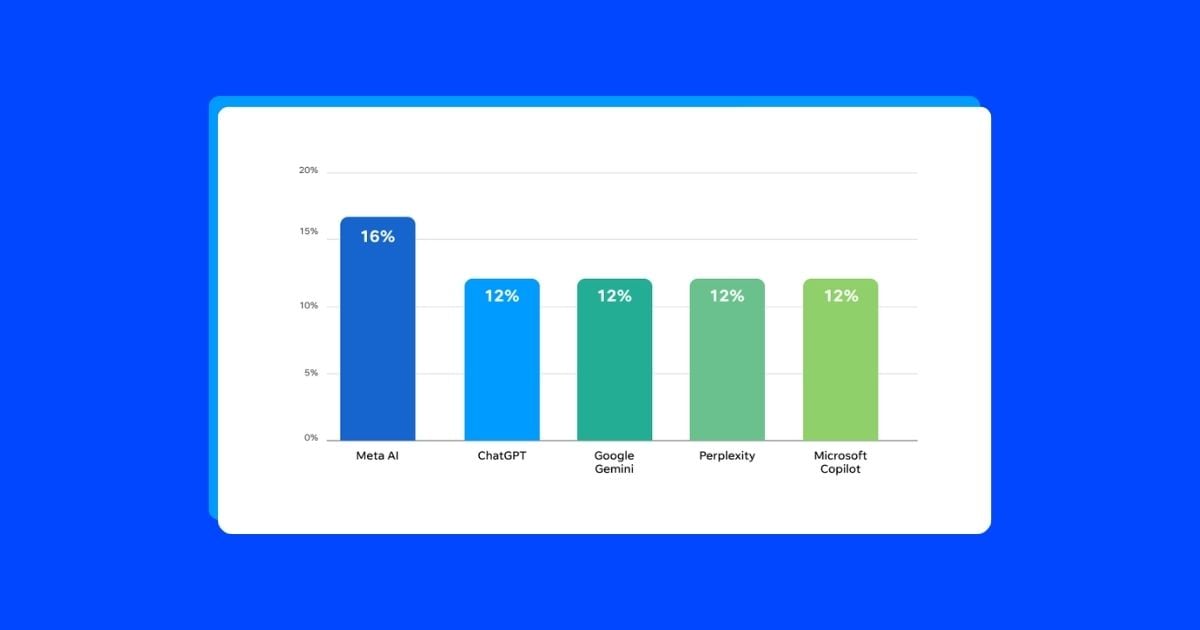
About 13% of all 250 AI answers to SEO questions were wrong or, in some cases, misleading where they provided iffy or only partially correct information. For the answers living in that gray area—we felt they should have included more nuance or expansion to fully answer the question and help direct strategy.
Here’s the accuracy breakdown by tool:
- 16% of Meta AI answers were wrong or misleading
- 12% of Microsoft Copilot answers were wrong or misleading
- 12% of Google Gemini answers were wrong or misleading
- 12% of Perplexity answers were wrong or misleading
- 12% of ChatGPT answers were wrong or misleading
Overall, that’s about an 87% accuracy rate across the five AI tools. If AI were in SEO school right now, its report card would show a B+, which, honestly, is better than we expected.
12 key observations from asking AI tools SEO-related questions
Here are the top 12 conclusions I was able to draw from asking five different AI tools the same 50 SEO questions.
1. Meta AI was the least accurate AI source for SEO information
Meta AI got about 16% of the 50 SEO questions I asked wrong or gave a misleading answer, making it the lowest-scoring AI tool in terms of SEO accuracy.
In contrast, the rest of the tools got about six of the 50 SEO questions completely incorrect, with two to three of each of their responses falling into the “iffy” or “misleading” category.
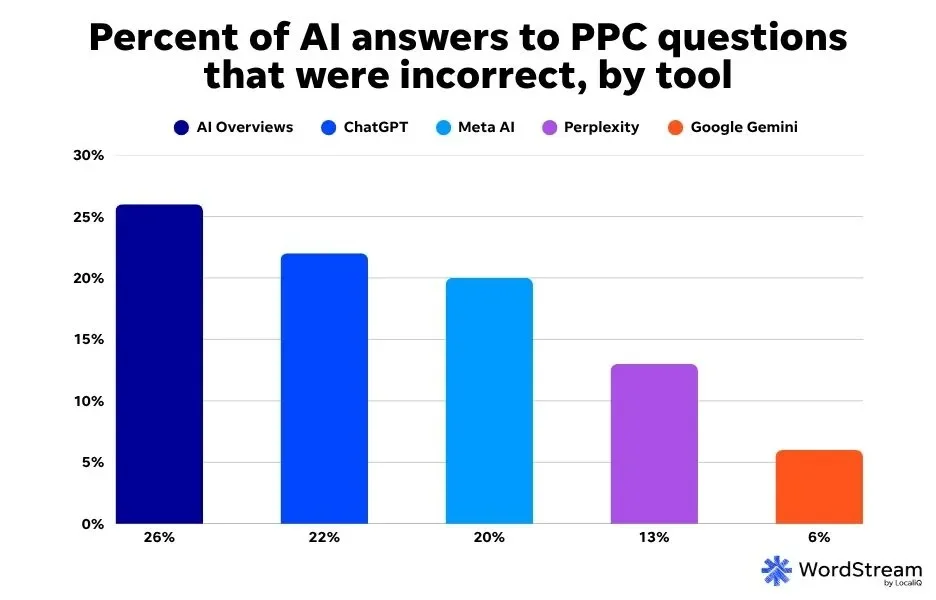
When we ran a similar test for PPC (more on this later), ChatGPT was in fourth place for providing correct answers to PPC questions. So, ChatGPT might know a bit more about SEO than PPC. Similarly, Meta AI was middle-of-the-pack with 20% of PPC questions wrong, which is still worse than its 16% inaccuracy rate for SEO questions.
🔍Is your SEO approach in need of a refresh? Download our free guide on How to Do SEO Right—Right Now!
2. Three of the five AI tools could not provide clear keyword data
Most SEO practitioners will tell you not to rely on AI for keyword research, and with good reason. Accurate and up-to-date keyword data is really only available within tools created specifically for keyword analysis, like WordStream’s Free Keyword Tool, Google Ads Keyword Planner, Ahrefs, or Semrush. While AI can be helpful for keyword list ideation or expansion, it’s not a replacement for a professionally managed keyword strategy.
However, plenty of people out there, unfortunately, still use AI for keyword data anyway, whether because of convenience or maybe they’re unaware of the risks involved when relying solely on AI for keyword research.
To get a perspective of how more or less detrimental to your SEO strategy it can be to use AI for keyword research, I gave all five tools a set of 10 different keywords across varying industries to see if they could provide clear keyword volume and competition metrics for each term.
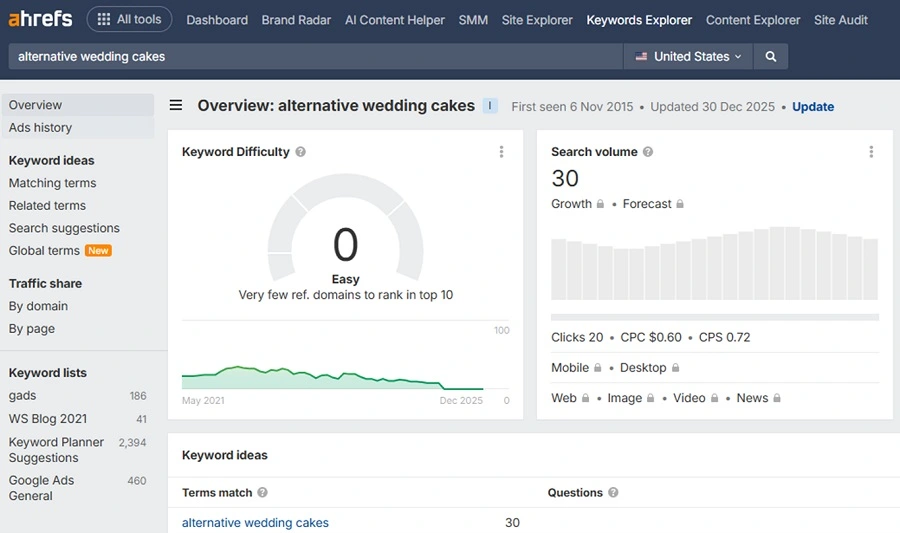
Here are some instances where the tools’ estimations were vastly different from one another, and how their estimates compare to real data from our own keyword research tool.
For the keyword “how to fix a leaky sink” (which is noted as a low-competition keyword with a 1.5K volume in our Free Keyword Tool), ChatGPT, Gemini, and Perplexity all gave different volume and competition answers. ChatGPT estimated its volume at 5-10K with medium-to-high competition, Gemini said it had a volume of 90K with high competition, and Perplexity assigned it a 10-50K volume estimate with medium competition.
Or, “oil change service near me,” a 1.5M volume, high-competition keyword according to our keyword tool, had volume estimates ranging from 10K to 2.2M across the tools, with medium to high competition estimates.
This continued across all ten different keywords falling into different industries, like education, personal services, ecommerce, and healthcare.
The least helpful answers came from Meta AI and Microsoft Copilot, as they weren’t able to provide actual numbers for keyword volume at all, only “low,” “medium,” and “high” values.
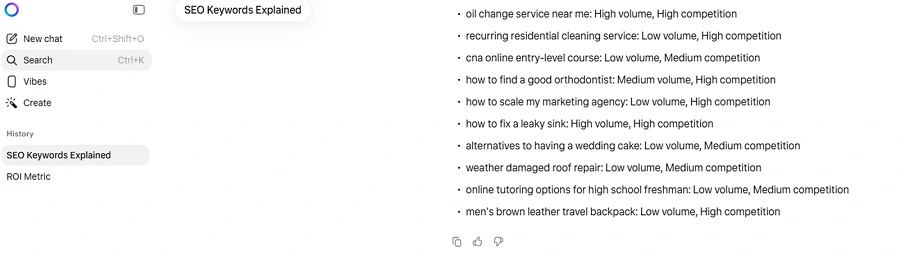
AI answers like these to keyword research questions simply don’t compare to the quality and credibility of information you could get from specialized keyword research tools. Plus, the vast differences between answers across tools can be confusing; it shows that you can’t necessarily trust one tool over another when conducting keyword research.
3. None of the tools could give practical steps for an SMB SEO audit
The questions I tested were phrased to come from the typical small business owner or marketer to get a feel for the average experience using AI for SEO. Odds are, experienced SEO professionals don’t need to use AI to audit a brand’s website and online presence. The typical user looking for help with an SEO audit likely wants basic ideas to help them get started.
Our own SEO audit resource is broken down into 10 simple steps, and this SEO checklist from LocaliQ covers the top 13 SEO basics to help businesses refine their strategy.
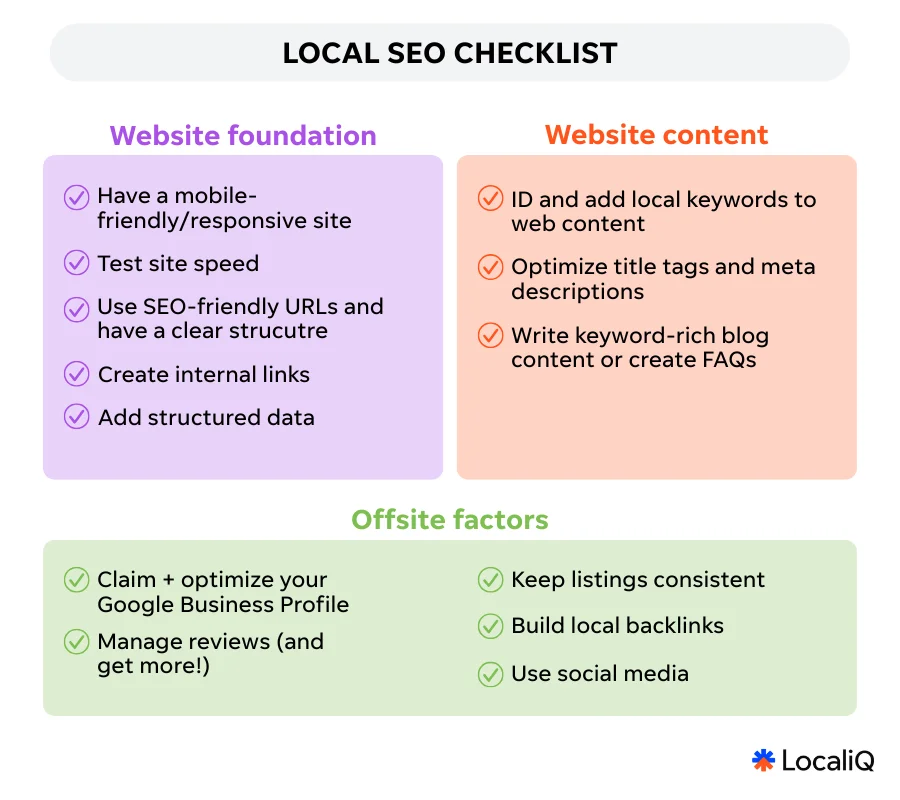
In comparison, check out this audit list from Gemini:
- Implement 1-to-1 301 Redirects
- Use Google Search Console Change of Address Tool
- Update Google Business Profile Name and URL
- Sync JSON-LD Schema (Organization and LocalBusiness)
- Update Social Media Handles and Bios
- Contact Top Referrers for Link Updates
- Update Business Directory Listings (Yelp, Bing, etc.)
- Verify XML Sitemaps for New Domain
- Monitor 404 Errors and Crawl Anomalies
- Update Internal Links to New Domain Structure
Meta AI gave a similar SEO audit list:
- Implement 301 redirects from every old URL to its new, corresponding URL.
- Update all internal links on your new site to the new URLs.
- Update and submit a new XML sitemap to Google Search Console.
- Ensure your robots.txt file is correctly configured for the new domain.
- Update all technical SEO elements (canonical tags, hreflang, SSL).
- Post-Migration Monitoring & Reclamation
- Monitor organic traffic, rankings, and crawl errors daily in Google Search Console and Analytics.
- Use Google’s “Change of Address” tool in Search Console.
- Reclaim external backlinks by asking referring sites to update links.
- Update your Google Business Profile and all other online business listings (NAP).
- Update all social media profiles and other online profiles with the new domain.
- Ensure all analytics and tracking codes are correctly set up for the new domain.
- Communicate the change to your audience.
While these answers aren’t wrong, some of them aren’t really practical first steps to an SEO audit for a novice or intermediate practitioner. For people looking to focus and improve the most important parts of their SEO strategy, using AI to help with SEO auditing can be more of a headache and a time-suck rather than the quick, easy solution one expects.
4. All five tools had conflicting advice for internal linking best practices
There is no limit to how many internal links you can include on your website’s pages, but there is a “sweet spot” as to not appear too spammy in the eyes of search engines like Google or Bing. Also, keep in mind there are some links you simply can’t avoid having present throughout your site pages, like contact or FAQ links in your footer, along with the additional relevant in-content links you voluntarily add to a specific page’s content.
With that in mind, ChatGPT’s answer of 3-10 internal links per page being the ideal for SEO seems a little low.
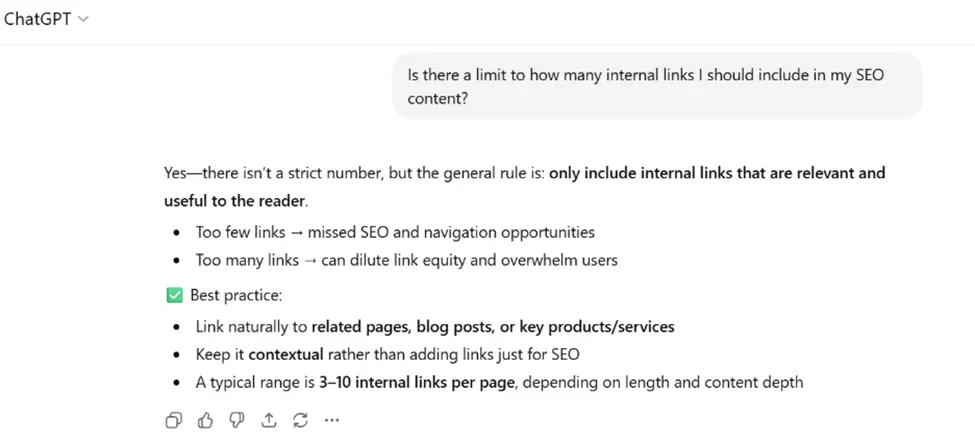
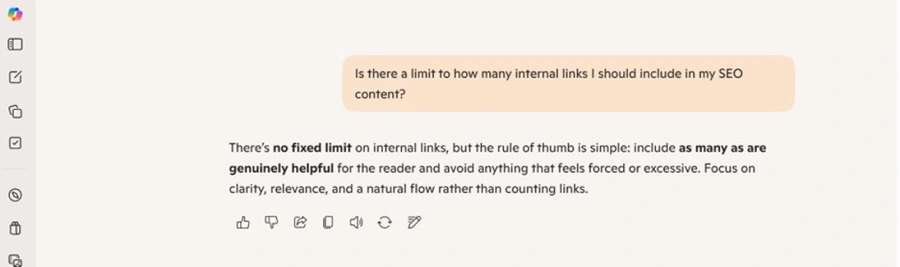
While the other tools gave different answers that were along the same lines as the above, Microsoft Copilot gave a pretty general, unhelpful answer to my question.
5. All five tools had conflicting estimates for how long it takes a page to rank
When I asked, “How long does it take for a page to rank on search engines?” Here’s a summary of what each tool said:
- ChatGPT: 1-6 months
- Gemini: 6-12 months
- Perplexity: 3-6 months
- Meta AI: 6-12 months
- Microsoft Copilot: 3-6 months
While it’s possible that time-sensitive news articles from larger or industry-specific sites may rank immediately, ChatGPT gives a general 1-6 month timeframe for page ranking, which seems a bit too generous. On the other hand, the estimations from Gemini and Meta AI, quoting 6-12 months for pages to rank, would likely be too conservative in most cases. It might be true for some sites covering more competitive topics or industries, but 3-6 months is a more realistic timeframe in most situations.
“I think 3-6 months is a reasonable timeline for the typical page to rank on search engines,” said Heman Patel, Senior SEO Analyst at WordStream and LocaliQ.
“In terms of accruing links, for example, that’s a tough one to put a timeframe on. Say a page is all about data—content containing stats is going to acquire links much faster than a different page that focuses on informational content, such as a ‘how to’ article,” Heman said.
In this case, Copilot and Perplexity had the most accurate answers. However, the point here is that there is no one AI tool that could be used as a source of truth for this type of SEO question. Understanding page ranking timelines requires insight from an experienced SEO expert who can pick out nuances in page types, SERP competition, and so on.
5. Two of the five tools could not give accurate SEO budget suggestions
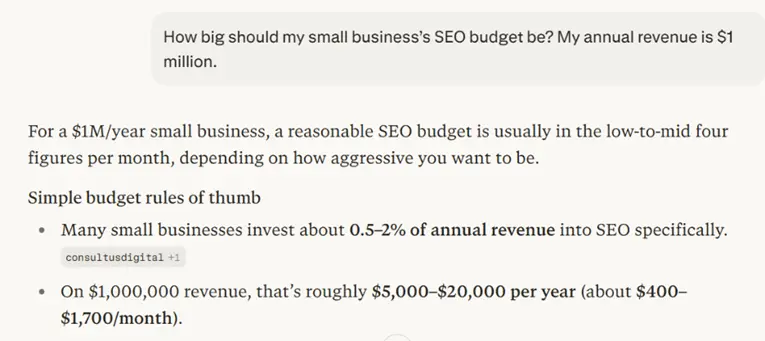
Another SEO subject some of the tools were iffy on was budgeting. I asked, “How big should my small business’s SEO budget be? My annual revenue is $1 million.” Here were the answers:
- Chat: $15,000-40,000 per year
- Gemini: $15,000-45,000 per year
- Perplexity: $5,000-20,000 per year
- Meta AI: $70,000-$120,000 per year
- Microsoft Copilot: $25,000-60,000 per year
Our guide to marketing budgets suggests that most small businesses spend roughly 5-10% of their revenue on marketing, but the percentage could be even higher depending on a business’s size and goals.
Let’s say in this instance, 10% of the million-dollar annual revenue in my prompt was put towards that business’s marketing budget. That would mean a $100,000 annual marketing budget; however, not all of that would go towards SEO. Some sources say 15-30% of your marketing budget should go towards SEO, but others give a wider range of anywhere from 10-40% of your marketing budget being dedicated to SEO.
In this instance, if the business in question put 20% of its $100,000 marketing budget towards SEO, it would be dedicating $20,000 per year. This is within the range of the answers provided by ChatGPT, Gemini, and Perplexity. But Meta AI and Microsoft Copilot were suggesting numbers that were a little too high. That, or they didn’t have the capacity to segment out an overall suggested marketing budget to just what would be spent on SEO.
But, for questions like budget and spending, it’s really dependent on your specific business, industry, goals, and more—it’s going to be near impossible to get a true recommendation from an AI tool that doesn’t know the inner workings of your business.
Either way, there are inconsistencies across all five answers, so there isn’t really a “winning” tool that users could trust more than the others in this case.
6. Some of Microsoft Copilot’s answers were a little too simple
One trend throughout the answers from Copilot was that they were super simple compared to the answers from all the other tools. While I was looking for answers that would be realistic for the typical SMB SEO manager to use, SEO can be complex and full of nuance that requires a bit of explanation to put certain best practices into play.
For instance, when I put in the prompt “List three ways to optimize my sitemap for SEO.” Gemini gave me this answer:
- Include only indexable URLs.
- Prioritize with “lastmod” tags. Use the
attribute only for pages with significant content updates to signal to Google’s AI which URLs need immediate re-crawling. - Segment large sites. Split sitemaps into smaller, topical files (e.g., sitemap-products.xml, sitemap-blog.xml) to improve crawl efficiency and bypass the 50,000 URL limit.
And Perplexity gave me this answer:
- Include only canonical, high-priority URLs (no noindex/redirects).
- Add lastmod dates, changefreq, and priority tags.
- Submit to Google Search Console and reference in robots.txt.
But Copilot said this:
- Remove non‑indexable or duplicate URLs.
- Keep your sitemap updated automatically.
- Submit it to Google Search Console.
It’s not wrong, but it’s not nearly as actionable or technical as the other responses.
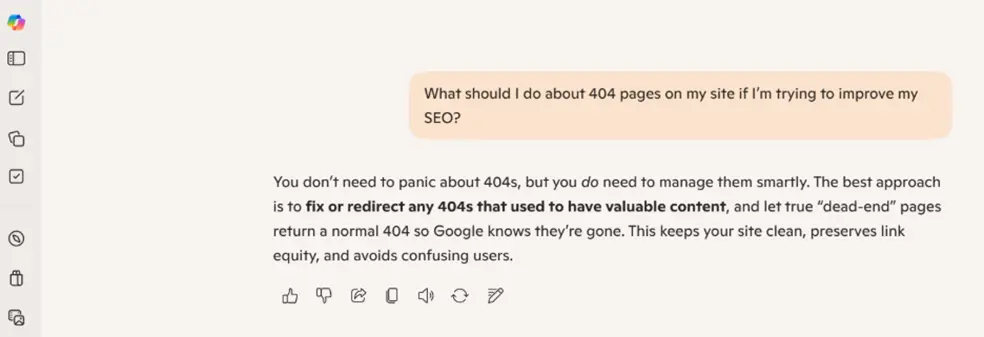
In another example, I asked, “What should I do about 404 pages on my site if I’m trying to improve my SEO?” Copilot answered correctly, but it left out a key tip, which is to create a custom 404 page for any true “dead-end” pages to return to. Custom 404 pages are relatively easy to create and provide an overall better user experience, and all four other tools I asked recommended this.
7. Some of Google Gemini’s answers were a little too advanced
You may have already started to notice this trend in some of my examples above, but Gemini was by far the most technical in its answers to SEO questions out of all five tools. This isn’t always a good thing, because again, it could be more than what the average SEO specialist is looking for.
For instance, here were the top SEO metrics Gemini recommended:
- Organic conversion rate (key events)
- Engagement rate
- Local interaction signals
- AI visibility and Mentions
- Interaction to Next Paint (INP)
In terms of top-level SEO measurement metrics, most experts would agree that INP is further down the average business’s priority list in favor of higher-impact KPIs, like sessions or key events in GA4.
With another prompt, “How often should I update my website’s content so that it ranks organically?” Gemini suggested updating your Google Business Profile weekly. First off, GBP isn’t a part of a business’s website content, so this answer would just be piling more work onto an SEO strategist’s plate when they might have been looking for a more basic answer.
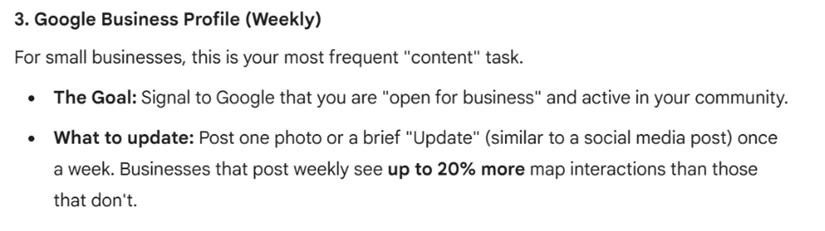
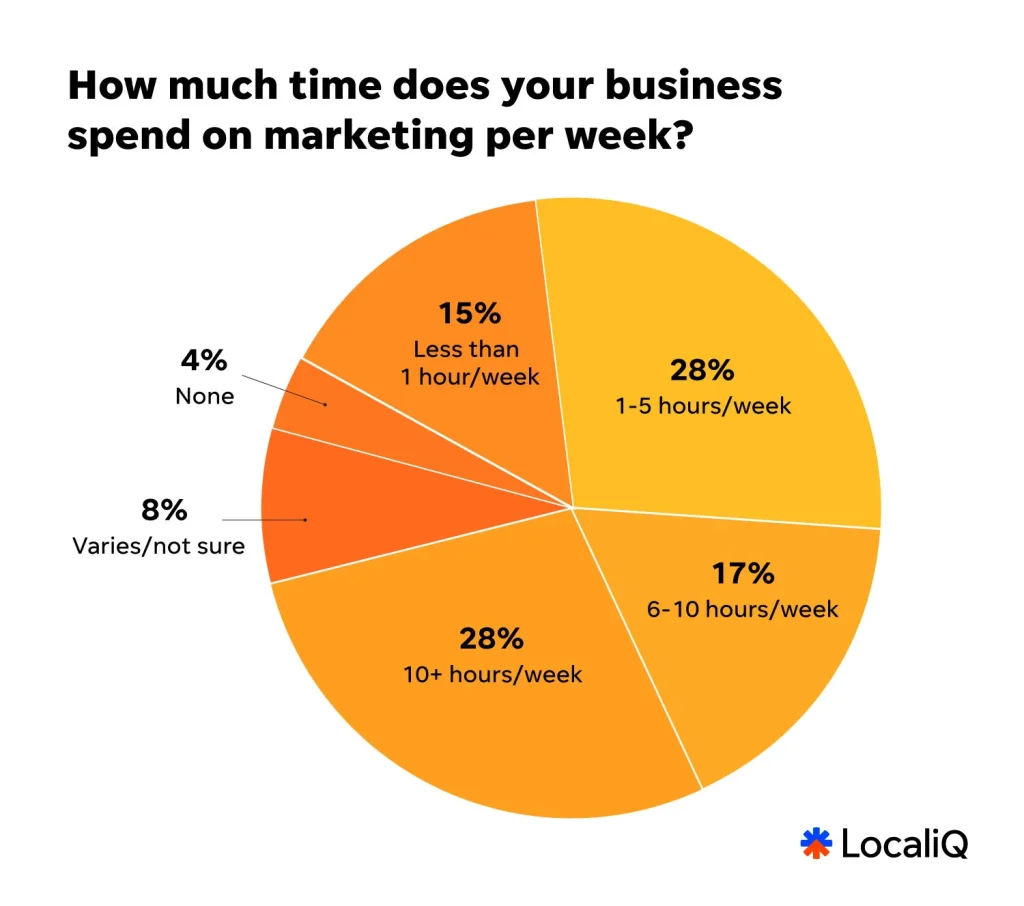
While keeping your GBP up to date and checking in to optimize it frequently is an SEO best practice, making changes or sharing content to that one business listing each week seems unattainable for most small businesses. This can be especially true when you consider that the majority of small businesses report spending between 1 and 10 hours per week on marketing overall.
If you’re a seasoned SEO expert or an agency, weekly Google Business Profile optimizations for you or your clients’ brands might be more common. Otherwise, Gemini is suggesting a listings optimization for SMBs that could really only be achievable with help from a marketing partner.
8. All the tools underestimated how often AI Overviews show up on Google SERPs
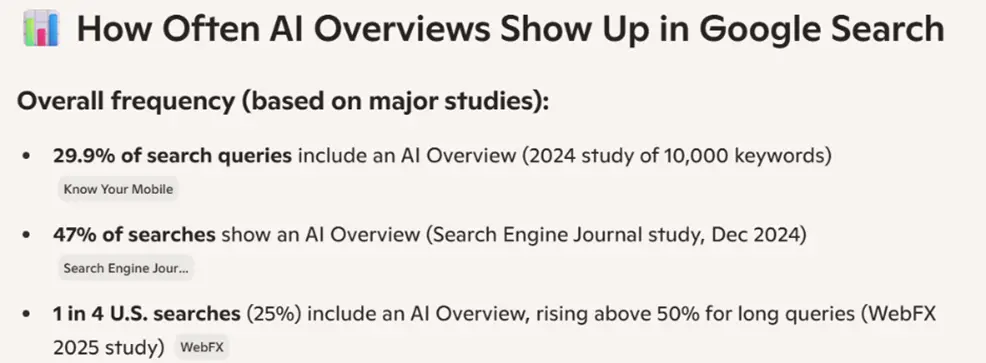
AI Overviews (Google’s AI-generated search results) show for about 55% of Google searches, and their prevalence is growing at a rapid rate. In fact, there have been some reports of AIOs showing at an even higher frequency, like 60% of the time or more.
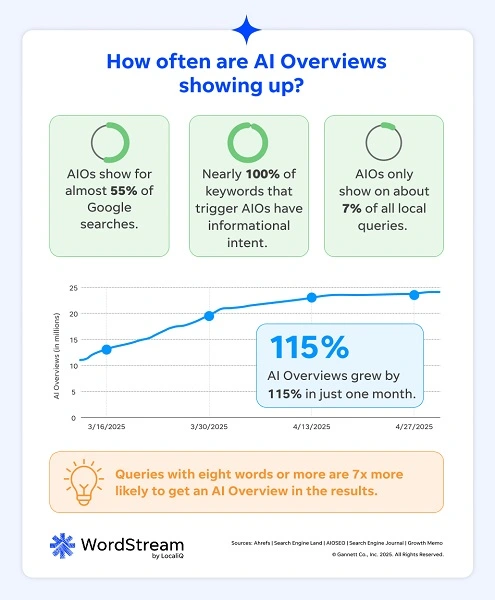
In contrast, here’s what the tools were saying after I input this prompt: “What percent of all Google searches contain an AI Overview currently?”
- Chat: 20-30% of searches
- Gemini: 48-55%
- Perplexity: 15-30%
- Meta AI: 21-30%
- Microsoft Copilot: 25-47% of searches
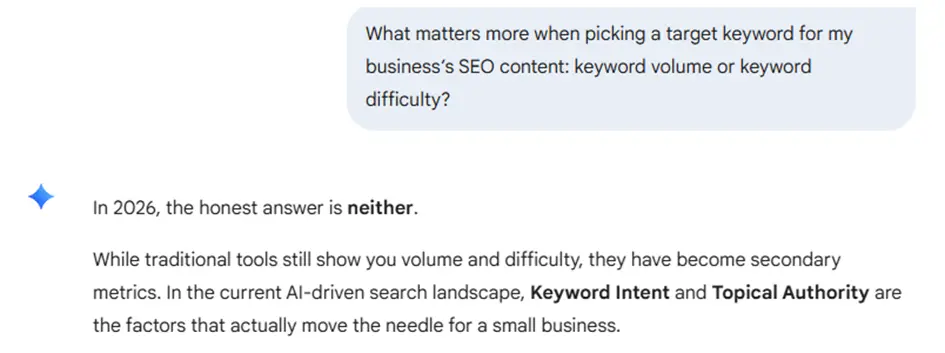
9. Google Gemini said keyword difficulty and volume don’t matter for SEO in 2026
I asked, “What matters more when picking a target keyword for my business’s SEO content: Keyword volume or keyword difficulty?”
Of course, there isn’t a right or wrong answer to this question, but I wanted to see how easy these AI tools might be to trick. Plus, to be fair, this could very well be a real question a business owner might ask their SEO consultant, expecting a clear answer.
I get the point behind the answer I’m about to quote from Gemini, but I’ll admit I think it’s a little annoying.
“In 2026, the honest answer is neither.
While traditional tools still show you volume and difficulty, they have become secondary metrics. In the current AI-driven search landscape, keyword intent and topical authority are the factors that actually move the needle for a small business.”
While Gemini’s thinking is on the right track, it doesn’t actually answer my question. Additionally, it insinuates that businesses should maybe disregard keyword volume and difficulty altogether, which is bad SEO advice.
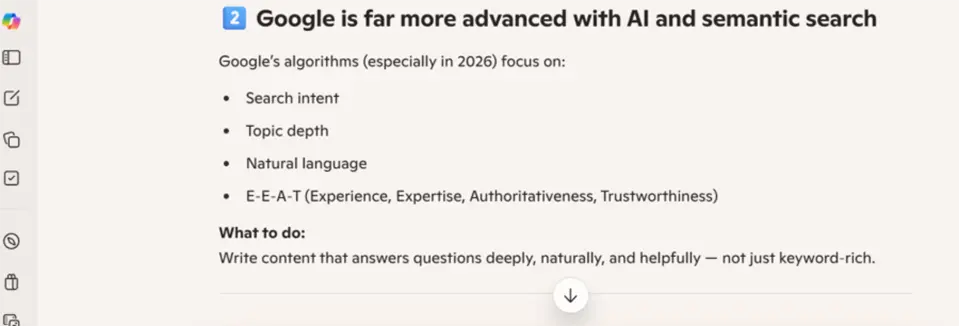
10. Microsoft’s Copilot tool knocked its own search engine
Who owns the AI tool, Copilot, and the search engine, Bing? Microsoft! So, it was interesting to see how Copilot handled its answer to the following question:
“Should I have different SEO strategies to rank on both Google and Bing?”
Copilot mentioned all the right things; an ever-so slightly different strategy for each search engine can be practical when considering the different types of content that’s favored by each. But it also admitted Google is better at AI search results than Bing when it said: “Google is far more advanced with AI and semantic search.”
That may be true, but if I were Copilot, I’d keep that to myself if I wanted to attract more users to the search engine I show up on.
11. Google Gemini was the only tool to plug competing AI tools for SEO help
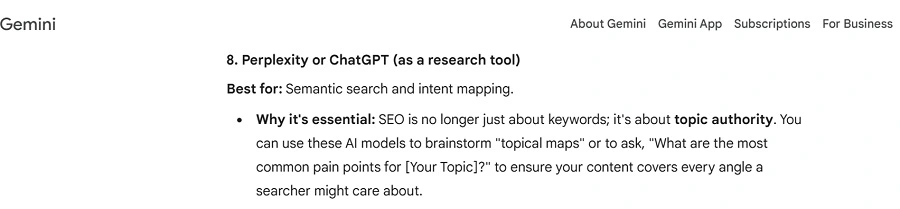
Speaking of competing platforms, Google Gemini was the only tool to suggest that businesses use other AI tools for SEO. My prompt was: “List 5-10 tools I can use to improve my SEO.”
Now, I didn’t necessarily differentiate whether I wanted AI tools or not; any of the five tools could have suggested themselves or AI in general as long as the use case was for SEO. Surprisingly, Gemini was the only tool to actually suggest using AI for SEO, and it called out Perplexity and ChatGPT as options. If I were Gemini, I would have suggested using AI, and I would have name-dropped my own name.
Although only using AI as a research tool is actually pretty solid advice because we also believe you shouldn’t fully use it for SEO.
12. AI is potentially better at SEO than PPC
Earlier, I mentioned how we published this same study testing AI on PPC questions rather than SEO. In the results from that version, one in five AI answers to PPC questions were wrong.
When you ask an AI tool a question about SEO, it will be wrong 13% of the time, but when you ask it a PPC question, the wrong answers you’ll receive will increase to about 20% of the time.
Solely relying on AI for either marketing channel isn’t a good idea either way, as no tool has been 100% correct for either category. However, it can be encouraging for people looking to incorporate AI into their SEO strategy to know that AI-generated SEO tips and ideas will likely be more accurate than when they’ve used AI for other marketing topics.
One caveat, though, is that PPC questions are a little more straightforward to determine right from wrong, whereas SEO answers live in more of a gray area. So, answers from AI on anything SEO-related still need to be taken with a grain of salt.
In fact, I’ve been working in content marketing and SEO for several years, and I still had to confirm some answers with our SEO expert myself, which just proves how much more difficult some SEO questions can be.
Tips for using AI in SEO
If you want to start asking your go-to AI tools more SEO questions, here’s what my advice would be.
1. Consider your prompts
The quality of your AI outputs will only be as good as the prompt you put into your tool. If you’re asking an AI tool a SEO question, consider all angles of what you’re asking and provide as much detail and context as possible. Here’s a quick checklist of what you should always include in your prompts when using AI for SEO.
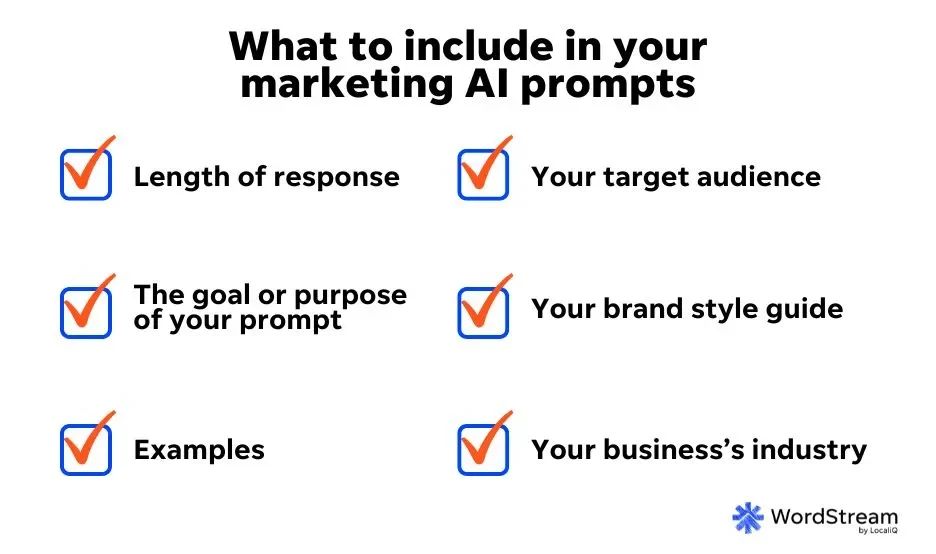
2. Cross-check AI answers to SEO questions
One trend across this entire experiment is that each AI tool gave slightly different answers to the same exact question. Ultimately, inaccurate answers pop up about 13% of the time. Be sure the SEO information you’re getting from AI tools is accurate by cross-checking any suggestions or data points with reliable sources, like expert articles in SEO publications such as Search Engine Round Table, SEO forums such as SEOchat, or other non-AI, SEO-specific tools (Moz, etc.).
3. Keep in mind AI is only one of many pieces in the SEO puzzle
AI can help answer basic questions and give you a good starting point, but you should never rely on it for your strategy. If you choose to use AI, keep it as only part of your bigger SEO picture, and be mindful of which tools you use in alignment with your strategy.
Try to choose an AI tool that makes the most sense for your current SEO level. Like I mentioned above, some tools, like Copilot, will provide more basic SEO information, while others, like Gemini, can get pretty advanced in their SEO suggestions. You may need to test a few different AI tools to find out which one works best with your business’s bandwidth.
Additionally, it’s critical to stay conscious of the fact that where these tools are failing the most is with nuanced SEO strategy insights. You should really only be using AI for brainstorming or as a starting point for SEO ideas, then double-check any and all AI outputs with experts or SEO-specific tools.
Should you use AI for SEO?
So, can you trust what AI tells you about SEO? Not entirely. Remember, no tool got all 50 questions right, so there will inevitably be a time when you use AI for SEO and get an unreliable response. However, it can sometimes be helpful if you’re not sure where to start with SEO or you need ideas to improve your strategy–just be sure to take everything with a grain of salt.
A healthy approach to SEO includes a mix of resources, AI included, but you should also consider leveraging online keyword tools, competitive analyses, marketing partners, and more to boost your strategy. For more ways to improve your business’s SEO, see how our solutions can help!