
By using this site, you agree to the Privacy Policy and Terms of Use.
Accept
World of SoftwareWorld of SoftwareWorld of Software
  • News
  • Software
  • Mobile
  • Computing
  • Gaming
  • Videos
  • More
    • Gadget
    • Web Stories
    • Trending
    • Press Release
Search
  • Privacy
  • Terms
  • Advertise
  • Contact
Copyright © All Rights Reserved. World of Software.
Reading: Dialogue Too Quiet When Watching TV? Change These Settings – BGR
Share
Sign In
Notification Show More
Font ResizerAa
World of SoftwareWorld of Software
Font ResizerAa
  • Software
  • Mobile
  • Computing
  • Gadget
  • Gaming
  • Videos
Search
  • News
  • Software
  • Mobile
  • Computing
  • Gaming
  • Videos
  • More
    • Gadget
    • Web Stories
    • Trending
    • Press Release
Have an existing account? Sign In
Follow US
  • Privacy
  • Terms
  • Advertise
  • Contact
Copyright © All Rights Reserved. World of Software.
World of Software > News > Dialogue Too Quiet When Watching TV? Change These Settings – BGR
News

Dialogue Too Quiet When Watching TV? Change These Settings – BGR

News Room
Last updated: 2026/01/12 at 4:00 AM
News Room Published 12 January 2026
Share
Dialogue Too Quiet When Watching TV? Change These Settings – BGR
SHARE


Yuganov Konstantin/Shutterstock

Ever watch a movie or TV show where the loud scenes are always drowning out the dialogue? Or worse yet, while your two favorite characters are speaking, and their voices sound like a whisper. Turning up the volume doesn’t help because most likely, it has to do with the dynamic range of the audio stream — the difference between the quietest and loudest sounds. When looking at a visualized sound wave, these are the valleys and peaks, and the bigger the range, the greater the difference in volume.

But there is a setting to make the difference more balanced called Dynamic Range Compression (DRC), also sometimes called volume leveling or night mode on various TVs and audio devices. By turning this setting on, you decrease the volume of the louder noises while increasing the softer noises, balancing out the audio so all of the sounds are relatively similar in regards to volume. This setting can especially help with varying audio streams, like when commercials come on and they’re much louder than what you’re watching. In fact, volume leveling is a great trick to use on Roku TV to eliminate the loud commercial problem.

Some TVs also have specific sound mode settings, like Movie, User, or Standard, similar to the preconfigured visual setting modes you’d select when changing picture quality. If this is the case, you’ll find these settings tucked away in a system menu related to Audio or Sound. You may even find one that refers to dialogue or speech, like Clear Voice.

Additional TV audio tweaks to improve dialogue
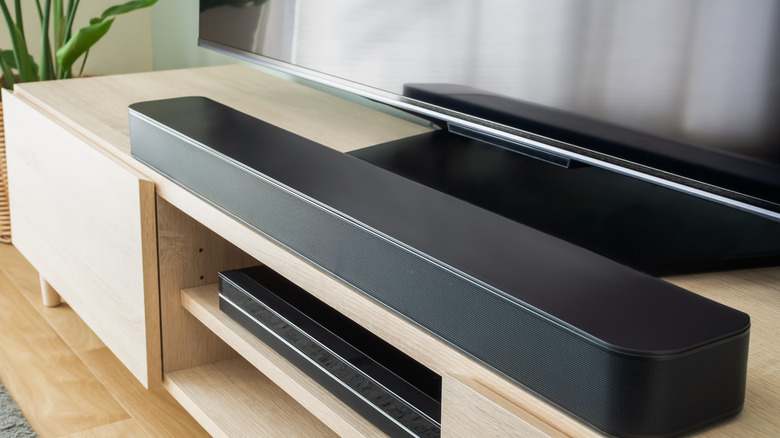

Soundbar resting on entertainment stand in front of television.
Kaorinne/Getty Images

If you own a soundbar or surround audio system, you can try doing the same with the audio mode settings on that device, by checking preconfigured modes or altering speech-related settings. But your best bet is usually to adjust the equalizer, which is often tucked away under Advanced settings in the Sound or Audio menus. When boosting dialogue, you want to focus on the frequencies between 2kHz to 6kHz, which is right around the range of a male or female human voice. By gradually boosting the toggles or dials in these ranges, using the graphic equalizer, you may be able to improve speech volume and clarity.

Finally, there’s the option of upgrading your audio setup for something that supports better quality, such as Apple’s spatial audio technology or Dolby Atmos. The easiest way to do this is with a modern soundbar or an upgrade if you have an older system. There are some excellent TV soundbars engineered for audiophiles and pristine audio streams. If you’ve been using the built-in speakers on your TV, you may notice a huge difference in audio quality and volume even with a small, relatively inexpensive soundbar.



Sign Up For Daily Newsletter

Be keep up! Get the latest breaking news delivered straight to your inbox.
By signing up, you agree to our Terms of Use and acknowledge the data practices in our Privacy Policy. You may unsubscribe at any time.
Share This Article
Facebook Twitter Email Print
Share
What do you think?
Love0
Sad0
Happy0
Sleepy0
Angry0
Dead0
Wink0
Previous Article BYD produces its 8 millionth EV, takes three months for last million · TechNode BYD produces its 8 millionth EV, takes three months for last million · TechNode
Next Article NextChina: The future of humanoid robots with Unitree Robotics co-founder Chen Li · TechNode NextChina: The future of humanoid robots with Unitree Robotics co-founder Chen Li · TechNode
Leave a comment

Leave a Reply Cancel reply

Your email address will not be published. Required fields are marked *

Stay Connected

248.1k Like
69.1k Follow
134k Pin
54.3k Follow

Latest News

Help get complex ideas across at work with this  Microsoft tool
Help get complex ideas across at work with this $10 Microsoft tool
Software
ByteDance introduces transitional subsidy policy for laid-off employees · TechNode
Computing
The Ikko Mind One is a phone like no other we’ve seen
Gadget
How to unblock X for free
News

You Might also Like

How to unblock X for free
News

How to unblock X for free

3 Min Read

Crime blotter: Armed robbery, fairground iPads, and a fortune teller

1 Min Read
Fitbit’s AI coach has completely changed my workouts
News

Fitbit’s AI coach has completely changed my workouts

13 Min Read
Google Releases Gemma Scope 2 to Deepen Understanding of LLM Behavior
News

Google Releases Gemma Scope 2 to Deepen Understanding of LLM Behavior

3 Min Read
//

World of Software is your one-stop website for the latest tech news and updates, follow us now to get the news that matters to you.

Quick Link

  • Privacy Policy
  • Terms of use
  • Advertise
  • Contact

Topics

  • Computing
  • Software
  • Press Release
  • Trending

Sign Up for Our Newsletter

Subscribe to our newsletter to get our newest articles instantly!

World of SoftwareWorld of Software
Follow US
Copyright © All Rights Reserved. World of Software.
Welcome Back!

Sign in to your account

Lost your password?